

Açık Arttırma Sistemi Kurulumu[/FONT]
Alıntıdır başka bir forumdan, türkçeleştirme translate ile yapılmadı gözümden kaçan hata varsa ö.m yollayın düzenleyeyim.
Not: sistemi test etmedim en yakın sürede test ederim ama gözlemlediğime göre çalışıyor.
indirin
virüstotal
Eğer konuda karışık geldiyse yukarıdaki dosyanın içerisindede aynı makale mevcut kodları sorunsuz eklersiniz.
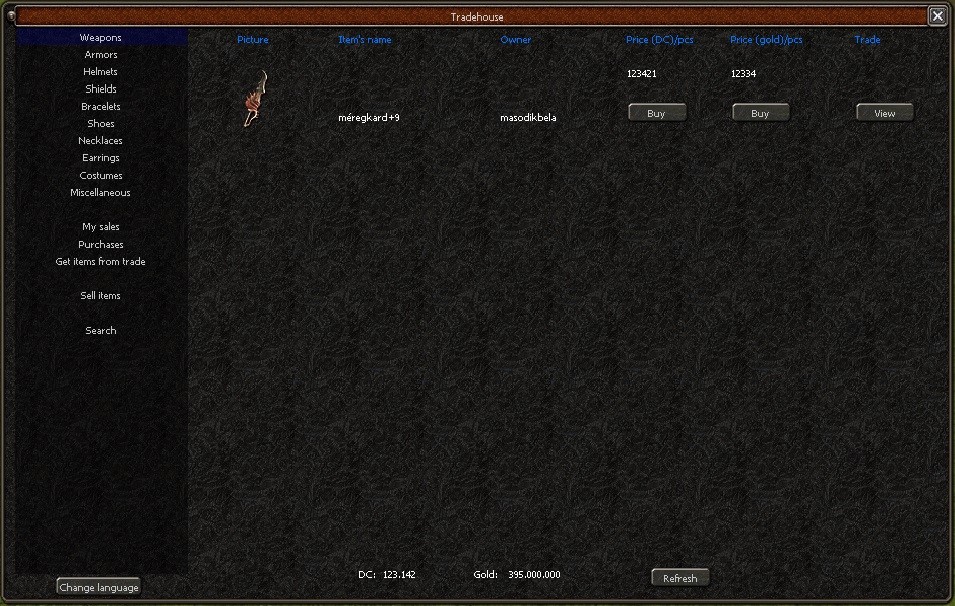
client source/pack.h açılır bul ve değiştir
Client işlemi bitti
aç source/game/packet.h ve değiştir
aç input_main.cpp: düzenle (kod bloğuyla beraber)
aç questlua_game.cpp açın (eğer myslq_query vanilla sourceye eklediyseniz bunu yapmayın)
sonra en yukarıya çıkıp includeyi ekleyin
daha sonra void RegisterGameFunctionTable() aratın ve altına aşşağıdakini ekleyin
sonra bunu aratın void RegisterGameFunctionTable()
altına ekleyin
açın questlua_item.cpp void RegisterITEMFunctionTable() bu fonksiyondan önce aşşağıdakini ekleyin
sonra altına aşşağıdakini ekleyin
açın questlua_pc.cpp ve aşşağıdakini void RegisterPCFunctionTable() bunun altına ekleyin
aşşağıdakini ekle bundan önce { NULL, NULL }
Source ile işimiz bitti şimdi questlib.lua aşamasına geçelim
questlib.lua en üste ekleyin
indirmiş olduğunuz serverside klasörü içerisindekileri /usr/game/share/locale/turkey/quest dizinine atıyoruz.
daha sonra qcliyoruz ./qc the mb_igshop_source.quest, eğer qc çektiğimizde ekranda hatalar varsa o fonksiyonlaır quest_functions'a ekliyoruz.
Şimdi python aşamalarını yapalım
açın game.py, en üste yapıştırın
arayın
class GameWindow(ui.ScriptWindow):
def __init__(self, stream):
bunun altına the __init__ ekleyin
arayın
def Close(self):
altına ekleyin
arayın
altına ekleyin
bu kod bloğunu arayın
altına ekleyin (eğer varsa eklemeyin)
en aşşağıya inin ve bunları ekleyin
açın constinfo.py ekleyin
[/CODE]
açın mousemodule.py ve bunun altındakini değiştirin def AttachObject(self, Owner, Type, SlotNumber, ItemIndex, count = 0):
bu şekilde değiştirin
Not :
sash sistemi ekli olan gamelerde fonksiyonlar ve değişkenler düzenlenmeden düzgün şekilde çalışmayacaktır herhangi bir artniyetle yazmadım...
attr7 , value7'ye kadar girilmiş fonksiyonlar bunlar attr15 , value15'e kadar girilmesi gerekmekte.
python to lua bağlantısındada aynı şey geçerli . aksi takdirde olabilecek şeyler ;
- Kuşaklar açık arttırmaya koyulmayabilir.
- itemler edit olarak görünüp edit olarak çekilebilir.
- itemler çekilmeyebilir.
Metin2 Lobby platformu, Metin2 özel sunucuları geliştirmek isteyen geliştiriciler için kapsamlı sistem anlatımları sunar. Bu bağlamda, Açık Artırma Sistemi, oyuncuların eşyaları alım-satım yaparken daha adil ve dengeli bir ortamda işlem yapmalarını sağlayan önemli bir yapıdır. Özellikle PvP sistemler ile entegre çalışması durumunda, sunucuların ekonomik dengesini korumada kritik rol oynar.
Sistem Nedir?
Açık artırma sistemi, oyuncuların belirli bir süre boyunca eşyaları teklif vererek satın alabildiği bir mekaniktir. Oyuncular, bir eşyayı satın almak için artan teklifler sunabilir ve süre bitiminde en yüksek teklifi veren kişi eşyayı alır. Bu sistem, Metin2 özel sunucularında C++ sistem veya Python tabanlı olarak entegre edilebilir. Kaynak kod üzerinde yapılan düzenlemelerle, sunucu sahipleri bu sistemi özelleştirip, sunucularına özel kurallar ekleyebilirler.
Nasıl Çalışır?
1. Oyuncu, bir eşyayı açık artırma listesine ekler ve başlangıç fiyatını belirler.
2. Diğer oyuncular, eşya için teklif verirler. Sistem, her yeni teklifle birlikte fiyatı günceller.
3. Belirlenen süre sonunda, en yüksek teklifi veren oyuncu eşyayı kazanır.
4. Para ve eşya transferi otomatik olarak gerçekleştirilir.
Teknik Uygulama
C++ tabanlı server src üzerinde geliştirilen sistemlerde, açık artırma fonksiyonları genellikle game server programming süreçleriyle birlikte çalışır. DB (veritabanı) üzerinden eşyaların ve tekliflerin tutulması gerekir. Auth sunucusuyla entegrasyon, kullanıcı doğrulama süreçlerini sağlar. Sistemde core yapılarla uyumlu olarak geliştirilen modüller, hem game hem de auth katmanlarında çalışabilir.
Python Entegrasyonu
Python ile yazılmış GUI sistemler (Py GUI) kullanılarak, geliştiriciler arayüz üzerinden sistem yönetimi yapabilirler. Örneğin, uiscript dosyaları ile birlikte py root üzerinden teklif takibi yapılabilir. Bu sayede hem backend hem frontend süreçleri kolaylaştırılır. Martysama gibi sistemlerle de entegre çalışarak, Metin2 development süreci hızlandırılır.
Avantajları
Oyuncu Etkileşimi: Daha fazla rekabet ve sosyal etkileşim sağlar.
Sunucu Dengesi: Eşya ve para akışı kontrol altında tutulabilir.
Gelir Modeli: Sunucu sahipleri, işlem ücreti alarak gelir elde edebilir.
SEO Açısından Önemi
Metin2 özel sunucular için geliştirilen bu tür sistemler, Metin2 lobby gibi platformlarda arama motorlarında daha üst sıralarda yer almayı sağlar. C++ source edit, Metin2 compile, client src gibi terimlerle birlikte 'açık artırma sistemi', geliştiricilerin ilgisini çekecek niteliktedir.
Metin2 Lobby platform offers comprehensive system explanations for developers who want to develop Metin2 private servers. Within this scope, the Auction System is an important mechanism that allows players to trade items in a more fair and balanced environment. Especially when integrated with PvP systems, it plays a critical role in maintaining the economic balance of servers.
What Is The System?
The auction system is a mechanic that allows players to bid on items within a certain time frame. Players can submit increasing bids for an item, and at the end of the timer, the player with the highest bid wins the item. This system can be integrated into Metin2 private servers based on C++ or Python. Through modifications on source code, server owners can customize the system and add custom rules to their servers.
How Does It Work?
1. Player adds an item to the auction list and sets a starting price.
2. Other players place bids. The system updates the price with each new bid.
3. At the end of the designated time, the player with the highest bid wins the item.
4. Money and item transfers are processed automatically.
Technical Implementation
In C++ based server src, auction functions typically work alongside game server programming processes. Items and bids must be stored via the DB (database). Integration with the auth server ensures user authentication. Modules developed to be compatible with core structures can operate on both game and auth layers.
Python Integration
With GUI systems written in Python (Py GUI), developers can manage the system through the interface. For example, with uiscript files, bid tracking can be done through py root. This simplifies both backend and frontend processes. Integration with systems like Martysama accelerates the Metin2 development process.
Advantages
Player Interaction: Offers more competition and social interaction.
Server Balance: Item and money flow can be controlled.
Revenue Model: Server owners can earn income by charging transaction fees.
Importance for SEO
Systems like these developed for Metin2 private servers help platforms such as Metin2 lobby rank higher in search engines. Combined with terms like C++ source edit, Metin2 compile, client src, 'auction system' will attract the interest of developers.
Alıntıdır başka bir forumdan, türkçeleştirme translate ile yapılmadı gözümden kaçan hata varsa ö.m yollayın düzenleyeyim.
Not: sistemi test etmedim en yakın sürede test ederim ama gözlemlediğime göre çalışıyor.
indirin
Ziyaretçiler için gizlenmiş link,görmek için üye olmalısınız!
Giriş yap veya üye ol.
virüstotal
Ziyaretçiler için gizlenmiş link,görmek için üye olmalısınız!
Giriş yap veya üye ol.
Eğer konuda karışık geldiyse yukarıdaki dosyanın içerisindede aynı makale mevcut kodları sorunsuz eklersiniz.
client source/pack.h açılır bul ve değiştir
Kod:
QUEST_INPUT_STRING_MAX_NUM = 120,Client işlemi bitti
aç source/game/packet.h ve değiştir
Kod:
typedef struct command_quest_input_string { BYTE header; char msg[120+1]; } TPacketCGQuestInputString;
Kod:
void CInputMain::QuestInputString(LPCHARACTER ch, const void* c_pData) { TPacketCGQuestInputString * p = (TPacketCGQuestInputString*) c_pData; char msg[121]; strlcpy(msg, p->msg, sizeof(msg)); sys_log(0, "QUEST InputString pid %u msg %s", ch->GetPlayerID(), msg); quest::CQuestManager::Instance().Input(ch->GetPlayerID(), msg); }sonra en yukarıya çıkıp includeyi ekleyin
Kod:
#include "db.h"
Kod:
int game_mysql_query(lua_State* L) { //MYSQL_FIELD *field; SQLMsg* run = DBManager::instance().DirectQuery(lua_tostring(L,1)); MYSQL_RES* res=run->Get()->pSQLResult; if (!res){ lua_pushnumber(L, 0); return 0; } MYSQL_ROW row; lua_newtable(L); int rowcount = 1; while((row = mysql_fetch_row(res))){ lua_newtable(L); lua_pushnumber(L, rowcount); lua_pushvalue(L, -2); lua_settable(L, -4); unsigned int fields = mysql_num_fields(res); for(unsigned int i = 0; i < fields; i++){ lua_pushnumber(L, i + 1); lua_pushstring(L, row[i]); lua_settable(L, -3); } lua_pop(L, 1); rowcount++; } return 1; }
Kod:
{ "open_web_mall", game_web_mall },
Kod:
{"mysql_query", game_mysql_query},açın questlua_item.cpp void RegisterITEMFunctionTable() bu fonksiyondan önce aşşağıdakini ekleyin
Kod:
int item_get_attr_value(lua_State* L) { CQuestManager& q = CQuestManager::instance(); LPITEM item = q.GetCurrentItem(); if (!item) { sys_err("cannot get current item"); lua_pushnumber(L, 0); return 1; } if (false == lua_isnumber(L, 1)) { sys_err("index is not a number"); lua_pushnumber(L, 0); return 1; } int index = lua_tonumber(L, 1); const TPlayerItemAttribute& attrItem = item->GetAttribute(index); lua_pushnumber(L, attrItem.sValue); return 1; } int item_get_attr_type(lua_State* L) { CQuestManager& q = CQuestManager::instance(); LPITEM item = q.GetCurrentItem(); if (!item) { sys_err("cannot get current item"); lua_pushnumber(L, 0); return 1; } if (false == lua_isnumber(L, 1)) { sys_err("index is not a number"); lua_pushnumber(L, 0); return 1; } int index = lua_tonumber(L, 1); const TPlayerItemAttribute& attrItem = item->GetAttribute(index); lua_pushnumber(L, attrItem.bType); return 1; }
Kod:
{ "copy_and_give_before_remove", item_copy_and_give_before_remove}, { "get_attr_type", item_get_attr_type }, { "get_attr_value", item_get_attr_value },açın questlua_pc.cpp ve aşşağıdakini void RegisterPCFunctionTable() bunun altına ekleyin
Kod:
int pc_give_item_with(lua_State* L) { if (lua_gettop(L) != 19) { lua_pushboolean(L, false); return 1; } LPCHARACTER ch = CQuestManager::instance().GetCurrentCharacterPtr(); if (!ch) { sys_err("Char not found (give item with)"); lua_pushboolean(L, false); return 1; } if (!lua_isstring(L, 1) && !lua_isnumber(L, 1)) { sys_err("QUEST Make item call error : wrong argument"); lua_pushboolean(L, false); return 1; } DWORD dwVnum; if (lua_isnumber(L, 1)) // arCLRΰcze arCL·Î ÁR´U. { dwVnum = (int)lua_tonumber(L, 1); } else if (!ITEM_MANAGER::instance().GetVnum(lua_tostring(L, 1), dwVnum)) { sys_err("QUEST Make item call error : wrong item name : %s", lua_tostring(L, 1)); lua_pushboolean(L, false); return 1; } int icount = 1; if (lua_isnumber(L, 2) && lua_tonumber(L, 2)>0) { icount = (int)rint(lua_tonumber(L, 2)); if (icount <= 0) { sys_err("QUEST Make item call error : wrong item count : %g", lua_tonumber(L, 2)); lua_pushboolean(L, false); return 1; } } LPITEM item = ch->AutoGiveItem(dwVnum, icount); if (NULL != item) { int attr1; int value1; int attr2; int value2; int attr3; int value3; int attr4; int value4; int attr5; int value5; int attr6; int value6; int attr7; int value7; int socket1; int socket2; int socket3; if (lua_isnumber(L, 3) && lua_isnumber(L, 4) && lua_isnumber(L, 5) && lua_isnumber(L, 6) && lua_isnumber(L, 7) && lua_isnumber(L, 8) && lua_isnumber(L, 9) && lua_isnumber(L, 10) && lua_isnumber(L, 11) && lua_isnumber(L, 12) && lua_isnumber(L, 13) && lua_isnumber(L, 14) && lua_isnumber(L, 15) && lua_isnumber(L, 16) && lua_isnumber(L, 17) && lua_isnumber(L, 18) && lua_isnumber(L, 19)) { attr1 = (int)lua_tonumber(L, 3); value1 = (int)lua_tonumber(L, 4); attr2 = (int)lua_tonumber(L, 5); value2 = (int)lua_tonumber(L, 6); attr3 = (int)lua_tonumber(L, 7); value3 = (int)lua_tonumber(L, 8); attr4 = (int)lua_tonumber(L, 9); value4 = (int)lua_tonumber(L, 10); attr5 = (int)lua_tonumber(L, 11); value5 = (int)lua_tonumber(L, 12); attr6 = (int)lua_tonumber(L, 13); value6 = (int)lua_tonumber(L, 14); attr7 = (int)lua_tonumber(L, 15); value7 = (int)lua_tonumber(L, 16); socket1 = (int)lua_tonumber(L, 17); socket2 = (int)lua_tonumber(L, 18); socket3 = (int)lua_tonumber(L, 19); item->SetForceAttribute(0, attr1, value1); item->SetForceAttribute(1, attr2, value2); item->SetForceAttribute(2, attr3, value3); item->SetForceAttribute(3, attr4, value4); item->SetForceAttribute(4, attr5, value5); item->SetForceAttribute(5, attr6, value6); item->SetForceAttribute(6, attr7, value7); item->SetSocket(0, socket1); item->SetSocket(1, socket2); item->SetSocket(2, socket3); lua_pushboolean(L, true); return 1; } lua_pushboolean(L, false); return 1; } lua_pushboolean(L, false); return 1; }
Kod:
{ "give_item_with", pc_give_item_with },Source ile işimiz bitti şimdi questlib.lua aşamasına geçelim
questlib.lua en üste ekleyin
Kod:
os.setlocale("fr_FR.ISO8859-1","ctype") dofile(get_locale_base_path().."/quest/igshop_settings.lua") dofile(get_locale_base_path().."/quest/igshop.lua")indirmiş olduğunuz serverside klasörü içerisindekileri /usr/game/share/locale/turkey/quest dizinine atıyoruz.
daha sonra qcliyoruz ./qc the mb_igshop_source.quest, eğer qc çektiğimizde ekranda hatalar varsa o fonksiyonlaır quest_functions'a ekliyoruz.
Şimdi python aşamalarını yapalım
açın game.py, en üste yapıştırın
Kod:
import igshopclass GameWindow(ui.ScriptWindow):
def __init__(self, stream):
bunun altına the __init__ ekleyin
Kod:
## Ingame Shop self.InGameShop = None ## Ingame Shop ENDarayın
def Close(self):
altına ekleyin
Kod:
if self.InGameShop != None: self.InGameShop.Close() ## Ingame Shop self.InGameShop = None ## Ingame Shop END
Kod:
def __ServerCommand_Build(self): serverCommandList={altına ekleyin
Kod:
##Ingame Shop "IGShopqID" : self._IGShopqID, "IGSHOP" : self._IGShopCMD, "IGShop_ITEMS" : self._IGShopItems, "IGShop_BOUGHTITEMS" : self._IGShopBoughtItems, "IGShop_MYSALES" : self._IGShopMyItems, "IGSHOP_ADDTOTEMPSLOT" : self._AddItemSlot, "trade.ReturnSearchItem" : self._IGShopReturnSearchItem, "trade.ApplySocket" : self._IGShopApplySocket, "trade.SendData" : self._IGShopAppendTradeDiagItem, "trade.GetTradeItems" : self._IGShopGetTradeItem, "trade.AppendGetItem" : self._IGShopAppendGetItem, ##End of Ingame Shop #InputBlock "inputblock" : self.__InputBlock, "inputblockend" : self.__InputBlockEnd, ##End of InputBlockbu kod bloğunu arayın
Kod:
def OpenQuestWindow(self, skin, idx):altına ekleyin (eğer varsa eklemeyin)
Kod:
if constInfo.INPUT_IGNORE == 1: return
Kod:
#InputBlock def __InputBlock(self): constInfo.INPUT_IGNORE = 1 def __InputBlockEnd(self): constInfo.INPUT_IGNORE = 0 ##End of InputBlock ## Ingame Shop def _IGShopqID(self, qID): constInfo.IGShop["qID"] = int(qID) def _IngameShopQuestCMD(self): net.SendQuestInputStringPacket(str(constInfo.IGShop["questCMD"])) constInfo.IGShop["questCMD"] = "NULL#" def _IGShopCMD(self, command): cmd = command.split("/") if cmd[0] == "QUESTCMD": self._IngameShopQuestCMD() elif cmd[0] == "OPEN": if self.InGameShop == None: enableTradeSys = False if int(cmd[2]) == 1: enableTradeSys = True self.InGameShop = igshop.IngameShop(enableTradeSys, int(cmd[3])-1) tradeSys = 0 if self.InGameShop.enableTradeSys: tradeSys = 1 if tradeSys != int(cmd[2]) or int(cmd[3])-1 != self.InGameShop.lang: del self.InGameShop enableTradeSys = False if int(cmd[2]) == 1: enableTradeSys = True self.InGameShop = igshop.IngameShop(enableTradeSys, int(cmd[3])-1) if not self.InGameShop.IsShow(): self.InGameShop.SetSE(int(cmd[1])) self.InGameShop.Show() elif cmd[0] == "MANAGEPAGES": self.InGameShop.ManagePageButtons(int(cmd[1]), int(cmd[2])) elif cmd[0] == "SETCASH": self.InGameShop.SetSE(cmd[1]) elif cmd[0] == "SETGOLD": self.InGameShop.SetGold(cmd[1]) elif cmd[0] == "REFRESHAFTERBUY": self.InGameShop.Refresh_func() elif cmd[0] == "EMPTYINPUTGOLD": self.InGameShop.GetMoney.SetText("0") elif cmd[0] == "trade.ApplyWantsItem": self.InGameShop.sellTradeDiag.RecvAppendItemCommand() elif cmd[0] == "recvSuccessSaleItem": self.InGameShop.RecvFinisSale() if self.InGameShop.enableTradeSys: self.InGameShop.sellTradeDiag.Close(2) elif cmd[0] == "OpenTradeDiag": if self.InGameShop.enableTradeSys: self.InGameShop.tradeDiag.Open() elif cmd[0] == "RecvTradeError": if self.InGameShop.enableTradeSys: self.InGameShop.tradeDiag.representedSlots.remove(int(cmd[2])) self.InGameShop.tradeDiag.applyedSlots.pop(int(cmd[1])) elif cmd[0] == "SecondFail": if self.InGameShop.enableTradeSys: self.InGameShop.tradeDiag.representedSlots.remove(int(cmd[1])) for i in self.InGameShop.tradeDiag.applyedSlots: if i[0] == int(cmd[2]): self.InGameShop.tradeDiag.applyedSlots.remove(i) break for i in self.InGameShop.tradeDiag.applyedSlots: if i[0] == int(cmd[1]): i[0] = int(cmd[2]) break elif cmd[0] == "SuccessAppend": if self.InGameShop.enableTradeSys: self.InGameShop.tradeDiag.SuccessAppend(int(cmd[1])) elif cmd[0] == "OpenGetDialog": if self.InGameShop.enableTradeSys: isPreview = False if int(cmd[4]) == 1: isPreview = True self.InGameShop.getTradeDiag.Open(int(cmd[1]), int(cmd[2]), int(cmd[3]), isPreview) def _IGShopItems(self, slot, mID, vnum, count, owner_name, price_se, price_yang, socket0, socket1, socket2, socket3, socket4, socket5, attrtype0,attrvalue0, attrtype1,attrvalue1, attrtype2, attrvalue2, attrtype3, attrvalue3, attrtype4, attrvalue4, attrtype5, attrvalue5, attrtype6, attrvalue6, istate, isTradeItem): item.SelectItem(int(vnum)) constInfo.IGShop["slot"+slot]["socket"] = [int(socket0), int(socket1), int(socket2), int(socket3), int(socket4), int(socket5)] constInfo.IGShop["slot"+slot]["attr"] = [(int(attrtype0),int(attrvalue0)), (int(attrtype1),int(attrvalue1)), (int(attrtype2), int(attrvalue2)), (int(attrtype3), int(attrvalue3)), (int(attrtype4), int(attrvalue4)), (int(attrtype5), int(attrvalue5)), (int(attrtype6), int(attrvalue6))] constInfo.IGShop["vnum"+slot] = int(vnum) self.InGameShop.AddItem(int(slot), long(mID), int(vnum), item.GetItemName(), count, owner_name, price_se, price_yang, int(isTradeItem)) def _IGShopBoughtItems(self, slot, mID, vnum, count, owner_name, price_se, price_yang, socket0, socket1, socket2, socket3, socket4, socket5, attrtype0,attrvalue0, attrtype1,attrvalue1, attrtype2, attrvalue2, attrtype3, attrvalue3, attrtype4, attrvalue4, attrtype5, attrvalue5, attrtype6, attrvalue6, istate, isTradeItem): item.SelectItem(int(vnum)) constInfo.IGShop["slot"+slot]["socket"] = [int(socket0), int(socket1), int(socket2), int(socket3), int(socket4), int(socket5)] constInfo.IGShop["slot"+slot]["attr"] = [(int(attrtype0),int(attrvalue0)), (int(attrtype1),int(attrvalue1)), (int(attrtype2), int(attrvalue2)), (int(attrtype3), int(attrvalue3)), (int(attrtype4), int(attrvalue4)), (int(attrtype5), int(attrvalue5)), (int(attrtype6), int(attrvalue6))] constInfo.IGShop["vnum"+slot] = int(vnum) self.InGameShop.AddItemToBoughtItems(int(slot), long(mID), int(vnum), item.GetItemName(), count, owner_name, int(isTradeItem)) def _IGShopMyItems(self, slot, mID, vnum, count, owner_name, price_se, price_yang, socket0, socket1, socket2, socket3, socket4, socket5, attrtype0,attrvalue0, attrtype1,attrvalue1, attrtype2, attrvalue2, attrtype3, attrvalue3, attrtype4, attrvalue4, attrtype5, attrvalue5, attrtype6, attrvalue6, istate, isTradeItem): item.SelectItem(int(vnum)) constInfo.IGShop["slot"+slot]["socket"] = [int(socket0), int(socket1), int(socket2), int(socket3), int(socket4), int(socket5)] constInfo.IGShop["slot"+slot]["attr"] = [(int(attrtype0),int(attrvalue0)), (int(attrtype1),int(attrvalue1)), (int(attrtype2), int(attrvalue2)), (int(attrtype3), int(attrvalue3)), (int(attrtype4), int(attrvalue4)), (int(attrtype5), int(attrvalue5)), (int(attrtype6), int(attrvalue6))] constInfo.IGShop["vnum"+slot] = int(vnum) self.InGameShop.AddItemToMyItems(int(slot), long(mID), int(vnum), item.GetItemName(), count, long(istate), int(isTradeItem)) def _AddItemSlot(self, slot ,itemVnum, count, socket0, socket1, socket2, socket3, socket4, socket5, attrtype0,attrvalue0, attrtype1,attrvalue1, attrtype2, attrvalue2, attrtype3, attrvalue3, attrtype4, attrvalue4, attrtype5, attrvalue5, attrtype6, attrvalue6): self.InGameShop.itembs["socket"] = [int(socket0), int(socket1), int(socket2), int(socket3), int(socket4), int(socket5)] self.InGameShop.itembs["attr"] = [(int(attrtype0),int(attrvalue0)), (int(attrtype1),int(attrvalue1)), (int(attrtype2), int(attrvalue2)), (int(attrtype3), int(attrvalue3)), (int(attrtype4), int(attrvalue4)), (int(attrtype5), int(attrvalue5)), (int(attrtype6), int(attrvalue6))] self.InGameShop.vnumb = int(itemVnum) self.InGameShop.countb = int(count) self.InGameShop.Slots.ClearSlot(1) self.InGameShop.Slots.ClearSlot(2) self.InGameShop.Slots.ClearSlot(3) if int(count) == 1: count = 0 self.InGameShop.Slots.SetItemSlot(int(slot), int(itemVnum), int(count)) self.InGameShop.Slots.RefreshSlot() self.InGameShop.ShowForSell() self.InGameShop.SetBuypageTexts() def _IGShopReturnSearchItem(self, itemVnum, slot, isStackable, addOnType, maxSocket): if int(isStackable) > 0: isStackable = True else: isStackable = False self.InGameShop.sellTradeDiag.SetSearchSlots(int(itemVnum), int(slot), isStackable, int(addOnType), int(maxSocket)) def _IGShopApplySocket(self, pos, vnum): self.InGameShop.sellTradeDiag.ApplySocket(int(pos), int(vnum)) def _IGShopAppendTradeDiagItem(self, pos, vnum, count, socket1, socket2, socket3, attrtype1, attrvalue1, attrtype2, attrvalue2, attrtype3, attrvalue3, attrtype4, attrvalue4, attrtype5, attrvalue5, attrtype6, attrvalue6, attrtype7, attrvalue7): self.InGameShop.tradeDiag.AppendWantsItem(int(pos), int(vnum), int(count), [int(socket1), int(socket2), int(socket3)], [[int(attrtype1), int(attrvalue1)], [int(attrtype2), int(attrvalue2)], [int(attrtype3), int(attrvalue3)], [int(attrtype4), int(attrvalue4)], [int(attrtype5), int(attrvalue5)], [int(attrtype6), int(attrvalue6)], [int(attrtype7), int(attrvalue7)]]) def _IGShopGetTradeItem(self, slot, itemID, vnum, count, buyer_name, socket0, socket1, socket2, socket3, socket4, socket5, attrtype0,attrvalue0, attrtype1,attrvalue1, attrtype2, attrvalue2, attrtype3, attrvalue3, attrtype4, attrvalue4, attrtype5, attrvalue5, attrtype6, attrvalue6): item.SelectItem(int(vnum)) constInfo.IGShop["slot"+slot]["socket"] = [int(socket0), int(socket1), int(socket2), int(socket3), int(socket4), int(socket5)] constInfo.IGShop["slot"+slot]["attr"] = [(int(attrtype0),int(attrvalue0)), (int(attrtype1),int(attrvalue1)), (int(attrtype2), int(attrvalue2)), (int(attrtype3), int(attrvalue3)), (int(attrtype4), int(attrvalue4)), (int(attrtype5), int(attrvalue5)), (int(attrtype6), int(attrvalue6))] constInfo.IGShop["vnum"+slot] = int(vnum) self.InGameShop.AddItemToTradeItem(int(slot), int(vnum), int(count), buyer_name, long(itemID)) def _IGShopAppendGetItem(self, pos, vnum, count, socket1, socket2, socket3, attrtype1, attrvalue1, attrtype2, attrvalue2, attrtype3, attrvalue3, attrtype4, attrvalue4, attrtype5, attrvalue5, attrtype6, attrvalue6, attrtype7, attrvalue7): self.InGameShop.getTradeDiag.AppendItem(int(pos), int(vnum), int(count), [int(socket1), int(socket2), int(socket3)], [[int(attrtype1), int(attrvalue1)], [int(attrtype2), int(attrvalue2)], [int(attrtype3), int(attrvalue3)], [int(attrtype4), int(attrvalue4)], [int(attrtype5), int(attrvalue5)], [int(attrtype6), int(attrvalue6)], [int(attrtype7), int(attrvalue7)]]) ## Ingame Shop END ui.py açın ve aşşağıdaki bloğu ekleyin class IgShopListBox(Window): TEMPORARY_PLACE = 3 def __init__(self, layer = "UI", isIgShop = False): Window.__init__(self, layer) self.isIgShop = isIgShop self.overLine = -1 self.selectedLine = -1 self.width = 0 self.height = 0 self.stepSize = 17 self.basePos = 0 self.showLineCount = 0 self.itemCenterAlign = True self.itemList = [*] self.keyDict = {} self.textDict = {} self.event = lambda *arg: None def __del__(self): Window.__del__(self) def GetSelectedItemText(self): return self.textDict.get(self.selectedLine, "") def SetWidth(self, width): self.SetSize(width, self.height) def SetSize(self, width, height): Window.SetSize(self, width, height) self.width = width self.height = height def SetTextCenterAlign(self, flag): self.itemCenterAlign = flag def SetBasePos(self, pos): self.basePos = pos self._LocateItem() def ClearItem(self): self.keyDict = {} self.textDict = {} self.itemList = [*] self.overLine = -1 self.selectedLine = -1 def InsertItem(self, number, text): self.keyDict[len(self.itemList)] = number self.textDict[len(self.itemList)] = text textLine = TextLine() textLine.SetParent(self) textLine.SetText(text) textLine.Show() if self.itemCenterAlign: textLine.SetWindowHorizontalAlignCenter() textLine.SetHorizontalAlignCenter() self.itemList.append(textLine) self._LocateItem() def ChangeItem(self, number, text): for key, value in self.keyDict.items(): if value == number: self.textDict[key] = text if number < len(self.itemList): self.itemList[key].SetText(text) return def LocateItem(self): self._LocateItem() def _LocateItem(self): skipCount = self.basePos yPos = 0 self.showLineCount = 0 for textLine in self.itemList: textLine.Hide() if skipCount > 0: skipCount -= 1 continue if localeInfo.IsARABIC(): w, h = textLine.GetTextSize() textLine.SetPosition(w+10, yPos + 3) else: textLine.SetPosition(0, yPos + 3) yPos += self.stepSize if yPos <= self.GetHeight(): self.showLineCount += 1 textLine.Show() def ArrangeItem(self): self.SetSize(self.width, len(self.itemList) * self.stepSize) self._LocateItem() def GetViewItemCount(self): return int(self.GetHeight() / self.stepSize) def GetItemCount(self): return len(self.itemList) def SetEvent(self, event): self.event = event def SelectItem(self, line): if not self.keyDict.has_key(line): return if line == self.selectedLine: return self.selectedLine = line self.event(self.keyDict.get(line, 0), self.textDict.get(line, "None")) def GetSelectedItem(self): return self.keyDict.get(self.selectedLine, 0) def OnMouseLeftButtonDown(self): if self.overLine < 0: return def OnMouseLeftButtonUp(self): if self.overLine >= 0: if self.isIgShop and self.keyDict.has_key(self.overLine+self.basePos): if self.textDict.get(self.overLine+self.basePos, "") == "": return self.SelectItem(self.overLine+self.basePos) def OnUpdate(self): self.overLine = -1 if self.IsIn(): x, y = self.GetGlobalPosition() height = self.GetHeight() xMouse, yMouse = wndMgr.GetMousePosition() if yMouse - y < height - 1: self.overLine = (yMouse - y) / self.stepSize if self.overLine < 0: self.overLine = -1 if self.overLine >= len(self.itemList): self.overLine = -1 if self.overLine != -1 and self.isIgShop and self.keyDict.has_key(self.overLine): if self.textDict.get(self.overLine, "") == "": self.overLine = -1 def OnRender(self): xRender, yRender = self.GetGlobalPosition() yRender -= self.TEMPORARY_PLACE widthRender = self.width heightRender = self.height + self.TEMPORARY_PLACE*2 if localeInfo.IsCIBN10:[CODE] if -1 != self.overLine and self.keyDict[self.overLine] != -1: grp.SetColor(HALF_WHITE_COLOR) grp.RenderBar(xRender + 2, yRender + self.overLine*self.stepSize + 4, self.width - 3, self.stepSize) if -1 != self.selectedLine and self.keyDict[self.selectedLine] != -1: if self.selectedLine >= self.basePos: if self.selectedLine - self.basePos < self.showLineCount: grp.SetColor(SELECT_COLOR) grp.RenderBar(xRender + 2, yRender + (self.selectedLine-self.basePos)*self.stepSize + 4, self.width - 3, self.stepSize) else: if -1 != self.overLine: grp.SetColor(HALF_WHITE_COLOR) grp.RenderBar(xRender + 2, yRender + self.overLine*self.stepSize + 4, self.width - 3, self.stepSize) if -1 != self.selectedLine: if self.selectedLine >= self.basePos: if self.selectedLine - self.basePos < self.showLineCount: grp.SetColor(SELECT_COLOR) grp.RenderBar(xRender + 2, yRender + (self.selectedLine-self.basePos)*self.stepSize + 4, self.width - 3, self.stepSize)
Kod:
INPUT_IGNORE = 0 [B](eğer varsa eklemeyin)[/B] ## Ingame Shop IGShop = { "qID" : 0, "questCMD" : "", "slot1" : {"socket" : {}, "attr" : {}}, "slot2" : {"socket" : {}, "attr" : {}}, "slot3" : {"socket" : {}, "attr" : {}}, "slot4" : {"socket" : {}, "attr" : {}}, "slot5" : {"socket" : {}, "attr" : {}}, "vnum1" : 0, "vnum2" : 0, "vnum3" : 0, "vnum4" : 0, "vnum5" : 0, } ##End of Ingame Shopaçın mousemodule.py ve bunun altındakini değiştirin def AttachObject(self, Owner, Type, SlotNumber, ItemIndex, count = 0):
Kod:
if Type == player.SLOT_TYPE_INVENTORY or\ Type == player.SLOT_TYPE_PRIVATE_SHOP or\ Type == player.SLOT_TYPE_SHOP or\ Type == player.SLOT_TYPE_SAFEBOX or\ Type == player.SLOT_TYPE_MALL or\ Type == player.SLOT_TYPE_DRAGON_SOUL_INVENTORY:bu şekilde değiştirin
Kod:
if Type == player.SLOT_TYPE_INVENTORY or\ Type == player.SLOT_TYPE_PRIVATE_SHOP or\ Type == player.SLOT_TYPE_SHOP or\ Type == player.SLOT_TYPE_SAFEBOX or\ Type == player.SLOT_TYPE_MALL or\ Type == player.SLOT_TYPE_DRAGON_SOUL_INVENTORY or\ Type == 777:Not :
sash sistemi ekli olan gamelerde fonksiyonlar ve değişkenler düzenlenmeden düzgün şekilde çalışmayacaktır herhangi bir artniyetle yazmadım...
attr7 , value7'ye kadar girilmiş fonksiyonlar bunlar attr15 , value15'e kadar girilmesi gerekmekte.
python to lua bağlantısındada aynı şey geçerli . aksi takdirde olabilecek şeyler ;
- Kuşaklar açık arttırmaya koyulmayabilir.
- itemler edit olarak görünüp edit olarak çekilebilir.
- itemler çekilmeyebilir.
Açık Artırma Sistemi (Türkçe Anlatım)
Metin2 Lobby platformu, Metin2 özel sunucuları geliştirmek isteyen geliştiriciler için kapsamlı sistem anlatımları sunar. Bu bağlamda, Açık Artırma Sistemi, oyuncuların eşyaları alım-satım yaparken daha adil ve dengeli bir ortamda işlem yapmalarını sağlayan önemli bir yapıdır. Özellikle PvP sistemler ile entegre çalışması durumunda, sunucuların ekonomik dengesini korumada kritik rol oynar.
Sistem Nedir?
Açık artırma sistemi, oyuncuların belirli bir süre boyunca eşyaları teklif vererek satın alabildiği bir mekaniktir. Oyuncular, bir eşyayı satın almak için artan teklifler sunabilir ve süre bitiminde en yüksek teklifi veren kişi eşyayı alır. Bu sistem, Metin2 özel sunucularında C++ sistem veya Python tabanlı olarak entegre edilebilir. Kaynak kod üzerinde yapılan düzenlemelerle, sunucu sahipleri bu sistemi özelleştirip, sunucularına özel kurallar ekleyebilirler.
Nasıl Çalışır?
1. Oyuncu, bir eşyayı açık artırma listesine ekler ve başlangıç fiyatını belirler.
2. Diğer oyuncular, eşya için teklif verirler. Sistem, her yeni teklifle birlikte fiyatı günceller.
3. Belirlenen süre sonunda, en yüksek teklifi veren oyuncu eşyayı kazanır.
4. Para ve eşya transferi otomatik olarak gerçekleştirilir.
Teknik Uygulama
C++ tabanlı server src üzerinde geliştirilen sistemlerde, açık artırma fonksiyonları genellikle game server programming süreçleriyle birlikte çalışır. DB (veritabanı) üzerinden eşyaların ve tekliflerin tutulması gerekir. Auth sunucusuyla entegrasyon, kullanıcı doğrulama süreçlerini sağlar. Sistemde core yapılarla uyumlu olarak geliştirilen modüller, hem game hem de auth katmanlarında çalışabilir.
Python Entegrasyonu
Python ile yazılmış GUI sistemler (Py GUI) kullanılarak, geliştiriciler arayüz üzerinden sistem yönetimi yapabilirler. Örneğin, uiscript dosyaları ile birlikte py root üzerinden teklif takibi yapılabilir. Bu sayede hem backend hem frontend süreçleri kolaylaştırılır. Martysama gibi sistemlerle de entegre çalışarak, Metin2 development süreci hızlandırılır.
Avantajları
Oyuncu Etkileşimi: Daha fazla rekabet ve sosyal etkileşim sağlar.
Sunucu Dengesi: Eşya ve para akışı kontrol altında tutulabilir.
Gelir Modeli: Sunucu sahipleri, işlem ücreti alarak gelir elde edebilir.
SEO Açısından Önemi
Metin2 özel sunucular için geliştirilen bu tür sistemler, Metin2 lobby gibi platformlarda arama motorlarında daha üst sıralarda yer almayı sağlar. C++ source edit, Metin2 compile, client src gibi terimlerle birlikte 'açık artırma sistemi', geliştiricilerin ilgisini çekecek niteliktedir.
Auction System (Turkish Explanation)
Metin2 Lobby platform offers comprehensive system explanations for developers who want to develop Metin2 private servers. Within this scope, the Auction System is an important mechanism that allows players to trade items in a more fair and balanced environment. Especially when integrated with PvP systems, it plays a critical role in maintaining the economic balance of servers.
What Is The System?
The auction system is a mechanic that allows players to bid on items within a certain time frame. Players can submit increasing bids for an item, and at the end of the timer, the player with the highest bid wins the item. This system can be integrated into Metin2 private servers based on C++ or Python. Through modifications on source code, server owners can customize the system and add custom rules to their servers.
How Does It Work?
1. Player adds an item to the auction list and sets a starting price.
2. Other players place bids. The system updates the price with each new bid.
3. At the end of the designated time, the player with the highest bid wins the item.
4. Money and item transfers are processed automatically.
Technical Implementation
In C++ based server src, auction functions typically work alongside game server programming processes. Items and bids must be stored via the DB (database). Integration with the auth server ensures user authentication. Modules developed to be compatible with core structures can operate on both game and auth layers.
Python Integration
With GUI systems written in Python (Py GUI), developers can manage the system through the interface. For example, with uiscript files, bid tracking can be done through py root. This simplifies both backend and frontend processes. Integration with systems like Martysama accelerates the Metin2 development process.
Advantages
Player Interaction: Offers more competition and social interaction.
Server Balance: Item and money flow can be controlled.
Revenue Model: Server owners can earn income by charging transaction fees.
Importance for SEO
Systems like these developed for Metin2 private servers help platforms such as Metin2 lobby rank higher in search engines. Combined with terms like C++ source edit, Metin2 compile, client src, 'auction system' will attract the interest of developers.
