

Ymir yazılımcılarının Dandik Kodlamasına Göre Baştan Savma Yaptım. Daha Düzgün Şekilde Yazılabilir.
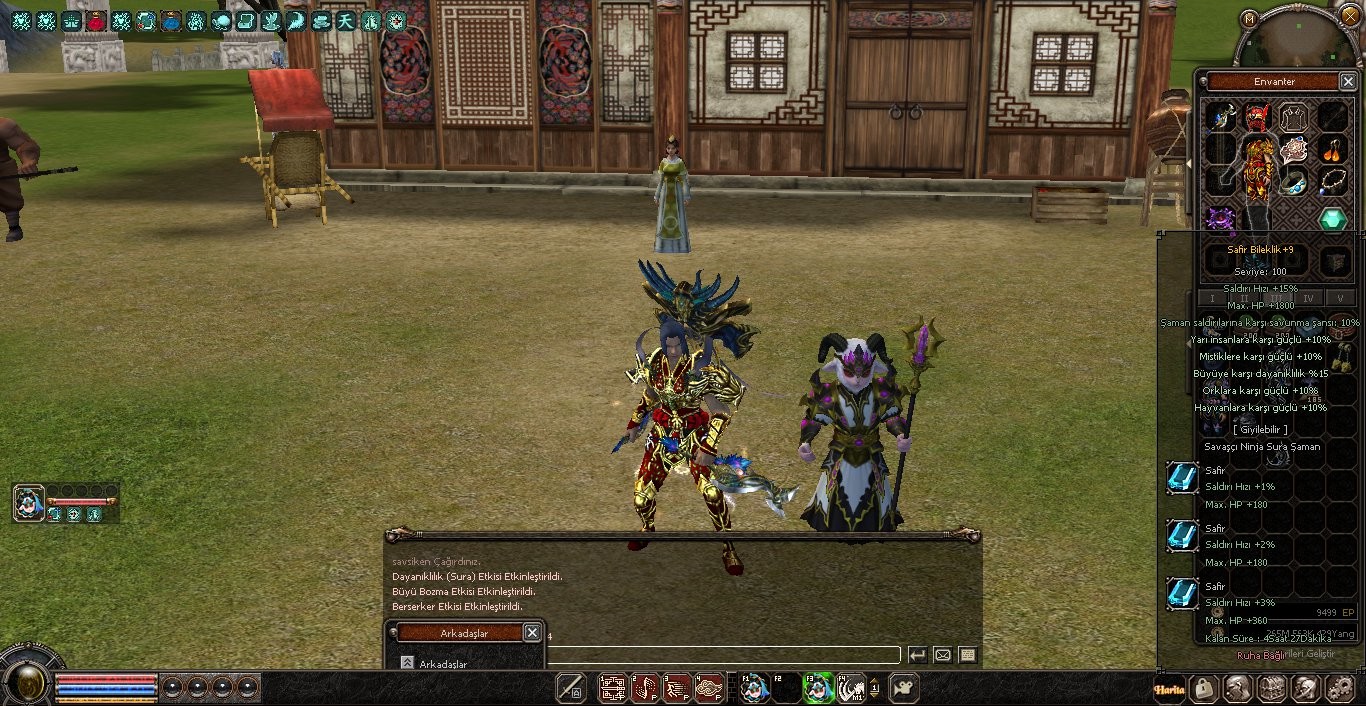
Önce
Sonra
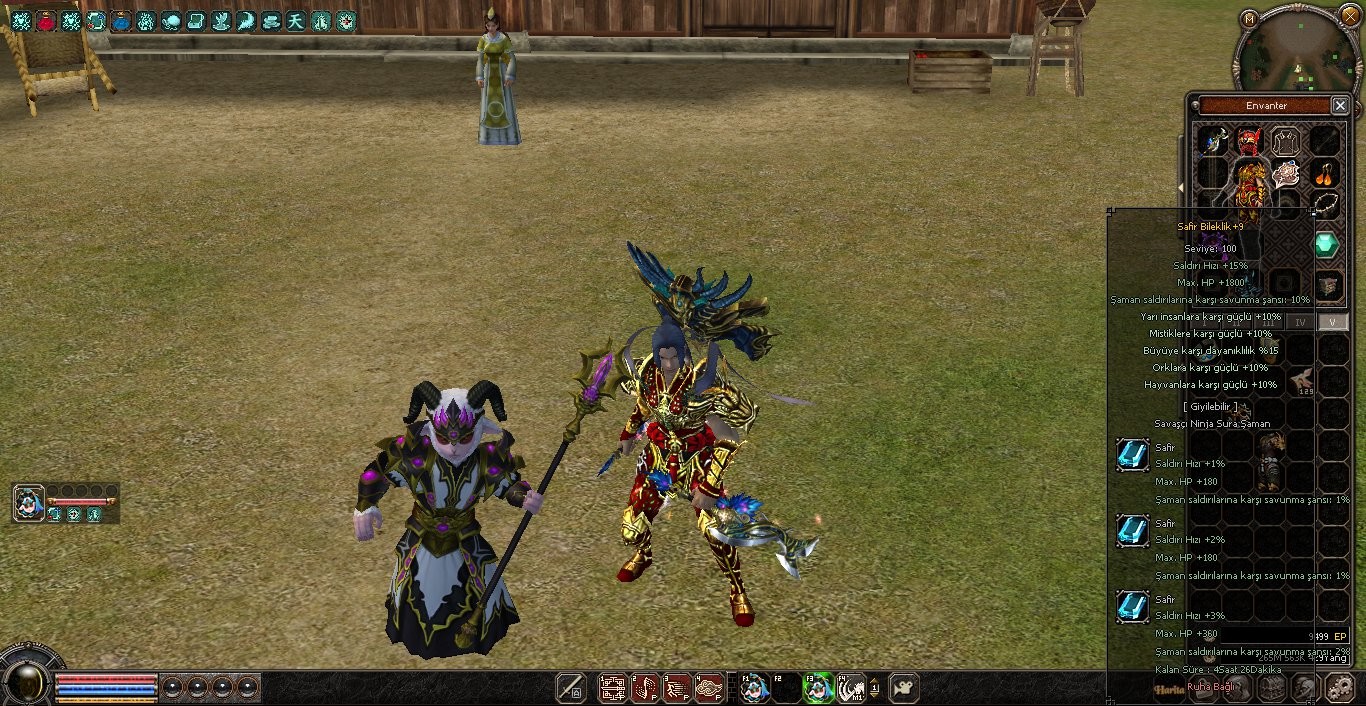
Aksesuar Özelliklerinde Görünüm Eksikliği
Metin2 özel sunucularında oyun deneyimini zenginleştiren pek çok sistem bulunur. Bunlardan birisi de aksesuar sistemidir. Ancak bazı durumlarda aksesuar özelliklerinde görünüm eksiklikleri yaşanabilir. Bu eksiklikler, oyuncuların donanımına ya da sunucu tarafında tanımlanan yapılandırmalara bağlı olarak ortaya çıkabilir. Bu yazıda, Metin2 özel sunucularında aksesuarların özelliklerinin görünümüne dair yaşanan sorunları ele alacağız.
Aksesuar Sistemine Genel Bakış
Metin2 oyununda aksesuarlar, karakterin gücüne doğrudan veya dolaylı katkı sağlayan eşyalardır. Özellikle PVP sistemlerinde etkin olan sunucularda aksesuarlar, savaş sırasında kritik rol oynar. Ancak bazı özel sunucularda, aksesuarların özelliklerinin tamamı doğru şekilde gösterilmeyebilir. Bu durum, hem estetik hem de stratejik açıdan oyuncuları olumsuz etkileyebilir.
Görünüm Eksikliğinin Nedenleri
Bu tür eksiklikler genellikle aşağıdaki nedenlerden dolayı oluşur:
- Sunucu tarafında tanımlanan item_proto dosyasında eksik veya yanlış özellik atamaları.
- Client tarafında aksesuar görünümünü yöneten UI Script dosyalarında yetersiz tanımlamalar.
- Python GUI sistemlerinde aksesuar bilgilerini görüntüleme kısmında meydana gelen hatalar.
- DB (veritabanı) ile game sunucusu arasında eksik veya hatalı veri aktarımı.
Sorunun Çözümü
Bu tür sorunları çözmek için öncelikle sunucu tarafında item_proto dosyasının kontrol edilmesi gerekir. Her aksesuarın sahip olması gereken tüm özellikler doğru şekilde tanımlanmalıdır. Ayrıca Py Root dosyalarında yer alan aksesuar ile ilgili scriptlerin de güncellenmiş ve hatasız olmasına dikkat edilmelidir. Eğer sunucu tarafı doğruysa, client kısmında UIScript dosyalarında gerekli düzenlemeler yapılmalıdır. Bu dosyalar, aksesuarın özelliklerinin doğru şekilde oyuncuya gösterilmesini sağlar.
Py GUI ve C++ Script Entegrasyonu
Metin2 özel sunucularında C++ ile yazılmış game server ve Python GUI sistemleri bir arada çalışır. Bu sistemlerin doğru şekilde entegre edilmesi, aksesuar özelliklerinin eksiksiz görünmesi için hayati önem taşır. Özellikle Py GUI sistemlerinde aksesuar bilgileri doğru şekilde render edilmelidir. Eğer bu işlemde bir hata varsa, oyuncular aksesuarların gerçek güçlerini göremeyeceklerdir. Bu da hem kullanıcı deneyimini düşürür hem de sunucunun adil oyun ortamını bozar.
Martysama ve Kaynak Kodlar
Metin2 geliştiricileri, özellikle Martysama gibi açık kaynak projeleri kullanarak aksesuar sistemini geliştirebilir. Bu projelerde yer alan C++ kaynak kodlar ve Python scriptler üzerinden yapılan değişiklikler sayesinde aksesuarların tüm özelliklerinin görünmesi sağlanabilir. Ancak bu süreçte dikkatli hareket etmek, kodların doğru derlenmesini ve test edilmesini sağlamak gerekir. Compile işlemlerinde dikkatsizlik, daha fazla hata ile sonuçlanabilir.
Sonuç
Aksesuar özelliklerinde görünüm eksikliği, Metin2 özel sunucularında ciddi bir sorun teşkil edebilir. Geliştiricilerin hem client hem de server tarafında gerekli kontrolleri yapması, aksesuarların tam olarak işlevsel ve estetik olarak doğru şekilde görünmesini sağlar. Bu sayede oyuncular, aksesuarlarını doğru şekilde değerlendirebilir ve oyun içinde daha verimli stratejiler geliştirebilir.
Visual Deficiency in Accessory Attributes
In Metin2 private servers, there are many systems that enhance the gameplay experience. One of these is the accessory system. However, sometimes visual deficiencies can occur in the display of accessory attributes. These issues may arise depending on the player's hardware or configurations defined on the server side. In this article, we will address the problems related to the visual representation of accessory properties in Metin2 private servers.
Overview of the Accessory System
In Metin2, accessories are items that contribute directly or indirectly to a character’s power. Especially in PVP-focused private servers, accessories play a critical role during combat. However, in some private servers, not all attributes of accessories might be displayed correctly. This situation can negatively affect players both aesthetically and strategically.
Causes of Visual Deficiencies
Such deficiencies generally occur due to the following reasons:
- Missing or incorrect attribute assignments in the item_proto file located on the server side.
- Insufficient definitions in UI Script files responsible for accessory visuals on the client side.
- Errors in Python GUI systems while displaying accessory information.
- Missing or faulty data transfers between the database (DB) and the game server.
Solution to the Problem
To solve such issues, first the item_proto file must be checked on the server side. All attributes that each accessory should have must be properly defined. Additionally, the scripts related to accessories located in the Py Root files must also be updated and error-free. If the server-side is correct, necessary adjustments must be made in the UIScript files on the client side. These files ensure that accessory attributes are properly displayed to the player.
Py GUI and C++ Script Integration
In Metin2 private servers, game servers written in C++ and Python GUI systems operate together. Proper integration of these systems is crucial for the complete display of accessory attributes. Specifically, in Py GUI systems, accessory information must be rendered correctly. If errors occur during this process, players will not see the true power of their accessories. This affects both user experience and the fairness of the gaming environment on the server.
Martysama and Source Codes
Metin2 developers can improve the accessory system by using open-source projects like Martysama. Modifications made through the C++ source codes and Python scripts found in these projects can ensure that all attributes of accessories are visible. However, caution must be exercised during this process; proper compilation and testing of the code are essential. Carelessness during compilation can lead to further errors.
Conclusion
Visual deficiency in accessory attributes can be a serious issue in Metin2 private servers. Developers must perform necessary checks on both the client and server sides to ensure accessories are fully functional and visually accurate. This allows players to properly evaluate their accessories and develop more effective strategies within the game.
Kod:
def __AppendAccessoryMetinSlotInfo
Kod:
def __AppendAccessoryMetinSlotInfo(self, metinSlot, mtrlVnum): ACCESSORY_SOCKET_MAX_SIZE = 4 cur=min(metinSlot[0], ACCESSORY_SOCKET_MAX_SIZE) end=min(metinSlot[1], ACCESSORY_SOCKET_MAX_SIZE) affectType1, affectValue1 = item.GetAffect(0) affectList1=[0, max(1, affectValue1*10/100), max(2, affectValue1*20/100), max(3, affectValue1*40/100), max(4, affectValue1*60/100)] affectType2, affectValue2 = item.GetAffect(1) affectList2=[0, max(1, affectValue2*10/100), max(2, affectValue2*20/100), max(3, affectValue2*40/100), max(4, affectValue1*60/100)] affectType3, affectValue3 = item.GetAffect(2) affectList3=[0, max(1, affectValue3*10/100), max(2, affectValue3*20/100), max(3, affectValue3*40/100), max(4, affectValue1*60/100)] mtrlPos=0 mtrlList=[mtrlVnum]*cur+[player.METIN_SOCKET_TYPE_SILVER]*(end-cur) for mtrl in mtrlList: affectString1 = self.__GetAffectString(affectType1, affectList1[mtrlPos+1]-affectList1[mtrlPos]) affectString2 = self.__GetAffectString(affectType2, affectList2[mtrlPos+1]-affectList2[mtrlPos]) affectString3 = self.__GetAffectString(affectType3, affectList3[mtrlPos+1]-affectList3[mtrlPos]) leftTime = 0 if cur == mtrlPos+1: leftTime=metinSlot[2] self.__AppendMetinSlotInfo_AppendMetinSocketData(mtrlPos, mtrl, affectString1, affectString2 ,affectString3, leftTime) mtrlPos+=1
Kod:
def __AppendMetinSlotInfo_AppendMetinSocketData
Kod:
def __AppendMetinSlotInfo_AppendMetinSocketData(self, index, metinSlotData, custumAffectString="", custumAffectString2="", custumAffectString3="",leftTime=0): slotType = self.GetMetinSocketType(metinSlotData) itemIndex = self.GetMetinItemIndex(metinSlotData) if 0 == slotType: return self.AppendSpace(5) slotImage = ui.ImageBox() slotImage.SetParent(self) slotImage.Show() ## Name nameTextLine = ui.TextLine() nameTextLine.SetParent(self) nameTextLine.SetFontName(self.defFontName) nameTextLine.SetPackedFontColor(self.NORMAL_COLOR) nameTextLine.SetOutline() nameTextLine.SetFeather() nameTextLine.Show() self.childrenList.append(nameTextLine) if player.METIN_SOCKET_TYPE_SILVER == slotType: slotImage.LoadImage("d:/ymir work/ui/game/windows/metin_slot_silver.sub") elif player.METIN_SOCKET_TYPE_GOLD == slotType: slotImage.LoadImage("d:/ymir work/ui/game/windows/metin_slot_gold.sub") self.childrenList.append(slotImage) if localeInfo.IsARABIC(): slotImage.SetPosition(self.toolTipWidth - slotImage.GetWidth() - 9, self.toolTipHeight-1) nameTextLine.SetPosition(self.toolTipWidth - 50, self.toolTipHeight + 2) else: slotImage.SetPosition(9, self.toolTipHeight-1) nameTextLine.SetPosition(50, self.toolTipHeight + 2) metinImage = ui.ImageBox() metinImage.SetParent(self) metinImage.Show() self.childrenList.append(metinImage) if itemIndex: item.SelectItem(itemIndex) ## Image try: metinImage.LoadImage(item.GetIconImageFileName()) except: dbg.TraceError("ItemToolTip.__AppendMetinSocketData() - Failed to find image file %d:%s" % (itemIndex, item.GetIconImageFileName()) ) nameTextLine.SetText(item.GetItemName()) ## Affect affectTextLine = ui.TextLine() affectTextLine.SetParent(self) affectTextLine.SetFontName(self.defFontName) affectTextLine.SetPackedFontColor(self.POSITIVE_COLOR) affectTextLine.SetOutline() affectTextLine.SetFeather() affectTextLine.Show() if localeInfo.IsARABIC(): metinImage.SetPosition(self.toolTipWidth - metinImage.GetWidth() - 10, self.toolTipHeight) affectTextLine.SetPosition(self.toolTipWidth - 50, self.toolTipHeight + 16 + 2) else: metinImage.SetPosition(10, self.toolTipHeight) affectTextLine.SetPosition(50, self.toolTipHeight + 16 + 2) if custumAffectString: affectTextLine.SetText(custumAffectString) elif itemIndex!=constInfo.ERROR_METIN_STONE: for i in xrange(item.ITEM_APPLY_MAX_NUM): (affectType, affectValue) = item.GetAffect(i) affectString = self.__GetAffectString(affectType, affectValue) if affectString: self.AppendSpace(20) self.StoneAppendTextLine(affectString, self.GetChangeTextLineColor(affectValue)) else: affectTextLine.SetText(localeInfo.TOOLTIP_APPLY_NOAFFECT) self.childrenList.append(affectTextLine) if custumAffectString2: affectTextLine = ui.TextLine() affectTextLine.SetParent(self) affectTextLine.SetFontName(self.defFontName) affectTextLine.SetPackedFontColor(self.POSITIVE_COLOR) affectTextLine.SetPosition(50, self.toolTipHeight + 16 + 2 + 16 + 2) affectTextLine.SetOutline() affectTextLine.SetFeather() affectTextLine.Show() affectTextLine.SetText(custumAffectString2) self.childrenList.append(affectTextLine) self.toolTipHeight += 16 + 2 if custumAffectString3: affectTextLine = ui.TextLine() affectTextLine.SetParent(self) affectTextLine.SetFontName(self.defFontName) affectTextLine.SetPackedFontColor(self.POSITIVE_COLOR) affectTextLine.SetPosition(50, self.toolTipHeight + 16 + 2 + 16 + 2) affectTextLine.SetOutline() affectTextLine.SetFeather() affectTextLine.Show() affectTextLine.SetText(custumAffectString3) self.childrenList.append(affectTextLine) self.toolTipHeight += 16 + 2 if 0 != leftTime: timeText = (localeInfo.LEFT_TIME + " : " + localeInfo.SecondToDHM(leftTime)) timeTextLine = ui.TextLine() timeTextLine.SetParent(self) timeTextLine.SetFontName(self.defFontName) timeTextLine.SetPackedFontColor(self.POSITIVE_COLOR) timeTextLine.SetPosition(50, self.toolTipHeight + 16 + 2 + 16 + 2) timeTextLine.SetOutline() timeTextLine.SetFeather() timeTextLine.Show() timeTextLine.SetText(timeText) self.childrenList.append(timeTextLine) self.toolTipHeight += 16 + 2 else: nameTextLine.SetText(localeInfo.TOOLTIP_SOCKET_EMPTY) self.toolTipHeight += 35 self.ResizeToolTip()Önce
Sonra
Aksesuar Özelliklerinde Görünüm Eksikliği
Metin2 özel sunucularında oyun deneyimini zenginleştiren pek çok sistem bulunur. Bunlardan birisi de aksesuar sistemidir. Ancak bazı durumlarda aksesuar özelliklerinde görünüm eksiklikleri yaşanabilir. Bu eksiklikler, oyuncuların donanımına ya da sunucu tarafında tanımlanan yapılandırmalara bağlı olarak ortaya çıkabilir. Bu yazıda, Metin2 özel sunucularında aksesuarların özelliklerinin görünümüne dair yaşanan sorunları ele alacağız.
Aksesuar Sistemine Genel Bakış
Metin2 oyununda aksesuarlar, karakterin gücüne doğrudan veya dolaylı katkı sağlayan eşyalardır. Özellikle PVP sistemlerinde etkin olan sunucularda aksesuarlar, savaş sırasında kritik rol oynar. Ancak bazı özel sunucularda, aksesuarların özelliklerinin tamamı doğru şekilde gösterilmeyebilir. Bu durum, hem estetik hem de stratejik açıdan oyuncuları olumsuz etkileyebilir.
Görünüm Eksikliğinin Nedenleri
Bu tür eksiklikler genellikle aşağıdaki nedenlerden dolayı oluşur:
- Sunucu tarafında tanımlanan item_proto dosyasında eksik veya yanlış özellik atamaları.
- Client tarafında aksesuar görünümünü yöneten UI Script dosyalarında yetersiz tanımlamalar.
- Python GUI sistemlerinde aksesuar bilgilerini görüntüleme kısmında meydana gelen hatalar.
- DB (veritabanı) ile game sunucusu arasında eksik veya hatalı veri aktarımı.
Sorunun Çözümü
Bu tür sorunları çözmek için öncelikle sunucu tarafında item_proto dosyasının kontrol edilmesi gerekir. Her aksesuarın sahip olması gereken tüm özellikler doğru şekilde tanımlanmalıdır. Ayrıca Py Root dosyalarında yer alan aksesuar ile ilgili scriptlerin de güncellenmiş ve hatasız olmasına dikkat edilmelidir. Eğer sunucu tarafı doğruysa, client kısmında UIScript dosyalarında gerekli düzenlemeler yapılmalıdır. Bu dosyalar, aksesuarın özelliklerinin doğru şekilde oyuncuya gösterilmesini sağlar.
Py GUI ve C++ Script Entegrasyonu
Metin2 özel sunucularında C++ ile yazılmış game server ve Python GUI sistemleri bir arada çalışır. Bu sistemlerin doğru şekilde entegre edilmesi, aksesuar özelliklerinin eksiksiz görünmesi için hayati önem taşır. Özellikle Py GUI sistemlerinde aksesuar bilgileri doğru şekilde render edilmelidir. Eğer bu işlemde bir hata varsa, oyuncular aksesuarların gerçek güçlerini göremeyeceklerdir. Bu da hem kullanıcı deneyimini düşürür hem de sunucunun adil oyun ortamını bozar.
Martysama ve Kaynak Kodlar
Metin2 geliştiricileri, özellikle Martysama gibi açık kaynak projeleri kullanarak aksesuar sistemini geliştirebilir. Bu projelerde yer alan C++ kaynak kodlar ve Python scriptler üzerinden yapılan değişiklikler sayesinde aksesuarların tüm özelliklerinin görünmesi sağlanabilir. Ancak bu süreçte dikkatli hareket etmek, kodların doğru derlenmesini ve test edilmesini sağlamak gerekir. Compile işlemlerinde dikkatsizlik, daha fazla hata ile sonuçlanabilir.
Sonuç
Aksesuar özelliklerinde görünüm eksikliği, Metin2 özel sunucularında ciddi bir sorun teşkil edebilir. Geliştiricilerin hem client hem de server tarafında gerekli kontrolleri yapması, aksesuarların tam olarak işlevsel ve estetik olarak doğru şekilde görünmesini sağlar. Bu sayede oyuncular, aksesuarlarını doğru şekilde değerlendirebilir ve oyun içinde daha verimli stratejiler geliştirebilir.
Visual Deficiency in Accessory Attributes
In Metin2 private servers, there are many systems that enhance the gameplay experience. One of these is the accessory system. However, sometimes visual deficiencies can occur in the display of accessory attributes. These issues may arise depending on the player's hardware or configurations defined on the server side. In this article, we will address the problems related to the visual representation of accessory properties in Metin2 private servers.
Overview of the Accessory System
In Metin2, accessories are items that contribute directly or indirectly to a character’s power. Especially in PVP-focused private servers, accessories play a critical role during combat. However, in some private servers, not all attributes of accessories might be displayed correctly. This situation can negatively affect players both aesthetically and strategically.
Causes of Visual Deficiencies
Such deficiencies generally occur due to the following reasons:
- Missing or incorrect attribute assignments in the item_proto file located on the server side.
- Insufficient definitions in UI Script files responsible for accessory visuals on the client side.
- Errors in Python GUI systems while displaying accessory information.
- Missing or faulty data transfers between the database (DB) and the game server.
Solution to the Problem
To solve such issues, first the item_proto file must be checked on the server side. All attributes that each accessory should have must be properly defined. Additionally, the scripts related to accessories located in the Py Root files must also be updated and error-free. If the server-side is correct, necessary adjustments must be made in the UIScript files on the client side. These files ensure that accessory attributes are properly displayed to the player.
Py GUI and C++ Script Integration
In Metin2 private servers, game servers written in C++ and Python GUI systems operate together. Proper integration of these systems is crucial for the complete display of accessory attributes. Specifically, in Py GUI systems, accessory information must be rendered correctly. If errors occur during this process, players will not see the true power of their accessories. This affects both user experience and the fairness of the gaming environment on the server.
Martysama and Source Codes
Metin2 developers can improve the accessory system by using open-source projects like Martysama. Modifications made through the C++ source codes and Python scripts found in these projects can ensure that all attributes of accessories are visible. However, caution must be exercised during this process; proper compilation and testing of the code are essential. Carelessness during compilation can lead to further errors.
Conclusion
Visual deficiency in accessory attributes can be a serious issue in Metin2 private servers. Developers must perform necessary checks on both the client and server sides to ensure accessories are fully functional and visually accurate. This allows players to properly evaluate their accessories and develop more effective strategies within the game.
