

Merhaba Turkmmo Halkı,
Önceden paylaşıldımı bilmiyorum paylaşılmış ise konu kapatılabilir.
Gerekli editlenicek yerler aşağıda mevcut.
Kanıt :
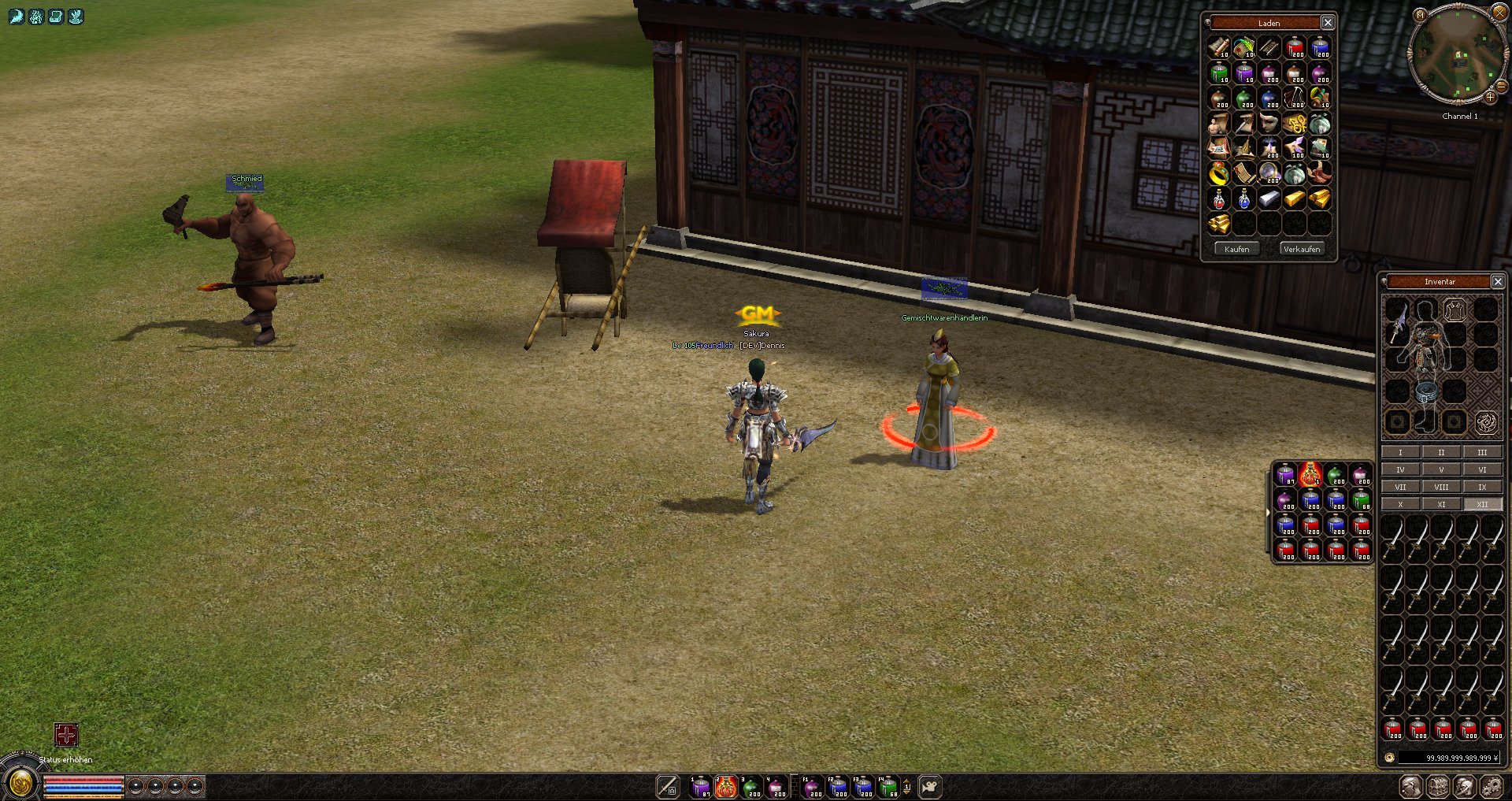
Önceden paylaşıldımı bilmiyorum paylaşılmış ise konu kapatılabilir.
Gerekli editlenicek yerler aşağıda mevcut.
Kanıt :
Game Sourcede Düzenlenicek Yerler:
Kod:
common/length.h - INVENTORY_MAX_NUM = 135, + INVENTORY_MAX_NUM = 540, common/tables.h typedef struct SQuickslot { BYTE type; - BYTE pos; + UINT pos; } TQuickslot; game/src/char.h - BYTE bItemGrid[INVENTORY_AND_EQUIP_SLOT_MAX]; + UINT bItemGrid[INVENTORY_AND_EQUIP_SLOT_MAX]; - void SyncQuickslot(BYTE bType, BYTE bOldPos, BYTE bNewPos); + void SyncQuickslot(BYTE bType, UINT bOldPos, UINT bNewPos); - bool GetQuickslot(BYTE pos, TQuickslot ** ppSlot); + bool GetQuickslot(UINT pos, TQuickslot ** ppSlot); - bool SetQuickslot(BYTE pos, TQuickslot & rSlot); + bool SetQuickslot(UINT pos, TQuickslot & rSlot); - bool DelQuickslot(BYTE pos); + bool DelQuickslot(UINT pos); - bool SwapQuickslot(BYTE a, BYTE b); + bool SwapQuickslot(UINT a, UINT b); - void ChainQuickslotItem(LPITEM pItem, BYTE bType, BYTE bOldPos); + void ChainQuickslotItem(LPITEM pItem, BYTE bType, UINT bOldPos); - void SetWear(BYTE bCell, LPITEM item); + void SetWear(UINT bCell, LPITEM item); - LPITEM GetWear(BYTE bCell) const; + LPITEM GetWear(UINT bCell) const; - bool RefineInformation(BYTE bCell, BYTE bType, int iAdditionalCell = -1); + bool RefineInformation(UINT bCell, BYTE bType, int iAdditionalCell = -1); - bool SwapItem(BYTE bCell, BYTE bDestCell); + bool SwapItem(UINT bCell, UINT bDestCell); game/src/char_battle.cpp ## 1000 can be change ## 2 x replace both available! - SyncQuickslot(QUICKSLOT_TYPE_ITEM, vec_bSlots, 255); + SyncQuickslot(QUICKSLOT_TYPE_ITEM, vec_bSlots, 1000); ## 2 x replace both available! - SyncQuickslot(QUICKSLOT_TYPE_ITEM, WEAR_UNIQUE1, 255); + SyncQuickslot(QUICKSLOT_TYPE_ITEM, WEAR_UNIQUE1, 1000); game/src/char_item.cpp -LPITEM CHARACTER::GetWear(BYTE bCell) const +LPITEM CHARACTER::GetWear(UINT bCell) const -void CHARACTER::SetWear(BYTE bCell, LPITEM item) +void CHARACTER::SetWear(UINT bCell, LPITEM item) ## 1000 can be change - SyncQuickslot(QUICKSLOT_TYPE_ITEM, i, 255); + SyncQuickslot(QUICKSLOT_TYPE_ITEM, i, 1000); - BYTE bCell = Cell.cell; + UINT bCell = Cell.cell; ## 2 x replace both available! - if (m_pointsInstant.bItemGrid[bCell] == iExceptionCell) + if (m_pointsInstant.bItemGrid[bCell] == (UINT)iExceptionCell) ## 2 x replace both available! - BYTE bPage = bCell / (INVENTORY_MAX_NUM / 3); + UINT bPage = bCell / (INVENTORY_MAX_NUM / 12); ## 2 x replace both available! - BYTE p = bCell + (5 * j); + UINT p = bCell + (5 * j); ## 2 x replace both available! - if (p / (INVENTORY_MAX_NUM / 3) != bPage) + if (p / (INVENTORY_MAX_NUM / 12) != bPage) ## 3 x replace both available! - BYTE bCell = item->GetCell(); + UINT bCell = item->GetCell(); -bool CHARACTER::RefineInformation(BYTE bCell, BYTE bType, int iAdditionalCell) +bool CHARACTER::RefineInformation(UINT bCell, BYTE bType, int iAdditionalCell) - SyncQuickslot(QUICKSLOT_TYPE_ITEM, Cell.cell, 255); + SyncQuickslot(QUICKSLOT_TYPE_ITEM, Cell.cell, 1000); -bool CHARACTER::SwapItem(BYTE bCell, BYTE bDestCell) +bool CHARACTER::SwapItem(UINT bCell, UINT bDestCell) - BYTE bEquipCell = item2->GetCell() - INVENTORY_MAX_NUM; + INT bEquipCell = item2->GetCell() - INVENTORY_MAX_NUM; - BYTE bInvenCell = item1->GetCell(); + UINT bInvenCell = item1->GetCell(); - BYTE bCell1 = item1->GetCell(); + UINT bCell1 = item1->GetCell(); - BYTE bCell2 = item2->GetCell(); + UINT bCell2 = item2->GetCell(); - BYTE bOldCell = item->GetCell(); + UINT bOldCell = item->GetCell(); game/src/char_quickslot.cpp -void CHARACTER::SyncQuickslot(BYTE bType, BYTE bOldPos, BYTE bNewPos) +void CHARACTER::SyncQuickslot(BYTE bType, UINT bOldPos, UINT bNewPos) - if (bNewPos == 255) + if (bNewPos == 1000) -bool CHARACTER::GetQuickslot(BYTE pos, TQuickslot ** ppSlot) +bool CHARACTER::GetQuickslot(UINT pos, TQuickslot ** ppSlot) -bool CHARACTER::SetQuickslot(BYTE pos, TQuickslot & rSlot) +bool CHARACTER::SetQuickslot(UINT pos, TQuickslot & rSlot) -bool CHARACTER::DelQuickslot(BYTE pos) +bool CHARACTER::DelQuickslot(UINT pos) -bool CHARACTER::SwapQuickslot(BYTE a, BYTE B) +bool CHARACTER::SwapQuickslot(UINT a, UINT B) -void CHARACTER::ChainQuickslotItem(LPITEM pItem, BYTE bType, BYTE bOldPos) +void CHARACTER::ChainQuickslotItem(LPITEM pItem, BYTE bType, UINT bOldPos) game/src/cmd_general.cpp - for (BYTE i=0; i<INVENTORY_MAX_NUM; ++i) + for (UINT i=0; i<INVENTORY_MAX_NUM; ++i) game/src/cmd_gm.cpp - ch->SyncQuickslot(QUICKSLOT_TYPE_ITEM, i, 255); + ch->SyncQuickslot(QUICKSLOT_TYPE_ITEM, i, 1000); ## 3 x replace both available! - BYTE cell = 0; + UINT cell = 0; game/src/exchange.cpp Such nach -> bool CExchange::CheckSpace() ## for 12 Inventory pages bool CExchange::CheckSpace() { static CGrid s_grid1(5, INVENTORY_MAX_NUM / 5 / 12); // inven page 1 static CGrid s_grid2(5, INVENTORY_MAX_NUM / 5 / 12); // inven page 2 static CGrid s_grid3(5, INVENTORY_MAX_NUM / 5 / 12); // inven page 3 static CGrid s_grid4(5, INVENTORY_MAX_NUM / 5 / 12); // inven page 4 static CGrid s_grid5(5, INVENTORY_MAX_NUM / 5 / 12); // inven page 5 static CGrid s_grid6(5, INVENTORY_MAX_NUM / 5 / 12); // inven page 6 static CGrid s_grid7(5, INVENTORY_MAX_NUM / 5 / 12); // inven page 7 static CGrid s_grid8(5, INVENTORY_MAX_NUM / 5 / 12); // inven page 8 static CGrid s_grid9(5, INVENTORY_MAX_NUM / 5 / 12); // inven page 9 static CGrid s_grid10(5, INVENTORY_MAX_NUM / 5 / 12); // inven page 10 static CGrid s_grid11(5, INVENTORY_MAX_NUM / 5 / 12); // inven page 11 static CGrid s_grid12(5, INVENTORY_MAX_NUM / 5 / 12); // inven page 12 s_grid1.Clear(); s_grid2.Clear(); s_grid3.Clear(); s_grid4.Clear(); s_grid5.Clear(); s_grid6.Clear(); s_grid7.Clear(); s_grid8.Clear(); s_grid9.Clear(); s_grid10.Clear(); s_grid11.Clear(); s_grid12.Clear(); LPCHARACTER victim = GetCompany()->GetOwner(); LPITEM item; int i; const int PageSlotCount = INVENTORY_MAX_NUM / 12; for (i = 0; i < INVENTORY_MAX_NUM; ++i) { if (!(item = victim->GetInventoryItem(i))) continue; BYTE itemSize = item->GetSize(); if (i < PageSlotCount) s_grid1.Put(i, 1, itemSize); else if (i < PageSlotCount * 2) s_grid2.Put(i - PageSlotCount, 1, itemSize); else if (i < PageSlotCount * 3) s_grid3.Put(i - PageSlotCount * 2, 1, itemSize); else if (i < PageSlotCount * 4) s_grid4.Put(i - PageSlotCount * 3, 1, itemSize); else if (i < PageSlotCount * 5) s_grid5.Put(i - PageSlotCount * 4, 1, itemSize); else if (i < PageSlotCount * 6) s_grid6.Put(i - PageSlotCount * 5, 1, itemSize); else if (i < PageSlotCount * 7) s_grid7.Put(i - PageSlotCount * 6, 1, itemSize); else if (i < PageSlotCount * 8) s_grid8.Put(i - PageSlotCount * 7, 1, itemSize); else if (i < PageSlotCount * 9) s_grid9.Put(i - PageSlotCount * 8, 1, itemSize); else if (i < PageSlotCount * 10) s_grid10.Put(i - PageSlotCount * 9, 1, itemSize); else if (i < PageSlotCount * 11) s_grid11.Put(i - PageSlotCount * 10, 1, itemSize); else if (i < PageSlotCount * 12) s_grid12.Put(i - PageSlotCount * 11, 1, itemSize); } static std::vector <WORD> s_vDSGrid(DRAGON_SOUL_INVENTORY_MAX_NUM); bool bDSInitialized = false; for (i = 0; i < EXCHANGE_ITEM_MAX_NUM; ++i) { if (!(item = m_apItems)) continue; BYTE itemSize = item->GetSize(); if (item->IsDragonSoul()) { if (!victim->DragonSoul_IsQualified()) { return false; } if (!bDSInitialized) { bDSInitialized = true; victim->CopyDragonSoulItemGrid(s_vDSGrid); } bool bExistEmptySpace = false; WORD wBasePos = DSManager::instance().GetBasePosition(item); if (wBasePos >= DRAGON_SOUL_INVENTORY_MAX_NUM) return false; for (int i = 0; i < DRAGON_SOUL_BOX_SIZE; i++) { WORD wPos = wBasePos + i; if (0 == s_vDSGrid[wBasePos]) { bool bEmpty = true; for (int j = 1; j < item->GetSize(); j++) { if (s_vDSGrid[wPos + j * DRAGON_SOUL_BOX_COLUMN_NUM]) { bEmpty = false; break; } } if (bEmpty) { for (int j = 0; j < item->GetSize(); j++) { s_vDSGrid[wPos + j * DRAGON_SOUL_BOX_COLUMN_NUM] = wPos + 1; } bExistEmptySpace = true; break; } } if (bExistEmptySpace) break; } if (!bExistEmptySpace) return false; } else { int iPos = s_grid1.FindBlank(1, itemSize); if (iPos >= 0) { s_grid1.Put(iPos, 1, itemSize); continue; } iPos = s_grid2.FindBlank(1, itemSize); if (iPos >= 0) { s_grid2.Put(iPos, 1, itemSize); continue; } iPos = s_grid3.FindBlank(1, itemSize); if (iPos >= 0) { s_grid3.Put(iPos, 1, itemSize); continue; } iPos = s_grid4.FindBlank(1, itemSize); if (iPos >= 0) { s_grid4.Put(iPos, 1, itemSize); continue; } iPos = s_grid5.FindBlank(1, itemSize); if (iPos >= 0) { s_grid5.Put(iPos, 1, itemSize); continue; } iPos = s_grid6.FindBlank(1, itemSize); if (iPos >= 0) { s_grid6.Put(iPos, 1, itemSize); continue; } iPos = s_grid7.FindBlank(1, itemSize); if (iPos >= 0) { s_grid7.Put(iPos, 1, itemSize); continue; } iPos = s_grid8.FindBlank(1, itemSize); if (iPos >= 0) { s_grid8.Put(iPos, 1, itemSize); continue; } iPos = s_grid9.FindBlank(1, itemSize); if (iPos >= 0) { s_grid9.Put(iPos, 1, itemSize); continue; } iPos = s_grid10.FindBlank(1, itemSize); if (iPos >= 0) { s_grid10.Put(iPos, 1, itemSize); continue; } iPos = s_grid11.FindBlank(1, itemSize); if (iPos >= 0) { s_grid11.Put(iPos, 1, itemSize); continue; } iPos = s_grid12.FindBlank(1, itemSize); if (iPos >= 0) { s_grid12.Put(iPos, 1, itemSize); continue; } return false; } } return true; } game/src/exchange.cpp - m_pOwner->SyncQuickslot(QUICKSLOT_TYPE_ITEM, item->GetCell(), 255); + m_pOwner->SyncQuickslot(QUICKSLOT_TYPE_ITEM, item->GetCell(), 1000); game/src/fishing.cpp ## 2 x replace both available! - BYTE bCell = rod->GetCell(); + UINT bCell = rod->GetCell(); game/src/input_main.cpp case SHOP_SUBHEADER_CG_SELL2: { - if (uiBytes < sizeof(BYTE) + sizeof(BYTE)) + if (uiBytes < sizeof(UINT) + sizeof(BYTE)) return -1; - BYTE pos = *(c_pData++); + UINT pos = *reinterpret_cast<const UINT*>(c_pData++); BYTE count = *(c_pData); sys_log(0, "INPUT: %s SHOP: SELL2", ch->GetName()); CShopManager::instance().Sell(ch, pos, count); - return sizeof(BYTE) + sizeof(BYTE); + return sizeof(UINT) + sizeof(BYTE); } - ch->SyncQuickslot(QUICKSLOT_TYPE_ITEM, p->ItemPos.cell, 255); + ch->SyncQuickslot(QUICKSLOT_TYPE_ITEM, p->ItemPos.cell, 1000); game/src/item.cpp - pOwner->SyncQuickslot(QUICKSLOT_TYPE_ITEM, wCell, 255); + pOwner->SyncQuickslot(QUICKSLOT_TYPE_ITEM, wCell, 1000); - m_pOwner->SyncQuickslot(QUICKSLOT_TYPE_ITEM, m_wCell, 255); + m_pOwner->SyncQuickslot(QUICKSLOT_TYPE_ITEM, m_wCell, 1000); -bool CItem::EquipTo(LPCHARACTER ch, BYTE bWearCell) +bool CItem::EquipTo(LPCHARACTER ch, UINT bWearCell) game/src/item.h - bool EquipTo(LPCHARACTER ch, BYTE bWearCell); + bool EquipTo(LPCHARACTER ch, UINT bWearCell); game/src/item_manager.cpp - o->SyncQuickslot(QUICKSLOT_TYPE_ITEM, item->GetCell(), 255); + o->SyncQuickslot(QUICKSLOT_TYPE_ITEM, item->GetCell(), 1000); game/src/minig.cpp ## 2 x replace both available! - BYTE bCell = rkOldPick.GetCell(); + UINT bCell = rkOldPick.GetCell(); game/src/packet.h typedef struct command_quickslot_add { BYTE header; - BYTE pos; + UINT pos; TQuickslot slot; } TPacketCGQuickslotAdd; typedef struct command_quickslot_del { BYTE header; - BYTE pos; + UINT pos; } TPacketCGQuickslotDel; typedef struct command_quickslot_swap { BYTE header; - BYTE pos; + UINT pos; - BYTE change_pos; + UINT change_pos; } TPacketCGQuickslotSwap; typedef struct packet_item_del { BYTE header; - BYTE pos; + UINT pos; } TPacketGCItemDel; struct packet_quickslot_add { BYTE header; - BYTE pos; + UINT pos; TQuickslot slot; }; struct packet_quickslot_del { BYTE header; - BYTE pos; + UINT pos; }; struct packet_quickslot_swap { BYTE header; - BYTE pos; + UINT pos; - BYTE pos_to; + UINT pos_to; }; typedef struct SPacketCGRefine { BYTE header; - BYTE pos; + UINT pos; BYTE type; } TPacketCGRefine; typedef struct SPacketCGRequestRefineInfo { BYTE header; - BYTE pos; + UINT pos; } TPacketCGRequestRefineInfo; typedef struct SPacketGCRefineInformaion { BYTE header; BYTE type; - BYTE pos; + UINT pos; DWORD src_vnum; DWORD result_vnum; BYTE material_count; game/src/questlua_global.cpp ## 2 x replace both available! - BYTE bCell = (BYTE) lua_tonumber(L,-1); + UINT bCell = lua_tonumber(L, -1); game/src/questlua_item.cpp - BYTE bCell = pItem->GetCell(); + UINT bCell = pItem->GetCell(); game/src/questlua_pc.cpp , - BYTE bCell = (BYTE)lua_tonumber(L, 1); + UINT bCell = lua_tonumber(L, 1); game/src/safebox.cpp -LPITEM CSafebox::GetItem(BYTE bCell) +LPITEM CSafebox::GetItem(INT bCell) -bool CSafebox::MoveItem(BYTE bCell, BYTE bDestCell, BYTE count) +bool CSafebox::MoveItem(INT bCell, INT bDestCell, BYTE count) game/src/safebox.h - bool MoveItem(BYTE bCell, BYTE bDestCell, BYTE count); + bool MoveItem(INT bCell, INT bDestCell, BYTE count); - LPITEM GetItem(BYTE bCell); + LPITEM GetItem(INT bCell); game/src/shop.cpp - m_pkPC->SyncQuickslot(QUICKSLOT_TYPE_ITEM, item->GetCell(), 255); + m_pkPC->SyncQuickslot(QUICKSLOT_TYPE_ITEM, item->GetCell(), 1000); game/src/shop_manager.cpp -void CShopManager::Sell(LPCHARACTER ch, BYTE bCell, BYTE bCount) +void CShopManager::Sell(LPCHARACTER ch, UINT bCell, BYTE bCount) game/src/shop_manager.h - void Sell(LPCHARACTER ch, BYTE bCell, BYTE bCount=0); + void Sell(LPCHARACTER ch, UINT bCell, BYTE bCount = 0);Client Sourcede düzenlenicek yerler :
Kod:
Client/UserInterface/AbstractPlayer.h - virtual void AddQuickSlot(int QuickslotIndex, char IconType, char IconPosition) = 0; + virtual void AddQuickSlot(int QuickslotIndex, char IconType, INT IconPosition) = 0; Client/UserInterface/GameType.h -const DWORD c_Inventory_Page_Count +const DWORD c_Inventory_Page_Count = 12; typedef struct SQuickSlot { BYTE Type; - BYTE Position; + UINT Position; } TQuickSlot; Client/UserInterface/Packet.h typedef struct command_quickslot_add { BYTE header; - BYTE pos; + UINT pos; TQuickSlot slot; }TPacketCGQuickSlotAdd; typedef struct command_quickslot_del { BYTE header; - BYTE pos; + UINT pos; }TPacketCGQuickSlotDel; typedef struct command_quickslot_swap { BYTE header; - BYTE pos; + UINT pos; - BYTE change_pos; + UINT change_pos; }TPacketCGQuickSlotSwap; typedef struct SPacketCGRefine { BYTE header; - BYTE pos; + UINT pos; BYTE type; } TPacketCGRefine; typedef struct packet_item_del { BYTE header; - BYTE pos; + UINT pos; } TPacketGCItemDel; typedef struct packet_quickslot_add { BYTE header; - BYTE pos; + UINT pos; TQuickSlot slot; } TPacketGCQuickSlotAdd; typedef struct packet_quickslot_del { BYTE header; - BYTE pos; + UINT pos; } TPacketGCQuickSlotDel; typedef struct packet_quickslot_swap { BYTE header; - BYTE pos; + UINT pos; - BYTE change_pos; + UINT change_pos; } TPacketGCQuickSlotSwap; typedef struct SPacketGCRefineInformation { BYTE header; - BYTE pos; + UINT pos; TRefineTable refine_table; } TPacketGCRefineInformation; typedef struct SPacketGCRefineInformationNew { BYTE header; BYTE type; - BYTE pos; + UINT pos; TRefineTable refine_table; } TPacketGCRefineInformationNew; Client/UserInterface/PythonNetworkStream.h - bool SendQuickSlotAddPacket(BYTE wpos, BYTE type, BYTE pos); + bool SendQuickSlotAddPacket(UINT wpos, BYTE type, UINT pos); - bool SendQuickSlotDelPacket(BYTE wpos); + bool SendQuickSlotDelPacket(UINT wpos); - bool SendQuickSlotMovePacket(BYTE wpos, BYTE change_pos); + bool SendQuickSlotMovePacket(UINT wpos, UINT change_pos); - bool SendShopSellPacketNew(BYTE bySlot, BYTE byCount); + bool SendShopSellPacketNew(UINT bySlot, BYTE byCount); - bool SendRefinePacket(BYTE byPos, BYTE byType); + bool SendRefinePacket(UINT byPos, BYTE byType); Client/UserInterface/PythonNetworkStreamPhaseGame.cpp -bool CPythonNetworkStream::SendRefinePacket(BYTE byPos, BYTE byType) +bool CPythonNetworkStream::SendRefinePacket(UINT byPos, BYTE byType) Client/UserInterface/PythonNetworkStreamPhaseGameItem.cpp ## The whole package should look like this -bool CPythonNetworkStream::SendShopSellPacketNew(BYTE bySlot, BYTE byCount) +bool CPythonNetworkStream::SendShopSellPacketNew(UINT bySlot, BYTE byCount) +{ + if (!__CanActMainInstance()) + return true; + TPacketCGShop PacketShop; + PacketShop.header = HEADER_CG_SHOP; + PacketShop.subheader = SHOP_SUBHEADER_CG_SELL2; + if (!Send(sizeof(TPacketCGShop), &PacketShop)) + { + Tracef("SendShopSellPacket Error\n"); + return false; + } + if (!Send(sizeof(UINT), &bySlot)) + { + Tracef("SendShopAddSellPacket Error\n"); + return false; + } + if (!Send(sizeof(BYTE), &byCount)) + { + Tracef("SendShopAddSellPacket Error\n"); + return false; + } + Tracef(" SendShopSellPacketNew(bySlot=%d, byCount=%d)\n", bySlot, byCount); + return SendSequence(); +} -bool CPythonNetworkStream::SendQuickSlotAddPacket(BYTE wpos, BYTE type, BYTE pos) +bool CPythonNetworkStream::SendQuickSlotAddPacket(UINT wpos, BYTE type, UINT pos) -bool CPythonNetworkStream::SendQuickSlotDelPacket(BYTE pos) +bool CPythonNetworkStream::SendQuickSlotDelPacket(UINT pos) -bool CPythonNetworkStream::SendQuickSlotMovePacket(BYTE pos, BYTE change_pos) +bool CPythonNetworkStream::SendQuickSlotMovePacket(UINT pos, UINT change_pos) Client/UserInterface/PythonPlayer.cpp - for (BYTE i = 0; i < QUICKSLOT_MAX_NUM; ++i) + for (UINT i = 0; i < QUICKSLOT_MAX_NUM; ++i) - rkNetStream.SendQuickSlotMovePacket((BYTE) dwGlobalSrcSlotIndex, (BYTE)dwGlobalDstSlotIndex); + rkNetStream.SendQuickSlotMovePacket((UINT) dwGlobalSrcSlotIndex, (UINT)dwGlobalDstSlotIndex); - rkNetStream.SendQuickSlotAddPacket((BYTE)dwGlobalSlotIndex, (BYTE)dwWndType, (BYTE)dwWndItemPos); + rkNetStream.SendQuickSlotAddPacket((UINT)dwGlobalSlotIndex, (BYTE)dwWndType, (UINT)dwWndItemPos); - rkNetStream.SendQuickSlotDelPacket((BYTE)dwGlobalSlotIndex); + rkNetStream.SendQuickSlotDelPacket((UINT)dwGlobalSlotIndex); -void CPythonPlayer::AddQuickSlot(int QuickSlotIndex, char IconType, char IconPosition) +void CPythonPlayer::AddQuickSlot(int QuickSlotIndex, char IconType, INT IconPosition) Client/UserInterface/PythonPlayer.h - void AddQuickSlot(int QuickslotIndex, char IconType, char IconPosition); + void AddQuickSlot(int QuickslotIndex, char IconType, INT IconPosition);Gerekli PY Dosyaları :
Ziyaretçiler için gizlenmiş link,görmek için üye olmalısınız!
Giriş yap veya üye ol.
Virüs Total :
Ziyaretçiler için gizlenmiş link,görmek için üye olmalısınız!
Giriş yap veya üye ol.
Kanıt için thanks :d
Metin2 Lobby olarak sunucu geliştiricileri için en kapsamlı sistemlerden biri olan Envanter Yapma Sistemini detaylıca ele alıyoruz. Bu makalede, C++ ve Python tabanlı 12 farklı envanter yapma sistemi incelenmekte ve geliştiriciler için uygulamalı örnekler sunulmaktadır. Metin2 özel sunucularında game core ve db core ile entegre çalışan bu sistemler, martysama ve diğer source edit araçları ile kolayca entegre edilebilir.
Öncelikle, envanter yapma sistemi nedir? Bu sistem, oyuncuların belirli malzemeleri bir araya getirerek yeni eşyalar üretmesini sağlar. Genellikle py root üzerinde uiscript ile grafiksel arayüzde sunulur ve C++ tarafında game server programming ile desteklenir. Bu sayede hem kullanıcı dostu hem de güçlü bir yapı sunulur.
1. Temel Crafting Sistemi (C++)
Oyun içi temel envanter yapma sistemi, auth ve game sunucularında tanımlanan fonksiyonlarla çalışır. Bu sistem, client src tarafında bir UI ile bağlanır ve oyuncuya üretim menüsü sunar. Kullanıcı, malzemeleri seçip işlem başlatır, db üzerinden kontrol yapılır.
2. GUI ile Eşya Yapımı (Py)
Python tarafında geliştirilen Py GUI sistemleri, uiscript dosyaları ile entegre olarak çalışır. Bu yapı sayesinde kullanıcıya görsel olarak daha zengin bir arayüz sağlanabilir. Py Root klasörlerinde tanımlanan komutlar ile üretim işlemleri yapılır.
3. Görsel Eşya Sunumu (Py + IMG)
Envanter yapımında,
 gibi görsellerle eşyalar daha net gösterilebilir. Bu görseller, pack dosyaları ile client tarafına aktarılır ve uiscript ile entegre edilir.
4. DB Entegrasyonlu Crafting
Ürünlerin db üzerinde tanımlanması, girdi/çıktı oranlarının tutulması ve üretim geçmişinin kayıt altına alınması önemlidir. Bu yapı, core seviyesinde C++ ile geliştirilmelidir.
5. Yetenek Tabanlı Crafting
Oyuncuların belirli bir level veya skill seviyesine göre üretim yapabilmesi sağlanabilir. Bu sistem, C++ tarafında karakter kontrolü ile yapılır.
6. Rastgele Bonuslar
Üretilen eşyaların rastgele bonuslar içermesi, sistemde sürpriz faktörü yaratır. Bu özellik, Python tarafında rastgele sayı üreteçleriyle yönetilir.
7. Takım Üzerinde Crafting
Bazı eşyalar sadece takımda iken üretilebilir. Bu durumda, game server tarafında takım kontrolü yapılmalıdır.
8. Zaman Tabanlı Crafting
Üretim süresi tanımlanarak, bekleme mekaniği eklenebilir. Bu sistem, timer fonksiyonları ile C++ veya Py üzerinden kontrol edilir.
9. Malzeme Kontrollü Crafting
Belirli malzemelerin yokluğunda üretim engellenir. Bu kontrol, db ve inventory üzerinden yapılır.
10. Görsel Geri Bildirim Sistemi
Üretim esnasında kullanıcıya animasyon veya ses efekti ile geri bildirim vermek için uiscript ve sound dosyaları entegre edilir.
11. Sunucu Tarafından Yönetilen Crafting
Tüm işlemler server side kontrol edilir. Oyuncu tarayıcısı manipüle edilemez şekilde, güvenli üretim yapılır.
12. Modüler Crafting Sistemi
Sistem modüler yapıda tasarlanarak, kolayca genişletilebilir ve güncellenebilir. Bu yapı, metin2dev geliştiricileri için büyük avantaj sağlar.
Bu sistemlerin hepsi, Metin2 Lobby tarafından önerilen standartlara uygun geliştirilmiş ve C++ / Python dillerinde optimize edilmiştir. Geliştiriciler, bu sistemleri doğrudan src dosyalarına entegre edebilir. Daha fazla bilgi ve örnek kod için Metin2 Lobby ziyaret edilebilir.
Metin2 Lobby presents one of the most comprehensive systems for server developers: the Inventory Crafting System. In this article, we examine 12 different inventory crafting systems based on C++ and Python, providing practical examples for developers. These systems, which integrate seamlessly with game core and db core in Metin2 private servers, can easily be integrated with tools like martysama and other source edit utilities.
Firstly, what is an inventory crafting system? This system allows players to combine specific materials to craft new items. Usually presented through a graphical interface using uiscript on py root, it is supported by game server programming on the C++ side, delivering both user-friendly and powerful functionality.
1. Basic Crafting System (C++)
The basic in-game crafting system operates through functions defined on auth and game servers. It connects to a UI on the client src side and presents a crafting menu to the player. Materials are selected, the process initiated, and checks are made via db.
2. GUI-Based Item Crafting (Py)
GUI systems developed in Python work integrated with uiscript files. This structure allows for a visually richer interface for users. Commands defined in Py Root folders handle crafting operations.
3. Visual Item Display (Py + IMG)
In crafting, images such as
can clearly show items. These images are transferred to the client side through pack files and integrated with uiscript.
4. DB Integrated Crafting
Recording item definitions, input/output ratios, and crafting history on db is crucial. This structure should be developed at the core level with C++.
5. Skill-Based Crafting
Players may be allowed to craft only after reaching a certain level or skill threshold. This is handled by character controls on the C++ side.
6. Random Bonuses
Adding random bonuses to crafted items introduces surprise elements into the system. This feature is managed in Python using random number generators.
7. Team-Based Crafting
Some items can only be crafted while in a team. In such cases, team checks must be performed on the game server side.
8. Time-Based Crafting
By defining crafting duration, waiting mechanics can be added. This system is controlled via timer functions in either C++ or Py.
9. Material-Controlled Crafting
Crafting can be blocked if certain materials are missing. This check is done via db and inventory.
10. Visual Feedback System
During crafting, animations or sound effects provide feedback to the user. Integration is done using uiscript and sound files.
11. Server-Side Crafting Management
All processes are controlled server-side to ensure secure crafting that cannot be manipulated by the client.
12. Modular Crafting System
Designed with a modular structure, the system is easily expandable and updatable, offering significant advantages for metin2dev developers.
All these systems have been developed according to standards recommended by Metin2 Lobby and optimized in C++ and Python. Developers can directly integrate these systems into their src files. For more information and sample code, visit Metin2 Lobby.
Metin2 Lobby olarak sunucu geliştiricileri için en kapsamlı sistemlerden biri olan Envanter Yapma Sistemini detaylıca ele alıyoruz. Bu makalede, C++ ve Python tabanlı 12 farklı envanter yapma sistemi incelenmekte ve geliştiriciler için uygulamalı örnekler sunulmaktadır. Metin2 özel sunucularında game core ve db core ile entegre çalışan bu sistemler, martysama ve diğer source edit araçları ile kolayca entegre edilebilir.
Öncelikle, envanter yapma sistemi nedir? Bu sistem, oyuncuların belirli malzemeleri bir araya getirerek yeni eşyalar üretmesini sağlar. Genellikle py root üzerinde uiscript ile grafiksel arayüzde sunulur ve C++ tarafında game server programming ile desteklenir. Bu sayede hem kullanıcı dostu hem de güçlü bir yapı sunulur.
1. Temel Crafting Sistemi (C++)
Oyun içi temel envanter yapma sistemi, auth ve game sunucularında tanımlanan fonksiyonlarla çalışır. Bu sistem, client src tarafında bir UI ile bağlanır ve oyuncuya üretim menüsü sunar. Kullanıcı, malzemeleri seçip işlem başlatır, db üzerinden kontrol yapılır.
2. GUI ile Eşya Yapımı (Py)
Python tarafında geliştirilen Py GUI sistemleri, uiscript dosyaları ile entegre olarak çalışır. Bu yapı sayesinde kullanıcıya görsel olarak daha zengin bir arayüz sağlanabilir. Py Root klasörlerinde tanımlanan komutlar ile üretim işlemleri yapılır.
3. Görsel Eşya Sunumu (Py + IMG)
Envanter yapımında,
4. DB Entegrasyonlu Crafting
Ürünlerin db üzerinde tanımlanması, girdi/çıktı oranlarının tutulması ve üretim geçmişinin kayıt altına alınması önemlidir. Bu yapı, core seviyesinde C++ ile geliştirilmelidir.
5. Yetenek Tabanlı Crafting
Oyuncuların belirli bir level veya skill seviyesine göre üretim yapabilmesi sağlanabilir. Bu sistem, C++ tarafında karakter kontrolü ile yapılır.
6. Rastgele Bonuslar
Üretilen eşyaların rastgele bonuslar içermesi, sistemde sürpriz faktörü yaratır. Bu özellik, Python tarafında rastgele sayı üreteçleriyle yönetilir.
7. Takım Üzerinde Crafting
Bazı eşyalar sadece takımda iken üretilebilir. Bu durumda, game server tarafında takım kontrolü yapılmalıdır.
8. Zaman Tabanlı Crafting
Üretim süresi tanımlanarak, bekleme mekaniği eklenebilir. Bu sistem, timer fonksiyonları ile C++ veya Py üzerinden kontrol edilir.
9. Malzeme Kontrollü Crafting
Belirli malzemelerin yokluğunda üretim engellenir. Bu kontrol, db ve inventory üzerinden yapılır.
10. Görsel Geri Bildirim Sistemi
Üretim esnasında kullanıcıya animasyon veya ses efekti ile geri bildirim vermek için uiscript ve sound dosyaları entegre edilir.
11. Sunucu Tarafından Yönetilen Crafting
Tüm işlemler server side kontrol edilir. Oyuncu tarayıcısı manipüle edilemez şekilde, güvenli üretim yapılır.
12. Modüler Crafting Sistemi
Sistem modüler yapıda tasarlanarak, kolayca genişletilebilir ve güncellenebilir. Bu yapı, metin2dev geliştiricileri için büyük avantaj sağlar.
Bu sistemlerin hepsi, Metin2 Lobby tarafından önerilen standartlara uygun geliştirilmiş ve C++ / Python dillerinde optimize edilmiştir. Geliştiriciler, bu sistemleri doğrudan src dosyalarına entegre edebilir. Daha fazla bilgi ve örnek kod için Metin2 Lobby ziyaret edilebilir.
Metin2 Lobby presents one of the most comprehensive systems for server developers: the Inventory Crafting System. In this article, we examine 12 different inventory crafting systems based on C++ and Python, providing practical examples for developers. These systems, which integrate seamlessly with game core and db core in Metin2 private servers, can easily be integrated with tools like martysama and other source edit utilities.
Firstly, what is an inventory crafting system? This system allows players to combine specific materials to craft new items. Usually presented through a graphical interface using uiscript on py root, it is supported by game server programming on the C++ side, delivering both user-friendly and powerful functionality.
1. Basic Crafting System (C++)
The basic in-game crafting system operates through functions defined on auth and game servers. It connects to a UI on the client src side and presents a crafting menu to the player. Materials are selected, the process initiated, and checks are made via db.
2. GUI-Based Item Crafting (Py)
GUI systems developed in Python work integrated with uiscript files. This structure allows for a visually richer interface for users. Commands defined in Py Root folders handle crafting operations.
3. Visual Item Display (Py + IMG)
In crafting, images such as
4. DB Integrated Crafting
Recording item definitions, input/output ratios, and crafting history on db is crucial. This structure should be developed at the core level with C++.
5. Skill-Based Crafting
Players may be allowed to craft only after reaching a certain level or skill threshold. This is handled by character controls on the C++ side.
6. Random Bonuses
Adding random bonuses to crafted items introduces surprise elements into the system. This feature is managed in Python using random number generators.
7. Team-Based Crafting
Some items can only be crafted while in a team. In such cases, team checks must be performed on the game server side.
8. Time-Based Crafting
By defining crafting duration, waiting mechanics can be added. This system is controlled via timer functions in either C++ or Py.
9. Material-Controlled Crafting
Crafting can be blocked if certain materials are missing. This check is done via db and inventory.
10. Visual Feedback System
During crafting, animations or sound effects provide feedback to the user. Integration is done using uiscript and sound files.
11. Server-Side Crafting Management
All processes are controlled server-side to ensure secure crafting that cannot be manipulated by the client.
12. Modular Crafting System
Designed with a modular structure, the system is easily expandable and updatable, offering significant advantages for metin2dev developers.
All these systems have been developed according to standards recommended by Metin2 Lobby and optimized in C++ and Python. Developers can directly integrate these systems into their src files. For more information and sample code, visit Metin2 Lobby.
