

Root/InterFaceModule.py
Arat :
Altına Ekle :
Arat :
Altına Ekle :
Arat ve Sil:
Arat :
Öncesine Ekle :
Arat :
Altına Ekle :
Root/Game.py Açılır:
Arat :
Altına Ekle :
Root/UiTip.py Açılır :
Arat :
Altına Ekle :
Nasıl Kullanırım?:
Cpp'lerinize Ekleyin:
------------------------------------------------------------------------------------------------------------------------------------
----------------------------------------------------------------------------------------------------------------------------------------------------
Client/SRC/UserInterface/PythonNetworkStreamCommand.cpp Aç:
EKLE:
Client/SRC/PythonApplicationModule.cpp Aç :
En Alt Kısımlara Ekle :
Ayrıca Bu Sistem İçin Yeni Bir CHAT_TYPE Oluşturup PhaseGame.cpp İçinde O Chat_Type......'nızın içine Bunları Ekleyeceksiniz.
Arat :
İçine Ekle :
KANIT :
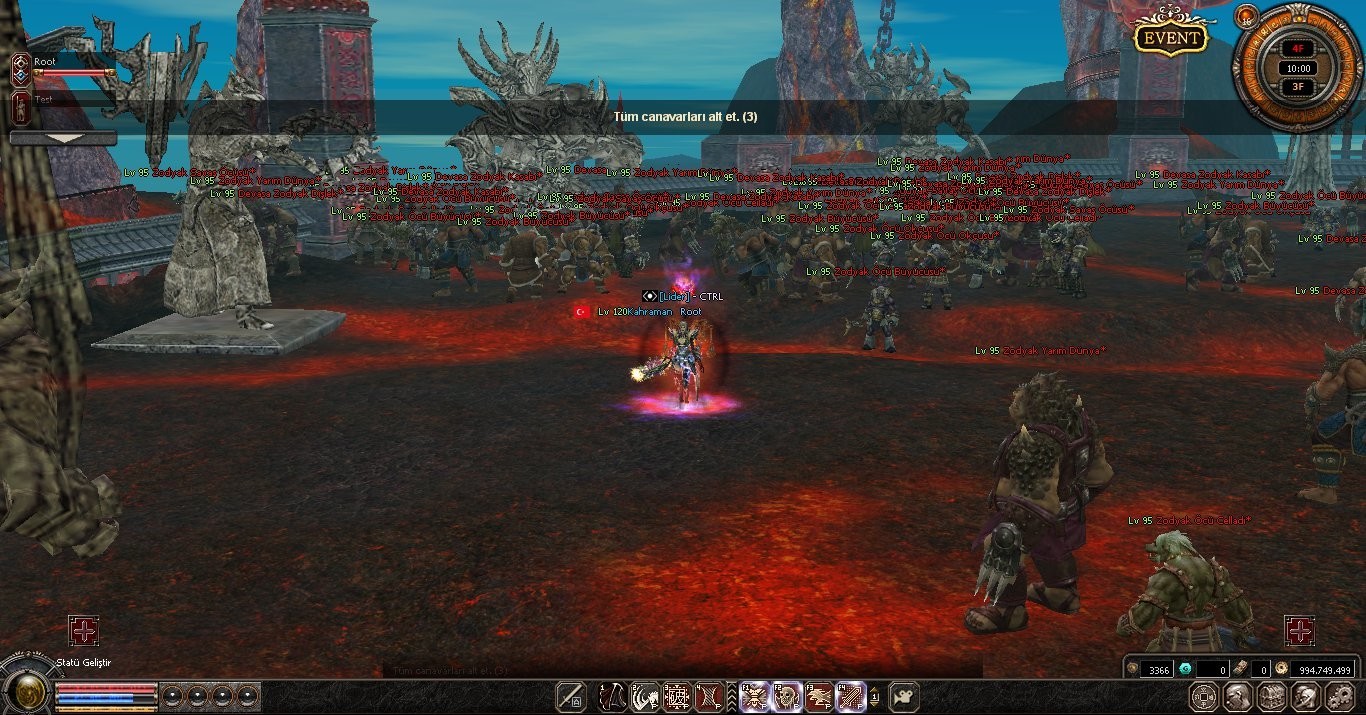
Zodyak Mission Notice Nedir?
Metin2 özel sunucularında oyun deneyimini artırmak amacıyla geliştirilen sistemlerden biri olan Zodyak Mission Notice, oyuncuların belirli görevleri tamamlayarak ödüller kazanmalarını sağlar. Bu sistem genellikle C++ ve Python dilleriyle entegre edilerek hem sunucu tarafında hem de istemci tarafında çalışır. Bu yazıda, [C++ & PY ] Zodyak Mission Notice sisteminin nasıl çalıştığını, nasıl kurulduğunu ve hangi avantajları sunduğunu detaylı olarak ele alacağız.
Zodyak Görev Sistemi Nasıl Çalışır?
Zodyak Mission Notice sistemi, oyunculara haftalık veya günlük temelde görevler sunar. Her görev, belirli bir ödülle sonuçlanır. Görevler genellikle PvP savaşları, belirli item toplama, belirli haritalarda geziyor olmak gibi aktiviteleri içerir. Görevler Python tarafında GUI üzerinden gösterilirken, sunucu tarafında C++ tabanlı yapı ile kontrol edilir. Bu sayede hem güvenli hem de kullanıcı dostu bir sistem ortaya çıkar.
C++ Tarafında Entegrasyon
Sunucu tarafında Zodyak Mission Notice sistemi, genellikle game core kısmında düzenlenir. Oyuncunun görev durumu, veritabanında saklanır. Görev tamamlandığında, C++ kodları ile sunucuya sinyal gönderilir ve oyuncuya bildirim gelir. Bu süreçte auth server ile haberleşme de önemli rol oynar. Özellikle martysama gibi sistemlerde bu yapı daha da gelişmiş hale getirilmiştir.
Python Tarafında GUI ve Root Ayarları
İstemci tarafında görev sistemi genellikle py GUI veya UIScript ile tasarlanır. Py Root dosyalarında görevlerin listelendiği bir arayüz hazırlanır. Oyuncu görevleri takip edebilir ve tamamladıkça ödül alabilir. Pack dosyaları ile bu arayüz sunucuya entegre edilir. Metin2 Lobby gibi platformlarda geliştirilen sistemlerde, bu yapı oldukça yaygın bir şekilde kullanılmaktadır.
Güvenlik ve Performans
Sistem, source edit yapılarak özelleştirilebilir. Ancak bu işlem sırasında dikkatli davranılması gerekir. Hatalı kodlama, Metin2 sunucusunda hatalara neden olabilir. Geliştiriciler, Metin2 Server SRC üzerinde test yaparak sistemi stabilize hale getirmelidir. DB Core ve Game Core arasında doğru haberleşme sağlanmalıdır. Ayrıca, compile işlemleri sonrası sistemde testler yapılmalıdır.
Avantajları
Zodyak Mission Notice sistemi, oyuncuların sunucuda daha aktif kalmasını sağlar. Görev sistemi sayesinde oyunculara motive edici hedefler sunulur. Aynı zamanda PvP sistemleri ile entegre çalışarak Metin2’nin rekabetçi yapısını güçlendirir. Geliştiriciler için ise modüler bir yapı sunar, kolayca özelleştirilebilir ve genişletilebilir.
What is Zodyak Mission Notice?
One of the systems developed to enhance the gameplay experience on Metin2 private servers is Zodyak Mission Notice, which allows players to earn rewards by completing specific tasks. This system typically integrates with C++ and Python languages, operating both on the server-side and client-side. In this article, we will examine in detail how the [C++ & PY ] Zodyak Mission Notice system works, how it is installed, and what benefits it provides.
How Does the Zodyak Quest System Work?
The Zodyak Mission Notice system presents players with weekly or daily quests. Each quest concludes with a specific reward. These quests usually involve activities such as participating in PvP battles, collecting certain items, or spending time in specific maps. The quests are displayed via GUI on the Python side, while controlled on the server-side through C++-based structures. This creates a secure and user-friendly system.
Integration on the C++ Side
On the server-side, the Zodyak Mission Notice system is generally configured within the game core. Player quest status is stored in the database. When a quest is completed, signals are sent to the server via C++ code, notifying the player. Communication with the auth server also plays an important role during this process. In systems like martysama, this structure has been further enhanced.
GUI and Root Settings on the Python Side
On the client-side, the quest system is often designed using py GUI or UIScript. In Py Root files, an interface listing the quests is created. Players can track their quests and claim rewards upon completion. This interface is integrated into the server through pack files. On platforms like Metin2 Lobby, such structures are commonly used.
Security and Performance
The system can be customized by editing the source. However, caution must be exercised during this process. Incorrect coding may cause errors in the Metin2 server. Developers should test on Metin2 Server SRC to stabilize the system. Proper communication between DB Core and Game Core must be ensured. Additionally, tests should be conducted after compile operations.
Benefits
The Zodyak Mission Notice system encourages players to stay more active on the server. It provides motivating goals for players through the quest system. Moreover, it strengthens the competitive nature of Metin2 by integrating with PvP systems. For developers, it offers a modular design that can easily be customized and extended.
Arat :
Kod:
self.bigBoard = NoneAltına Ekle :
Kod:
if app.ENABLE_12ZI: self.missionBoard = NoneArat :
Kod:
self.bigBoard = uiTip.BigBoard() self.bigBoard.Hide()Altına Ekle :
Kod:
if app.ENABLE_12ZI: self.missionBoard = uiTip.MissionBoard() self.missionBoard.Hide()Arat ve Sil:
Kod:
self.__MakeTipBoard()Arat :
Kod:
self.__MakeMessengerWindow()Öncesine Ekle :
Kod:
self.__MakeTipBoard() # ENABLE_12ZIArat :
Kod:
del self.wndItemSelectAltına Ekle :
Kod:
if app.ENABLE_12ZI: del self.missionBoardRoot/Game.py Açılır:
Arat :
Kod:
def BINARY_SetBigMessage(self, message): self.interface.bigBoard.SetTip(message)Altına Ekle :
Kod:
if app.ENABLE_12ZI: def BINARY_SetMissionMessage(self, message): if self.interface: self.interface.missionBoard.SetMission(message) def BINARY_SetSubMissionMessage(self, message): if self.interface: self.interface.missionBoard.SetSubMission(message) def BINARY_CleanMissionMessage(self): if self.interface: self.interface.missionBoard.CleanMission()Root/UiTip.py Açılır :
Arat :
Kod:
class BigTextBar(TextBar): def __init__(self, width, height, fontSize): ui.Window.__init__(self) self.handle = grp.CreateBigTextBar(width, height, fontSize) def __del__(self): ui.Window.__del__(self) grp.DestroyTextBar(self.handle)Altına Ekle :
Kod:
if app.ENABLE_12ZI: class MissionBoard(ui.Bar): FONT_HEIGHT = 15 LINE_HEIGHT = FONT_HEIGHT + 5 STEP_HEIGHT = LINE_HEIGHT + 5 LONG_TEXT_START_X = 300 SCREEN_WIDTH = wndMgr.GetScreenWidth() def __init__(self): ui.Bar.__init__(self) self.AddFlag("not_pick") self.missionText = None self.missionFullText = None self.curPos = 0 self.dstPos = -5 self.nextScrollTime = 0 self.flowMode = False self.ScrollStartTime = 0.0 self.SetPosition(0, 100) self.SetSize(self.SCREEN_WIDTH, 35) self.SetColor(grp.GenerateColor(0.0, 0.0, 0.0, 0.5)) self.SetWindowHorizontalAlignCenter() self.__CreateTextBar() def __del__(self): ui.Bar.__del__(self) def __CreateTextBar(self): x, y = self.GetGlobalPosition() self.textBar = BigTextBar(self.SCREEN_WIDTH * 2, 300, self.FONT_HEIGHT) self.textBar.SetParent(self) self.textBar.SetPosition(6, 8) self.textBar.SetTextColor(242, 231, 193) self.textBar.SetClipRect(0, y, self.SCREEN_WIDTH, y + 8 + self.STEP_HEIGHT) self.textBar.Show() def CleanMission(self): self.missionText = None self.missionFullText = None self.textBar.ClearBar() self.Hide() def __RefreshBoard(self): self.textBar.ClearBar() if self.missionFullText: (text_width, text_height) = self.textBar.GetTextExtent(self.missionFullText) if text_width>self.SCREEN_WIDTH: self.textBar.TextOut(0, (self.STEP_HEIGHT - 8 - text_height) / 2, self.missionFullText) self.flowMode = True else: self.textBar.TextOut((wndMgr.GetScreenWidth() - text_width) / 2, (self.STEP_HEIGHT - 8 - text_height) / 2, self.missionFullText) self.flowMode = False def SetMission(self, text): self.__AppendText(text) self.__RefreshBoard() if self.flowMode: self.dstPos = -text_width self.curPos = self.LONG_TEXT_START_X self.textBar.SetPosition(3 + self.curPos, 8) else: self.dstPos = 0 self.curPos = self.STEP_HEIGHT self.textBar.SetPosition(3, 8 + self.curPos) if not self.IsShow(): self.Show() def SetSubMission(self, text): self.missionFullText = self.missionText + text preflowMode = self.flowMode self.__RefreshBoard() if preflowMode != self.flowMode: if self.flowMode: self.dstPos = -text_width self.curPos = self.LONG_TEXT_START_X self.textBar.SetPosition(3 + self.curPos, 8) else: self.dstPos = 0 self.curPos = self.STEP_HEIGHT self.textBar.SetPosition(3, 8 + self.curPos) def __AppendText(self, text): if text == "": self.CleanMission() return self.missionText = text self.missionFullText = text def OnUpdate(self): if self.missionFullText == None: self.Hide() return if self.dstPos < self.curPos: self.curPos -= 1 if self.flowMode: self.textBar.SetPosition(3 + self.curPos, 8) else: self.textBar.SetPosition(3, 8 + self.curPos) else: if self.flowMode: self.curPos = self.SCREEN_WIDTHNasıl Kullanırım?:
Cpp'lerinize Ekleyin:
------------------------------------------------------------------------------------------------------------------------------------
Kod:
ChatPacket(CHAT_TYPE_COMMAND, "SetMissionMessage %s", "VS. Ending Soon"); ChatPacket(CHAT_TYPE_COMMAND, "SetSubMission %s", "VS. is over. The world begins again under..."); ChatPacket(CHAT_TYPE_COMMAND, "CleanMission");Client/SRC/UserInterface/PythonNetworkStreamCommand.cpp Aç:
EKLE:
Kod:
#ifdef ENABLE_12ZI else if (!strcmpi(szCmd, "SetMissionMessage")) { if (2 != TokenVector.size()) { TraceError("CPythonNetworkStream::ServerCommand(c_szCommand=%s) - Strange Parameter Count : %s", c_szCommand); return; } const std::string & c_rstrMessage = TokenVector[1].c_str(); PyCallClassMemberFunc(m_apoPhaseWnd[PHASE_WINDOW_GAME], "BINARY_SetMissionMessage", Py_BuildValue("(s)", c_rstrMessage.c_str())); } else if (!strcmpi(szCmd, "SetSubMissionMessage")) { if (2 != TokenVector.size()) { TraceError("CPythonNetworkStream::ServerCommand(c_szCommand=%s) - Strange Parameter Count : %s", c_szCommand); return; } const std::string & c_rstrMessage = TokenVector[1].c_str(); PyCallClassMemberFunc(m_apoPhaseWnd[PHASE_WINDOW_GAME], "BINARY_SetSubMissionMessage", Py_BuildValue("(s)", c_rstrMessage.c_str())); } else if (!strcmpi(szCmd, "CleanMissionMessage")) { PyCallClassMemberFunc(m_apoPhaseWnd[PHASE_WINDOW_GAME], "BINARY_CleanMissionMessage", Py_BuildValue("()")); } #endifClient/SRC/PythonApplicationModule.cpp Aç :
En Alt Kısımlara Ekle :
Kod:
#ifdef ENABLE_12ZI PyModule_AddIntConstant(poModule, "ENABLE_12ZI", 1); #else PyModule_AddIntConstant(poModule, "ENABLE_12ZI", 0); #endifAyrıca Bu Sistem İçin Yeni Bir CHAT_TYPE Oluşturup PhaseGame.cpp İçinde O Chat_Type......'nızın içine Bunları Ekleyeceksiniz.
Arat :
Kod:
bool CPythonNetworkStream::RecvChatPacket()İçine Ekle :
Kod:
else (CHAT_TYPE_MISSION == kChat.type) { if (uChatSize) PyCallClassMemberFunc (m_apoPhaseWnd [PHASE_WINDOW_GAME], "BINARY_SetMissionMessage", Py_BuildValue ("(s)", buf)); else PyCallClassMemberFunc (m_apoPhaseWnd [PHASE_WINDOW_GAME], "BINARY_CleanMissionMessage", Py_BuildValue ("()")); } else (CHAT_TYPE_SUB_MISSION == kChat.type) { PyCallClassMemberFunc (m_apoPhaseWnd [PHASE_WINDOW_GAME], "BINARY_SetSubMissionMessage", Py_BuildValue ("(s)", buf)); }KANIT :
Zodyak Mission Notice Nedir?
Metin2 özel sunucularında oyun deneyimini artırmak amacıyla geliştirilen sistemlerden biri olan Zodyak Mission Notice, oyuncuların belirli görevleri tamamlayarak ödüller kazanmalarını sağlar. Bu sistem genellikle C++ ve Python dilleriyle entegre edilerek hem sunucu tarafında hem de istemci tarafında çalışır. Bu yazıda, [C++ & PY ] Zodyak Mission Notice sisteminin nasıl çalıştığını, nasıl kurulduğunu ve hangi avantajları sunduğunu detaylı olarak ele alacağız.
Zodyak Görev Sistemi Nasıl Çalışır?
Zodyak Mission Notice sistemi, oyunculara haftalık veya günlük temelde görevler sunar. Her görev, belirli bir ödülle sonuçlanır. Görevler genellikle PvP savaşları, belirli item toplama, belirli haritalarda geziyor olmak gibi aktiviteleri içerir. Görevler Python tarafında GUI üzerinden gösterilirken, sunucu tarafında C++ tabanlı yapı ile kontrol edilir. Bu sayede hem güvenli hem de kullanıcı dostu bir sistem ortaya çıkar.
C++ Tarafında Entegrasyon
Sunucu tarafında Zodyak Mission Notice sistemi, genellikle game core kısmında düzenlenir. Oyuncunun görev durumu, veritabanında saklanır. Görev tamamlandığında, C++ kodları ile sunucuya sinyal gönderilir ve oyuncuya bildirim gelir. Bu süreçte auth server ile haberleşme de önemli rol oynar. Özellikle martysama gibi sistemlerde bu yapı daha da gelişmiş hale getirilmiştir.
Python Tarafında GUI ve Root Ayarları
İstemci tarafında görev sistemi genellikle py GUI veya UIScript ile tasarlanır. Py Root dosyalarında görevlerin listelendiği bir arayüz hazırlanır. Oyuncu görevleri takip edebilir ve tamamladıkça ödül alabilir. Pack dosyaları ile bu arayüz sunucuya entegre edilir. Metin2 Lobby gibi platformlarda geliştirilen sistemlerde, bu yapı oldukça yaygın bir şekilde kullanılmaktadır.
Güvenlik ve Performans
Sistem, source edit yapılarak özelleştirilebilir. Ancak bu işlem sırasında dikkatli davranılması gerekir. Hatalı kodlama, Metin2 sunucusunda hatalara neden olabilir. Geliştiriciler, Metin2 Server SRC üzerinde test yaparak sistemi stabilize hale getirmelidir. DB Core ve Game Core arasında doğru haberleşme sağlanmalıdır. Ayrıca, compile işlemleri sonrası sistemde testler yapılmalıdır.
Avantajları
Zodyak Mission Notice sistemi, oyuncuların sunucuda daha aktif kalmasını sağlar. Görev sistemi sayesinde oyunculara motive edici hedefler sunulur. Aynı zamanda PvP sistemleri ile entegre çalışarak Metin2’nin rekabetçi yapısını güçlendirir. Geliştiriciler için ise modüler bir yapı sunar, kolayca özelleştirilebilir ve genişletilebilir.
What is Zodyak Mission Notice?
One of the systems developed to enhance the gameplay experience on Metin2 private servers is Zodyak Mission Notice, which allows players to earn rewards by completing specific tasks. This system typically integrates with C++ and Python languages, operating both on the server-side and client-side. In this article, we will examine in detail how the [C++ & PY ] Zodyak Mission Notice system works, how it is installed, and what benefits it provides.
How Does the Zodyak Quest System Work?
The Zodyak Mission Notice system presents players with weekly or daily quests. Each quest concludes with a specific reward. These quests usually involve activities such as participating in PvP battles, collecting certain items, or spending time in specific maps. The quests are displayed via GUI on the Python side, while controlled on the server-side through C++-based structures. This creates a secure and user-friendly system.
Integration on the C++ Side
On the server-side, the Zodyak Mission Notice system is generally configured within the game core. Player quest status is stored in the database. When a quest is completed, signals are sent to the server via C++ code, notifying the player. Communication with the auth server also plays an important role during this process. In systems like martysama, this structure has been further enhanced.
GUI and Root Settings on the Python Side
On the client-side, the quest system is often designed using py GUI or UIScript. In Py Root files, an interface listing the quests is created. Players can track their quests and claim rewards upon completion. This interface is integrated into the server through pack files. On platforms like Metin2 Lobby, such structures are commonly used.
Security and Performance
The system can be customized by editing the source. However, caution must be exercised during this process. Incorrect coding may cause errors in the Metin2 server. Developers should test on Metin2 Server SRC to stabilize the system. Proper communication between DB Core and Game Core must be ensured. Additionally, tests should be conducted after compile operations.
Benefits
The Zodyak Mission Notice system encourages players to stay more active on the server. It provides motivating goals for players through the quest system. Moreover, it strengthens the competitive nature of Metin2 by integrating with PvP systems. For developers, it offers a modular design that can easily be customized and extended.
