

Arkadaşlar bu linkten bakın hatasız bir şekilde
Kullanın
Kanıt
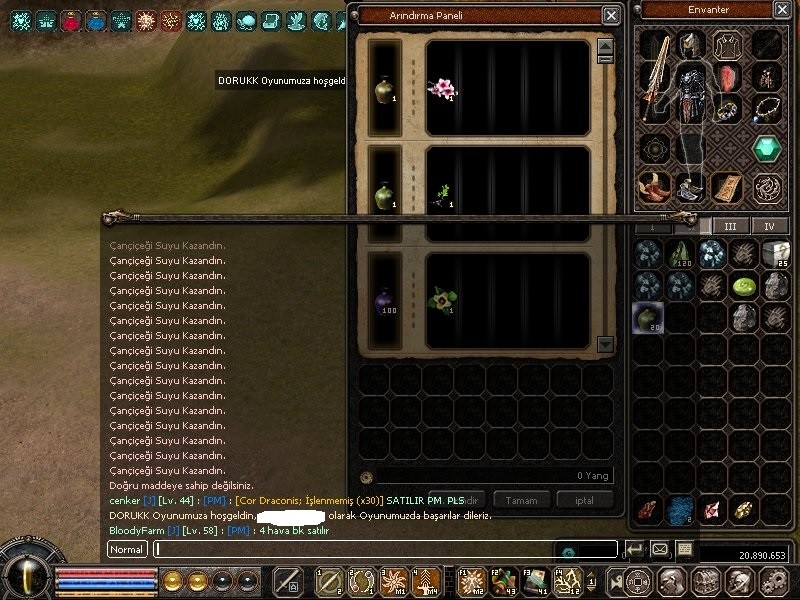
Giriş:
Metin2 özel sunucularında kullanıcı deneyimini artırmak için birçok küçük ama etkili sistem geliştirilebilir. Bu sistemlerden biri de Cube için hızlı arındır butonudur. Cube, oyuncuların eşyalarını yükseltmek, güçlendirmek veya farklı malzemeler elde etmek için kullandığı temel bir sistemdir. Ancak bazı işlemler zaman alıcı olabilir, özellikle tekrarlayan arındırma işlemleri için kullanıcı dostu bir arayüz önemli hale gelir.
Hızlı Arındır Sistemi Nedir?
Hızlı arındır butonu, oyuncuların Cube arayüzüne eklenerek, belirli bir işlemi otomatikleştiren bir özelliktir. Örneğin, bir oyuncu 10 adet aynı türden eşyayı arındırmak istiyorsa, bunu tek tek yapmak yerine hızlı bir buton yardımıyla hepsini sıraya sokabilir. Bu sistem genellikle Python GUI (py root) dosyalarında geliştirilir ve uiscript ile arayüze entegre edilir.
Neden Hızlı Arındır Butonu Gereklidir?
Oyuncuların oyun içi verimliliğini artırmak için sistemlerin kolay kullanılabilir olması gerekir. Özellikle PvP sunucularında oyuncular silah ve zırh gibi eşyalarını sık sık yükseltmek isterler. Bu bağlamda, Cube arayüzüne entegre edilen hızlı arındır butonu, kullanıcıların zaman kaybetmeden işlemlerini gerçekleştirmesini sağlar. Ayrıca, C++ tabanlı sunucu sistemleriyle uyumlu olarak geliştirildiğinde, hem güvenlik hem de performans açısından avantaj sağlar.
Python GUI ve Uiscript Kullanımı
Bu sistemi entegre etmek için öncelikle py root klasörlerinde gerekli Python dosyaları düzenlenmelidir. Arayüz tarafında ise uiscript dosyasına yeni bir buton tanımlaması yapılır. Butona tıklanması durumunda, belirli bir fonksiyon çağrılır ve arındırma işlemi başlatılır. Bu süreçte, Martysama tarzı sistemlerle uyumlu çalışacak şekilde yapılandırılmış kodlar kullanılır.
Adım Adım Kurulum
1. uiscript dosyasında Cube penceresine bir buton ekleyin. Bu butonun konumu, görünümü ve ismi ayarlanmalıdır.
2. py root kısmında, bu butona tıklanınca çalışacak fonksiyon tanımlayın. Fonksiyon, arındırma işlemi için gerekli parametreleri alıp, sunucuya göndermelidir.
3. Sunucu tarafında (game server), bu işlemin doğruluğu kontrol edilmeli ve işlem başlatılmalıdır.
Sunucu Tarafında Geliştirme
Sunucu tarafında C++ source düzenlemeleri yapılmalıdır. Cube sistemi genellikle game ve auth sunucularıyla bağlantılı çalışır. Cube için geliştirilen hızlı arındır sistemi, db core ile de ilişkilendirilmelidir. Bu sayede veritabanında tutulan eşya ve kullanıcı bilgileri doğru şekilde işlenebilir.
Sonuç
Cube için hızlı arındır butonu eklemek, Metin2 özel sunucularında kullanıcı memnuniyetini artıran küçük ama etkili bir özelliktir. Bu sistem, hem client hem de server tarafında uygun entegrasyonla kolayca geliştirilebilir. Metin2lobby.com üzerinden sunulan kaynaklar ve örnek sistemlerle bu tür geliştirmeler daha da kolaylaştırılabilir.
Introduction:
In Metin2 private servers, many small yet effective systems can be developed to enhance user experience. One such system is the quick purification button for Cube. Cube is a fundamental system that players use to upgrade items, strengthen them, or obtain different materials. However, some processes can be time-consuming; thus, a user-friendly interface becomes crucial, especially for repetitive purification tasks.
What Is the Quick Purification System?
The quick purification button is a feature added to the Cube interface, allowing players to automate certain operations. For instance, if a player wants to purify 10 identical items, instead of doing so one by one, they can queue all of them via a quick button. This system is typically developed within Python GUI (py root) files and integrated into the UI using uiscript.
Why Is a Quick Purification Button Needed?
To increase player efficiency in-game, systems must be easy to use. Especially on PvP servers, players often wish to upgrade their weapons and armor. In this context, a quick purification button integrated into the Cube interface allows users to perform operations without wasting time. When developed to work seamlessly with C++-based server systems, it also offers advantages in terms of security and performance.
Using Python GUI and Uiscript
To integrate this system, first, the necessary Python files in the py root folder should be edited. On the interface side, a new button definition must be added to the uiscript file. When clicked, a specific function is called and the purification process begins. The codes used should be structured to be compatible with systems like Martysama.
Step-by-Step Installation
1. Add a button to the Cube window in the uiscript file. Its position, appearance, and name should be configured.
2. In the py root section, define a function that executes when the button is clicked. The function should take the required parameters for the purification operation and send them to the server.
3. On the server side (game server), verify the correctness of the operation and initiate it.
Development on Server Side
Modifications to the C++ source are required on the server side. The Cube system typically works in conjunction with game and auth servers. The quick purification system for Cube should also be linked with the db core. This ensures that item and user data stored in the database are processed correctly.
Conclusion
Adding a quick purification button for Cube is a small yet impactful feature that enhances user satisfaction in Metin2 private servers. With proper integration on both client and server sides, this system can easily be developed. Resources and sample systems provided through Metin2lobby.com can further simplify such improvements.
Ziyaretçiler için gizlenmiş link,görmek için üye olmalısınız!
Giriş yap veya üye ol.
Kullanın
Kanıt
Cube İçin Hızlı Arındır Butonu Ekleme
Giriş:
Metin2 özel sunucularında kullanıcı deneyimini artırmak için birçok küçük ama etkili sistem geliştirilebilir. Bu sistemlerden biri de Cube için hızlı arındır butonudur. Cube, oyuncuların eşyalarını yükseltmek, güçlendirmek veya farklı malzemeler elde etmek için kullandığı temel bir sistemdir. Ancak bazı işlemler zaman alıcı olabilir, özellikle tekrarlayan arındırma işlemleri için kullanıcı dostu bir arayüz önemli hale gelir.
Hızlı Arındır Sistemi Nedir?
Hızlı arındır butonu, oyuncuların Cube arayüzüne eklenerek, belirli bir işlemi otomatikleştiren bir özelliktir. Örneğin, bir oyuncu 10 adet aynı türden eşyayı arındırmak istiyorsa, bunu tek tek yapmak yerine hızlı bir buton yardımıyla hepsini sıraya sokabilir. Bu sistem genellikle Python GUI (py root) dosyalarında geliştirilir ve uiscript ile arayüze entegre edilir.
Neden Hızlı Arındır Butonu Gereklidir?
Oyuncuların oyun içi verimliliğini artırmak için sistemlerin kolay kullanılabilir olması gerekir. Özellikle PvP sunucularında oyuncular silah ve zırh gibi eşyalarını sık sık yükseltmek isterler. Bu bağlamda, Cube arayüzüne entegre edilen hızlı arındır butonu, kullanıcıların zaman kaybetmeden işlemlerini gerçekleştirmesini sağlar. Ayrıca, C++ tabanlı sunucu sistemleriyle uyumlu olarak geliştirildiğinde, hem güvenlik hem de performans açısından avantaj sağlar.
Python GUI ve Uiscript Kullanımı
Bu sistemi entegre etmek için öncelikle py root klasörlerinde gerekli Python dosyaları düzenlenmelidir. Arayüz tarafında ise uiscript dosyasına yeni bir buton tanımlaması yapılır. Butona tıklanması durumunda, belirli bir fonksiyon çağrılır ve arındırma işlemi başlatılır. Bu süreçte, Martysama tarzı sistemlerle uyumlu çalışacak şekilde yapılandırılmış kodlar kullanılır.
Adım Adım Kurulum
1. uiscript dosyasında Cube penceresine bir buton ekleyin. Bu butonun konumu, görünümü ve ismi ayarlanmalıdır.
2. py root kısmında, bu butona tıklanınca çalışacak fonksiyon tanımlayın. Fonksiyon, arındırma işlemi için gerekli parametreleri alıp, sunucuya göndermelidir.
3. Sunucu tarafında (game server), bu işlemin doğruluğu kontrol edilmeli ve işlem başlatılmalıdır.
Sunucu Tarafında Geliştirme
Sunucu tarafında C++ source düzenlemeleri yapılmalıdır. Cube sistemi genellikle game ve auth sunucularıyla bağlantılı çalışır. Cube için geliştirilen hızlı arındır sistemi, db core ile de ilişkilendirilmelidir. Bu sayede veritabanında tutulan eşya ve kullanıcı bilgileri doğru şekilde işlenebilir.
Sonuç
Cube için hızlı arındır butonu eklemek, Metin2 özel sunucularında kullanıcı memnuniyetini artıran küçük ama etkili bir özelliktir. Bu sistem, hem client hem de server tarafında uygun entegrasyonla kolayca geliştirilebilir. Metin2lobby.com üzerinden sunulan kaynaklar ve örnek sistemlerle bu tür geliştirmeler daha da kolaylaştırılabilir.
Adding a Quick Purification Button for Cube
Introduction:
In Metin2 private servers, many small yet effective systems can be developed to enhance user experience. One such system is the quick purification button for Cube. Cube is a fundamental system that players use to upgrade items, strengthen them, or obtain different materials. However, some processes can be time-consuming; thus, a user-friendly interface becomes crucial, especially for repetitive purification tasks.
What Is the Quick Purification System?
The quick purification button is a feature added to the Cube interface, allowing players to automate certain operations. For instance, if a player wants to purify 10 identical items, instead of doing so one by one, they can queue all of them via a quick button. This system is typically developed within Python GUI (py root) files and integrated into the UI using uiscript.
Why Is a Quick Purification Button Needed?
To increase player efficiency in-game, systems must be easy to use. Especially on PvP servers, players often wish to upgrade their weapons and armor. In this context, a quick purification button integrated into the Cube interface allows users to perform operations without wasting time. When developed to work seamlessly with C++-based server systems, it also offers advantages in terms of security and performance.
Using Python GUI and Uiscript
To integrate this system, first, the necessary Python files in the py root folder should be edited. On the interface side, a new button definition must be added to the uiscript file. When clicked, a specific function is called and the purification process begins. The codes used should be structured to be compatible with systems like Martysama.
Step-by-Step Installation
1. Add a button to the Cube window in the uiscript file. Its position, appearance, and name should be configured.
2. In the py root section, define a function that executes when the button is clicked. The function should take the required parameters for the purification operation and send them to the server.
3. On the server side (game server), verify the correctness of the operation and initiate it.
Development on Server Side
Modifications to the C++ source are required on the server side. The Cube system typically works in conjunction with game and auth servers. The quick purification system for Cube should also be linked with the db core. This ensures that item and user data stored in the database are processed correctly.
Conclusion
Adding a quick purification button for Cube is a small yet impactful feature that enhances user satisfaction in Metin2 private servers. With proper integration on both client and server sides, this system can easily be developed. Resources and sample systems provided through Metin2lobby.com can further simplify such improvements.

