

Eski yapı fileslere eklenen ekipman görüntülenme sistemidir.
Hatalı gösterme, item görüntü kaymasının,efsun göstermemenin fixli halidir.
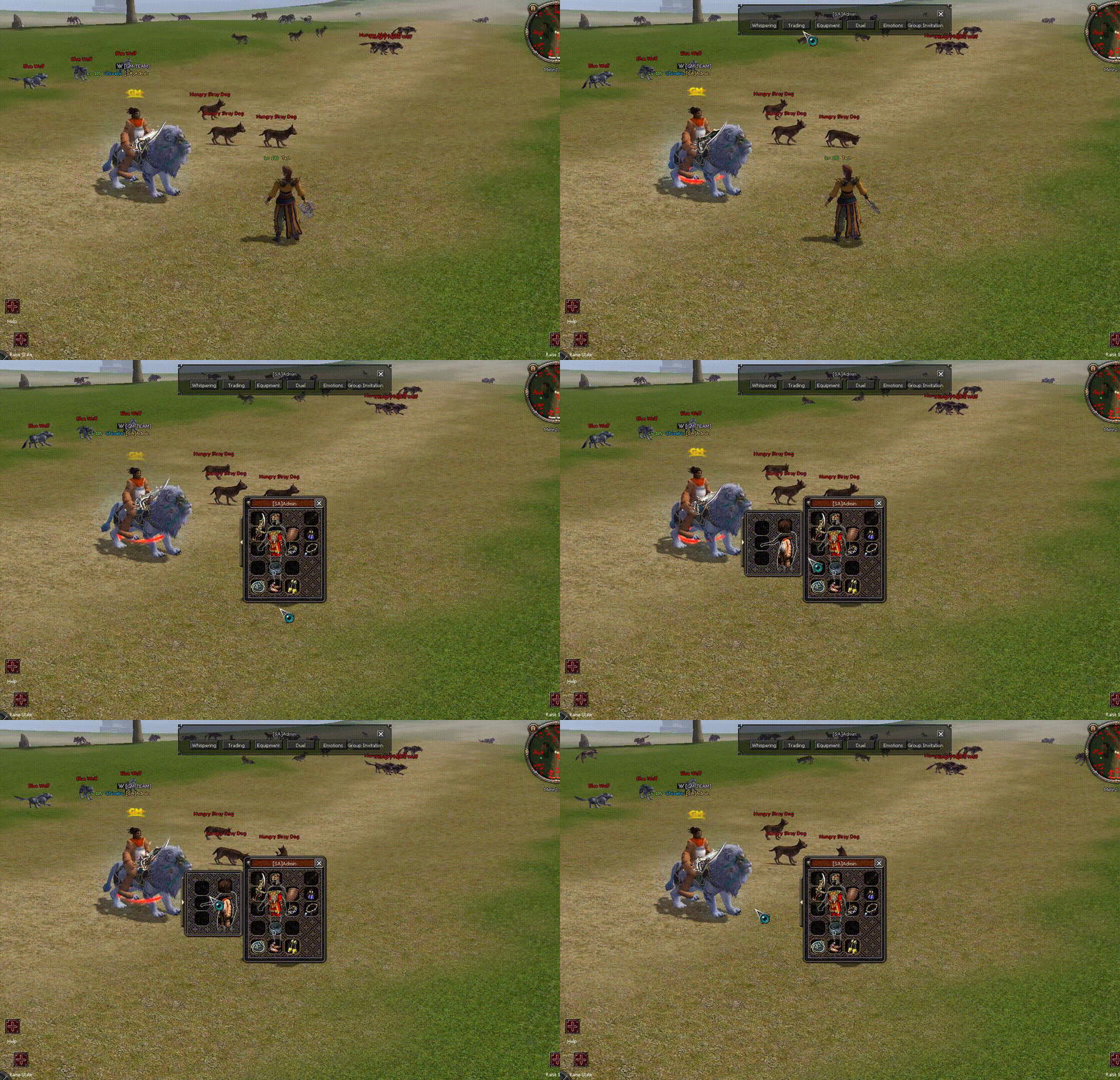
cmd_general.cpp (server/game):
char.cpp (server/game):
PythonNetworkStreamPhaseGame (Binary/client):
root/interfaceModule.py:
root/uiequipmentdialog.py:
root/uitarget.py:
uiscript/equipmentdialog.py:
costumeequipmentdialog.py in uiscript:
Metin2 özel sunucularında ekipmanların görünümü oyuncu deneyimini doğrudan etkileyen kritik bir unsurdur. Özellikle PvP sistemlerinde, ekipmanın doğru şekilde görüntülenmesi hem estetik hem de stratejik açıdan önemlidir. Ancak bazı modifikasyonlar sonucunda ekipman görünümü bozulabilir. Bu yazıda, Düzenlenmiş Ekipman Görünüm Fix konusunu detaylı olarak ele alacağız.
Sorun Nedir?
Metin2 özel sunucularında geliştirilen PvP sistemlerinde, oyuncuların ekipmanlarını özelleştirmesi yaygın bir özelliktir. Örneğin, Martysama tabanlı sistemlerde ekipmanlara özel efektler, renkler veya görseller eklenebilir. Ancak bazı durumlarda, bu değişiklikler sonucunda ekipman görünümü düzgün yüklenmeyebilir. Bu durum, hem oyun içi grafiksel bozukluklara neden olur hem de oyuncu memnuniyetini düşürür.
Neden Görünüm Bozulur?
Görünüm bozulması genellikle aşağıdaki nedenlerden dolayı meydana gelir:
- Client tarafında yapılan modifikasyonlar sırasında uiscript dosyalarında hatalı yapılandırmalar.
- pack dosyalarında eksik veya hatalı ekipman görselleri.
- py root veya Python sistemlerinde ekipman yükleme fonksiyonlarında yapılan değişiklikler.
- C++ kaynak kodlarında ekipman renderlama kısmında hata bulunması.
Fix Nasıl Uygulanır?
Bu sorunun çözümü için aşağıdaki adımları izlemek gerekir:
1. Uiscript Dosyalarını Kontrol Et
Öncelikle root klasöründe bulunan uiscript dosyaları incelenmelidir. Ekipman slotlarının tanımı yapılan kısım kontrol edilmeli ve eksik ya da yanlış tanımlamalar düzeltilmelidir. Özellikle equipmentwindow.py dosyası üzerinde çalışmak faydalı olacaktır.
2. Pack İçeriğini Doğrula
Ekipman görsellerinin bulunduğu pack dosyaları kontrol edilmelidir. Her ekipmanın doğru ve eksiksiz bir şekilde paketlenmiş olduğundan emin olunmalıdır. Eksik veya bozuk görseller yerine doğru olanlar konulmalıdır.
3. Python Sistemlerini Güncelle
Py GUI veya diğer Python sistemleri üzerinden ekipman görüntüleme fonksiyonları gözden geçirilmelidir. py root klasöründe yer alan ekipmanla ilgili dosyaların güncel ve hatasız olması gerekir.
4. C++ Kodlarında Gerekli Değişiklikler
Oyunun temel motoru olan C++ tarafında ekipman renderlama işlemleri yapılır. Eğer burada bir eksiklik varsa, client src üzerinde değişiklik yapılması gerekebilir. Özellikle game core kısmında ekipmanla ilgili sınıfların ve fonksiyonların doğruluğu kontrol edilmelidir.
5. Test ve Geri Bildirim
Yapılan tüm değişikliklerin ardından sunucuda test yapılmalı ve ekipman görünümünün düzgün çalışıp çalışmadığı kontrol edilmelidir. Oyunculardan gelen geri bildirimler de düzeltmeler için önemli bir kaynaktır.
Sonuç
Düzenlenmiş Ekipman Görünüm Fix, Metin2 özel sunucularında kullanıcı deneyimini artırmak için oldukça önemli bir sistemdir. Hataların erken fark edilip düzeltilmesi, hem sunucu sahipleri hem de oyuncular için kazan-kazan senaryosu yaratır. Bu tür sistemlerin geliştirilmesi ve sürdürülebilir olması için Metin2 development süreçlerinin titizlikle yönetilmesi gerekir.
In Metin2 private servers, the appearance of equipment directly affects the player experience. Especially in PvP systems, correct rendering of equipment is important both aesthetically and strategically. However, after certain modifications, equipment visuals may become corrupted. In this article, we will examine the topic of Customized Equipment Appearance Fix in detail.
What Is The Problem?
In PvP-based Metin2 private servers, customizing character equipment is a common feature. For instance, in Martysama-based systems, special effects, colors, or images can be added to equipment. However, in some cases, these modifications cause equipment visuals not to load correctly. This situation leads to in-game graphical glitches and reduces player satisfaction.
Why Does The Visual Break?
Visual corruption usually occurs due to the following reasons:
- Incorrect configurations in uiscript files during client-side modifications.
- Missing or incorrect equipment images in pack files.
- Modifications made in equipment loading functions within py root or Python systems.
- Errors found in equipment rendering sections of C++ source code.
How To Apply The Fix?
To resolve this issue, follow these steps:
1. Check Uiscript Files
Firstly, check the uiscript files located in the root folder. Examine the section defining equipment slots and fix any missing or incorrect definitions. Working specifically on the equipmentwindow.py file would be beneficial.
2. Validate Pack Contents
Ensure that the pack files containing equipment visuals are properly checked. Each piece of equipment must be correctly and completely packaged. Replace any missing or corrupt visuals with correct ones.
3. Update Python Systems
Review equipment display functions via Py GUI or other Python systems. Files related to equipment in the py root folder must be up-to-date and error-free.
4. Make Necessary Changes in C++ Code
The core engine of the game uses C++ for equipment rendering. If there are errors here, modifications might be needed in client src. Particularly, verify the correctness of classes and functions related to equipment in the game core section.
5. Testing and Feedback
After all changes are applied, test on the server and ensure that equipment visuals work correctly. Player feedback is also an important resource for corrections.
Conclusion
Customized Equipment Appearance Fix is a very important system for enhancing user experience in Metin2 private servers. Detecting and correcting errors early creates a win-win scenario for both server owners and players. Careful management of Metin2 development processes is essential for such systems to be developed and sustained.
Hatalı gösterme, item görüntü kaymasının,efsun göstermemenin fixli halidir.
cmd_general.cpp (server/game):
Kod:
Orjinalde GM_PLAYER Yetkisine ve Oyunculara Kapalıydı. Eğer Profil Görüntülemeyi Herkes Kullanabilsin İstiyorsanız. Arat: ACMD(do_view_equip) Tekrar Arat: if (ch->GetGMLevel() <= GM_PLAYER) return; Alttaki Gibi Yorum Satırı Yapın veya Silin: //if (ch->GetGMLevel() <= GM_PLAYER) //return;char.cpp (server/game):
Kod:
Burada Lenght.h'de İçinde EWearPositions var. Bunun Sıralarını Yazınız. #int pos[24] = { 0, 1, 2, 3, 4, 5, 6, 7, 8, 9, 10, 11, 12, 13, 14, 15, 16, 17, 18, 19, 20, 21, 22, 23 }; #24 adet Örneğin: 0 WEAR_BODY (Zırh ) 4 WEAR_WEAPON(Silah) 29 WEAR_GLOVE (Eldiven) mesela ben yukarıdaki int pos[3] yazsaydım ve list içine 0, 4, 29 yazsaydım profilde sadece zırh silah ve eldiven gözükürdü. Ona göre nelerin gözükmesini istiyorsanız EWearPositions daki sıralamaları doğru yazınız. Toplam kaçtane varsa int pos[toplam sayıyı giriniz.] Anladıysanız O Zaman Başlayalım: char.cpp aç ve bunu arat: void CHARACTER::SendEquipment(LPCHARACTER ch) ve Bununla Değiştir: void CHARACTER::SendEquipment(LPCHARACTER ch) { TPacketViewEquip p; p.header = HEADER_GC_VIEW_EQUIP; p.vid = GetVID(); int pos[24] = { 0, 1, 2, 3, 4, 5, 6, 7, 8, 9, 10, 11, 12, 13, 14, 15, 16, 17, 18, 19, 20, 21, 22, 23 }; //Burayı yapmayı unutmayın üstte gösterdiğim örnekteki gibi. for (int i = 0; i < 24; i++) //buradaki 24 sayısını toplam sayınız kadar değiştiriniz. int pos[toplam değer] burası ne ise aynen onu yazınız. { LPITEM item = GetWear(pos[i]); if (item) { p.equips[i].vnum = item->GetVnum(); p.equips[i].count = item->GetCount(); thecore_memcpy(p.equips[i].alSockets, item->GetSockets(), sizeof(p.equips[i].alSockets)); thecore_memcpy(p.equips[i].aAttr, item->GetAttributes(), sizeof(p.equips[i].aAttr)); } else { p.equips[i].vnum = 0; } } ch->GetDesc()->Packet(&p, sizeof(p)); }
Kod:
game/packet.h aç ve arat: typedef struct pakcet_view_equip ve komple değiştir: typedef struct pakcet_view_equip { BYTE header; DWORD vid; struct { DWORD vnum; BYTE count; long alSockets[ITEM_SOCKET_MAX_NUM]; TPlayerItemAttribute aAttr[ITEM_ATTRIBUTE_MAX_NUM]; } equips[24]; //Buradaki toplam sayıyı değiştirmeyi unutmayın. } TPacketViewEquip;
Kod:
Packet.h (Binary/client): UserInterfacePacket.h aç ve arat: typedef struct pakcet_view_equip ve komple değiştir: typedef struct pakcet_view_equip { BYTE header; DWORD dwVID; TEquipmentItemSet equips[24]; //buradaki toplam sayıyı değiştimeyi unutma } TPacketGCViewEquip;PythonNetworkStreamPhaseGame (Binary/client):
Kod:
Arat: bool CPythonNetworkStream::RecvViewEquipPacket() ve Komple Değiştir: bool CPythonNetworkStream::RecvViewEquipPacket() { TPacketGCViewEquip kViewEquipPacket; if (!Recv(sizeof(kViewEquipPacket), &kViewEquipPacket)) return false; PyCallClassMemberFunc(m_apoPhaseWnd[PHASE_WINDOW_GAME], "OpenEquipmentDialog", Py_BuildValue("(i)", kViewEquipPacket.dwVID)); for (int i = 0; i < 24; ++i) //Buradaki Toplam Sayıyı Değiştirmeyi Unutma. { TEquipmentItemSet & rItemSet = kViewEquipPacket.equips[i]; PyCallClassMemberFunc(m_apoPhaseWnd[PHASE_WINDOW_GAME], "SetEquipmentDialogItem", Py_BuildValue("(iiii)", kViewEquipPacket.dwVID, i, rItemSet.vnum, rItemSet.count)); for (int j = 0; j < ITEM_SOCKET_SLOT_MAX_NUM; ++j) PyCallClassMemberFunc(m_apoPhaseWnd[PHASE_WINDOW_GAME], "SetEquipmentDialogSocket", Py_BuildValue("(iiii)", kViewEquipPacket.dwVID, i, j, rItemSet.alSockets[j])); for (int k = 0; k < ITEM_ATTRIBUTE_SLOT_MAX_NUM; ++k) PyCallClassMemberFunc(m_apoPhaseWnd[PHASE_WINDOW_GAME], "SetEquipmentDialogAttr", Py_BuildValue("(iiiii)", kViewEquipPacket.dwVID, i, k, rItemSet.aAttr[k].bType, rItemSet.aAttr[k].sValue)); } return true; }root/interfaceModule.py:
Kod:
Arat: def OpenEquipmentDialog(self, vid): dlg = uiEquipmentDialog.EquipmentDialog() dlg.SetItemToolTip(self.tooltipItem) dlg.SetCloseEvent(ui.__mem_func__(self.CloseEquipmentDialog)) dlg.Open(vid) self.equipmentDialogDict[vid] = dlg Alttaki Gibi Değiştiriniz: def OpenEquipmentDialog(self, vid): if self.equipmentDialogDict.has_key(vid): self.equipmentDialogDict[vid].Destroy() self.CloseEquipmentDialog(vid) dlg = uiEquipmentDialog.EquipmentDialog() dlg.SetItemToolTip(self.tooltipItem) dlg.SetCloseEvent(ui.__mem_func__(self.CloseEquipmentDialog)) dlg.Open(vid) self.equipmentDialogDict[vid] = dlgroot/uiequipmentdialog.py:
Kod:
#Kodunuz İle Karşılaştırın. #Neden ? Çünkü burada CostumeEquipmentDialog sınıfı var (Muhtemelen buna sahip değilsiniz) import ui import chr import player class CostumeEquipmentDialog(ui.ScriptWindow): def __init__(self, wndEquipment): if not wndEquipment: import exception exception.Abort("wndEquipment parameter must be set to CostumeEquipmentDialog") return ui.ScriptWindow.__init__(self) self.isLoaded = 0 self.wndEquipment = wndEquipment; self.wndCostumeEquipmentLayer = None self.wndCostumeEquipmentSlot = None self.expandBtn = None self.minBtn = None self.__LoadWindow() def __del__(self): ui.ScriptWindow.__del__(self) def Show(self): self.__LoadWindow() ui.ScriptWindow.Show(self) self.CloseCostumeEquipment() def Close(self): self.Hide() def IsOpenedCostumeEquipment(self): return self.wndCostumeEquipmentLayer.IsShow() def OpenCostumeEquipment(self): self.wndCostumeEquipmentLayer.Show() self.expandBtn.Hide() self.AdjustPositionAndSize() self.RefreshSlot() def CloseCostumeEquipment(self): self.wndCostumeEquipmentLayer.Hide() self.expandBtn.Show() self.AdjustPositionAndSize() def GetBasePosition(self): x, y = self.wndEquipment.GetGlobalPosition() return x - 139, y + 30 def AdjustPositionAndSize(self): bx, by = self.GetBasePosition() if self.IsOpenedCostumeEquipment(): self.SetPosition(bx, by) self.SetSize(self.ORIGINAL_WIDTH, self.GetHeight()) else: self.SetPosition(bx + 129, by); self.SetSize(10, self.GetHeight()) def __LoadWindow(self): if self.isLoaded == 1: return self.isLoaded = 1 try: pyScrLoader = ui.PythonScriptLoader() pyScrLoader.LoadScriptFile(self, "UIScript/CostumeEquipmentDialog.py") except: import exception exception.Abort("CostumeEquipmentDialog.LoadWindow.LoadObject") try: self.ORIGINAL_WIDTH = self.GetWidth() wndCostumeEquipmentSlot = self.GetChild("CostumeEquipmentSlot") self.wndCostumeEquipmentLayer = self.GetChild("CostumeEquipmentLayer") self.expandBtn = self.GetChild("ExpandButton") self.minBtn = self.GetChild("MinimizeButton") self.expandBtn.SetEvent(ui.__mem_func__(self.OpenCostumeEquipment)) self.minBtn.SetEvent(ui.__mem_func__(self.CloseCostumeEquipment)) except: import exception exception.Abort("CostumeEquipmentDialog.LoadWindow.BindObject") wndCostumeEquipmentSlot.SetOverInItemEvent(ui.__mem_func__(self.wndEquipment.OverInItem)) wndCostumeEquipmentSlot.SetOverOutItemEvent(ui.__mem_func__(self.wndEquipment.OverOutItem)) self.wndCostumeEquipmentSlot = wndCostumeEquipmentSlot def RefreshSlot(self): equipmentDict = self.wndEquipment.itemDataDict for i in [19, 20]: if equipmentDict.has_key(i): self.wndCostumeEquipmentSlot.SetItemSlot(i, equipmentDict[i][0], equipmentDict[i][1]) class EquipmentDialog(ui.ScriptWindow): def __init__(self): print "NEW EQUIPMENT DIALOG ----------------------------------------------------------------------------" ui.ScriptWindow.__init__(self) self.__LoadDialog() self.vid = None self.eventClose = None self.itemDataDict = {} self.tooltipItem = None def __del__(self): print "---------------------------------------------------------------------------- DELETE EQUIPMENT DIALOG " ui.ScriptWindow.__del__(self) def __LoadDialog(self): try: PythonScriptLoader = ui.PythonScriptLoader() PythonScriptLoader.LoadScriptFile(self, "UIScript/EquipmentDialog.py") getObject = self.GetChild self.board = getObject("Board") self.slotWindow = getObject("EquipmentSlot") self.wndCostumeEquipment = CostumeEquipmentDialog(self) except: import exception exception.Abort("EquipmentDialog.LoadDialog.BindObject") self.board.SetCloseEvent(ui.__mem_func__(self.Close)) self.slotWindow.SetOverInItemEvent(ui.__mem_func__(self.OverInItem)) self.slotWindow.SetOverOutItemEvent(ui.__mem_func__(self.OverOutItem)) def Open(self, vid): self.vid = vid self.itemDataDict = {} name = chr.GetNameByVID(vid) self.board.SetTitleName(name) self.SetCenterPosition() self.SetTop() self.Show() if self.wndCostumeEquipment: self.wndCostumeEquipment.Show() def Close(self): self.itemDataDict = {} self.tooltipItem = None self.Hide() if self.eventClose: self.eventClose(self.vid) if self.wndCostumeEquipment: self.wndCostumeEquipment.Close() def Destroy(self): self.eventClose = None self.Close() self.ClearDictionary() self.board = None self.slotWindow = None if self.wndCostumeEquipment: self.wndCostumeEquipment.Destroy() self.wndCostumeEquipment = None def SetEquipmentDialogItem(self, slotIndex, vnum, count): if count <= 1: count = 0 self.slotWindow.SetItemSlot(slotIndex, vnum, count) emptySocketList = [] emptyAttrList = [] for i in xrange(player.METIN_SOCKET_MAX_NUM): emptySocketList.append(0) for i in xrange(player.ATTRIBUTE_SLOT_MAX_NUM): emptyAttrList.append((0, 0)) self.itemDataDict[slotIndex] = (vnum, count, emptySocketList, emptyAttrList) def SetEquipmentDialogSocket(self, slotIndex, socketIndex, value): if not slotIndex in self.itemDataDict: return if socketIndex < 0 or socketIndex > player.METIN_SOCKET_MAX_NUM: return self.itemDataDict[slotIndex][2][socketIndex] = value def SetEquipmentDialogAttr(self, slotIndex, attrIndex, type, value): if not slotIndex in self.itemDataDict: return if attrIndex < 0 or attrIndex > player.ATTRIBUTE_SLOT_MAX_NUM: return self.itemDataDict[slotIndex][3][attrIndex] = (type, value) def SetItemToolTip(self, tooltipItem): self.tooltipItem = tooltipItem def SetCloseEvent(self, event): self.eventClose = event def OverInItem(self, slotIndex): if None == self.tooltipItem: return if not slotIndex in self.itemDataDict: return itemVnum = self.itemDataDict[slotIndex][0] if 0 == itemVnum: return self.tooltipItem.ClearToolTip() metinSlot = self.itemDataDict[slotIndex][2] attrSlot = self.itemDataDict[slotIndex][3] self.tooltipItem.AddItemData(itemVnum, metinSlot, attrSlot) self.tooltipItem.ShowToolTip() def OverOutItem(self): if None != self.tooltipItem: self.tooltipItem.HideToolTip() def OnPressEscapeKey(self): self.Close() return True def OnMoveWindow(self, x, y): if self.wndCostumeEquipment: self.wndCostumeEquipment.AdjustPositionAndSize()root/uitarget.py:
Kod:
Arat: self.showingButtonList.append(self.buttonDict[localeInfo.TARGET_BUTTON_EXCHANGE]) Altına Ekle: self.showingButtonList.append(self.buttonDict[localeInfo.TARGET_BUTTON_VIEW_EQUIPMENT]) Arat: BUTTON_NAME_LIST = ( Tekrar Arat: localeInfo.TARGET_BUTTON_EXIT_OBSERVER, Altına Ekle: localeInfo.TARGET_BUTTON_VIEW_EQUIPMENT, Arat: def ShowDefaultButton(self): #İçinde Tekrar Arat: self.showingButtonList.append(self.buttonDict[localeInfo.TARGET_BUTTON_EXCHANGE]) #Altına Ekle: self.showingButtonList.append(self.buttonDict[localeInfo.TARGET_BUTTON_VIEW_EQUIPMENT]) #Böyle Gözükecek: def ShowDefaultButton(self): self.isShowButton = True self.showingButtonList.append(self.buttonDict[localeInfo.TARGET_BUTTON_WHISPER]) self.showingButtonList.append(self.buttonDict[localeInfo.TARGET_BUTTON_EXCHANGE]) self.showingButtonList.append(self.buttonDict[localeInfo.TARGET_BUTTON_VIEW_EQUIPMENT]) self.showingButtonList.append(self.buttonDict[localeInfo.TARGET_BUTTON_FIGHT]) self.showingButtonList.append(self.buttonDict[localeInfo.TARGET_BUTTON_EMOTION_ALLOW]) for button in self.showingButtonList: button.Show() Sadece GM'ler görsün istiyorsanız, şu şekilde yapın: def ShowDefaultButton(self): self.isShowButton = True self.showingButtonList.append(self.buttonDict[localeInfo.TARGET_BUTTON_WHISPER]) self.showingButtonList.append(self.buttonDict[localeInfo.TARGET_BUTTON_EXCHANGE]) self.showingButtonList.append(self.buttonDict[localeInfo.TARGET_BUTTON_FIGHT]) if str(player.GetName())[0] == "[": self.showingButtonList.append(self.buttonDict[localeInfo.TARGET_BUTTON_VIEW_EQUIPMENT]) self.showingButtonList.append(self.buttonDict[localeInfo.TARGET_BUTTON_EMOTION_ALLOW]) for button in self.showingButtonList: button.Show()uiscript/equipmentdialog.py:
Kod:
import uiScriptLocale window = { "name" : "EquipmentDialog", "style" : ("movable", "float",), "x" : 0, "y" : 0, "width" : 180, "height" : 230, "children" : ( { "name" : "Board", "type" : "board_with_titlebar", "x" : 0, "y" : 0, "width" : 180, "height" : 230, "title" : "Character Name", "children" : ( { "name":"EquipmentBaseImage", "type":"image", "style" : ("attach",), "x" : 0, "y" : 9, "horizontal_align" : "center", "vertical_align" : "center", "image" : "d:/ymir work/ui/equipment_bg_OGZZ.tga", "children" : ( { "name" : "EquipmentSlot", "type" : "slot", "x" : 3, "y" : 3, "width" : 150, "height" : 182, "slot" : ( {"index":0, "x":39, "y":37, "width":32, "height":64}, {"index":1, "x":39, "y":2, "width":32, "height":32}, {"index":2, "x":39, "y":145, "width":32, "height":32}, {"index":3, "x":75, "y":67, "width":32, "height":32}, {"index":4, "x":3, "y":3, "width":32, "height":96}, {"index":5, "x":114, "y":67, "width":32, "height":32}, {"index":6, "x":114, "y":35, "width":32, "height":32}, {"index":7, "x":2, "y":145, "width":32, "height":32}, {"index":8, "x":75, "y":145, "width":32, "height":32}, {"index":9, "x":114, "y":2, "width":32, "height":32}, {"index":10, "x":75, "y":35, "width":32, "height":32}, ## ring 1 ##{"index":21, "x":2, "y":106, "width":32, "height":32}, ## ring 2 ##{"index":22, "x":75, "y":106, "width":32, "height":32}, ## Belt {"index":23, "x":39, "y":106, "width":32, "height":32}, ## Buradaki "İndex": xx sayısı olan rakamlar Lenght.h'deki EWearPositions 'daki Sayılardır. Örneğin: ## "İndex": 0 WEAR_BODY Gibi Zırh Gözükür. Ona Göre Ayarlaryın Kordinatlarını İndexlerini vs. ), }, ), }, ), }, ), }costumeequipmentdialog.py in uiscript:
Kod:
import uiScriptLocale window = { "name" : "CostumeEquipmentDialog", "x" : 0, "y" : 0, "width" : 139, "height" : 145, "children" : ( { "name" : "ExpandButton", "type" : "button", "x" : 2, "y" : 15, "default_image" : "d:/ymir work/ui/game/belt_inventory/btn_expand_normal.tga", "over_image" : "d:/ymir work/ui/game/belt_inventory/btn_expand_over.tga", "down_image" : "d:/ymir work/ui/game/belt_inventory/btn_expand_down.tga", "disable_image" : "d:/ymir work/ui/game/belt_inventory/btn_expand_disabled.tga", }, { "name" : "CostumeEquipmentLayer", "x" : 5, "y" : 0, "width" : 139, "height" : 145, "children" : ( { "name" : "MinimizeButton", "type" : "button", "x" : 2, "y" : 15, "default_image" : "d:/ymir work/ui/game/belt_inventory/btn_minimize_normal.tga", "over_image" : "d:/ymir work/ui/game/belt_inventory/btn_minimize_over.tga", "down_image" : "d:/ymir work/ui/game/belt_inventory/btn_minimize_down.tga", "disable_image" : "d:/ymir work/ui/game/belt_inventory/btn_minimize_disabled.tga", }, { "name" : "CostumeEquipmentBoard", "type" : "board", "style" : ("attach", "float"), "x" : 10, "y" : 0, "width" : 129, "height" : 145, "children" : ( { "name" : "Costume_Base", "type" : "image", "x" : 8, "y" : 8, "image" : uiScriptLocale.LOCALE_UISCRIPT_PATH + "costume/costume_bg.jpg", "children" : ( { "name" : "CostumeEquipmentSlot", "type" : "slot", "x" : 3, "y" : 3, "width" : 127, "height" : 145, "slot" : ( {"index":19, "x":61, "y":45, "width":32, "height":64}, {"index":20, "x":61, "y": 8, "width":32, "height":32}, #{"index":, "x":5, "y":145, "width":32, "height":32}, # 19 ve 20 indexler kostümlerdir ona göre düzenleyiniz. ), }, ), }, ), }, ), }, ), }Düzenlenmiş Ekipman Görünüm Fix
Metin2 özel sunucularında ekipmanların görünümü oyuncu deneyimini doğrudan etkileyen kritik bir unsurdur. Özellikle PvP sistemlerinde, ekipmanın doğru şekilde görüntülenmesi hem estetik hem de stratejik açıdan önemlidir. Ancak bazı modifikasyonlar sonucunda ekipman görünümü bozulabilir. Bu yazıda, Düzenlenmiş Ekipman Görünüm Fix konusunu detaylı olarak ele alacağız.
Sorun Nedir?
Metin2 özel sunucularında geliştirilen PvP sistemlerinde, oyuncuların ekipmanlarını özelleştirmesi yaygın bir özelliktir. Örneğin, Martysama tabanlı sistemlerde ekipmanlara özel efektler, renkler veya görseller eklenebilir. Ancak bazı durumlarda, bu değişiklikler sonucunda ekipman görünümü düzgün yüklenmeyebilir. Bu durum, hem oyun içi grafiksel bozukluklara neden olur hem de oyuncu memnuniyetini düşürür.
Neden Görünüm Bozulur?
Görünüm bozulması genellikle aşağıdaki nedenlerden dolayı meydana gelir:
- Client tarafında yapılan modifikasyonlar sırasında uiscript dosyalarında hatalı yapılandırmalar.
- pack dosyalarında eksik veya hatalı ekipman görselleri.
- py root veya Python sistemlerinde ekipman yükleme fonksiyonlarında yapılan değişiklikler.
- C++ kaynak kodlarında ekipman renderlama kısmında hata bulunması.
Fix Nasıl Uygulanır?
Bu sorunun çözümü için aşağıdaki adımları izlemek gerekir:
1. Uiscript Dosyalarını Kontrol Et
Öncelikle root klasöründe bulunan uiscript dosyaları incelenmelidir. Ekipman slotlarının tanımı yapılan kısım kontrol edilmeli ve eksik ya da yanlış tanımlamalar düzeltilmelidir. Özellikle equipmentwindow.py dosyası üzerinde çalışmak faydalı olacaktır.
2. Pack İçeriğini Doğrula
Ekipman görsellerinin bulunduğu pack dosyaları kontrol edilmelidir. Her ekipmanın doğru ve eksiksiz bir şekilde paketlenmiş olduğundan emin olunmalıdır. Eksik veya bozuk görseller yerine doğru olanlar konulmalıdır.
3. Python Sistemlerini Güncelle
Py GUI veya diğer Python sistemleri üzerinden ekipman görüntüleme fonksiyonları gözden geçirilmelidir. py root klasöründe yer alan ekipmanla ilgili dosyaların güncel ve hatasız olması gerekir.
4. C++ Kodlarında Gerekli Değişiklikler
Oyunun temel motoru olan C++ tarafında ekipman renderlama işlemleri yapılır. Eğer burada bir eksiklik varsa, client src üzerinde değişiklik yapılması gerekebilir. Özellikle game core kısmında ekipmanla ilgili sınıfların ve fonksiyonların doğruluğu kontrol edilmelidir.
5. Test ve Geri Bildirim
Yapılan tüm değişikliklerin ardından sunucuda test yapılmalı ve ekipman görünümünün düzgün çalışıp çalışmadığı kontrol edilmelidir. Oyunculardan gelen geri bildirimler de düzeltmeler için önemli bir kaynaktır.
Sonuç
Düzenlenmiş Ekipman Görünüm Fix, Metin2 özel sunucularında kullanıcı deneyimini artırmak için oldukça önemli bir sistemdir. Hataların erken fark edilip düzeltilmesi, hem sunucu sahipleri hem de oyuncular için kazan-kazan senaryosu yaratır. Bu tür sistemlerin geliştirilmesi ve sürdürülebilir olması için Metin2 development süreçlerinin titizlikle yönetilmesi gerekir.
Customized Equipment Appearance Fix
In Metin2 private servers, the appearance of equipment directly affects the player experience. Especially in PvP systems, correct rendering of equipment is important both aesthetically and strategically. However, after certain modifications, equipment visuals may become corrupted. In this article, we will examine the topic of Customized Equipment Appearance Fix in detail.
What Is The Problem?
In PvP-based Metin2 private servers, customizing character equipment is a common feature. For instance, in Martysama-based systems, special effects, colors, or images can be added to equipment. However, in some cases, these modifications cause equipment visuals not to load correctly. This situation leads to in-game graphical glitches and reduces player satisfaction.
Why Does The Visual Break?
Visual corruption usually occurs due to the following reasons:
- Incorrect configurations in uiscript files during client-side modifications.
- Missing or incorrect equipment images in pack files.
- Modifications made in equipment loading functions within py root or Python systems.
- Errors found in equipment rendering sections of C++ source code.
How To Apply The Fix?
To resolve this issue, follow these steps:
1. Check Uiscript Files
Firstly, check the uiscript files located in the root folder. Examine the section defining equipment slots and fix any missing or incorrect definitions. Working specifically on the equipmentwindow.py file would be beneficial.
2. Validate Pack Contents
Ensure that the pack files containing equipment visuals are properly checked. Each piece of equipment must be correctly and completely packaged. Replace any missing or corrupt visuals with correct ones.
3. Update Python Systems
Review equipment display functions via Py GUI or other Python systems. Files related to equipment in the py root folder must be up-to-date and error-free.
4. Make Necessary Changes in C++ Code
The core engine of the game uses C++ for equipment rendering. If there are errors here, modifications might be needed in client src. Particularly, verify the correctness of classes and functions related to equipment in the game core section.
5. Testing and Feedback
After all changes are applied, test on the server and ensure that equipment visuals work correctly. Player feedback is also an important resource for corrections.
Conclusion
Customized Equipment Appearance Fix is a very important system for enhancing user experience in Metin2 private servers. Detecting and correcting errors early creates a win-win scenario for both server owners and players. Careful management of Metin2 development processes is essential for such systems to be developed and sustained.
