

Selam, arşivimde buldum. (Sistem benim değil!) Bir kaç düzenleme yapıp paylaşmak istedim.
Sistem oyunda ne kadar süredir aktif olduğunuzu gösterir.
Saat olarak da gösteriyor fakat zamanım olmadığı için saat gelene kadar bekleyemedim
Geliştirilebilir.
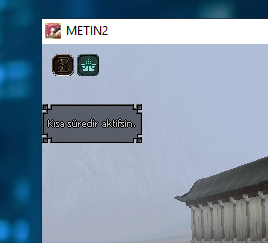
Sistem oyunda ne kadar süredir aktif olduğunuzu gösterir.
Saat olarak da gösteriyor fakat zamanım olmadığı için saat gelene kadar bekleyemedim
Geliştirilebilir.
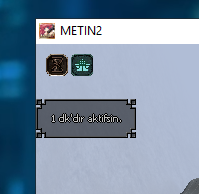
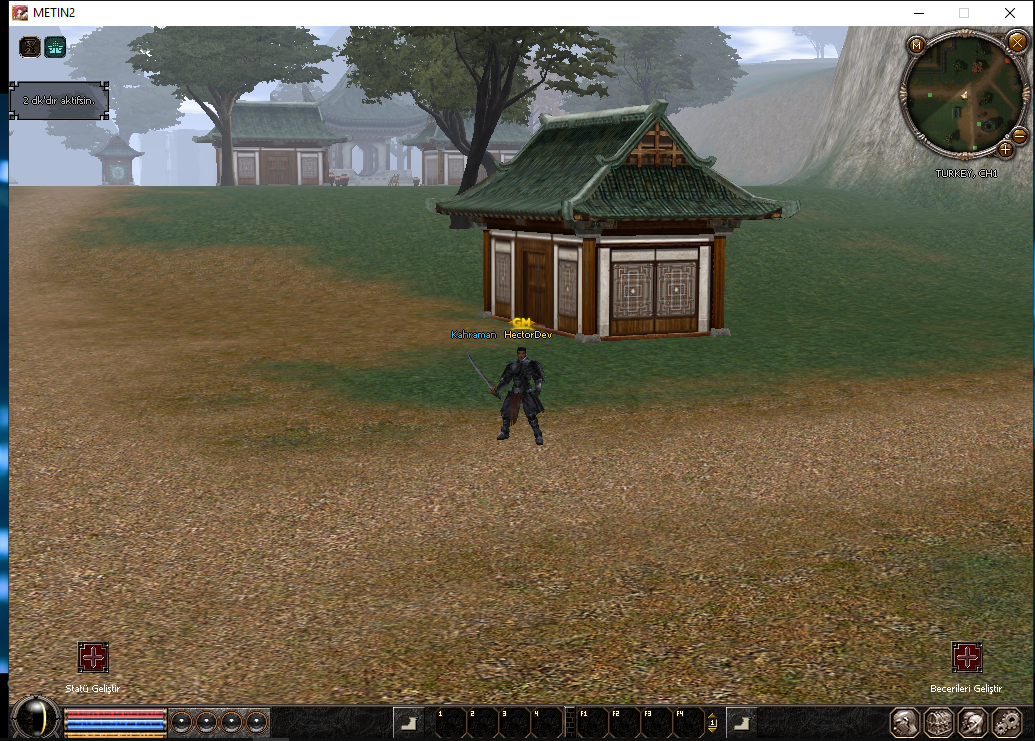
Not : Işınlandığınız zaman süre sıfırlanıyor. Sistemi geliştirerek sıfırlanmamasını sağlıyabilirsiniz.
Ziyaretçiler için gizlenmiş link,görmek için üye olmalısınız!
Giriş yap veya üye ol.
&
Ziyaretçiler için gizlenmiş link,görmek için üye olmalısınız!
Giriş yap veya üye ol.
Efektlerde Oyunda Geçirdiğiniz Süre Sistemi (C++ & Python)
Metin2 özel sunucularında efekt sisteminin daha kullanıcı dostu hale getirilmesi, oyuncuların oyun içinde geçirdikleri süreye göre dinamik olarak etkileşim kurulmasını sağlar. Bu yazıda, efektlerin aktif olduğu süre boyunca oyuncunun kaç dakika oynadığını takip eden C++ ve Python tabanlı bir sistem geliştirmeyi ele alacağız.
Sistem Nedir ve Ne İşe Yarar?
Bu sistem, oyuncuya belirli bir efekt (örneğin haste, poison, speed boost vb.) uygulandığında, efekt süresince oyun içinde harcanan süreyi takip eder. Bu sayede efekt süresi dolmadan önce, örneğin 10 dakikalık oynama süresi dolduğunda efekt manuel olarak kaldırılabilir veya farklı bir mekanizma tetiklenebilir. Bu özellikle Metin2 PvP sunucularında güç dengelerinin korunması ve oyun içi adil oynanışın sağlanması açısından önemlidir.
C++ Tarafında Temel Yapının Kurulması
C++ tarafında bu sistem, efekt uygulandığında başlatılan bir sayaç üzerinden çalışır. Öncelikle Character.cpp dosyasında bir sayaç değişkeni tanımlamak gerekir:
Kod:
void CHARACTER::ApplyBuffWithTimeTracking(BYTE bType, DWORD dwVnum, int iDuration){[BR][/BR] m_mapBuffTime[bType] = get_global_time(); // Efektin uygulanma zamanını kaydet[BR][/BR] ApplyBuff(bType, dwVnum, iDuration); // Normal efekt uygulaması[BR][/BR]}Bu fonksiyon, efektin uygulandığı zamanı global zamanla kaydeder. Ardından sayaç, her oyun döngüsünde kontrol edilir:
Kod:
void CHARACTER::CheckActiveBuffTimers(){[BR][/BR] for (auto& it : m_mapBuffTime){[BR][/BR] if (get_global_time() - it.second >= 600) { // 10 dakika = 600 saniye[BR][/BR] RemoveBuff(it.first);[BR][/BR] ChatPacket(CHAT_TYPE_INFO, 'Efekt suresi dolmadan 10 dakikaniz doldu.');[BR][/BR] }[BR][/BR] }[BR][/BR]}Python Tarafında GUI Entegrasyonu
Python tarafında bu sistemi kullanıcıya göstermek için PyMT veya UIScript gibi kütüphaneler kullanılır. Örnek olarak bir sayaç çubuğu oluşturulabilir:
Kod:
class TimeTrackerWindow(ui.Window):[BR][/BR] def __init__(self):[BR][/BR] ui.Window.__init__(self)[BR][/BR] self.timeLabel = ui.TextLine()[BR][/BR] self.timeLabel.SetText('Oynama Süresi: 0 dk')[BR][/BR] self.RefreshTimer()[BR][/BR][BR][/BR] def RefreshTimer(self):[BR][/BR] # Serverdan gelen veri ile güncelle[BR][/BR] elapsed = net.GetBuffElapsedTime()[BR][/BR] self.timeLabel.SetText('Oynama Süresi: %d dk' % (elapsed / 60))[BR][/BR]Veritabanı Entegrasyonu
Oyuncunun oynama süresi DB'de tutulabilir. Auth ve Game sunucuları arasında senkronizasyon sağlanarak, efekt süresi ve oynama süresi eşleşmeleri kayıt altına alınabilir. Bu sayede sunucu yeniden başlatıldığında bile veri kaybı yaşanmaz.
Avantajları
- Oyuncuların uzun süreli etkilerden dolayı unfair avantaj sağlamasını engeller.
- PvP deneyimini daha adil ve rekabetçi kılar.
- Zaman bazlı sistemlerle kolay entegre edilir.
Sonuç
Bu sistem, Metin2 özel sunucularında hem oyun içi dengeyi hem de oyuncu deneyimini artırmak adına güçlü bir araçtır. C++ ve Python tabanlı geliştirilen bu yapı, sunucu yöneticilerine daha fazla esneklik sunar.
Time Tracking System for Effects (C++ & Python)
Making the effect system more user-friendly in Metin2 private servers allows dynamic interaction based on how long players have been active in-game. In this article, we'll discuss developing a C++ and Python-based system that tracks how many minutes a player has spent in-game while an effect is active.
What Is The System and What Does It Do?
This system tracks the amount of time a player has been in-game during the duration of an applied effect (such as haste, poison, speed boost, etc.). This enables manual removal of the effect before its timer ends — for example, after 10 minutes of playtime — or triggers another mechanism. This is especially important in PvP Metin2 servers for maintaining balance and ensuring fair gameplay.
Setting Up the Core Structure in C++
In C++, the system works by starting a counter when an effect is applied. First, define a counter variable in the Character.cpp file:
Kod:
void CHARACTER::ApplyBuffWithTimeTracking(BYTE bType, DWORD dwVnum, int iDuration){[BR][/BR] m_mapBuffTime[bType] = get_global_time(); // Record the time the effect was applied[BR][/BR] ApplyBuff(bType, dwVnum, iDuration); // Normal effect application[BR][/BR]}This function records the time the effect was applied using global time. Then, the counter is checked every game loop:
Kod:
void CHARACTER::CheckActiveBuffTimers(){[BR][/BR] for (auto& it : m_mapBuffTime){[BR][/BR] if (get_global_time() - it.second >= 600) { // 10 minutes = 600 seconds[BR][/BR] RemoveBuff(it.first);[BR][/BR] ChatPacket(CHAT_TYPE_INFO, 'Your 10-minute gameplay time has ended before the effect duration expired.');[BR][/BR] }[BR][/BR] }[BR][/BR]}GUI Integration in Python
To display this system to the user in Python, libraries like PyMT or UIScript can be used. For example, a countdown bar can be created:
Kod:
class TimeTrackerWindow(ui.Window):[BR][/BR] def __init__(self):[BR][/BR] ui.Window.__init__(self)[BR][/BR] self.timeLabel = ui.TextLine()[BR][/BR] self.timeLabel.SetText('Gameplay Time: 0 min')[BR][/BR] self.RefreshTimer()[BR][/BR][BR][/BR] def RefreshTimer(self):[BR][/BR] # Update with data received from server[BR][/BR] elapsed = net.GetBuffElapsedTime()[BR][/BR] self.timeLabel.SetText('Gameplay Time: %d min' % (elapsed / 60))[BR][/BR]Database Integration
Player's in-game time can be stored in the database. Sync between auth and game servers ensures that effect durations and gameplay times are logged, preventing data loss even after server restarts.
Benefits
- Prevents players from gaining unfair advantages through long-term effects.
- Makes the PvP experience more balanced and competitive.
- Easily integrated with time-based systems.
Conclusion
This system serves as a powerful tool in Metin2 private servers for enhancing both in-game balance and player experience. The C++ and Python-based structure provides server administrators with greater flexibility.
