

Alt Yapı Başlayalanlar Arıyordur İlakki yeni login vs eklendiğinde bu hatayla karşilacaklardır basmıcaktır butonlara
root gir ui.py aç
aratılır,
Üstüne şu kod eklenir;
Kod:
Son Hali
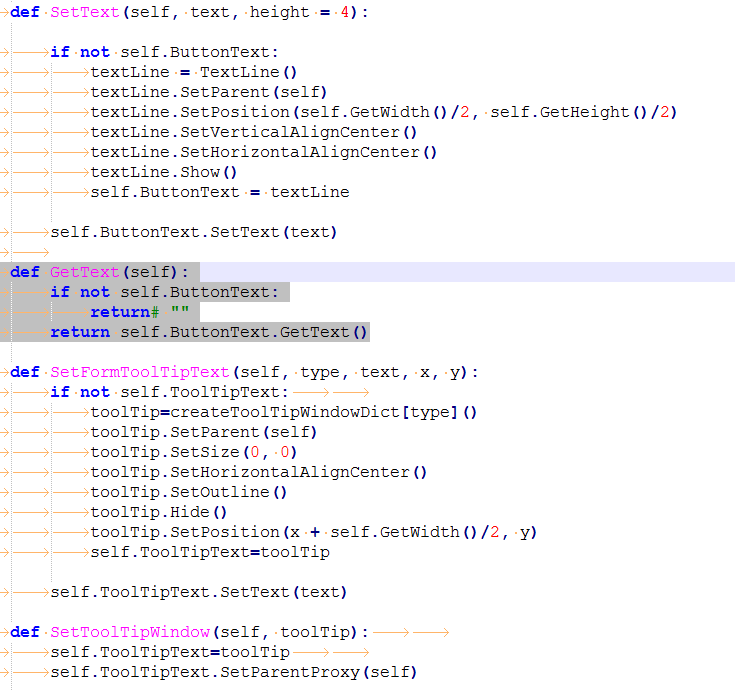
root gir ui.py aç
Kod:
def SetFormToolTipText(self, type, text, x, y):aratılır,
Üstüne şu kod eklenir;
Kod:
Kod:
def GetText(self): if not self.ButtonText: return# "" return self.ButtonText.GetText()Son Hali
Metin2 Oyunu İçin GetText Sysser Buton Tıklamama Hatası ve Çözümü
Giriş:
Metin2 özel sunucularında geliştirme yaparken birçok geliştirici, GUI tabanlı arayüzlerde yaşanan çeşitli hatalarla karşılaşabilir. Bunlardan biri de GetText Sysser adlı pencere bileşeni üzerinde butonların tıklanamaması sorunudur. Bu durum genellikle Python GUI ve UIScript dosyalarında yapılan küçük yapısal veya mantıksal hatalardan kaynaklanmaktadır. Bu yazıda bu hatayı detaylıca ele alacak ve adım adım çözüm sunacağız.
Sorun Nedir?
GetText Sysser penceresi genellikle kullanıcıdan bir girdi almak amacıyla kullanılır. Örneğin, bir komut sistemi veya yetkilendirme panelinde kullanıcıdan bir şifre, kod veya metin alınması gerektiği durumlarda bu pencere kullanılır. Ancak bazı durumlarda butonlara tıklanamaz hale gelir ve kullanıcı hiçbir işlem gerçekleştiremez. Bu durum hem oyun içi deneyimi hem de geliştirme sürecini olumsuz etkiler.
Olası Nedenler:
1. UIScript dosyasında buton tanımları eksik veya hatalı olabilir.
2. Python tarafında event handler eksik veya yanlış bağlanmış olabilir.
3. Pencere odaklama (focus) ya da sıralama (z-order) problemleri olabilir.
4. PyRoot veya UI modülünde bir çakışma olabilir.
Detaylı Hata Analizi:
Hatanın kökenini anlamak için öncelikle UIScript dosyasını incelemek gerekir. GetText Sysser penceresi genellikle bir Window sınıfından türetilmiş bir yapıdır. Butonlar bu pencerenin alt bileşenleri olarak tanımlanır. Eğer bu butonlara tıklama event’i doğru şekilde bağlanmamışsa, butonlar pasif kalır. Bu durumda kullanıcı ne yazık ki butona tıklasa da hiçbir tepki alamaz.
Çözüm Adımları:
1. UIScript dosyasındaki buton tanımlarını kontrol edin. Button nesnesi doğru şekilde tanımlanmış mı? Butona özel bir ID atanmış mı? Butonun pozisyonu ve büyüklüğü doğru mu?
2. Python tarafında buton event’leri bağlanmalıdır. Örneğin: self.acceptButton.SetEvent(self.__OnAccept) gibi bir kodun var olduğundan emin olun.
3. Eğer butonlar görünüyor ama tıklanamıyorsa, pencerenin alt bileşenlerinin SetParent metodu ile doğru şekilde atanmış olduğundan emin olun.
4. Gerekirse pencereye SetTop() veya Show() metodları ile öncelik verin.
Örnek Kod Yapısı:
def __init__(self):
ui.ScriptWindow.__init__(self)
self.__CreateDialog()
def __CreateDialog(self):
# UIScript üzerinden yükleme
# Buton tanımları burada yapılmalı
self.acceptButton = self.GetChild('accept_button')
self.cancelButton = self.GetChild('cancel_button')
# Event bağlamaları
self.acceptButton.SetEvent(ui.__mem_func__(self.__OnAccept))
self.cancelButton.SetEvent(ui.__mem_func__(self.__OnCancel))
def __OnAccept(self):
# Kabul butonuna tıklanınca yapılacak işlemler
pass
Sonuç:
GetText Sysser buton tıklanamama hatası, genellikle PyGUI ile ilgili küçük yapısal hatalardan kaynaklanır. Doğru event bağlamaları ve UIScript uyumu ile kolayca çözülebilir. Bu tür hataların önlenmesi için geliştirme sırasında dikkatli olunmalı ve test süreçleri sık aralıklarla yapılmalıdır. Metin2 Lobby olarak bu gibi teknik sorunlara çözüm üretmeyi ve topluluğa katkı sağlamayı hedefliyoruz.
Kaynaklar:
- Metin2 Sunucu Geliştirme Rehberi
- PyRoot ve UIScript Dokümantasyonu
- Martysama GitHub Repositories
GetText Sysser Button Not Clickable Error and Fix for Metin2
Introduction:
While developing on Metin2 private servers, many developers may encounter various errors related to GUI-based interfaces. One of these is the issue where buttons within the GetText Sysser window component cannot be clicked. This problem typically stems from small structural or logical errors made in Python GUI and UIScript files. In this article, we will examine this error in detail and provide a step-by-step solution.
What is the Problem?
GetText Sysser windows are generally used to receive input from users. For example, they can be used to retrieve passwords, codes, or text in command systems or authorization panels. However, in some cases, the buttons become unclickable, preventing the user from performing any action. This negatively affects both the in-game experience and the development process.
Possible Causes:
1. Button definitions in the UIScript file may be incomplete or incorrect.
2. The event handler on the Python side may be missing or incorrectly bound.
3. Window focus or z-order issues might exist.
4. Conflicts may occur in PyRoot or UI modules.
Detailed Error Analysis:
To understand the root cause of the error, it's important to first examine the UIScript file. The GetText Sysser window is usually derived from a Window class. Buttons are defined as child components of this window. If click events are not properly bound to these buttons, they remain passive. Unfortunately, even if the user clicks the button, no response occurs.
Solution Steps:
1. Check the button definitions in the UIScript file. Is the Button object correctly defined? Has an ID been assigned to the button? Are the position and size correct?
2. On the Python side, button events must be bound. For example, ensure that code like self.acceptButton.SetEvent(self.__OnAccept) exists.
3. If the buttons are visible but unclickable, make sure child components are correctly assigned using the SetParent method.
4. If necessary, give priority to the window with methods like SetTop() or Show().
Sample Code Structure:
def __init__(self):
ui.ScriptWindow.__init__(self)
self.__CreateDialog()
def __CreateDialog(self):
# Load from UIScript
# Button definitions should be here
self.acceptButton = self.GetChild('accept_button')
self.cancelButton = self.GetChild('cancel_button')
# Event bindings
self.acceptButton.SetEvent(ui.__mem_func__(self.__OnAccept))
self.cancelButton.SetEvent(ui.__mem_func__(self.__OnCancel))
def __OnAccept(self):
# Actions to perform when accept button is clicked
pass
Conclusion:
The GetText Sysser button click issue usually stems from minor structural errors related to PyGUI. It can be easily fixed with proper event bindings and UIScript compatibility. To prevent such errors, attention must be paid during development, and testing processes should be conducted regularly. Metin2 Lobby aims to provide solutions to technical issues like this and contribute to the community.
Resources:
- Metin2 Server Development Guide
- PyRoot and UIScript Documentation
- Martysama GitHub Repositories
