

input_login.cpp
entergame içerisine
locale_string.txt dosyanızı kendinize göre düzenlersiniz.
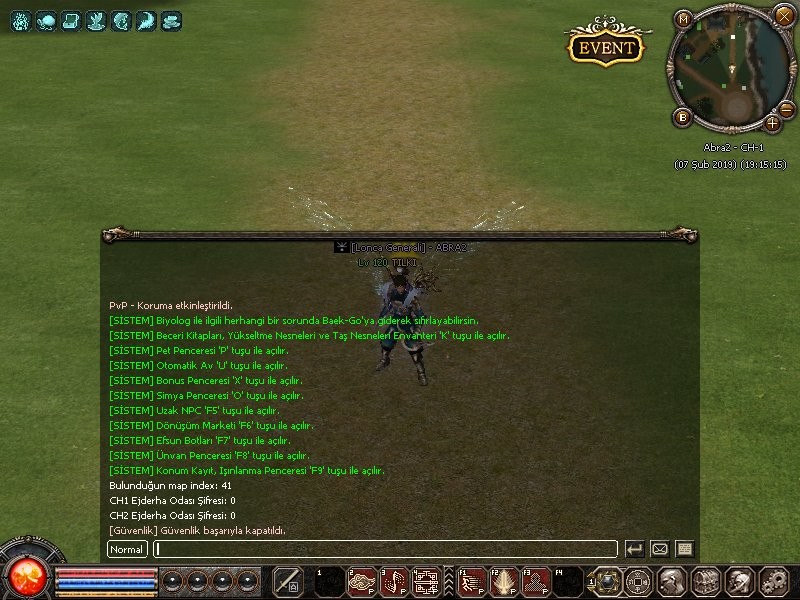
Metin2 Lobby'da Girişte Yazı Sistemi Nasıl Kurulur?
Metin2 özel sunucularında kullanıcı deneyimini artırmak ve sunucu kimliğini güçlendirmek adına birçok geliştirici giriş ekranına özel yazılar koymayı tercih eder. Bu yazılar genellikle sunucu adını, sloganı veya özel duyuruları içerir. Bu rehberde Metin2 Lobby platformuna özel olarak girişte yazı sisteminin nasıl kurulacağını adım adım anlatacağız. Bu sistem özellikle C++ source edit, Python GUI, uiscript[/CR] gibi teknik yapılarla entegre çalışır.
Girişte Yazı Nedir?
Girişte yazı, oyuncu oyunu açtığında ekranda beliren ilk mesaj veya metindir. Bu metin genellikle logo altında veya ekranın ortasında konumlanır. Bu sayede oyunculara sunucu kimliği, duyuru veya özel teşekkür gibi önemli bilgiler verilebilir. Özellikle Metin2 PvP sistem sunucularında bu özellik marka bilinirliğini artırmada kilit rol oynar.
Hazırlık Aşaması
Girişte yazı sistemi için öncelikle client src üzerinde değişiklik yapmanız gerekir. Eğer uiscript dosyalarında deneyiminiz yoksa, bu işlemi dikkatli bir şekilde yapmalısınız. Ayrıca py root[/CR] klasörlerindeki arayüz dosyaları da düzenlenebilir. Bu sistem aynı zamanda Python GUI[/CR] ile de entegre edilebilir.
Adım Adım Kurulum
1. Uiscript Dosyasını Düzenleme
uiscript[/CR] klasöründe bulunan login veya intro ekranı ile ilgili dosyaları açarak yeni bir TextLine[/CR] nesnesi ekleyin. Örneğin:
python
uiDef = { 'TEXT_COLOR': 0xffffffff, 'FONT_SIZE': 14, }
intro_text = ui.TextLine()
intro_text.SetText('Hoş geldiniz! Metin2 Lobby özel sunucusu.')
intro_text.SetPosition(SCREEN_WIDTH / 2, SCREEN_HEIGHT / 2 + 50)
intro_text.Show()
2. Python Root ve Pack Dosyalarıyla Entegrasyon
Yukarıdaki değişikliği yaptıktan sonra, pack[/CR] dosyanızı güncelleyin. Oyuncuların bu değişikliği görebilmesi için py root[/CR] ile birlikte gelen tüm dosyalar doğru şekilde paketlenmiş olmalıdır. Bu işlem Metin2 server src[/CR] üzerinden derlenerek dağıtılır.
3. Martysama veya Diğer Geliştirici Araçları Kullanımı
Eğer Martysama[/CR] veya benzeri araçlarla çalışıyorsanız, bu tür özel sistemleri daha hızlı ve güvenli şekilde kurabilirsiniz. Bu araçlar, C++ source edit[/CR] ve Python GUI[/CR] işlemleri için oldukça kullanışlıdır. Otomasyon sağlayan bu araçlar, zaman kazandırır.
Sunucu Tarafında Yapılabilecek Ekstra Ayarlar
Eğer girişte yazının dinamik olmasını isterseniz, game server programming[/CR] seviyenizi yükselterek, sunucudan gelen verilerle bu yazıyı güncelleyebilirsiniz. Bu işlem için db core[/CR] ve auth[/CR] sistemleriyle entegrasyon gerekebilir. Böylece duyurular, bakım zamanları veya özel etkinlikler gibi bilgiler girişte otomatik olarak gösterilebilir.
Sonuç
Girişte yazı sistemi, Metin2 lobby[/CR] gibi özel sunucular için kullanıcı deneyimi açısından büyük önem taşır. Doğru yapılandırıldığında hem marka bilinirliğini artırır hem de oyunculara önemli mesajlar iletmenizi sağlar. Bu sistemi kurarken C++ system[/CR], Python GUI[/CR] ve uiscript[/CR] gibi teknik bileşenleri dikkatlice kullanmalısınız. Metin2 development[/CR] sürecinde bu tür küçük ama etkili geliştirmeler, sunucunuzun diğerlerinden ayrılmasını sağlar.
How to Set Up Welcome Text on Launch in Metin2 Lobby?
To enhance user experience and strengthen server identity in Metin2 private servers, many developers prefer placing custom texts at the entry screen. These texts often include the server name, slogan, or special announcements. In this guide, we will explain step-by-step how to set up the welcome text system specifically for the Metin2 Lobby platform. This system integrates well with technical structures such as C++ source edit, Python GUI, and uiscript[/CR].
What Is Welcome Text?
Welcome text is the first message or text that appears on the screen when a player opens the game. It typically appears below the logo or centered on the screen. This allows important information such as the server identity, announcements, or special thanks to be conveyed to players. Especially in Metin2 PvP systems, this feature plays a key role in increasing brand awareness.
Preparation Stage
To implement a welcome text system, you first need to make changes in the client src[/CR]. If you are not experienced with uiscript[/CR] files, you should proceed carefully. Additionally, interface files in the py root[/CR] folder can also be edited. This system can also be integrated with Python GUI[/CR].
Step-by-Step Installation
1. Editing the Uiscript File
Open the file related to the login or intro screen in the uiscript[/CR] folder and add a new TextLine[/CR] object. For example:
python
uiDef = { 'TEXT_COLOR': 0xffffffff, 'FONT_SIZE': 14, }
intro_text = ui.TextLine()
intro_text.SetText('Welcome! Metin2 Lobby private server.')
intro_text.SetPosition(SCREEN_WIDTH / 2, SCREEN_HEIGHT / 2 + 50)
intro_text.Show()
2. Integration with Py Root and Pack Files
After making the above change, update your pack[/CR] file. For players to see these changes, all files coming with py root[/CR] must be correctly packaged. This process is compiled and distributed via Metin2 server src[/CR].
3. Using Tools Like Martysama
If you are working with tools like Martysama[/CR] or similar, you can install such custom systems more quickly and securely. These tools are very useful for operations involving C++ source edit[/CR] and Python GUI[/CR]. Such automation tools save time.
Extra Server-Side Settings
If you want the welcome text to be dynamic, by raising your level in game server programming[/CR], you can update the text with data received from the server. This may require integration with db core[/CR] and auth[/CR] systems. Thus, announcements, maintenance times, or special events can be automatically displayed at the start.
Conclusion
The welcome text system holds significant importance in terms of user experience for private servers like Metin2 lobby[/CR]. When configured correctly, it enhances brand recognition and helps convey important messages to players. While implementing this system, you should carefully use technical components such as C++ system[/CR], Python GUI[/CR], and uiscript[/CR]. In the Metin2 development[/CR] process, such small but impactful improvements help distinguish your server from others.
entergame içerisine
Kod:
switch (ch->GetMapIndex()) { case 1: //metin2_map_a1 case 3: //metin2_map_a3 case 4: //metin2_map_guild_01 case 5: //metin2_map_monkey_dungeon_11 case 6: //metin2_guild_village_01 case 21: // metin2_map_b1 case 23: // metin2_map_b3 case 24: //metin2_map_guild_02 case 25: //metin2_map_monkey_dungeon_12 case 26: //metin2_guild_village_02 case 41: //metin2_map_c1 case 43: //metin2_map_c3 case 44: //metin2_map_guild_03 case 45: //metin2_map_monkey_dungeon_13 case 46: //metin2_guild_village_03 case 61: //map_n_snowm_01 case 62: //metin2_map_n_flame_01 case 63: //metin2_map_n_desert_01 case 64: //map_n_threeway case 65: //metin2_map_milgyo case 66: // metin2_map_deviltower1 case 67: // metin2_map_trent case 68: // metin2_map_trent02 case 69: // metin2_map_WL_01 case 70: // metin2_map_nusluck01 case 71: // metin2_map_spiderdungeon_02 case 72: // metin2_map_skipia_dungeon_01 case 73: // metin2_map_skipia_dungeon_02 case 81: // metin2_map_wedding_01 case 100: // metin2_map_fielddungeon case 101: // metin2_map_resources_zon case 103: // metin2_map_t1 case 104: // metin2_map_spiderdungeon case 105: // metin2_map_t2 case 107: // metin2_map_monkey_dungeon case 108: // metin2_map_monkey_dungeon2 case 109: // metin2_map_monkey_dungeon3 case 110: // metin2_map_t3 case 111: // metin2_map_t4 case 112: // metin2_map_duel case 113: // metin2_map_oxevent case 114: // metin2_map_sungzi case 118: // metin2_map_sungzi_flame_hill_01 case 119: // metin2_map_sungzi_flame_hill_02 case 120: // metin2_map_sungzi_flame_hill_03 case 121: // metin2_map_sungzi_snow case 122: // metin2_map_sungzi_snow_pass01 case 123: // metin2_map_sungzi_snow_pass02 case 124: // metin2_map_sungzi_snow_pass03 case 125: // metin2_map_sungzi_desert_01 case 126: // metin2_map_sungzi_desert_hill_01 case 127: // metin2_map_sungzi_desert_hill_02 case 128: // metin2_map_sungzi_desert_hill_03 case 181: // metin2_map_empirewar01 case 182: // metin2_map_empirewar02 case 183: // metin2_map_empirewar03 case 200: // gm_guild_build case 207: // metin2_map_skipia_dungeon_boss case 216: // metin2_map_devilcatacomb case 217: // metin2_map_spiderdungeon_03 case 301: // Metin2_map_CapeDragonHead case 302: // metin2_map_dawnmistwood case 303: // metin2_map_BayBlackSand case 304: // metin2_map_Mt_Thunder case 235: // metin2_map_n_flame_dungeon_01 case 240: // metin2_map_n_snow_dungeon_01 case 241: // metin2_map_colosseum case 222: // metin2_map_wolf case 223: // metin2_map_dragon_timeattack_02 case 305: // metin2_map_sungzi_flame_pass01 case 306: //metin2_map_sungzi_flame_pass02 case 307: //metin2_map_sungzi_flame_pass03 case 353: //metin2_map_dawnmist_dungeon_01 case 354: //metin2_map_mt_th_dungeon_01 case 355: //metin2_map_dawnmist_dungeon_02 case 356: //metin2_map_orclabyrinth case 357: //metin2_map_gemi case 212: //metin2_map_n_flame_dragon ch->ChatPacket(CHAT_TYPE_INFO, LC_TEXT("text1")); ch->ChatPacket(CHAT_TYPE_INFO, LC_TEXT("text2")); ch->ChatPacket(CHAT_TYPE_INFO, LC_TEXT("text3")); ch->ChatPacket(CHAT_TYPE_INFO, LC_TEXT("text4")); ch->ChatPacket(CHAT_TYPE_INFO, LC_TEXT("text5")); ch->ChatPacket(CHAT_TYPE_INFO, LC_TEXT("text6")); ch->ChatPacket(CHAT_TYPE_INFO, LC_TEXT("text7")); ch->ChatPacket(CHAT_TYPE_INFO, LC_TEXT("text8")); ch->ChatPacket(CHAT_TYPE_INFO, LC_TEXT("text9")); ch->ChatPacket(CHAT_TYPE_INFO, LC_TEXT("text10")); ch->ChatPacket(CHAT_TYPE_INFO, LC_TEXT("text11")); }locale_string.txt dosyanızı kendinize göre düzenlersiniz.
Metin2 Lobby'da Girişte Yazı Sistemi Nasıl Kurulur?
Metin2 özel sunucularında kullanıcı deneyimini artırmak ve sunucu kimliğini güçlendirmek adına birçok geliştirici giriş ekranına özel yazılar koymayı tercih eder. Bu yazılar genellikle sunucu adını, sloganı veya özel duyuruları içerir. Bu rehberde Metin2 Lobby platformuna özel olarak girişte yazı sisteminin nasıl kurulacağını adım adım anlatacağız. Bu sistem özellikle C++ source edit, Python GUI, uiscript[/CR] gibi teknik yapılarla entegre çalışır.
Girişte Yazı Nedir?
Girişte yazı, oyuncu oyunu açtığında ekranda beliren ilk mesaj veya metindir. Bu metin genellikle logo altında veya ekranın ortasında konumlanır. Bu sayede oyunculara sunucu kimliği, duyuru veya özel teşekkür gibi önemli bilgiler verilebilir. Özellikle Metin2 PvP sistem sunucularında bu özellik marka bilinirliğini artırmada kilit rol oynar.
Hazırlık Aşaması
Girişte yazı sistemi için öncelikle client src üzerinde değişiklik yapmanız gerekir. Eğer uiscript dosyalarında deneyiminiz yoksa, bu işlemi dikkatli bir şekilde yapmalısınız. Ayrıca py root[/CR] klasörlerindeki arayüz dosyaları da düzenlenebilir. Bu sistem aynı zamanda Python GUI[/CR] ile de entegre edilebilir.
Adım Adım Kurulum
1. Uiscript Dosyasını Düzenleme
uiscript[/CR] klasöründe bulunan login veya intro ekranı ile ilgili dosyaları açarak yeni bir TextLine[/CR] nesnesi ekleyin. Örneğin:
python
uiDef = { 'TEXT_COLOR': 0xffffffff, 'FONT_SIZE': 14, }
intro_text = ui.TextLine()
intro_text.SetText('Hoş geldiniz! Metin2 Lobby özel sunucusu.')
intro_text.SetPosition(SCREEN_WIDTH / 2, SCREEN_HEIGHT / 2 + 50)
intro_text.Show()
2. Python Root ve Pack Dosyalarıyla Entegrasyon
Yukarıdaki değişikliği yaptıktan sonra, pack[/CR] dosyanızı güncelleyin. Oyuncuların bu değişikliği görebilmesi için py root[/CR] ile birlikte gelen tüm dosyalar doğru şekilde paketlenmiş olmalıdır. Bu işlem Metin2 server src[/CR] üzerinden derlenerek dağıtılır.
3. Martysama veya Diğer Geliştirici Araçları Kullanımı
Eğer Martysama[/CR] veya benzeri araçlarla çalışıyorsanız, bu tür özel sistemleri daha hızlı ve güvenli şekilde kurabilirsiniz. Bu araçlar, C++ source edit[/CR] ve Python GUI[/CR] işlemleri için oldukça kullanışlıdır. Otomasyon sağlayan bu araçlar, zaman kazandırır.
Sunucu Tarafında Yapılabilecek Ekstra Ayarlar
Eğer girişte yazının dinamik olmasını isterseniz, game server programming[/CR] seviyenizi yükselterek, sunucudan gelen verilerle bu yazıyı güncelleyebilirsiniz. Bu işlem için db core[/CR] ve auth[/CR] sistemleriyle entegrasyon gerekebilir. Böylece duyurular, bakım zamanları veya özel etkinlikler gibi bilgiler girişte otomatik olarak gösterilebilir.
Sonuç
Girişte yazı sistemi, Metin2 lobby[/CR] gibi özel sunucular için kullanıcı deneyimi açısından büyük önem taşır. Doğru yapılandırıldığında hem marka bilinirliğini artırır hem de oyunculara önemli mesajlar iletmenizi sağlar. Bu sistemi kurarken C++ system[/CR], Python GUI[/CR] ve uiscript[/CR] gibi teknik bileşenleri dikkatlice kullanmalısınız. Metin2 development[/CR] sürecinde bu tür küçük ama etkili geliştirmeler, sunucunuzun diğerlerinden ayrılmasını sağlar.
How to Set Up Welcome Text on Launch in Metin2 Lobby?
To enhance user experience and strengthen server identity in Metin2 private servers, many developers prefer placing custom texts at the entry screen. These texts often include the server name, slogan, or special announcements. In this guide, we will explain step-by-step how to set up the welcome text system specifically for the Metin2 Lobby platform. This system integrates well with technical structures such as C++ source edit, Python GUI, and uiscript[/CR].
What Is Welcome Text?
Welcome text is the first message or text that appears on the screen when a player opens the game. It typically appears below the logo or centered on the screen. This allows important information such as the server identity, announcements, or special thanks to be conveyed to players. Especially in Metin2 PvP systems, this feature plays a key role in increasing brand awareness.
Preparation Stage
To implement a welcome text system, you first need to make changes in the client src[/CR]. If you are not experienced with uiscript[/CR] files, you should proceed carefully. Additionally, interface files in the py root[/CR] folder can also be edited. This system can also be integrated with Python GUI[/CR].
Step-by-Step Installation
1. Editing the Uiscript File
Open the file related to the login or intro screen in the uiscript[/CR] folder and add a new TextLine[/CR] object. For example:
python
uiDef = { 'TEXT_COLOR': 0xffffffff, 'FONT_SIZE': 14, }
intro_text = ui.TextLine()
intro_text.SetText('Welcome! Metin2 Lobby private server.')
intro_text.SetPosition(SCREEN_WIDTH / 2, SCREEN_HEIGHT / 2 + 50)
intro_text.Show()
2. Integration with Py Root and Pack Files
After making the above change, update your pack[/CR] file. For players to see these changes, all files coming with py root[/CR] must be correctly packaged. This process is compiled and distributed via Metin2 server src[/CR].
3. Using Tools Like Martysama
If you are working with tools like Martysama[/CR] or similar, you can install such custom systems more quickly and securely. These tools are very useful for operations involving C++ source edit[/CR] and Python GUI[/CR]. Such automation tools save time.
Extra Server-Side Settings
If you want the welcome text to be dynamic, by raising your level in game server programming[/CR], you can update the text with data received from the server. This may require integration with db core[/CR] and auth[/CR] systems. Thus, announcements, maintenance times, or special events can be automatically displayed at the start.
Conclusion
The welcome text system holds significant importance in terms of user experience for private servers like Metin2 lobby[/CR]. When configured correctly, it enhances brand recognition and helps convey important messages to players. While implementing this system, you should carefully use technical components such as C++ system[/CR], Python GUI[/CR], and uiscript[/CR]. In the Metin2 development[/CR] process, such small but impactful improvements help distinguish your server from others.
