

Merhaba arkadaşlar, piyasada en güncel sürümü diye dolaşan Great Offline Shop'un Python kısmında denk geldiğim bir hatanın nasıl düzeltileceğini anlattım.
Umarım işinize yarar, iyi forumlar.
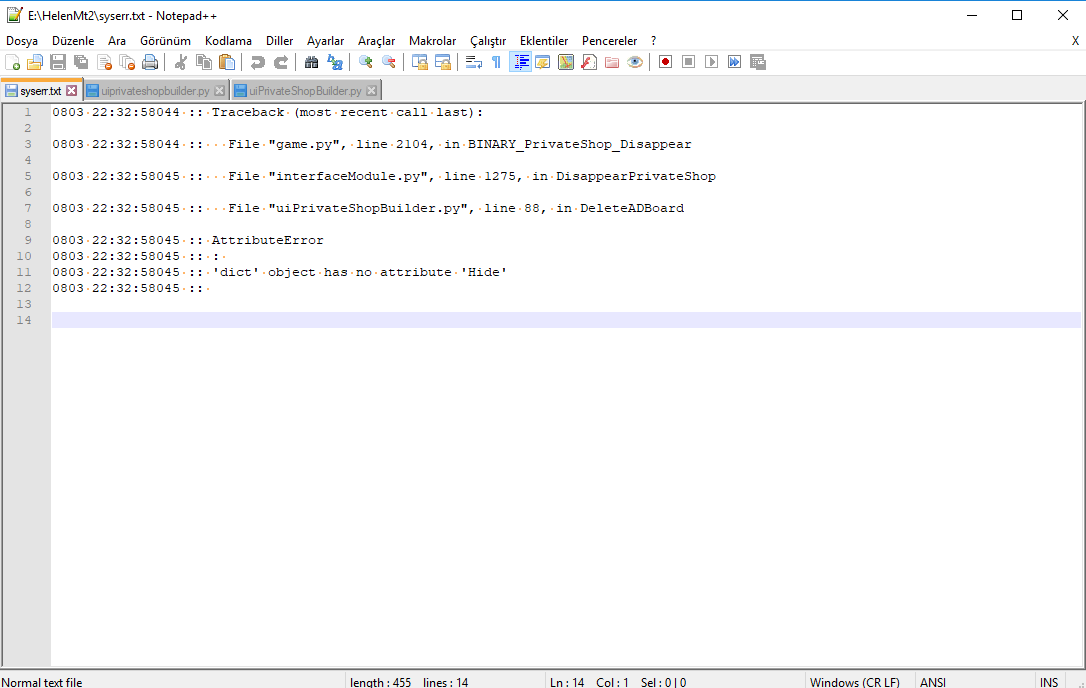
Düzeltmezseniz şöyle bir syserr alıyorsunuz Client'ten;
Metin2 Lobby'da Great Offline Shop Kodu Düzeltmesi - Python Tabanlı Geliştirme
Metin2 özel sunucularında geliştirme yaparken, oyuncuların offline状态下 alışveriş yapabilmesini sağlayan Great Offline Shop sistemi, oldukça yaygın kullanılan modüllerden biridir. Ancak zamanla eski kalmış veya eksik yapılandırılmış kodlar, sistemin düzgün çalışmamasına neden olabilir. Bu yazıda, Great Offline Shop sisteminin Python tabanlı kodlarını nasıl düzelteceğinizi adım adım ele alacağız. Bu süreçte hem Python hem de Metin2 GUI sistemleri üzerinden ilerlenecektir.
Great Offline Shop Nedir?
Great Offline Shop, oyuncuların sunucudan çıkmadan önce bir mağaza kurmalarına ve sunucu kapalıyken bile diğer oyuncuların bu mağazalardan ürün satın almasını sağlayan bir özelliktir. Bu sayede oyuncuların aktif olmaması durumunda bile ekonomik faaliyetlerde bulunması mümkün hale gelir. Sistem genellikle Python betikleri ile çalışır ve uiscript dosyaları üzerinden arayüz ile entegre edilir.
Kod Hataları Nelerdir?
Bu sistemde karşılaşılan en yaygın sorunlar şunlardır:
- Eski py root yapıları ile uyumsuzluk
- Eksik fonksiyon tanımlamaları
- Arayüzde hata veren uiscript dosyaları
- Sunucu ile iletişim kurmayan komutlar
Bu gibi sorunlar genellikle Python tarafında meydana gelen küçük eksikliklerden veya yanlış tanımlamalardan kaynaklanır.
Düzeltme Adımları
Öncelikle python kök dizinine erişim sağlanmalıdır. Burada bulunan shop.py, game.py gibi dosyalar üzerinde değişiklik yapılacaktır. Özellikle net.SendShopEndPacket() gibi fonksiyonlar doğru şekilde çağrılmalıdır. Ayrıca, offline shop açıldığında sunucuya doğru mesaj gönderilmelidir. Bu mesajların doğru işlenmesi için pack ve db katmanlarında da bazı güncellemeler gerekebilir.
Arayüz Ayarlamaları
Great Offline Shop için tasarlanmış arayüz dosyaları genellikle uiscript formatındadır. Bu dosyaların hatalı veya eski yapılandırılmış olması durumunda, sistem açılmayabilir ya da kullanıcıya hatalı veri gösterebilir. Bu nedenle, ui dosyalarının py root ile uyumlu olması sağlanmalıdır. Örneğin, wndMgr.RegisterWindow('OfflineShop', wndOfflineShop) gibi tanımlamalar eksiksiz yapılmalıdır.
Sunucu Taraflı Entegrasyon
Great Offline Shop sistemi, hem game server hem de auth server ile uyumlu çalışmalıdır. Sunucu tarafında eksik olan komutlar, C++ src üzerinden güncellenmelidir. Bu işlem sırasında martysama gibi popüler frameworklerden yararlanmak da faydalı olabilir. Özellikle offline shop listeleme, ürün ekleme ve silme gibi işlemler sunucu tarafında güvenli ve hızlı bir şekilde işlenmelidir.
Sonuç
Great Offline Shop sisteminin düzgün çalışması için hem istemci hem de sunucu tarafında birçok yapıyı senkronize etmek gerekir. Bu makalede anlatılan adımlar, Python tabanlı sistemlerde oluşabilecek hataları gidermede rehber niteliğindedir. Metin2 Lobby olarak bu tür sistemleri güncel tutmak, topluluk odaklı gelişim için büyük önem taşır.
Great Offline Shop Code Fix on Metin2 Lobby - Python-Based Development
When developing Metin2 private servers, the Great Offline Shop system, which allows players to shop while offline, is one of the commonly used modules. However, outdated or misconfigured code can cause the system to malfunction. In this article, we will explain step by step how to fix the Python-based codes of the Great Offline Shop system. Throughout this process, both Python and Metin2 GUI systems will be referenced.
What Is Great Offline Shop?
Great Offline Shop enables players to set up stores before logging out and allows other players to purchase items from these stores even when the server is offline. This way, players can engage in economic activities even when they are not actively online. The system typically runs through Python scripts and integrates with the interface via uiscript files.
What Are Common Code Issues?
The most common issues encountered in this system are:
- Incompatibility with older py root structures
- Missing function definitions
- Interface files (uiscript) throwing errors
- Commands failing to communicate with the server
Such issues often arise from minor deficiencies or incorrect definitions in the Python layer.
Correction Steps
First, access the python root directory. Files such as shop.py and game.py located here will be modified. Specifically, functions like net.SendShopEndPacket() must be called correctly. Additionally, the correct message must be sent to the server when opening the offline shop. For proper processing of these messages, updates may also be required in the pack and db layers.
Interface Adjustments
Interface files for Great Offline Shop are usually in uiscript format. If these files are misconfigured or outdated, the system may fail to launch or display incorrect data to the user. Therefore, ensure that the ui files are compatible with py root. For instance, definitions like wndMgr.RegisterWindow('OfflineShop', wndOfflineShop) must be complete and accurate.
Server-Side Integration
The Great Offline Shop system must operate in harmony with both the game server and the auth server. Server-side commands that are missing should be updated via C++ src. During this process, utilizing popular frameworks like martysama can be beneficial. Especially, operations like listing offline shops, adding, and removing items must be processed securely and quickly on the server side.
Conclusion
To ensure the Great Offline Shop system operates correctly, multiple components on both client and server sides must be synchronized. The steps outlined in this article serve as a guide to resolving potential errors in Python-based systems. At Metin2 Lobby, maintaining such systems up-to-date is crucial for community-driven development.
Umarım işinize yarar, iyi forumlar.
Ziyaretçiler için gizlenmiş link,görmek için üye olmalısınız!
Giriş yap veya üye ol.
Düzeltmezseniz şöyle bir syserr alıyorsunuz Client'ten;
Metin2 Lobby'da Great Offline Shop Kodu Düzeltmesi - Python Tabanlı Geliştirme
Metin2 özel sunucularında geliştirme yaparken, oyuncuların offline状态下 alışveriş yapabilmesini sağlayan Great Offline Shop sistemi, oldukça yaygın kullanılan modüllerden biridir. Ancak zamanla eski kalmış veya eksik yapılandırılmış kodlar, sistemin düzgün çalışmamasına neden olabilir. Bu yazıda, Great Offline Shop sisteminin Python tabanlı kodlarını nasıl düzelteceğinizi adım adım ele alacağız. Bu süreçte hem Python hem de Metin2 GUI sistemleri üzerinden ilerlenecektir.
Great Offline Shop Nedir?
Great Offline Shop, oyuncuların sunucudan çıkmadan önce bir mağaza kurmalarına ve sunucu kapalıyken bile diğer oyuncuların bu mağazalardan ürün satın almasını sağlayan bir özelliktir. Bu sayede oyuncuların aktif olmaması durumunda bile ekonomik faaliyetlerde bulunması mümkün hale gelir. Sistem genellikle Python betikleri ile çalışır ve uiscript dosyaları üzerinden arayüz ile entegre edilir.
Kod Hataları Nelerdir?
Bu sistemde karşılaşılan en yaygın sorunlar şunlardır:
- Eski py root yapıları ile uyumsuzluk
- Eksik fonksiyon tanımlamaları
- Arayüzde hata veren uiscript dosyaları
- Sunucu ile iletişim kurmayan komutlar
Bu gibi sorunlar genellikle Python tarafında meydana gelen küçük eksikliklerden veya yanlış tanımlamalardan kaynaklanır.
Düzeltme Adımları
Öncelikle python kök dizinine erişim sağlanmalıdır. Burada bulunan shop.py, game.py gibi dosyalar üzerinde değişiklik yapılacaktır. Özellikle net.SendShopEndPacket() gibi fonksiyonlar doğru şekilde çağrılmalıdır. Ayrıca, offline shop açıldığında sunucuya doğru mesaj gönderilmelidir. Bu mesajların doğru işlenmesi için pack ve db katmanlarında da bazı güncellemeler gerekebilir.
Arayüz Ayarlamaları
Great Offline Shop için tasarlanmış arayüz dosyaları genellikle uiscript formatındadır. Bu dosyaların hatalı veya eski yapılandırılmış olması durumunda, sistem açılmayabilir ya da kullanıcıya hatalı veri gösterebilir. Bu nedenle, ui dosyalarının py root ile uyumlu olması sağlanmalıdır. Örneğin, wndMgr.RegisterWindow('OfflineShop', wndOfflineShop) gibi tanımlamalar eksiksiz yapılmalıdır.
Sunucu Taraflı Entegrasyon
Great Offline Shop sistemi, hem game server hem de auth server ile uyumlu çalışmalıdır. Sunucu tarafında eksik olan komutlar, C++ src üzerinden güncellenmelidir. Bu işlem sırasında martysama gibi popüler frameworklerden yararlanmak da faydalı olabilir. Özellikle offline shop listeleme, ürün ekleme ve silme gibi işlemler sunucu tarafında güvenli ve hızlı bir şekilde işlenmelidir.
Sonuç
Great Offline Shop sisteminin düzgün çalışması için hem istemci hem de sunucu tarafında birçok yapıyı senkronize etmek gerekir. Bu makalede anlatılan adımlar, Python tabanlı sistemlerde oluşabilecek hataları gidermede rehber niteliğindedir. Metin2 Lobby olarak bu tür sistemleri güncel tutmak, topluluk odaklı gelişim için büyük önem taşır.
Great Offline Shop Code Fix on Metin2 Lobby - Python-Based Development
When developing Metin2 private servers, the Great Offline Shop system, which allows players to shop while offline, is one of the commonly used modules. However, outdated or misconfigured code can cause the system to malfunction. In this article, we will explain step by step how to fix the Python-based codes of the Great Offline Shop system. Throughout this process, both Python and Metin2 GUI systems will be referenced.
What Is Great Offline Shop?
Great Offline Shop enables players to set up stores before logging out and allows other players to purchase items from these stores even when the server is offline. This way, players can engage in economic activities even when they are not actively online. The system typically runs through Python scripts and integrates with the interface via uiscript files.
What Are Common Code Issues?
The most common issues encountered in this system are:
- Incompatibility with older py root structures
- Missing function definitions
- Interface files (uiscript) throwing errors
- Commands failing to communicate with the server
Such issues often arise from minor deficiencies or incorrect definitions in the Python layer.
Correction Steps
First, access the python root directory. Files such as shop.py and game.py located here will be modified. Specifically, functions like net.SendShopEndPacket() must be called correctly. Additionally, the correct message must be sent to the server when opening the offline shop. For proper processing of these messages, updates may also be required in the pack and db layers.
Interface Adjustments
Interface files for Great Offline Shop are usually in uiscript format. If these files are misconfigured or outdated, the system may fail to launch or display incorrect data to the user. Therefore, ensure that the ui files are compatible with py root. For instance, definitions like wndMgr.RegisterWindow('OfflineShop', wndOfflineShop) must be complete and accurate.
Server-Side Integration
The Great Offline Shop system must operate in harmony with both the game server and the auth server. Server-side commands that are missing should be updated via C++ src. During this process, utilizing popular frameworks like martysama can be beneficial. Especially, operations like listing offline shops, adding, and removing items must be processed securely and quickly on the server side.
Conclusion
To ensure the Great Offline Shop system operates correctly, multiple components on both client and server sides must be synchronized. The steps outlined in this article serve as a guide to resolving potential errors in Python-based systems. At Metin2 Lobby, maintaining such systems up-to-date is crucial for community-driven development.
