

Yabancı Forumdan Alıntı
Sistem Görüntü

Sistem Görüntü
Root uiaffectshower.py aratılır
Kod:
class HorseImage(ui.ExpandedImageBox):Kod Blogu Degişir
Ziyaretçiler için gizlenmiş link,görmek için üye olmalısınız!
Giriş yap veya üye ol.
Kod:
class HorseImage(ui.ExpandedImageBox): FILE_PATH = "d:/ymir work/ui/pattern/HorseState/" SZAZALEK = { 0: 0, 1: 0, 2: 0, 3: 0, 10: 10, 11: 15, 12: 20, 13: 30, 20: 35, 21: 40, 22: 45, 23: 50, 30: 55, 31: 60, 32: 70, 33: 100 } BAR_B = { 0: "blackgauge", 1: "blackgauge", 2: "blackgauge", 3: "blackgauge", 10: "redgauge", 11: "redgauge", 12: "redgauge", 13: "redgauge", 20: "yellowgauge", 21: "yellowgauge", 22: "yellowgauge", 23: "yellowgauge", 30: "greengauge", 31: "greengauge", 32: "greengauge", 33: "greengauge" } FILE_DICT = { 00 : FILE_PATH+"00.dds", 01 : FILE_PATH+"00.dds", 02 : FILE_PATH+"00.dds", 03 : FILE_PATH+"00.dds", 10 : FILE_PATH+"10.dds", 11 : FILE_PATH+"11.dds", 12 : FILE_PATH+"12.dds", 13 : FILE_PATH+"13.dds", 20 : FILE_PATH+"20.dds", 21 : FILE_PATH+"21.dds", 22 : FILE_PATH+"22.dds", 23 : FILE_PATH+"23.dds", 30 : FILE_PATH+"30.dds", 31 : FILE_PATH+"31.dds", 32 : FILE_PATH+"32.dds", 33 : FILE_PATH+"33.dds", }Aratılır
Kod:
def __init__(self):Kod Blogu Degişir
Ziyaretçiler için gizlenmiş link,görmek için üye olmalısınız!
Giriş yap veya üye ol.
Kod:
def __init__(self): ui.ExpandedImageBox.__init__(self) #self.textLineList = [*] self.toolTip = uiToolTip.ToolTip(100) self.toolTip.HideToolTip() self.Gui = ui.ImageBox() self.Gui.LoadImage("horsegui/horsegui/gui.tga") self.Gui.SetPosition(255, 5) self.Gui.Show() self.Gui.AddFlag("movable") self.Gui.AddFlag("attach") self.Fej = ui.ImageBox() self.Fej.SetParent(self.Gui) self.Fej.SetPosition(4, 9) self.Fej.Show() self.Gauge3 = ui.AniImageBox() self.Gauge3.SetDelay(5) self.Gauge3.Show() self.Gauge3.SetParent(self.Fej) self.Gauge3.SetPercentage(100, 100) self.Szint = ui.TextLine() self.Szint.SetFeather() self.Szint.SetOutline() self.Szint.SetPackedFontColor(-1034) self.Szint.Show() self.Szint.SetParent(self.Gui) self.Szint.SetPosition(55, 4) self.Ehseg = ui.TextLine() self.Ehseg.SetFeather() self.Ehseg.SetOutline() self.Ehseg.SetPackedFontColor(-1034) self.Ehseg.Show() self.Ehseg.SetParent(self.Gui) self.Ehseg.SetPosition(60, 26) self.Faradtsag = ui.TextLine() self.Faradtsag.SetFeather() self.Faradtsag.SetOutline() self.Faradtsag.SetPackedFontColor(-29696) self.Faradtsag.Show() self.Faradtsag.SetParent(self.Gui) self.Faradtsag.SetPosition(40, 36)Aratılır
Kod:
def __GetHorseGrade(self, level):Kod Blogu Komple Degişir
Ziyaretçiler için gizlenmiş link,görmek için üye olmalısınız!
Giriş yap veya üye ol.
Kod:
def __GetHorseGrade(self, level): if 0 == level: return 0 return (level-1)/10 + 1Aratılır
Kod:
def SetState(self, level, health, battery):Kod Blogu Komple Degişir
Ziyaretçiler için gizlenmiş link,görmek için üye olmalısınız!
Giriş yap veya üye ol.
Kod:
def SetState(self, level, health, battery): #self.textLineList=[*] self.toolTip.ClearToolTip() if level>0: try: grade = self._HorseImage__GetHorseGrade(level) self._HorseImage__AppendText(localeInfo.LEVEL_LIST[grade]) self.Szint.SetText(localeInfo.LEVEL_LIST[grade]) LEVEL_IMAGE = [ "", "horsegui/horsegui/face_1.tga", "horsegui/horsegui/face_2.tga", "horsegui/horsegui/face_3.tga" ] self.Fej.LoadImage(LEVEL_IMAGE[grade]) except IndexError: print "HorseImage.SetState(level=%d, health=%d, battery=%d) - Unknown Index" % (level, health, battery) return try: healthName = localeInfo.HEALTH_LIST[health] if (len(healthName) > 0): self._HorseImage__AppendText(healthName) self.Ehseg.SetText(healthName) except IndexError: print "HorseImage.SetState(level=%d, health=%d, battery=%d) - Unknown Index" % (level, health, battery) return if health>0: if battery==0: self.__AppendText(localeInfo.NEEFD_REST) self.Faradtsag.SetText(elements.RENDIDO) try: fileName = self.FILE_DICT[((health * 10) + battery)] folyamat = self.SZAZALEK[((health * 10) + battery)] ActualBar = self.BAR_B[((health * 10) + battery)] except KeyError: print "HorseImage.SetState(level=%d, health=%d, battery=%d) - KeyError" % (level, health, battery) try: for x in range(int(1), int(7)): self.Gauge3.AppendImage((((("horsegui/" + ActualBar) + "/0") + str(x)) + ".tga")) self.Gauge3.SetPosition(55, 12) self.Gauge3.SetPercentage(folyamat, 57) except: print "HorseImage.SetState(level=%d, health=%d, battery=%d) - LoadError %s" % (level, health, battery, fileName, folyamat) self.SetScale(0.69999999999999996, 0.69999999999999996)Sorun Yaşamamak İçin Verdiğim Sitelerden Down Edin Kodları
Anlatım .PY Eklenmiştir.
40K Olanlar localeInfo
34K Olanlar locale Olarak Düzenlesinler
Uygulama Gayet Basit Sorun Yaşayanlar Ö.M Atabilir.
----------------------------------------------------------------------
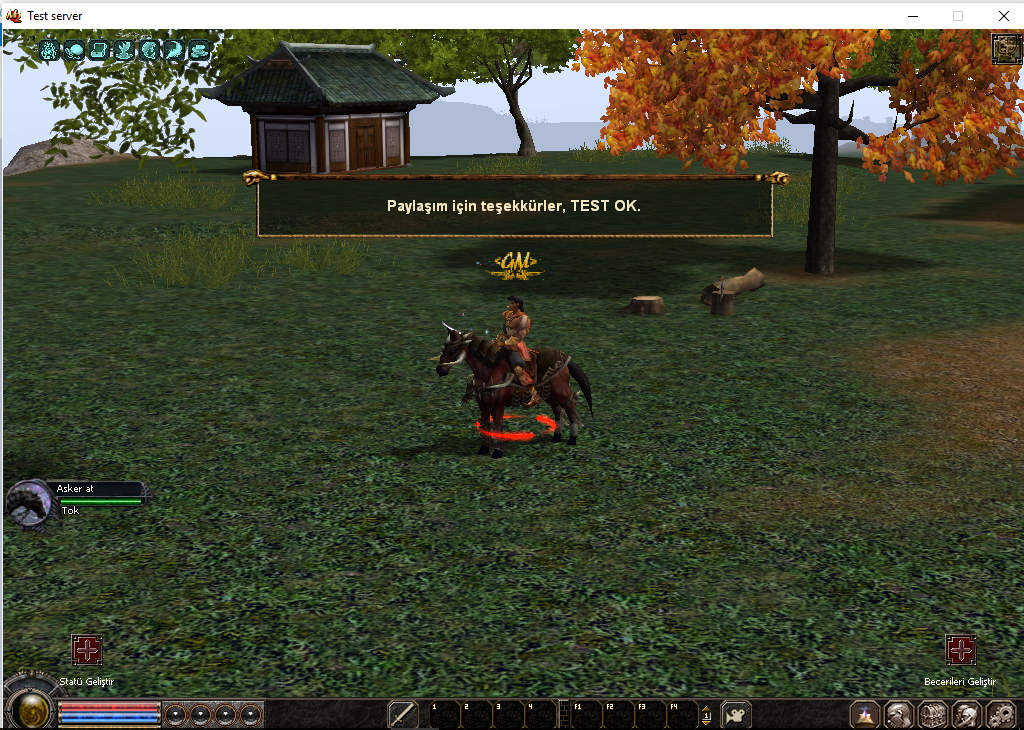
Horse & At Durum GUI Sistemi Nedir?
Metin2 özel sunucularında oyun içi deneyimi artırmak için geliştirilen pek çok sistem vardır. Bunlardan birisi de Horse & At Durum GUI sistemidir. Bu sistem, oyuncuların sahip oldukları atların veya diğer binici hayvanlarının durumlarını kolayca takip edebilmelerini sağlar. Özellikle Metin2 PvP sunucularında bu sistem, stratejik avantaj sağlar. Atınızın sağlık durumu, hızı, canavarla olan uyumu gibi kritik bilgilere anlık olarak erişim sağlarsınız.
Sistem Nasıl Çalışır?
Bu GUI sistemi genellikle Python tabanlı arayüz dosyalarıyla entegre edilir. UIScript ile arayüz tasarımı yapılırken, PY Root üzerinden gerekli veriler sunucudan alınır. Oyuncu bir at kullandığında, sistem otomatik olarak atın mevcut durumunu ekranda gösterir. Bu sayede savaş sırasında ani kararlar almanız kolaylaşır.
Neden Kullanmalısınız?
At sistemi Metin2 oyununda önemli bir rol oynar. Özellikle PvP savaşlarında doğru zamanda doğru atı kullanmak kazanma ihtimalini artırır. Bu GUI sayesinde, atınızın can, enerji, hız gibi değerlerini görsel olarak takip edebilirsiniz. Bu sayede hem oyun içi performansınız artar hem de daha stratejik hareket edersiniz.
Teknik Açıklamalar
Sistem genellikle C++ ile yazılmış sunucu tarafında tanımlanmış verilerle çalışır. Sunucu tarafında game core ile entegre bir yapıda çalışır. Client tarafında ise Python GUI kullanılarak arayüz oluşturulur. Bu sistem, Martysama ve benzeri geliştirme araçlarıyla kolayca entegre edilebilir. Ayrıca pack dosyaları ile sunucuya kolayca yüklenebilir.
Geliştirme ve Kurulum Notları
Sistemi kurmadan önce Metin2 server SRC üzerinde gerekli değişikliklerin yapılması gerekir. Bu sistem genellikle auth ve db sistemleriyle de entegre çalışır. Geliştirme sürecinde dikkat edilmesi gereken hususlar arasında veri akışı, güvenlik ve performans optimizasyonu yer alır. Metin2Dev toplulukları bu konuda size rehberlik edebilir.
What is Horse & At Status GUI System?
There are many systems developed to enhance the in-game experience on Metin2 private servers. One of these is the Horse & At Status GUI system. This system allows players to easily monitor the status of their horses or other riding animals. Especially on Metin2 PvP servers, this system provides strategic advantages. You gain instant access to critical information such as your horse's health, speed, and compatibility with monsters.
How Does It Work?
This GUI system typically integrates with Python-based interface files. Interface design is done via UIScript, while necessary data is retrieved from the server through PY Root. When a player rides a horse, the system automatically displays the current status of the horse on screen. This makes it easier to make quick decisions during combat.
Why Should You Use It?
The horse system plays an important role in Metin2 gameplay. Especially in PvP battles, using the right horse at the right time increases your chances of winning. With this GUI, you can visually track your horse's health, energy, speed, and more. This way, both your in-game performance improves and you play more strategically.
Technical Explanations
The system usually works with data defined on the server-side written in C++. It operates integrated with game core on the server side. On the client side, the interface is created using Python GUI. This system can be easily integrated with tools like Martysama. Moreover, it can be effortlessly installed onto the server via pack files.
Development and Installation Notes
Before installing this system, necessary modifications must be made on Metin2 server SRC. This system often works integrated with auth and db systems. Key considerations during the development process include data flow, security, and performance optimization. Metin2Dev communities can provide guidance on this topic.
