

Userinterface/instancebase.cpp açılır-aratılır:
Kod:
if (12010 <= vnum && vnum <= 12049)
Kod:
if (vnum >= 20760 && vnum <= 20959) { __AttachEffect(EFFECT_REFINED+YENI_YILDIRIM_EFEKTI _BLACK); }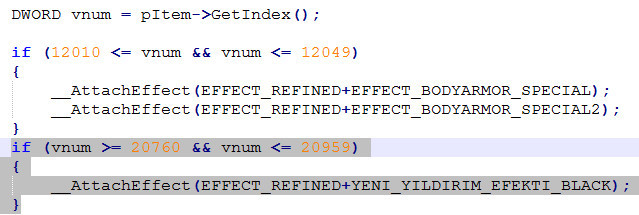
instancebase.h açılır-aratılır:
Kod:
EFFECT_BODYARMOR_SPECIAL2,
Kod:
YENI_YILDIRIM_EFEKTI_BLACK,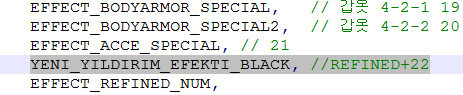
root/playersettingsmodule.py açılır-aratılır:
Kod:
chrmgr.RegisterEffect(chrmgr.EFFECT_REFINED+20, "Bip01", "D:/ymir work/pc/common/effect/armor/armor-4-2-2.mse")
Kod:
chrmgr.RegisterEffect(chrmgr.EFFECT_REFINED+22, "Bip01", "D:/ymir work/pc/common/effect/armor/armor-5-1.mse")
Ziyaretçiler için gizlenmiş link,görmek için üye olmalısınız!
Giriş yap veya üye ol.
Bunu Pack'e atıp
Index'e Ekleyin;
Kod:
*black_new_armor_effects *Metin2 Official Zırhlara Efekt Verme[C++&PYTHON]
Metin2 özel sunucularında geliştirme yaparken, oyuncuların dikkatini çekmek ve oyun deneyimini zenginleştirmek adına zırhlara efekt ekleme işlemleri oldukça popülerdir. Bu işlem, özellikle PvP sistemlerinde daha görsel ve stratejik bir avantaj sağlar. Bu rehberde, hem C++ hem de Python tarafında nasıl zırhlara efekt verileceğini adım adım inceleyeceğiz.
Zırhlara Efekt Ekleme Nedir?
Zırhlara efekt ekleme işlemi, oyuncunun giydiği zırh eşyasına özel görsel efektler (örneğin parlama, renk değişimi, özel animasyonlar) kazandırmayı sağlar. Bu efektler genellikle belirli bir seviye, bonus veya özel bir item setine bağlı olarak aktif edilir.
C++ Tarafında Zırhlara Efekt Ekleme
C++ tarafında bu işlem genellikle 'game' sunucusu üzerinde yapılır. Oyuncunun hangi zırhı giydiğini takip eden fonksiyonlar üzerinden bu efektler kontrol edilir. Öncelikle, zırh eşyasının ID’si tanımlanmalı ve bu ID’ye göre efekt verilmelidir. Bu işlem için 'char_item.cpp' veya benzeri dosyalarda gerekli düzenlemeler yapılmalıdır.
Örnek Kod Yapısı:
Bir zırh ID’si belirlenir ve bu zırh giyildiğinde bir efekt çağrılır. Bu efekt genellikle 'EffectManager' sınıfı aracılığıyla gönderilir. Bu sayede zırh giyildiğinde belirli bir efekt dosyası (.msc) oynatılır.
Python Tarafında Zırh Efekt Yönetimi
Python tarafında ise genellikle GUI ve kullanıcı arayüzü ile ilgili işlemler yapılır. Ancak zırh efekti yönetimi için 'root' klasöründeki Python dosyaları da kullanılabilir. Özellikle 'playerSettingModule.py', 'item.py', gibi dosyalar üzerinden zırh efektleri tetiklenebilir. Ayrıca PyMT ya da başka bir Python GUI kütüphanesiyle efekt yönetim ekranları oluşturulabilir.
Efekt Dosyalarının Hazırlanması
Zırh efekti için öncelikle bir efekt dosyası (.msc) hazırlanmalıdır. Bu dosya genellikle Martysama veya diğer Metin2 araçları ile tasarlanır. Efekt dosyası doğru konumlandırıldığında ve C++ tarafında doğru şekilde çağrıldığında, zırh giyildiğinde otomatik olarak efekt çalışacaktır.
Geliştirme Sürecinde Dikkat Edilmesi Gerekenler
• Efekt dosyalarının doğru yolda olduğundan emin olun.
• C++ tarafında zırh ID kontrolü eksiksiz yapılmalı.
• Python tarafında efekt tetiklemesi doğru yapılandırılmalı.
• Test sırasında farklı zırh tipleri ile test yapılmalı.
Sonuç
Metin2 özel sunucularda zırhlara efekt ekleme işlemi, oyun içi deneyimi ciddi anlamda artırır. C++ ve Python bilgisiyle bu işlem güvenilir ve stabil şekilde yapılabilir. Geliştiriciler bu sayede daha özgün ve dikkat çekici sunucular oluşturabilirler.
Adding Effects to Official Metin2 Armors [C++&PYTHON]
When developing Metin2 private servers, adding effects to armors is quite popular for catching player attention and enriching the gaming experience. This process especially provides more visual and strategic advantages in PvP systems. In this guide, we will examine step by step how to add armor effects on both C++ and Python sides.
What Is Adding Effects to Armors?
Adding effects to armors grants special visual effects (such as glow, color change, special animations) to armor items worn by players. These effects are typically activated depending on certain levels, bonuses, or special item sets.
Adding Armor Effects in C++
This process is generally done on the 'game' server side. Functions that track which armor the player wears are used to control these effects. First, an armor item ID must be defined, and an effect should be applied according to this ID. Necessary modifications must be made in files like 'char_item.cpp' or similar ones.
Sample Code Structure:
An armor ID is determined, and when this armor is equipped, an effect is called. This effect is usually sent via the 'EffectManager' class. Thus, when the armor is equipped, a specific effect file (.msc) is played.
Armor Effect Management in Python
In Python, operations related to GUI and user interface are typically handled. However, Python files located in the 'root' folder can also be used for armor effect management. Specifically, armor effects can be triggered through files like 'playerSettingModule.py', 'item.py'. Additionally, effect management screens can be created using PyMT or other Python GUI libraries.
Preparing Effect Files
Firstly, an effect file (.msc) must be prepared for the armor effect. This file is usually designed with tools like Martysama or other Metin2 tools. When correctly placed and properly called from the C++ side, the effect will automatically play upon equipping the armor.
Considerations During Development
• Ensure effect files are placed in the correct path.
• Armor ID checks on the C++ side must be completed thoroughly.
• Effect triggering on the Python side must be configured correctly.
• Testing should be performed with different armor types during testing phase.
Conclusion
Adding effects to armors in Metin2 private servers significantly enhances the in-game experience. With C++ and Python knowledge, this process can be done reliably and stably. Developers can thereby create more unique and attractive servers.
