

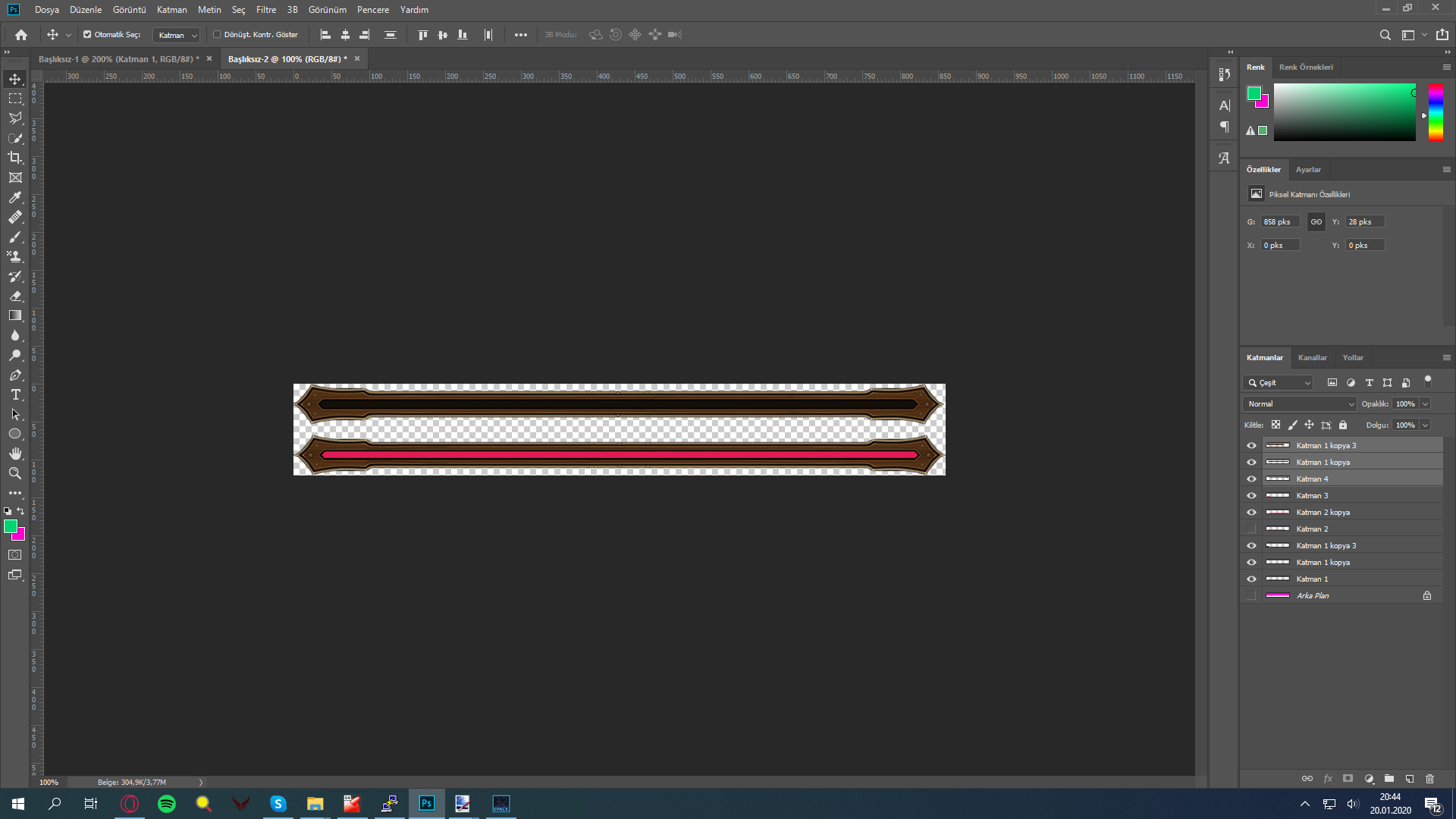
Zip içinde png halindedir siz onu dds çevirip kullanabilirsiniz.
Ziyaretçiler için gizlenmiş link,görmek için üye olmalısınız!
Giriş yap veya üye ol.
Ziyaretçiler için gizlenmiş link,görmek için üye olmalısınız!
Giriş yap veya üye ol.
Metin2.tc Yeni Yükleme Çubuğu ile Hızlı ve Sorunsuz Client Deneyimi
Merhaba sevgili Metin2 severleri!
Bugün sizlere Metin2Lobby.com üzerinde yepyeni bir yenilikle geliyoruz: Metin2.tc yeni yükleme çubuğu! Bu özellik, özellikle Metin2 client indirme, Metin2 pack yükleme ve Metin2 pvp client kurulumu süreçlerinizi daha hızlı, daha şeffaf ve daha keyifli hale getirmek için tasarlandı.
Dikkat: Eski yükleme sistemiyle karşılaştırıldığında, yeni çubuk sayesinde indirme hızı, dosya bütünlüğü kontrolü ve kurulum ilerleme durumu artık anlık olarak görülebiliyor. Bu da hata riskini minimuma indirir ve kullanıcı memnuniyetini artırır.
Yeni yükleme çubuğu, özellikle aşağıdaki senaryolarda devrim yaratıyor:
• Büyük Metin2 client pack dosyalarını (örneğin 20GB+ eter pack'ler) indirirken, gerçek zamanlı ilerleme yüzdesi ve tahmini bitiş süresi görüntülenir.
• Metin2 client edit veya Metin2 pack extract işlemleri sırasında, işlemin hangi aşamada olduğu net şekilde belirtilir.
• Metin2 client yama veya Metin2 client güncelleme sırasında, eksik veya bozuk dosya tespiti yapılarak otomatik onarım başlatılır.

Teknik Detaylar: Yeni sistem, asenkron dosya parça indirme teknolojisi ile çalışarak hem hızı artırır hem de sunucu yükünü azaltır. Ayrıca MD5 ve SHA-256 hash doğrulaması ile her indirilen Metin2 client dosyasının orijinal olduğu garanti edilir. Bu sayede 'corrupted file' hatası ya da 'missing texture' sorunlarıyla uğraşmanız gerekmez!
Özellikle Metin2 özel client veya Metin2 custom client kullanıcıları için bu yenilik büyük kolaylık sağlıyor. Çünkü genellikle bu tür client’ler oldukça büyük boyutlara ulaşabiliyor ve kurulum süreci uzun sürebiliyor. Artık her adımda ne kadar ilerlediğinizi ve ne zaman tamamlanacağını tam olarak bileceksiniz.
Nasıl Kullanılır?
1. Metin2Lobby.com adresine gidin.
2. İstediğiniz Metin2 client, Metin2 pvp pack veya eter pack’i seçin.
3. 'İndir' butonuna tıklayın — karşınıza yeni yükleme çubuğu çıkacak.
4. İndirme sırasında hız bilgisi, ilerleme çubuğu ve geriye kalan süre anlık güncellenir.
5. İşlem tamamlandığında otomatik olarak 'Kurulum Tamamlandı!' mesajı alırsınız.
Önemli Hatırlatma: Eski tarayıcılar veya desteklenmeyen sürümlerde yükleme çubuğu düzgün görünmeyebilir. Bu durumda lütfen tarayıcınızı güncelleyin veya Chrome, Firefox veya Edge gibi modern tarayıcıları kullanın.
Son olarak, bu yenilik sadece başlangıç! Yakın zamanda Metin2 client skin, Metin2 client effect ve Metin2 client texture gibi özelleştirmeleri de aynı şeffaf sistemle yönetebileceksiniz. Amacımız, Metin2Dev client ve Martysama client gibi popüler projeleri seven her oyuncuya en iyi deneyimi sunmak.
Hadi gelin, Metin2Lobby.com’da yeni yükleme çubuğunu deneyin ve farkı hemen hisedin!
İyi oyunlar, bol eter ve sorunsuz client’lar dileriz!
Metin2.tc New Loading Bar for Fast and Seamless Client Experience
Hello dear Metin2 players!
Today we are bringing you a brand-new feature on Metin2Lobby.com: the Metin2.tc new loading bar! This feature is designed to make your Metin2 client downloads, Metin2 pack installations, and Metin2 pvp client setups faster, more transparent, and more enjoyable.
Attention: Compared to the old loading system, the new bar now allows you to see download speed, file integrity checks, and installation progress in real time. This minimizes the risk of errors and greatly improves user satisfaction.
The new loading bar revolutionizes the experience especially in the following scenarios:
• When downloading large Metin2 client pack files (e.g., 20GB+ eter packs), you now see real-time progress percentage and estimated completion time.
• During Metin2 client edit or Metin2 pack extract operations, the current stage of the process is clearly displayed.
• While applying Metin2 client patches or Metin2 client updates, missing or corrupted files are automatically detected and repaired.
Technical Details: The new system uses asynchronous file chunk downloading technology, which increases speed and reduces server load. Additionally, every downloaded Metin2 client file is verified using MD5 and SHA-256 hash checks, ensuring authenticity. This eliminates the need to deal with 'corrupted file' errors or 'missing texture' issues!
This innovation is especially helpful for users of Metin2 custom clients or Metin2 special clients, as these clients often reach very large sizes and have lengthy installation processes. Now you’ll always know exactly how much progress has been made and when the process will finish.
How to Use It?
1. Go to Metin2Lobby.com.
2. Select your desired Metin2 client, Metin2 pvp pack, or eter pack.
3. Click the 'Download' button — the new loading bar will appear.
4. During download, speed, progress bar, and remaining time are updated in real time.
5. Once complete, you’ll automatically receive a 'Installation Completed!' message.
Important Reminder: The loading bar may not display correctly on outdated or unsupported browsers. In such cases, please update your browser or use modern ones like Chrome, Firefox, or Edge.
Finally, this is just the beginning! Soon, you’ll also be able to manage customizations like Metin2 client skins, Metin2 client effects, and Metin2 client textures through the same transparent system. Our goal is to deliver the best experience to all players, including fans of popular projects like Metin2Dev client and Martysama client.
Come and try the new loading bar on Metin2Lobby.com and feel the difference right away!
Happy gaming, lots of eter, and smooth clients!
