

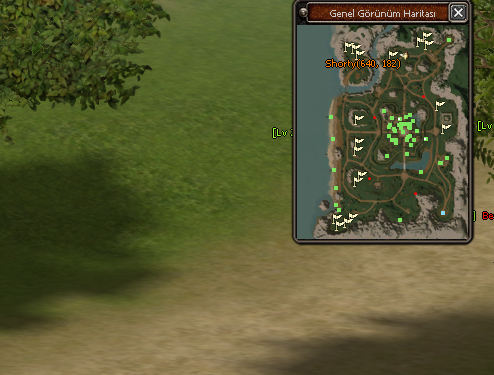
Merhaba Gamemasterların oyuna daha hakim olup belirli kordinatlara hızlıca ışınlanabilmeleri için hazırladığım küçük bir yardımcıdır kendi sunucunuza göre düzenlemeniz gerekmektedir sadece basit halini ekliyorum.
M bastığınızda açılan haritada Mouse ile tıkladığınız kordinata ışınlanmanızı sağlar.
17.01.2021 Tarihinde Güncellendi
uiminimap.py içerisinde bulun
Altına ekleyin.
uiminimap.py içerisinde bulun
Altına ekleyin
PythonMinimap.cpp içerisinde bulun
Altına ekleyin
NetworkActorManager.cpp dosyası içerisinde bulun --------- YENİ 17.01.2021
Methodun tamamını bununla değiştirin --------- YENİ 17.01.2021
NetworkActorManager.cpp dosyası içerisinde bulun --------- YENİ 17.01.2021
Bununla değiştirin --------- YENİ 17.01.2021
<blockquote data-attributes="member: 1444333" data-quote="hakanvolkan01" data-source="post: 20380775" class="bbCodeBlock bbCodeBlock--expandable bbCodeBlock--quote js-expandWatch">
Artık "M" bastığınızda açılan büyük haritada GM yetkisine sahip olan kişi haritada tıkladığı herhangi bir yere ışınlanabilir bununla beraber yönetimi dahada kolaylaştırmak için sectree_manager.cpp SendNPCPosition fonksiyonundaki örnekten yola çıkarak x haritada çevrimiçi gamemastera oyuncuların kordinat bilgilerini gönderip slotlar da kasan oyuncuları haritadan görerek üstüne tıklayıp takip edebilirsiniz hile takibinde çok güzel işe yarıyor
Mini Haritada İstenilen Yere Işınlanma Sistemi Nedir?
Metin2 özel sunucularında oyun içi deneyimi artırmak için geliştirilen sistemlerden biri de mini harita üzerinde belirlenen konuma ışınlanabilme özelliğidir. Bu özellik, oyuncuların harita üzerinde gezinmesini kolaylaştırırken aynı zamanda zaman kazanmalarını sağlar. Özellikle PvP odaklı sunucularda hızlı hareket etmek ve stratejik pozisyonlara erişmek büyük avantaj sağlar.
Sistemin Temel Yapısı
Bu sistem, genellikle Python tabanlı GUI üzerinden entegre edilir. Oyuncu, mini haritayı açtığında ekrana gelen arayüz üzerinden tıklamak istediği koordinata ışınlanabilir. Bu işlem sırasında C++ backend tarafında bir komut çalışır ve oyuncunun konumu güncellenir. Bu işlem, güvenlik açısından doğrulama süreçlerinden geçirilir.
Kurulum ve Entegrasyon
Mini harita ışınlanma sistemi kurulumu, Metin2 server src dosyalarında değişiklik yapmayı gerektirir. Öncelikle, GUI tarafında bir buton veya tıklanabilir alan oluşturulur. Ardından, tıklanan koordinat bilgisi sunucuya gönderilir. Sunucu tarafında game server programming ile bu koordinat kontrol edilir ve ışınlanma işlemi başlatılır. Bu sistem, py root ve uiscript dosyalarıyla birlikte çalışarak tam entegrasyon sağlar.
Avantajları ve Kullanım Alanları
Oyuncular için en büyük faydası, harita üzerindeki uzun mesafeleri hızlıca geçebilmektir. Özellikle PvP savaşlarında stratejik bölgelere anında ulaşmak, rakip avantajı yakalamak için kritik olabilir. Ayrıca bazı özel görevlerde veya pack sistemlerinde belirli konumlara gitmek için zaman kazandırır. Sistem, doğru şekilde yapılandırıldığında Metin2 development sürecinde önemli bir araç haline gelir.
Güvenlik ve Hile Engelleme
Işınlanma sistemi, hile riskini de beraberinde getirir. Bu nedenle, koordinat doğrulaması ve auth sunucusuyla senkronizasyon önemlidir. Sunucu, her ışınlanma isteğinde konumun geçerli olup olmadığını kontrol etmelidir. Aksi takdirde, oyuncular güvenli olmayan bölgelere ışınlanarak hile yapabilirler. Bu tür sistemlerde db core entegrasyonu da güvenlik katmanı olarak devreye girer.
Sonuç
Mini harita üzerinde ışınlanma sistemi, Metin2 private server geliştiricileri için kullanıcı deneyimini ciddi anlamda artıran bir özelliktir. Ancak dikkatli planlama ve doğru entegrasyon olmadan güvenlik açıklarına neden olabilir. MartySama gibi deneyimli geliştiricilerin katkılarıyla bu tür sistemler sürekli gelişmekte ve topluluk tarafından yaygınlaşmaktadır.
What is the Teleportation System to Desired Location on Mini Map?
In Metin2 private servers, one of the developed systems to enhance the in-game experience is the ability to teleport to a selected location on the mini map. This feature facilitates navigation across the map while saving players valuable time. Particularly in PvP-oriented servers, fast movement and access to strategic positions provide significant advantages.
Core Structure of the System
This system is typically integrated via a Python-based GUI. When the player opens the mini map, they can click on the desired coordinates within the displayed interface to teleport. In the background, a command executes on the C++ backend to update the player's position. This action passes through validation processes for security purposes.
Installation and Integration
Installing the mini map teleportation system requires modifications to Metin2 server src files. First, a button or clickable area must be created in the GUI. Then, the clicked coordinate information is sent to the server. On the server side, game server programming verifies these coordinates and initiates the teleportation. This system works seamlessly with py root and uiscript files to ensure full integration.
Benefits and Use Cases
The main advantage for players is the ability to quickly traverse long distances on the map. Especially during PvP battles, instant access to strategic areas can be crucial for gaining an edge over opponents. Additionally, this system saves time when traveling to specific locations for quests or pack systems. Properly configured, it becomes a vital tool in Metin2 development.
Security and Anti-Cheat Measures
Teleportation systems also introduce potential cheating risks. Therefore, coordinate validation and synchronization with the auth server are essential. The server must verify whether each teleport request is valid. Otherwise, players might exploit the system to teleport to unsafe zones. In such systems, db core integration acts as an additional security layer.
Conclusion
The mini map teleportation system is a feature that significantly enhances user experience for Metin2 private server developers. However, without careful planning and proper integration, it may lead to security vulnerabilities. With contributions from experienced developers like MartySama, such systems continue to evolve and gain popularity among the community.
M bastığınızda açılan haritada Mouse ile tıkladığınız kordinata ışınlanmanızı sağlar.
17.01.2021 Tarihinde Güncellendi
- <li data-xf-list-type="ul">Işınlanma sonrası yaşanan donma/kasma sorunları düzeltildi.
uiminimap.py içerisinde bulun
Kod:
self.SetPosition(wndMgr.GetScreenWidth() - 136 - 256 - 10, 0)Altına ekleyin.
Kod:
self.board.SetOnMouseLeftButtonUpEvent(ui.__mem_func__(self.OnMouseLeftButtonUpEvent))uiminimap.py içerisinde bulun
Kod:
def SetCenterPositionAdjust(self, x, y): self.SetPosition((wndMgr.GetScreenWidth() - self.GetWidth()) / 2 + x, (wndMgr.GetScreenHeight() - self.GetHeight()) / 2 + y)Altına ekleyin
Kod:
def OnMouseLeftButtonUpEvent(self): (mouseX, mouseY) = wndMgr.GetMousePosition() (bFind, sName, iPosX, iPosY, dwTextColor, dwGuildID) = miniMap.GetAtlasInfo(mouseX, mouseY) net.SendChatPacket("/go %s %s" % (str(iPosX), str(iPosY)))PythonMinimap.cpp içerisinde bulun
Kod:
bool CPythonMiniMap::GetAtlasInfo(float fScreenX, float fScreenY, std::string & rReturnString, float * pReturnPosX, float * pReturnPosY, DWORD * pdwTextColor, DWORD * pdwGuildID) { float fRealX = (fScreenX - m_fAtlasScreenX) * (m_fAtlasMaxX / m_fAtlasImageSizeX); float fRealY = (fScreenY - m_fAtlasScreenY) * (m_fAtlasMaxY / m_fAtlasImageSizeY);Altına ekleyin
Kod:
*pReturnPosX = fRealX; *pReturnPosY = fRealY;NetworkActorManager.cpp dosyası içerisinde bulun --------- YENİ 17.01.2021
Kod:
bool CNetworkActorManager::__IsVisiblePos(LONG lPosX, LONG lPosY)Methodun tamamını bununla değiştirin --------- YENİ 17.01.2021
Kod:
bool CNetworkActorManager::__IsVisiblePos(LONG lPosX, LONG lPosY) { LONG dx = lPosX - m_lMainPosX; LONG dy = lPosY - m_lMainPosY; LONG len = (LONG)sqrtf((float(dx) * float(dx) + float(dy) * float(dy))); extern int CHAR_STAGE_VIEW_BOUND; if (len < CHAR_STAGE_VIEW_BOUND && len > -CHAR_STAGE_VIEW_BOUND) return true; return false; }NetworkActorManager.cpp dosyası içerisinde bulun --------- YENİ 17.01.2021
Kod:
if (rkActorEach->IsPC() || rkActorEach->IsNPC() || rkActorEach->IsEnemy())Bununla değiştirin --------- YENİ 17.01.2021
Kod:
if (rkActorEach->IsPC() || rkActorEach->IsNPC() || rkActorEach->IsEnemy() || rkActorEach->IsStone() )
Ziyaretçiler için gizlenmiş link,görmek için üye olmalısınız!
Giriş yap veya üye ol.
Teşekkürler<blockquote data-attributes="member: 1444333" data-quote="hakanvolkan01" data-source="post: 20380775" class="bbCodeBlock bbCodeBlock--expandable bbCodeBlock--quote js-expandWatch">
Kod:
#uiminimap.py net.SendChatPacket("/go %s %s" % (str(iPosX), str(iPosY))) # arat #değiştir if chr.IsGameMaster(player.GetMainCharacterIndex()): net.SendChatPacket("/go %s %s" % (str(iPosX), str(iPosY))) import chr import player #eğer importlarda yoksa ekleArtık "M" bastığınızda açılan büyük haritada GM yetkisine sahip olan kişi haritada tıkladığı herhangi bir yere ışınlanabilir bununla beraber yönetimi dahada kolaylaştırmak için sectree_manager.cpp SendNPCPosition fonksiyonundaki örnekten yola çıkarak x haritada çevrimiçi gamemastera oyuncuların kordinat bilgilerini gönderip slotlar da kasan oyuncuları haritadan görerek üstüne tıklayıp takip edebilirsiniz hile takibinde çok güzel işe yarıyor
Mini Haritada İstenilen Yere Işınlanma Sistemi Nedir?
Metin2 özel sunucularında oyun içi deneyimi artırmak için geliştirilen sistemlerden biri de mini harita üzerinde belirlenen konuma ışınlanabilme özelliğidir. Bu özellik, oyuncuların harita üzerinde gezinmesini kolaylaştırırken aynı zamanda zaman kazanmalarını sağlar. Özellikle PvP odaklı sunucularda hızlı hareket etmek ve stratejik pozisyonlara erişmek büyük avantaj sağlar.
Sistemin Temel Yapısı
Bu sistem, genellikle Python tabanlı GUI üzerinden entegre edilir. Oyuncu, mini haritayı açtığında ekrana gelen arayüz üzerinden tıklamak istediği koordinata ışınlanabilir. Bu işlem sırasında C++ backend tarafında bir komut çalışır ve oyuncunun konumu güncellenir. Bu işlem, güvenlik açısından doğrulama süreçlerinden geçirilir.
Kurulum ve Entegrasyon
Mini harita ışınlanma sistemi kurulumu, Metin2 server src dosyalarında değişiklik yapmayı gerektirir. Öncelikle, GUI tarafında bir buton veya tıklanabilir alan oluşturulur. Ardından, tıklanan koordinat bilgisi sunucuya gönderilir. Sunucu tarafında game server programming ile bu koordinat kontrol edilir ve ışınlanma işlemi başlatılır. Bu sistem, py root ve uiscript dosyalarıyla birlikte çalışarak tam entegrasyon sağlar.
Avantajları ve Kullanım Alanları
Oyuncular için en büyük faydası, harita üzerindeki uzun mesafeleri hızlıca geçebilmektir. Özellikle PvP savaşlarında stratejik bölgelere anında ulaşmak, rakip avantajı yakalamak için kritik olabilir. Ayrıca bazı özel görevlerde veya pack sistemlerinde belirli konumlara gitmek için zaman kazandırır. Sistem, doğru şekilde yapılandırıldığında Metin2 development sürecinde önemli bir araç haline gelir.
Güvenlik ve Hile Engelleme
Işınlanma sistemi, hile riskini de beraberinde getirir. Bu nedenle, koordinat doğrulaması ve auth sunucusuyla senkronizasyon önemlidir. Sunucu, her ışınlanma isteğinde konumun geçerli olup olmadığını kontrol etmelidir. Aksi takdirde, oyuncular güvenli olmayan bölgelere ışınlanarak hile yapabilirler. Bu tür sistemlerde db core entegrasyonu da güvenlik katmanı olarak devreye girer.
Sonuç
Mini harita üzerinde ışınlanma sistemi, Metin2 private server geliştiricileri için kullanıcı deneyimini ciddi anlamda artıran bir özelliktir. Ancak dikkatli planlama ve doğru entegrasyon olmadan güvenlik açıklarına neden olabilir. MartySama gibi deneyimli geliştiricilerin katkılarıyla bu tür sistemler sürekli gelişmekte ve topluluk tarafından yaygınlaşmaktadır.
What is the Teleportation System to Desired Location on Mini Map?
In Metin2 private servers, one of the developed systems to enhance the in-game experience is the ability to teleport to a selected location on the mini map. This feature facilitates navigation across the map while saving players valuable time. Particularly in PvP-oriented servers, fast movement and access to strategic positions provide significant advantages.
Core Structure of the System
This system is typically integrated via a Python-based GUI. When the player opens the mini map, they can click on the desired coordinates within the displayed interface to teleport. In the background, a command executes on the C++ backend to update the player's position. This action passes through validation processes for security purposes.
Installation and Integration
Installing the mini map teleportation system requires modifications to Metin2 server src files. First, a button or clickable area must be created in the GUI. Then, the clicked coordinate information is sent to the server. On the server side, game server programming verifies these coordinates and initiates the teleportation. This system works seamlessly with py root and uiscript files to ensure full integration.
Benefits and Use Cases
The main advantage for players is the ability to quickly traverse long distances on the map. Especially during PvP battles, instant access to strategic areas can be crucial for gaining an edge over opponents. Additionally, this system saves time when traveling to specific locations for quests or pack systems. Properly configured, it becomes a vital tool in Metin2 development.
Security and Anti-Cheat Measures
Teleportation systems also introduce potential cheating risks. Therefore, coordinate validation and synchronization with the auth server are essential. The server must verify whether each teleport request is valid. Otherwise, players might exploit the system to teleport to unsafe zones. In such systems, db core integration acts as an additional security layer.
Conclusion
The mini map teleportation system is a feature that significantly enhances user experience for Metin2 private server developers. However, without careful planning and proper integration, it may lead to security vulnerabilities. With contributions from experienced developers like MartySama, such systems continue to evolve and gain popularity among the community.
