

Daha önce paylaşıldı mı bilmyorum görmedim yabancı forumda görüp beğendim, Paylaşıdıysa konun linkini atarsanız mesaj olarak kapatırım.
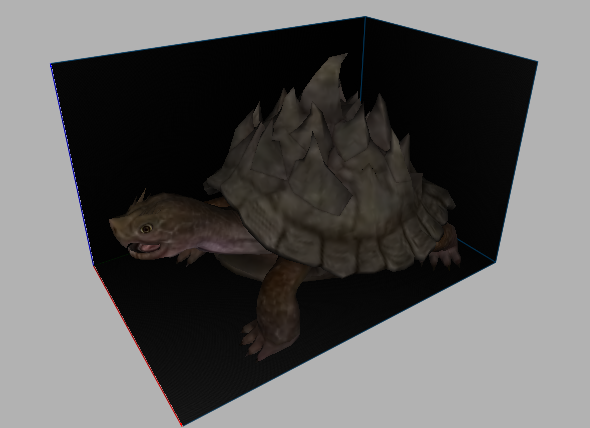
Link
Mob-Kaplumbağa: Metin2 3D Modelleme ve Oyun İçeriği Geliştirme
Metin2 Lobby olarak, oyun geliştiricileri ve 3D modelleme tutkunları için en önemli konulardan biri olan Mob-Kaplumbağa konusunu detaylıca ele alıyoruz. Bu yazıda, Metin2 oyununda kullanılan 3D modelleme teknikleri, kaplumbağa temalı mob (canavar) modellerinin tasarımı, gr2 formatı, Blender ve 3ds Max gibi yazılımlarla nasıl çalışılacağı ve bu modellerin oyun içine nasıl entegre edileceği anlatılmaktadır.
Metin2'de Mob Tasarımı ve 3D Modelleme
Metin2, özellikle Asya kökenli MMORPG oyunlarında önemli bir yere sahiptir. Bu oyunun görsel zenginliği, özellikle NPC ve monster modellerine dayanmaktadır. Bu modellerin çoğu GR2 ve Granny formatında gelir. Mob-Kaplumbağa gibi özel yaratıkların tasarımı, hem estetik hem de teknik açıdan dikkat gerektirir.
Kaplumbağa Temalı Canavarların Özellikleri
Kaplumbağa temalı moblar genellikle savunma odaklı karakteristik özellikler taşır. Gövdesi sert kabukla kaplıdır, yavaş hareket eder ama güçlüdür. Bu tür yaratıklar için UV mapping, texture ve animation gibi kavramlar önemlidir. Blender veya 3ds Max gibi programlarla bu modellerin oluşturulması, ardından Metin2 model edit süreçlerine entegrasyonu oldukça profesyonel bir yaklaşım gerektirir.
3D Modelleme Sürecinde Kullanılan Araçlar
Metin2 3D modellemesi yaparken öncelikle Blender ya da 3ds Max gibi yazılımlar tercih edilir. Bu platformlarda oluşturulan modeller, gr2 formatına dönüştürülmek üzere dışa aktarılır. GR2 Export ve Import işlemleri sırasında dikkat edilmesi gereken pek çok teknik detay vardır. Özellikle bone yapısı ve mesh düzeni, animasyon akışını doğrudan etkiler.
Metin2 İçin Özel Kaplumbağa Mobu Nasıl Yapılır?
Öncelikle kaplumbağanın anatomisi çizilir. Blender üzerinde gövde, kafa, ayaklar ve kuyruk gibi parçalar ayrı ayrı modellenir. Ardından Rigging işlemiyle kemik yapısı eklenir. Bu işlem, animation sürecinde modelin doğru şekilde hareket etmesini sağlar. UV haritası çıkarıldıktan sonra texture ataması yapılır. Renk paleti, Metin2'in genel atmosferine uygun olacak şekilde seçilir. Son aşamada GR2 formatına dönüştürülerek oyun içi klasörlere yerleştirilir.
Modelin Oyun İçine Entegrasyonu
Hazırlanan Mob-Kaplumbağa modeli, Metin2 sunucularına entegre edilmeden önce test ortamında kontrol edilmelidir. Bu testler sırasında model replace işlemleri yapılabilir. Eğer model doğru şekilde çalışıyorsa, custom model olarak sunucuya yüklenebilir. Bu tür modifikasyonlar, oyunun görsel zenginliğini artırır ve oyuncuların deneyimini daha keyifli hale getirir.
Sonuç
Metin2 Lobby olarak, Metin2 oyununda 3D modelleme konusunda uzmanlaşmış bir toplulukla çalışıyoruz. Mob-Kaplumbağa gibi özel modellerin tasarımı, sadece teknik bilgi değil aynı zamanda yaratıcılık da gerektirir. Blender, 3ds Max, GR2 formatı, texture ve animasyon gibi konular bu süreci şekillendirir. Siz de bu alandaki deneyiminizi paylaşarak topluluğa katkıda bulunabilirsiniz.
Turtle-Mob: Metin2 3D Modeling and Game Content Development
Metin2 Lobby, as one of the most important topics for game developers and 3D modeling enthusiasts, we thoroughly examine the topic of Turtle-Mob. In this article, we explain how 3D modeling techniques used in the Metin2 game, design of turtle-themed mob models, gr2 format, usage of software such as Blender and 3ds Max, and integration of these models into the game are performed.
Mob Design and 3D Modeling in Metin2
Metin2 holds a significant place among Asian-originated MMORPG games. The visual richness of this game largely depends on NPC and monster models. Most of these models come in GR2 and Granny formats. Designing special creatures like Turtle-Mob requires both aesthetic and technical attention.
Characteristics of Turtle-Themed Mobs
Turtle-themed mobs usually have defense-oriented characteristics. Their bodies are covered with hard shells, they move slowly but are strong. For such creatures, concepts like UV mapping, texture, and animation are important. Creating these models with programs like Blender or 3ds Max and integrating them into Metin2 model edit processes requires a highly professional approach.
Tools Used in 3D Modeling Process
When performing Metin2 3D modeling, software like Blender or 3ds Max is primarily preferred. Models created on these platforms are exported to be converted into gr2 format. There are many technical details to pay attention to during GR2 Export and Import operations. Especially the bone structure and mesh arrangement directly affect the flow of animation.
How to Create a Special Turtle Mob for Metin2?
Firstly, the anatomy of the turtle is drawn. In Blender, parts such as the body, head, legs, and tail are modeled separately. Then, the bone structure is added through the Rigging process. This ensures that the model moves correctly during the animation stage. After the UV map is extracted, texture assignment is done. The color palette is chosen to match the overall atmosphere of Metin2. Finally, it is converted to GR2 format and placed in the in-game folders.
Integration of the Model into the Game
Before integrating the prepared Turtle-Mob model into Metin2 servers, it should be tested in a test environment. During these tests, model replace operations can be performed. If the model works correctly, it can be uploaded to the server as a custom model. Such modifications enhance the visual richness of the game and make the player experience more enjoyable.
Conclusion
Metin2 Lobby, working with a community specialized in 3D modeling in the Metin2 game. Designing special models like Turtle-Mob requires not only technical knowledge but also creativity. Topics such as Blender, 3ds Max, GR2 format, texture, and animation shape this process. You too can contribute to the community by sharing your experience in this field.
Link
Ziyaretçiler için gizlenmiş link,görmek için üye olmalısınız!
Giriş yap veya üye ol.
Virüs totalı konuya ekleyen olursa sevinirim.Mob-Kaplumbağa: Metin2 3D Modelleme ve Oyun İçeriği Geliştirme
Metin2 Lobby olarak, oyun geliştiricileri ve 3D modelleme tutkunları için en önemli konulardan biri olan Mob-Kaplumbağa konusunu detaylıca ele alıyoruz. Bu yazıda, Metin2 oyununda kullanılan 3D modelleme teknikleri, kaplumbağa temalı mob (canavar) modellerinin tasarımı, gr2 formatı, Blender ve 3ds Max gibi yazılımlarla nasıl çalışılacağı ve bu modellerin oyun içine nasıl entegre edileceği anlatılmaktadır.
Metin2'de Mob Tasarımı ve 3D Modelleme
Metin2, özellikle Asya kökenli MMORPG oyunlarında önemli bir yere sahiptir. Bu oyunun görsel zenginliği, özellikle NPC ve monster modellerine dayanmaktadır. Bu modellerin çoğu GR2 ve Granny formatında gelir. Mob-Kaplumbağa gibi özel yaratıkların tasarımı, hem estetik hem de teknik açıdan dikkat gerektirir.
Kaplumbağa Temalı Canavarların Özellikleri
Kaplumbağa temalı moblar genellikle savunma odaklı karakteristik özellikler taşır. Gövdesi sert kabukla kaplıdır, yavaş hareket eder ama güçlüdür. Bu tür yaratıklar için UV mapping, texture ve animation gibi kavramlar önemlidir. Blender veya 3ds Max gibi programlarla bu modellerin oluşturulması, ardından Metin2 model edit süreçlerine entegrasyonu oldukça profesyonel bir yaklaşım gerektirir.
3D Modelleme Sürecinde Kullanılan Araçlar
Metin2 3D modellemesi yaparken öncelikle Blender ya da 3ds Max gibi yazılımlar tercih edilir. Bu platformlarda oluşturulan modeller, gr2 formatına dönüştürülmek üzere dışa aktarılır. GR2 Export ve Import işlemleri sırasında dikkat edilmesi gereken pek çok teknik detay vardır. Özellikle bone yapısı ve mesh düzeni, animasyon akışını doğrudan etkiler.
Metin2 İçin Özel Kaplumbağa Mobu Nasıl Yapılır?
Öncelikle kaplumbağanın anatomisi çizilir. Blender üzerinde gövde, kafa, ayaklar ve kuyruk gibi parçalar ayrı ayrı modellenir. Ardından Rigging işlemiyle kemik yapısı eklenir. Bu işlem, animation sürecinde modelin doğru şekilde hareket etmesini sağlar. UV haritası çıkarıldıktan sonra texture ataması yapılır. Renk paleti, Metin2'in genel atmosferine uygun olacak şekilde seçilir. Son aşamada GR2 formatına dönüştürülerek oyun içi klasörlere yerleştirilir.
Modelin Oyun İçine Entegrasyonu
Hazırlanan Mob-Kaplumbağa modeli, Metin2 sunucularına entegre edilmeden önce test ortamında kontrol edilmelidir. Bu testler sırasında model replace işlemleri yapılabilir. Eğer model doğru şekilde çalışıyorsa, custom model olarak sunucuya yüklenebilir. Bu tür modifikasyonlar, oyunun görsel zenginliğini artırır ve oyuncuların deneyimini daha keyifli hale getirir.
Sonuç
Metin2 Lobby olarak, Metin2 oyununda 3D modelleme konusunda uzmanlaşmış bir toplulukla çalışıyoruz. Mob-Kaplumbağa gibi özel modellerin tasarımı, sadece teknik bilgi değil aynı zamanda yaratıcılık da gerektirir. Blender, 3ds Max, GR2 formatı, texture ve animasyon gibi konular bu süreci şekillendirir. Siz de bu alandaki deneyiminizi paylaşarak topluluğa katkıda bulunabilirsiniz.
Turtle-Mob: Metin2 3D Modeling and Game Content Development
Metin2 Lobby, as one of the most important topics for game developers and 3D modeling enthusiasts, we thoroughly examine the topic of Turtle-Mob. In this article, we explain how 3D modeling techniques used in the Metin2 game, design of turtle-themed mob models, gr2 format, usage of software such as Blender and 3ds Max, and integration of these models into the game are performed.
Mob Design and 3D Modeling in Metin2
Metin2 holds a significant place among Asian-originated MMORPG games. The visual richness of this game largely depends on NPC and monster models. Most of these models come in GR2 and Granny formats. Designing special creatures like Turtle-Mob requires both aesthetic and technical attention.
Characteristics of Turtle-Themed Mobs
Turtle-themed mobs usually have defense-oriented characteristics. Their bodies are covered with hard shells, they move slowly but are strong. For such creatures, concepts like UV mapping, texture, and animation are important. Creating these models with programs like Blender or 3ds Max and integrating them into Metin2 model edit processes requires a highly professional approach.
Tools Used in 3D Modeling Process
When performing Metin2 3D modeling, software like Blender or 3ds Max is primarily preferred. Models created on these platforms are exported to be converted into gr2 format. There are many technical details to pay attention to during GR2 Export and Import operations. Especially the bone structure and mesh arrangement directly affect the flow of animation.
How to Create a Special Turtle Mob for Metin2?
Firstly, the anatomy of the turtle is drawn. In Blender, parts such as the body, head, legs, and tail are modeled separately. Then, the bone structure is added through the Rigging process. This ensures that the model moves correctly during the animation stage. After the UV map is extracted, texture assignment is done. The color palette is chosen to match the overall atmosphere of Metin2. Finally, it is converted to GR2 format and placed in the in-game folders.
Integration of the Model into the Game
Before integrating the prepared Turtle-Mob model into Metin2 servers, it should be tested in a test environment. During these tests, model replace operations can be performed. If the model works correctly, it can be uploaded to the server as a custom model. Such modifications enhance the visual richness of the game and make the player experience more enjoyable.
Conclusion
Metin2 Lobby, working with a community specialized in 3D modeling in the Metin2 game. Designing special models like Turtle-Mob requires not only technical knowledge but also creativity. Topics such as Blender, 3ds Max, GR2 format, texture, and animation shape this process. You too can contribute to the community by sharing your experience in this field.