

Merhaba Turkmmo Halkı;
Arkadaşlar konu önceden paylaşıldıysa kusura bakmayın detaylı bir araştırma yapamadım ama bende bugu dev'de buldum ve fixini araştırıp buldum paylaşmak istedim.
Pazar ismini böyle açınca game.core veriyor. %s%S(bunu yazın sonra ctrl+a ya basın) ondan sonra pazarı kurun game.core verecek.
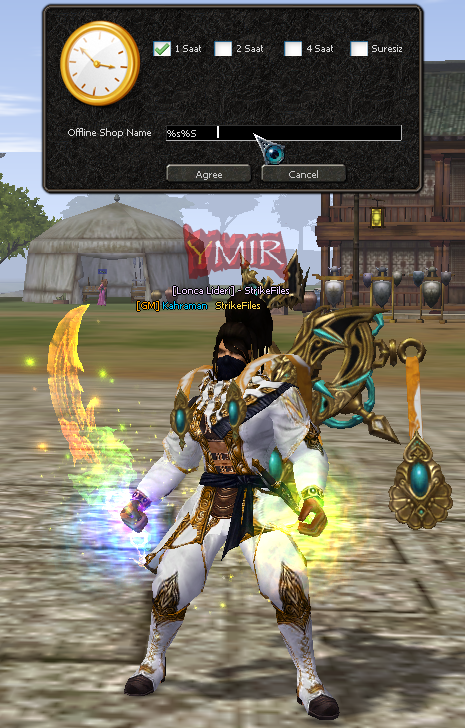
Anlatıma geçelim:
Char.cpp açılır
ARATILIR
Kod bloğunun içinde aratılır;
Altına boşluk bırak ekle;
KANIT:
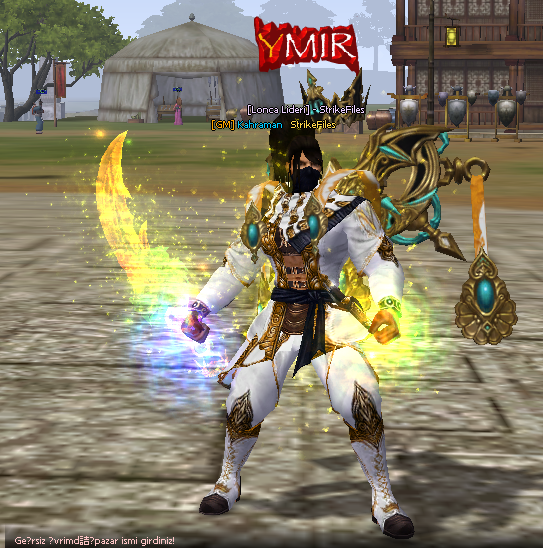
İsim bozukluğunu kodlarda güncelleme yaparak giderdim attığım kanıttaki gibi gözükmeyecektir.
Herkese iyi forumlar.
Offline Shop İsim game.core Fix Nedir?
Metin2 özel sunucularında geliştirme yaparken birçok geliştirici, offline shop (çevrimdışı dükkan) sistemini aktif etmek ister. Ancak bu işlem sırasında bazı dosya isimlerinde değişiklikler yapılması gerekir. Özellikle game.core dosyası gibi kritik yapılarla çalışırken dikkat edilmesi gereken durumlar vardır. Bu yazıda, offline shop isim fix işlemini nasıl yapacağınızı ve bu işlemin game.core dosyası üzerindeki etkilerini detaylıca ele alacağız.
Metin2 Sunucu Geliştirme ve Core Dosyaları
Metin2 özel sunucularında server src, yani sunucu kaynak kodları üzerinde çalışmak oldukça önemli bir beceridir. Bu süreçte game core, db core, auth core gibi temel yapılarla çalışılır. Özellikle game.core dosyası, sunucunun ana oyun motorunu içerdiğinden dolayı, bu dosya üzerinde yapılan her değişiklik büyük dikkat gerektirir.
Offline shop sistemi, oyuncuların sunucudan ayrıldıklarında dükkanlarını açık bırakmalarına olanak tanır. Bu sayede diğer oyuncular dükkanları ziyaret edip ürün alabilir. Ancak bu sistem aktif edildiğinde, bazı isimlendirme sorunları ortaya çıkabilir. Örneğin, game.core dosyasının adı bazı işlemlerden sonra farklılaşabilir veya sunucu bu dosyayı tanıyamaz hale gelebilir. İşte bu noktada offline shop isim fix devreye girer.
Game.core Fix İşlemi Nasıl Yapılır?
Öncelikle, sunucu kapalıyken game.core dosyasının bulunduğu dizine erişmeniz gerekir. Bu dosya genellikle game sunucusu altında yer alır. Eğer bu dosyanın adı değişmişse veya farklı bir isimdeyse, doğru ismine geri döndürülmesi gerekir. Bu işlem sırasında C++ bilginiz işinize yarayabilir çünkü core dosyaları genellikle C++ ile yazılmıştır.
Sunucu derleme (compile) işlemleri sırasında da bu isimlendirmeye dikkat edilmelidir. Eğer dosya adı doğru değilse, sunucu başlatıldığında hata alınabilir. Bu nedenle, offline shop sistemi aktif edildiğinde, game.core dosyasının adının kontrol edilmesi büyük önem taşır. Bu kontrolü yaparken, sunucu ayar dosyalarında (örneğin .conf uzantılı dosyalar) da doğru dosya adının belirtildiğinden emin olmalısınız.
Metin2 Compile ve Kaynak Kod Düzenlemeleri
Metin2 özel sunucularında kaynak kod düzenleme işlemleri, genellikle martysama gibi geliştiriciler tarafından hazırlanan kaynak kodları üzerinden yapılır. Bu kaynak kodlar, hem C++ hem de Python tabanlı sistemler içerir. Özellikle uiscript ve py root gibi Python tabanlı yapılar, istemci tarafında çalışan arayüzleri yönetirken, game server programming kısmında C++ bilgisi kritik öneme sahiptir.
Offline shop sisteminin düzgün çalışması için, hem sunucu hem de istemci tarafında bazı değişiklikler yapılmalıdır. Bu değişiklikler sırasında core dosyaları etkilenebilir. Bu yüzden, offline shop isim fix işlemi, sadece dosya adı değiştirmeyle sınırlı kalmaz; aynı zamanda sistemsel olarak tüm yapıların uyumlu çalışması sağlanmalıdır.
Sonuç
Offline shop sistemi, Metin2 özel sunucularında popüler bir özelliktir. Ancak bu sistemi aktif ederken, özellikle game.core dosyasının isimlendirilmesi gibi küçük detaylara dikkat etmek, sistemin sağlıklı çalışması açısından hayati öneme sahiptir. Bu makalede bahsedilen adımları takip ederek, offline shop isim fix işlemini güvenli bir şekilde gerçekleştirebilirsiniz. Daha fazla Metin2 geliştirme kaynağı için Metin2Lobby sitesini ziyaret edebilirsiniz.
What is Offline Shop Name game.core Fix?
While developing Metin2 private servers, many developers want to activate the offline shop system. However, during this process, changes may need to be made to certain file names. Especially when working with critical structures such as game.core, there are situations that require attention. In this article, we will explain how to perform the offline shop name fix and its impact on the game.core file in detail.
Metin2 Server Development and Core Files
Working with server src, the server source codes, is highly important in Metin2 private servers. At this point, basic structures like game core, db core, and auth core are used. Particularly, the game.core file contains the main game engine of the server, so any modifications to this file require great caution.
The offline shop system allows players to keep their shops open even after disconnecting from the server. This way, other players can visit and purchase items from these shops. However, after activating this system, some naming issues may occur. For example, the name of the game.core file might change or the server may fail to recognize the file. That's where the offline shop name fix comes into play.
How to Perform the Game.core Fix Process?
Firstly, you need to access the directory containing the game.core file while the server is offline. This file is generally located under the game server folder. If the name of the file has changed or it has a different name, it must be reverted to its original name. In this process, your knowledge of C++ may be helpful since core files are typically written in C++.
Naming conventions should also be considered during server compilation processes. If the file name is incorrect, errors may occur when starting the server. Therefore, when the offline shop system is activated, checking the name of the game.core file is very important. While performing this check, ensure that the correct filename is specified in server configuration files (e.g., .conf files).
Metin2 Compile and Source Code Modifications
In Metin2 private servers, source code modification tasks are usually performed using source codes prepared by developers like martysama. These source codes include both C++ and Python-based systems. Specifically, Python-based structures like uiscript and py root manage client-side interfaces, while C++ knowledge is crucial in game server programming.
To properly run the offline shop system, changes must be made on both the server and client sides. During these changes, core files may be affected. Therefore, the offline shop name fix process is not limited to just renaming the file; it also ensures that all structures work in harmony system-wide.
Conclusion
The offline shop system is a popular feature in Metin2 private servers. However, when activating this system, paying attention to small details such as the naming of the game.core file is crucial for the system to operate correctly. By following the steps outlined in this article, you can safely perform the offline shop name fix process. For more Metin2 development resources, visit Metin2Lobby.
Arkadaşlar konu önceden paylaşıldıysa kusura bakmayın detaylı bir araştırma yapamadım ama bende bugu dev'de buldum ve fixini araştırıp buldum paylaşmak istedim.
Pazar ismini böyle açınca game.core veriyor. %s%S(bunu yazın sonra ctrl+a ya basın) ondan sonra pazarı kurun game.core verecek.
Anlatıma geçelim:
Char.cpp açılır
ARATILIR
Kod:
void CHARACTER::OpenMyOfflineShop(const char * c_pszSign, TShopItemTable * pTable, BYTE bItemCount, BYTE bTime)Kod bloğunun içinde aratılır;
Kod:
char szSign[SHOP_SIGN_MAX_LEN+1]; strlcpy(szSign, c_pszSign, sizeof(szSign));Altına boşluk bırak ekle;
Kod:
if (strlen(szSign) == 0) { ChatPacket(CHAT_TYPE_INFO, "Geçersiz çevrimdışı pazar ismi girdiniz!"); return; } if (strstr(szSign, "%") || strstr(szSign, "'")) { ChatPacket(CHAT_TYPE_INFO, "Geçersiz çevrimdışı pazar ismi girdiniz!"); return; }KANIT:
İsim bozukluğunu kodlarda güncelleme yaparak giderdim attığım kanıttaki gibi gözükmeyecektir.
Herkese iyi forumlar.
Offline Shop İsim game.core Fix Nedir?
Metin2 özel sunucularında geliştirme yaparken birçok geliştirici, offline shop (çevrimdışı dükkan) sistemini aktif etmek ister. Ancak bu işlem sırasında bazı dosya isimlerinde değişiklikler yapılması gerekir. Özellikle game.core dosyası gibi kritik yapılarla çalışırken dikkat edilmesi gereken durumlar vardır. Bu yazıda, offline shop isim fix işlemini nasıl yapacağınızı ve bu işlemin game.core dosyası üzerindeki etkilerini detaylıca ele alacağız.
Metin2 Sunucu Geliştirme ve Core Dosyaları
Metin2 özel sunucularında server src, yani sunucu kaynak kodları üzerinde çalışmak oldukça önemli bir beceridir. Bu süreçte game core, db core, auth core gibi temel yapılarla çalışılır. Özellikle game.core dosyası, sunucunun ana oyun motorunu içerdiğinden dolayı, bu dosya üzerinde yapılan her değişiklik büyük dikkat gerektirir.
Offline shop sistemi, oyuncuların sunucudan ayrıldıklarında dükkanlarını açık bırakmalarına olanak tanır. Bu sayede diğer oyuncular dükkanları ziyaret edip ürün alabilir. Ancak bu sistem aktif edildiğinde, bazı isimlendirme sorunları ortaya çıkabilir. Örneğin, game.core dosyasının adı bazı işlemlerden sonra farklılaşabilir veya sunucu bu dosyayı tanıyamaz hale gelebilir. İşte bu noktada offline shop isim fix devreye girer.
Game.core Fix İşlemi Nasıl Yapılır?
Öncelikle, sunucu kapalıyken game.core dosyasının bulunduğu dizine erişmeniz gerekir. Bu dosya genellikle game sunucusu altında yer alır. Eğer bu dosyanın adı değişmişse veya farklı bir isimdeyse, doğru ismine geri döndürülmesi gerekir. Bu işlem sırasında C++ bilginiz işinize yarayabilir çünkü core dosyaları genellikle C++ ile yazılmıştır.
Sunucu derleme (compile) işlemleri sırasında da bu isimlendirmeye dikkat edilmelidir. Eğer dosya adı doğru değilse, sunucu başlatıldığında hata alınabilir. Bu nedenle, offline shop sistemi aktif edildiğinde, game.core dosyasının adının kontrol edilmesi büyük önem taşır. Bu kontrolü yaparken, sunucu ayar dosyalarında (örneğin .conf uzantılı dosyalar) da doğru dosya adının belirtildiğinden emin olmalısınız.
Metin2 Compile ve Kaynak Kod Düzenlemeleri
Metin2 özel sunucularında kaynak kod düzenleme işlemleri, genellikle martysama gibi geliştiriciler tarafından hazırlanan kaynak kodları üzerinden yapılır. Bu kaynak kodlar, hem C++ hem de Python tabanlı sistemler içerir. Özellikle uiscript ve py root gibi Python tabanlı yapılar, istemci tarafında çalışan arayüzleri yönetirken, game server programming kısmında C++ bilgisi kritik öneme sahiptir.
Offline shop sisteminin düzgün çalışması için, hem sunucu hem de istemci tarafında bazı değişiklikler yapılmalıdır. Bu değişiklikler sırasında core dosyaları etkilenebilir. Bu yüzden, offline shop isim fix işlemi, sadece dosya adı değiştirmeyle sınırlı kalmaz; aynı zamanda sistemsel olarak tüm yapıların uyumlu çalışması sağlanmalıdır.
Sonuç
Offline shop sistemi, Metin2 özel sunucularında popüler bir özelliktir. Ancak bu sistemi aktif ederken, özellikle game.core dosyasının isimlendirilmesi gibi küçük detaylara dikkat etmek, sistemin sağlıklı çalışması açısından hayati öneme sahiptir. Bu makalede bahsedilen adımları takip ederek, offline shop isim fix işlemini güvenli bir şekilde gerçekleştirebilirsiniz. Daha fazla Metin2 geliştirme kaynağı için Metin2Lobby sitesini ziyaret edebilirsiniz.
What is Offline Shop Name game.core Fix?
While developing Metin2 private servers, many developers want to activate the offline shop system. However, during this process, changes may need to be made to certain file names. Especially when working with critical structures such as game.core, there are situations that require attention. In this article, we will explain how to perform the offline shop name fix and its impact on the game.core file in detail.
Metin2 Server Development and Core Files
Working with server src, the server source codes, is highly important in Metin2 private servers. At this point, basic structures like game core, db core, and auth core are used. Particularly, the game.core file contains the main game engine of the server, so any modifications to this file require great caution.
The offline shop system allows players to keep their shops open even after disconnecting from the server. This way, other players can visit and purchase items from these shops. However, after activating this system, some naming issues may occur. For example, the name of the game.core file might change or the server may fail to recognize the file. That's where the offline shop name fix comes into play.
How to Perform the Game.core Fix Process?
Firstly, you need to access the directory containing the game.core file while the server is offline. This file is generally located under the game server folder. If the name of the file has changed or it has a different name, it must be reverted to its original name. In this process, your knowledge of C++ may be helpful since core files are typically written in C++.
Naming conventions should also be considered during server compilation processes. If the file name is incorrect, errors may occur when starting the server. Therefore, when the offline shop system is activated, checking the name of the game.core file is very important. While performing this check, ensure that the correct filename is specified in server configuration files (e.g., .conf files).
Metin2 Compile and Source Code Modifications
In Metin2 private servers, source code modification tasks are usually performed using source codes prepared by developers like martysama. These source codes include both C++ and Python-based systems. Specifically, Python-based structures like uiscript and py root manage client-side interfaces, while C++ knowledge is crucial in game server programming.
To properly run the offline shop system, changes must be made on both the server and client sides. During these changes, core files may be affected. Therefore, the offline shop name fix process is not limited to just renaming the file; it also ensures that all structures work in harmony system-wide.
Conclusion
The offline shop system is a popular feature in Metin2 private servers. However, when activating this system, paying attention to small details such as the naming of the game.core file is crucial for the system to operate correctly. By following the steps outlined in this article, you can safely perform the offline shop name fix process. For more Metin2 development resources, visit Metin2Lobby.
