

Kod:
WHISPER_OTO_MESAJ = 0 WHISPER_OTO_MESAJ_TEXT = ""
Kod:
def __Initialize(self): En alta şu kod eklenir: self.showotoTextButtonList = [] Tekrar aratılır; self.showDamageButtonList.append(GetObject("show_d amage_off_button")) Altına şu kodlar eklenir: self.showotoTextButtonList.append(GetObject("ototext_on_button2")) self.showotoTextButtonList.append(GetObject("ototext_off_button2")) Tekrar aratılır; self.showDamageButtonList[1].SAFE_SetEvent(self.__OnClickShowDamageOffButton) Altına şu kodlar eklenir: self.showotoTextButtonList[0].SAFE_SetEvent(self.__OnClickOtoTextOnButton2) self.showotoTextButtonList[1].SAFE_SetEvent(self.__OnClickOtoTextOffButton2) Tekrar aratılır; def OnUpdate(self): Altına şu kodlar eklenir: if constInfo.bildirimler == 0: if tek == 0: self.showotoTextButtonList[0].Down() self.showotoTextButtonList[1].SetUp() tek = 1 #self.showotoTextButto[HASH=237321]#self.showotoTextButtonList[/HASH]ir work/ui/public/middle_button_03.sub") else: if tek == 0: self.showotoTextButtonList[0].SetUp() self.showotoTextButtonList[1].Down() tek = 1 #self.showotoTextButto[HASH=237321]#self.showotoTextButtonList[/HASH]ir work/ui/public/middle_button_03.sub") #self.showotoTextButto[HASH=237321]#self.showotoTextButtonList[/HASH] #self.showotoTextButto[HASH=237321]#self.showotoTextButtonList[/HASH]ılır; def __OnClickBlockPartyRequest(self): Altına şu kodlar eklenir: def __OnClickOtoTextOnButton2(self): global tek tek = 0 self.showotoTextButtonList[0].Down() self.showotoTextButtonList[1].SetUp() def __OnClickOtoTextOffButton2(self): global tek tek = 0 self.showotoTextButtonList[0].SetUp() self.showotoTextButtonList[1].Down() ve root bölümüde bitti sıra uiscript'e geldi
Kod:
{ "name" : "ototext_on_button2", "type" : "radio_button", "x" : LINE_DATA_X, "y" : 240 + EK_Y + 25, "text" : uiScriptLocale.OPTION_SALESTEXT_VIEW_ON, "default_image" : ROOT_PATH + "middle_button_01.sub", "over_image" : ROOT_PATH + "middle_button_02.sub", "down_image" : ROOT_PATH + "middle_button_03.sub", }, { "name" : "ototext_off_button2", "type" : "radio_button", "x" : LINE_DATA_X+MIDDLE_BUTTON_WIDTH, "y" : 240 + EK_Y + 25, "text" : uiScriptLocale.OPTION_SALESTEXT_VIEW_OFF, "default_image" : ROOT_PATH + "middle_button_01.sub", "over_image" : ROOT_PATH + "middle_button_02.sub", "down_image" : ROOT_PATH + "middle_button_03.sub", },Sistemin çalıştığına dair kanıt;
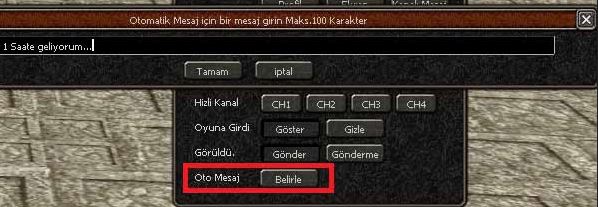
Oyun Seçeneklerine Oto Mesaj Ekleme [Python]
Metin2 özel sunucularında oyun içi deneyimi zenginleştirmek için bazı otomatik mesaj sistemleri oldukça faydalıdır. Bu yazıda, oyuncuların belirli eylemleri sırasında sistem tarafından otomatik olarak mesaj gönderilmesini sağlayan bir Python tabanlı sistemden bahsedeceğiz. Bu sistem özellikle oyun seçeneği menüsüne entegre edilebilir ve oyunculara anlık bilgi veya uyarı mesajları gönderebilir.
Neden Otomatik Mesaj Sistemi?
Metin2 özel sunucularında oyuncu etkileşimi ve deneyim kalitesi oldukça önemlidir. Özellikle turnuvalar, PvP sistemleri veya özel etkinlikler gibi durumlarda, oyuncuların dikkatini çekmek ve onlara anlık bilgi vermek için sistemsel mesajlar göndermek çok işe yarar. Bu mesajlar, örneğin bir turnuvanın başladığını, bir boss’un spawn olduğunu ya da bir sunucu güncellemesi yapıldığını duyurmak için kullanılabilir.
Python ile Geliştirilen Oto-Mesaj Sistemi
Python, özellikle GUI (Grafik Kullanıcı Arayüzü) oluşturma konusunda oldukça güçlüdür. Bu sayede, oyuncuların oyun içi menüye erişim sırasında tetiklenecek olan mesaj sistemini Python kullanarak geliştirebiliriz. PyQt veya Tkinter gibi kütüphaneler yardımıyla arayüz tarafını kolayca tasarlayabiliriz.
Sistem Nasıl Çalışır?
Otomatik mesaj sistemi, oyuncu oyun menüsünden belirli bir seçeneğe tıkladığında devreye girer. Bu sistem, önceden tanımlanmış bir mesaj listesinden rastgele ya da sırayla mesajları alarak, oyun penceresinde bir popup veya oyun içi chat üzerinden gösterir. Bu işlem, Python ile yazılmış bir modül tarafından kontrol edilir ve oyun sunucusuyla senkronize çalışır.
Uygulama Adımları
1. Python GUI Tasarımı: Tkinter veya PyQt kullanarak basit bir arayüz oluşturun. Bu arayüzde oyun seçenekleri arasında bir buton yerleştirin.
2. Mesaj Listesi Tanımı: Python üzerinde bir mesaj listesi tanımlayın. Örnek:
Kod:
messages = ['Turnuva başladı!', 'Boss spawn oldu!', 'Yeni özellik eklendi!']3. Buton Tetikleme: Butona tıklandığında rastgele bir mesaj seçip oyun içi chat'e yazdırın.
4. Entegrasyon:[/COORD] Bu modülü Metin2 client tarafına entegre ederek, oyuncuların menüden seçtikleri anda mesajı almasını sağlayın.
Avantajları
- Oyuncu etkileşimini artırır.
- Sunucu duyurularını daha etkili yapar.
- Oyun içi deneyimi kişiselleştirir.
Sonuç
Metin2 özel sunucularında Python ile geliştirilen otomatik mesaj sistemleri, hem oyun içi etkileşimi artırır hem de yöneticilerin oyunculara hızlıca ulaşmasını sağlar. Bu sistem, doğru uygulandığında hem teknik hem de oynanış açısından ciddi bir değer katacaktır. Dilerseniz örnek Python kodlarını ve entegrasyon süreçlerini forumumuzda paylaşabilirsiniz.
Metin2 Lobby - Özel Sunucu Geliştirme
Adding Auto Messages to Game Options [Python]
In Metin2 private servers, enhancing the in-game experience with certain auto-message systems can be highly beneficial. In this article, we will discuss an automatic message system based on Python that sends messages to players during specific actions. This system can be integrated into the game options menu to deliver real-time notifications or warnings to players.
Why Use an Auto-Message System?
Player engagement and experience quality are very important in Metin2 private servers. Especially during tournaments, PvP events, or special activities, sending systematic notifications to attract player attention and provide instant updates can be extremely useful. These messages can announce events such as tournament starts, boss spawns, or server updates.
Auto-Message System Developed with Python
Python is particularly powerful in GUI (Graphical User Interface) creation. Thus, you can develop a message system triggered when players access in-game menus using Python. With libraries like PyQt or Tkinter, designing the interface becomes straightforward.
How Does the System Work?
The auto-message system activates when a player clicks a specific option from the in-game menu. The system selects a random or sequential message from a predefined list and displays it either as a pop-up or through the in-game chat. This process is controlled by a Python module and operates in sync with the game server.
Implementation Steps
1. Python GUI Design: Create a simple interface using Tkinter or PyQt. Place a button among the game options.
2. Define Message List: Define a list of messages in Python. Example:
Kod:
messages = ['Tournament started!', 'Boss has spawned!', 'New feature added!']3. Button Trigger: Upon clicking the button, randomly select a message and print it to the in-game chat.
4. Integration: Integrate this module into the Metin2 client so that players receive the message instantly upon selecting the option from the menu.
Benefits
- Increases player interaction.
- Delivers server announcements more effectively.
- Personalizes the in-game experience.
Conclusion
Auto-message systems developed with Python in Metin2 private servers enhance both in-game interactions and allow administrators to reach players quickly. When applied correctly, such systems add significant value in both technical and gameplay aspects. You can share sample Python codes and integration processes on our forum for further assistance.
Metin2 Lobby - Private Server Development

