

Root game.py açılır.
import chat aratılır altına:
eklenir.

import chat aratılır altına:
Kod:
import eventtestAlignment = 0 aratılır altına:
Kod:
[COLOR=#333333][I]BPisLodaded = 0[/I][/COLOR]
from _weakref import proxy aratılır altına:
Kod:
from switchbot import Boteklenir.

self.__ProcessPreservedServerCommand() aratılır altına:
Kod:
self.switchbot = Bot() self.switchbot.Hide()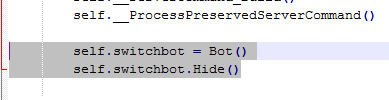
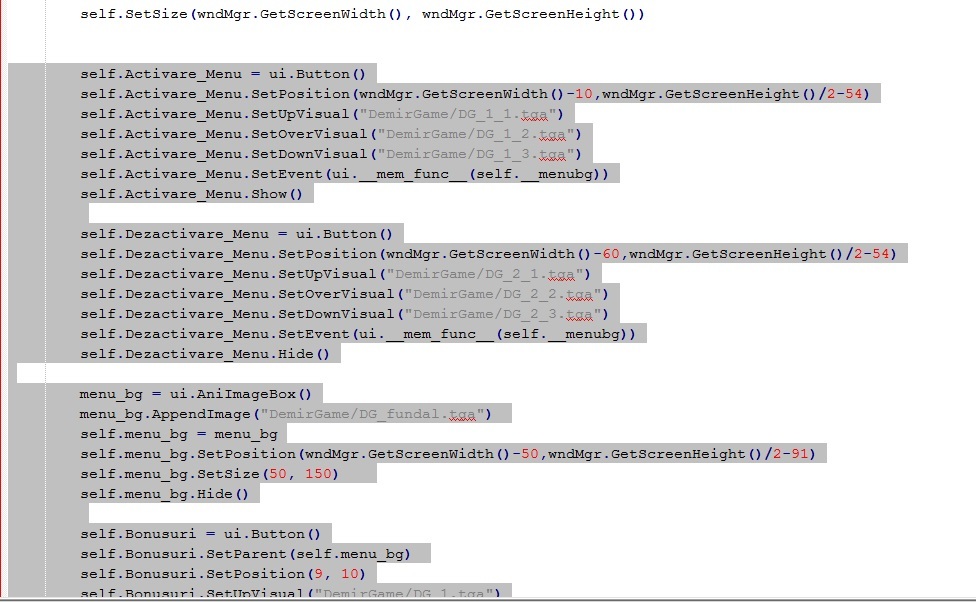
self.SetSize(wndMgr.GetScreenWidth(), wndMgr.GetScreenHeight()) aratılır altına bosluk:
Kod:
self.Activare_Menu = ui.Button() self.Activare_Menu.SetPosition(wndMgr.GetScreenWidth()-10,wndMgr.GetScreenHeight()/2-54) self.Activare_Menu.SetUpVisual("DemirGame/DG_1_1.tga") self.Activare_Menu.SetOverVisual("DemirGame/DG_1_2.tga") self.Activare_Menu.SetDownVisual("DemirGame/DG_1_3.tga") self.Activare_Menu.SetEvent(ui.__mem_func__(self.__menubg)) self.Activare_Menu.Show() self.Dezactivare_Menu = ui.Button() self.Dezactivare_Menu.SetPosition(wndMgr.GetScreenWidth()-60,wndMgr.GetScreenHeight()/2-54) self.Dezactivare_Menu.SetUpVisual("DemirGame/DG_2_1.tga") self.Dezactivare_Menu.SetOverVisual("DemirGame/DG_2_2.tga") self.Dezactivare_Menu.SetDownVisual("DemirGame/DG_2_3.tga") self.Dezactivare_Menu.SetEvent(ui.__mem_func__(self.__menubg)) self.Dezactivare_Menu.Hide() menu_bg = ui.AniImageBox() menu_bg.AppendImage("DemirGame/DG_fundal.tga") self.menu_bg = menu_bg self.menu_bg.SetPosition(wndMgr.GetScreenWidth()-50,wndMgr.GetScreenHeight()/2-91) self.menu_bg.SetSize(50, 150) self.menu_bg.Hide() self.Bonusuri = ui.Button() self.Bonusuri.SetParent(self.menu_bg) self.Bonusuri.SetPosition(9, 10) self.Bonusuri.SetUpVisual("DemirGame/DG_1.tga") self.Bonusuri.SetOverVisual("DemirGame/DG_2.tga") self.Bonusuri.SetDownVisual("DemirGame/DG_1.tga") self.Bonusuri.SetEvent(ui.__mem_func__(self.__BonusPage)) self.Bonusuri.Show() self.Switch = ui.Button() self.Switch.SetParent(self.menu_bg) self.Switch.SetPosition(9, 42) self.Switch.SetUpVisual("DemirGame/DG_3.tga") self.Switch.SetOverVisual("DemirGame/DG_4.tga") self.Switch.SetDownVisual("DemirGame/DG_3.tga") self.Switch.SetEvent(ui.__mem_func__(self.__uiswitchbonus)) self.Switch.Show() self.Depozit = ui.Button() self.Depozit.SetParent(self.menu_bg) self.Depozit.SetPosition(9, 74) self.Depozit.SetUpVisual("DemirGame/DG_5.tga") self.Depozit.SetOverVisual("DemirGame/DG_6.tga") self.Depozit.SetDownVisual("DemirGame/DG_5.tga") self.Depozit.SetEvent(self.__activare_depozit) self.Depozit.Show() self.AntiExp = ui.Button() self.AntiExp.SetParent(self.menu_bg) self.AntiExp.SetPosition(9, 106) self.AntiExp.SetUpVisual("DemirGame/DG_7.tga") self.AntiExp.SetOverVisual("DemirGame/DG_8.tga") self.AntiExp.SetDownVisual("DemirGame/DG_7.tga") self.AntiExp.SetEvent(self.__activare_antiexp) self.AntiExp.Show() self.Teleporter = ui.Button() self.Teleporter.SetParent(self.menu_bg) self.Teleporter.SetPosition(9, 138) self.Teleporter.SetUpVisual("DemirGame/DG_9.tga") self.Teleporter.SetOverVisual("DemirGame/DG_10.tga") self.Teleporter.SetDownVisual("DemirGame/DG_9.tga") self.Teleporter.SetEvent(self.__activare_teleporter) self.Teleporter.Show()eklenir.
chat.Close() aratılır altına:
Kod:
self.menu_bg.Hide() self.Dezactivare_Menu.Hide() self.Activare_Menu.Hide()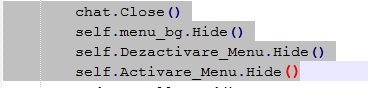
"DayMode" : self.__DayMode_Update, aratılır altına:
Kod:
"depozit_index" :self.__depozit_questindex, "antiexp_index" :self.__antiexp_questindex, "teleporter_index" :self.__teleporter_questindex,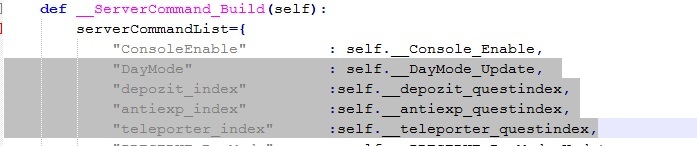
en alta gelip boşluk:
Kod:
# DemirGame Buton def __menubg(self): if constInfo.MENU_BG == 0: constInfo.MENU_BG = 1 self.menu_bg.Show() self.Activare_Menu.Hide() self.Dezactivare_Menu.Show() else: constInfo.MENU_BG = 0 self.menu_bg.Hide() self.Activare_Menu.Show() self.Dezactivare_Menu.Hide() def __BonusPage(self): import PaginaBonusuri global BPisLodaded try: if BPisLodaded == 0: BPisLodaded = 1 exec 'PaginaBonusuri.BonusBoardDialog().Show()' else: exec 'PaginaBonusuri.BonusBoardDialog().Hide()' BPisLodaded = 0 except ImportError: import dbg,app dbg.Trace('PaginaBonusuri.py Importing error') app.Abort def __uiswitchbonus(self): if self.switchbot.Vectors_bot_shown == 1: self.switchbot.Hide() else: self.switchbot.Show() def __depozit_questindex(self, value): constInfo.DEPOZIT_QUESTINDEX = int(value) def __activare_depozit(self): activare_depozit = constInfo.DEPOZIT_QUESTINDEX event.QuestButtonClick(activare_depozit) def __antiexp_questindex(self, value1): constInfo.ANTIEXP_QUESTINDEX = int(value1) def __activare_antiexp(self): activare_antiexp = constInfo.ANTIEXP_QUESTINDEX event.QuestButtonClick(activare_antiexp) def __teleporter_questindex(self, value2): constInfo.TELEPORTER_QUESTINDEX = int(value2) def __activare_teleporter(self): activare_teleporter = constInfo.TELEPORTER_QUESTINDEX event.QuestButtonClick(activare_teleporter) # DemirGame Buton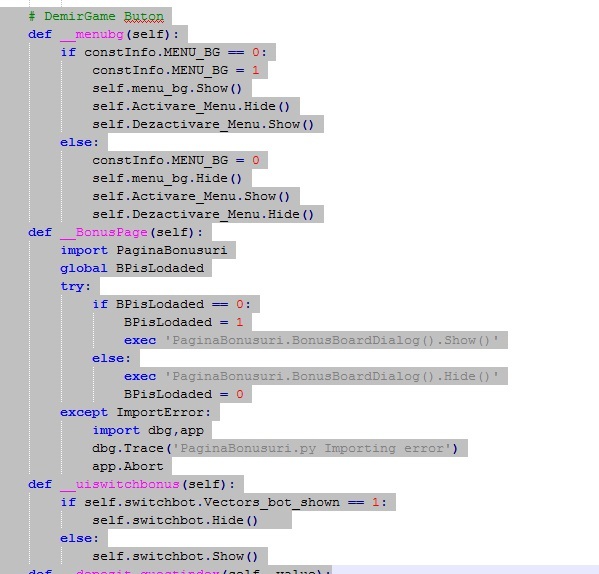
Root constinfo.py açılır.
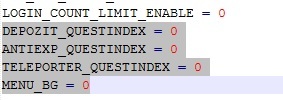
LOGIN_COUNT_LIMIT_ENABLE = 0 aratılır altına:
Kod:
DEPOZIT_QUESTINDEX = 0 ANTIEXP_QUESTINDEX = 0 TELEPORTER_QUESTINDEX = 0 MENU_BG = 0eklenir.
Root ui.py açılır.
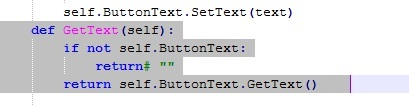
self.ButtonText.SetText(text) aratılır altına:
Kod:
def GetText(self): if not self.ButtonText: return# "" return self.ButtonText.GetText()eklenir.
Çoğu kişini aradığı bi sistemmiş bu günde boş zamanım vardı ve paylaşmak istedim.
indirdiginiz klasördeki
"demirgame" klasörü
"switchbot.py"
"paginabonusuri.py"
Root'un içine atın.
quest klasöründeki questleri atın ve okutun ardından reboot atın. olmassa quest.listesine ekleyin isimlerini sh mahe.sh çekin.
anti exp buton
depo açma buton
ışınlanma buton
efsun botu buton
bonus tablosu buton
eklidir.
Oyun içinden görüntü:

Ziyaretçiler için gizlenmiş link,görmek için üye olmalısınız!
Giriş yap veya üye ol.

Ziyaretçiler için gizlenmiş link,görmek için üye olmalısınız!
Giriş yap veya üye ol.
Metin2 Özel Sunucularında Python Kullanımı: Çoklu Buton Sistemi
Giriş
Metin2 özel sunucularında kullanıcı arayüzü geliştirmek, oyuncu deneyimini doğrudan etkileyen önemli bir alandır. Özellikle PvP sunucularında, oyuncuların hızlıca erişebildiği butonlar, sistemler ve menüler tasarlamak kritik önem taşır. Bu bağlamda, Python tabanlı GUI sistemleri, özellikle #DemirGame geliştiricileri tarafından sıklıkla tercih edilmektedir. Bu yazıda, Python kullanarak çoklu buton sistemi nasıl oluşturulur ve Metin2 özel sunucularına entegre edilir, detaylıca ele alınacaktır.
Python GUI ve Uiscript Nedir?
Python ile Metin2 arayüz geliştirme, genellikle uiscript dosyaları üzerinden yapılır. Bu dosyalar, oyunculara gösterilecek arayüzleri tanımlamak için kullanılır. Py Root klasöründe bulunan bu scriptler, hem görsel hem de fonksiyonel olarak arayüzlerin kontrolünü sağlar. #DemirGame gibi sistemlerde, butonlar, menüler ve eylem tetiklemeleri bu yapılarla yapılır.
Çoklu Buton Sistemi Nedir?
Çoklu buton sistemi, oyuncuya belirli bir alanda birden fazla işlev sunan butonların yer aldığı bir arayüzdür. Örneğin, PvP etkinliklerinde hızlı savaş komutları, envanter kısayolları veya sunucu içi özel sistemlere erişim için kullanılabilir. Bu sistemler genellikle Python ile yazılmış GUI sınıflarıyla yönetilir ve uiscript üzerinden görselleştirilir.
Python ile Çoklu Buton Sistemi Oluşturmak
Python tabanlı bir çoklu buton sistemi oluşturmak için öncelikle bir window class tanımlanmalıdır. Bu sınıf, butonların pozisyonlarını, boyutlarını ve tıklama eylemlerini içerir. Py Root altında yer alan uiscript dosyası, bu sınıfa referans ederek butonları oyuna entegre eder. #DemirGame geliştiricileri, bu yapıyı genellikle PvP sistemlerinde, özel komut butonları veya turnuva menüleri için kullanırlar.
Butonlara Fonksiyon Atamak
Her butona özel bir fonksiyon atanabilir. Bu fonksiyonlar, örneğin bir komutu çalıştırmak, bir menüyü açmak veya PvP statüsünü değiştirmek gibi işlemleri gerçekleştirebilir. Python scriptleri sayesinde bu tür işlemler kolayca yönetilebilir. Metin2 Lobby sistemlerinde, bu yapılar genellikle pack dosyalarıyla birlikte dağıtılmaktadır.
Python GUI ile Yetenek ve PvP Sistemleri
#DemirGame tarzı sistemlerde, PvP etkileşimleri için özel butonlar oldukça yaygındır. Bu butonlar sayesinde oyuncular, hızlıca eşleşmeler yapabilir, turnuvalara katılabilir veya özel yetenek sistemlerine erişebilir. Python GUI sayesinde bu butonlar hem görsel olarak şık hem de işlevsel hale getirilebilir. Metin2 Development sürecinde bu tür yapılar, hem oyun içi hem de sunucu yönetiminde büyük kolaylık sağlar.
Sonuç
#DemirGame gibi sistemlerde, Python ile çoklu buton sistemleri oluşturmak, oyuncu etkileşimini ve sunucu yönetimini kolaylaştırır. Py Root, uiscript ve özel GUI sınıfları kullanarak bu sistemleri hızlıca entegre edebilirsiniz. Metin2 Lobby gibi platformlarda, bu tür gelişmiş sistemlerin kullanımı giderek yaygınlaşmaktadır. C++ System ile birlikte çalışan bu yapılar, hem teknik hem de estetik açıdan güçlü çözümler sunar.
Using Python in Metin2 Private Servers: Multi Button System
Introduction
Improving user interfaces in Metin2 private servers directly impacts player experience. Especially on PvP servers, designing quick-access buttons, systems, and menus for players is critically important. In this context, Python-based GUI systems are frequently preferred by developers such as those working on #DemirGame. This article will detail how to create a multi button system using Python and integrate it into Metin2 private servers.
What is Python GUI and Uiscript?
Python based UI development in Metin2 usually occurs through uiscript files. These files define the interfaces shown to players. Located within the Py Root folder, these scripts manage both visual and functional aspects of the interface. In systems like #DemirGame, buttons, menus, and action triggers are implemented using these structures.
What is a Multi Button System?
A multi button system is an interface where multiple functional buttons are available to the player in a specific area. For example, they can be used for quick combat commands during PvP events, inventory shortcuts, or access to special in-game systems. These systems are typically managed with GUI classes written in Python and visualized via uiscript.
Creating a Multi Button System with Python
To create a multi button system based on Python, you first need to define a window class. This class includes the positions, sizes, and click actions of the buttons. The uiscript file located under Py Root integrates these buttons into the game by referencing this class. Developers of #DemirGame type systems often use this structure for PvP systems, special command buttons, or tournament menus.
Assigning Functions to Buttons
Each button can have its own assigned function. These functions may execute commands, open menus, or change PvP status. With Python scripts, such operations can be easily managed. On Metin2 Lobby systems, these structures are commonly distributed together with pack files.
Python GUI for Skill and PvP Systems
In systems similar to #DemirGame, special buttons for PvP interactions are quite common. These buttons allow players to quickly match, join tournaments, or access special skill systems. With Python GUI, these buttons can become both visually appealing and functional. In Metin2 Development, such structures provide significant convenience both in-game and for server management.
Conclusion
In systems like #DemirGame, creating multi button systems with Python enhances player interaction and simplifies server management. You can quickly integrate these systems using Py Root, uiscript, and custom GUI classes. On platforms like Metin2 Lobby, the use of such advanced systems is becoming increasingly common. Structures that work alongside C++ System offer powerful solutions both technically and aesthetically.
