

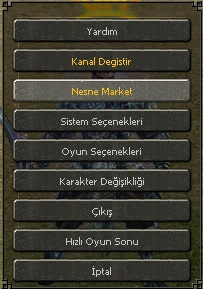
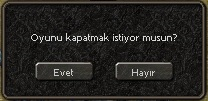
root / uisystem.py açılır importlara eklenir.
Kod:
import uiCommonaratılır.
Kod:
def __ClickExitButton(self):kod bloğu tamamen değiştirilir.
Kod:
def __ClickExitButton(self): self.Close() questionDialog = uiCommon.QuestionDialogHizliCikis() # questionDialog.SetText2(localeInfo.HIZLI_CIKIS_BILGILENDIRME) questionDialog.SetText("Oyunu kapatmak istiyor musun?") questionDialog.SetAcceptEvent(ui.__mem_func__(self.__EvetKapat)) questionDialog.SetCancelEvent(ui.__mem_func__(self.__HayirKapatma)) questionDialog.Open() self.questionDialog = questionDialog def __EvetKapat(self): app.Exit() def __HayirKapatma(self): self.questionDialog.Close()root / uicommon.py açılır. ve aratılır
Kod:
class QuestionDialogItem(ui.ScriptWindow):Kod bloğunun altına bu blok eklenir.
Kod:
class QuestionDialogHizliCikis(ui.ScriptWindow): def __init__(self): ui.ScriptWindow.__init__(self) self.__CreateDialog() def __del__(self): ui.ScriptWindow.__del__(self) def __CreateDialog(self): pyScrLoader = ui.PythonScriptLoader() pyScrLoader.LoadScriptFile(self, "uiscript/questiondialog_hizlicikis.py") self.board = self.GetChild("board") # self.textLine2 = self.GetChild("message_duello") self.textLine = self.GetChild("message") self.acceptButton = self.GetChild("accept") self.cancelButton = self.GetChild("cancel") def Open(self): self.SetCenterPosition() self.SetTop() self.Show() def Close(self): self.Hide() def SetWidth(self, width): height = self.GetHeight() self.SetSize(width, height) self.board.SetSize(width, height) self.SetCenterPosition() self.UpdateRect() def SAFE_SetAcceptEvent(self, event): self.acceptButton.SAFE_SetEvent(event) def SAFE_SetCancelEvent(self, event): self.cancelButton.SAFE_SetEvent(event) def SetAcceptEvent(self, event): self.acceptButton.SetEvent(event) def SetCancelEvent(self, event): self.cancelButton.SetEvent(event) def SetText(self, text): self.textLine.SetText(text) # def SetText2(self, text): # self.textLine2.SetText(text) def SetAcceptText(self, text): self.acceptButton.SetText(text) def SetCancelText(self, text): self.cancelButton.SetText(text) def OnPressEscapeKey(self): self.Close() return TRUElocale_tr / locale_interface.txt açılır ve aratılır
Kod:
SYSTEM_EXIT Oyun Sonudeğiştirilir.
Kod:
SYSTEM_EXIT Hızlı Oyun SonuSon olarak vereceğim indirme linkindeki dosya uiscript'in içine atılır !
LİNK:
Ziyaretçiler için gizlenmiş link,görmek için üye olmalısınız!
Giriş yap veya üye ol.
VT:
Python ile Hızlı Oyun Sonu Sistemi
Metin2 özel sunucularında geliştirme yaparken, oyuncuların oyun sonundaki deneyimini optimize etmek oldukça önemlidir. Bu bağlamda, hızlı ve etkili bir oyun sonu sistemi (Quick Game End System), hem PvP sistemlerinde hem de turnuvalarda büyük avantaj sağlar. Bu yazıda, Python diliyle yazılmış ve Metin2 özel sunucularında entegre edilebilecek bir hızlı oyun sonu sistemi üzerinde duracağız.
Sistem Nedir?
Oyun sonu sistemi, bir maçın ya da PvP dövüşünün belirli kriterlere göre otomatik olarak sonlandırılmasıdır. Bu sistem sayesinde oyuncular, uzun süren ya da çıkmaza giren savaşlardan kurtulabilir ve yeni mücadelelere daha hızlı geçiş yapabilir. Özellikle turnuva modlarında bu özellik büyük kolaylık sağlar.
Python ile Geliştirme
Python, özellikle GUI (Grafiksel Kullanıcı Arayüzü) ve backend işlemleri için idealdir. Metin2 özel sunucularında genellikle uiscript ve py root dosyaları ile istemci tarafında arayüz oluşturulur. Bu sistemde, Python GUI kullanılarak kullanıcı dostu bir panel tasarlanabilir. Bu panel üzerinden oyun sonu komutları verilebilir, sayaçlar takip edilebilir ve PvP aktiviteleri yönetilebilir.
Python Kod Yapısı
Python scripti, genellikle game core ile entegre çalışır. Oyun içinde belirlenen bir sayaç veya can puanı eşik değerine ulaşıldığında, sistem otomatik olarak oyunu sonlandırabilir. Örneğin:
if player_hp <= 0 or timer <= 0:
end_game_immediately()
Bu tür bir yapı, source edit ile oyun sunucusuna entegre edilerek, gerçek zamanlı olarak PvP karşılaşmalarında kullanılabilir.
Özel Sunucular İçin Avantajlar
Metin2 özel sunucularında, PvP sistemleri her zaman popülerdir. Ancak bazı maçlar uzun sürdüğü için oyuncuların ilgisini kaybetmesine neden olabilir. Hızlı oyun sonu sistemi ile:
- Süre bitmeden eşik değerlerine göre oyun bitebilir.
- Turnuva sistemleri daha verimli çalışır.
- Oyuncu memnuniyeti artar.
- Sunucu performansı optimize edilir.
Kurulum ve Entegrasyon
Python tabanlı bu sistem, server src ile uyumlu olacak şekilde düzenlenmelidir. Özellikle auth ve game server yapılarına dokunmadan sadece oyun içi komutlarla çalışacak şekilde tasarlanmalıdır. Ayrıca pack dosyalarına uygun şekilde client tarafına entegre edilmelidir. Bu işlem sırasında martysama gibi bilinen kaynaklardan yararlanmak faydalı olabilir.
Sonuç
Python ile yazılmış hızlı oyun sonu sistemi, Metin2 özel sunucularında hem teknik hem de deneyimsel açıdan büyük faydalar sağlar. Geliştiriciler için esnek, kullanıcılar için keyifli bir yapıdır. Bu sistemle birlikte PvP ve turnuva sistemleriniz daha profesyonel hale gelir.
Quick Game End System with Python
When developing for Metin2 private servers, optimizing the player experience at the end of a match is crucial. In this context, a quick and effective game end system provides significant advantages in both PvP systems and tournaments. In this article, we will focus on a quick game end system written in Python and designed for integration into Metin2 private servers.
What Is This System?
The game end system refers to automatically ending a match or PvP battle based on certain criteria. This system allows players to exit prolonged or stalemate battles and transition more quickly into new fights. Especially in tournament modes, this feature offers great convenience.
Development with Python
Python is ideal especially for GUI (Graphical User Interface) and backend operations. On Metin2 private servers, uiscript and py root files are generally used to create interfaces on the client side. Within this system, a user-friendly panel can be designed using Python GUI. Through this panel, game-end commands can be issued, timers monitored, and PvP activities managed.
Python Code Structure
The Python script typically works integrated with the game core. When a specific threshold such as a countdown or health value is reached within the game, the system can automatically end the match. For example:
if player_hp <= 0 or timer <= 0:
end_game_immediately()
Such a structure can be integrated into the game server through source edit and used in real-time PvP encounters.
Benefits for Private Servers
PvP systems are always popular on Metin2 private servers. However, some matches can last too long, causing players to lose interest. With a quick game end system:
- Matches can end before the timer runs out based on threshold values.
- Tournament systems operate more efficiently.
- Player satisfaction increases.
- Server performance is optimized.
Installation and Integration
This Python-based system should be configured to work compatibly with server src. It must be designed to operate solely via in-game commands without interfering with auth and game server structures. Additionally, it needs to be integrated properly into client-side pack files. During this process, utilizing known resources like martysama can be beneficial.
Conclusion
A quick game end system written in Python offers significant technical and experiential benefits for Metin2 private servers. It provides a flexible solution for developers and an enjoyable structure for users. With this system, your PvP and tournament systems become more professional.
Ziyaretçiler için gizlenmiş link,görmek için üye olmalısınız!
Giriş yap veya üye ol.
Python ile Hızlı Oyun Sonu Sistemi
Metin2 özel sunucularında geliştirme yaparken, oyuncuların oyun sonundaki deneyimini optimize etmek oldukça önemlidir. Bu bağlamda, hızlı ve etkili bir oyun sonu sistemi (Quick Game End System), hem PvP sistemlerinde hem de turnuvalarda büyük avantaj sağlar. Bu yazıda, Python diliyle yazılmış ve Metin2 özel sunucularında entegre edilebilecek bir hızlı oyun sonu sistemi üzerinde duracağız.
Sistem Nedir?
Oyun sonu sistemi, bir maçın ya da PvP dövüşünün belirli kriterlere göre otomatik olarak sonlandırılmasıdır. Bu sistem sayesinde oyuncular, uzun süren ya da çıkmaza giren savaşlardan kurtulabilir ve yeni mücadelelere daha hızlı geçiş yapabilir. Özellikle turnuva modlarında bu özellik büyük kolaylık sağlar.
Python ile Geliştirme
Python, özellikle GUI (Grafiksel Kullanıcı Arayüzü) ve backend işlemleri için idealdir. Metin2 özel sunucularında genellikle uiscript ve py root dosyaları ile istemci tarafında arayüz oluşturulur. Bu sistemde, Python GUI kullanılarak kullanıcı dostu bir panel tasarlanabilir. Bu panel üzerinden oyun sonu komutları verilebilir, sayaçlar takip edilebilir ve PvP aktiviteleri yönetilebilir.
Python Kod Yapısı
Python scripti, genellikle game core ile entegre çalışır. Oyun içinde belirlenen bir sayaç veya can puanı eşik değerine ulaşıldığında, sistem otomatik olarak oyunu sonlandırabilir. Örneğin:
if player_hp <= 0 or timer <= 0:
end_game_immediately()
Bu tür bir yapı, source edit ile oyun sunucusuna entegre edilerek, gerçek zamanlı olarak PvP karşılaşmalarında kullanılabilir.
Özel Sunucular İçin Avantajlar
Metin2 özel sunucularında, PvP sistemleri her zaman popülerdir. Ancak bazı maçlar uzun sürdüğü için oyuncuların ilgisini kaybetmesine neden olabilir. Hızlı oyun sonu sistemi ile:
- Süre bitmeden eşik değerlerine göre oyun bitebilir.
- Turnuva sistemleri daha verimli çalışır.
- Oyuncu memnuniyeti artar.
- Sunucu performansı optimize edilir.
Kurulum ve Entegrasyon
Python tabanlı bu sistem, server src ile uyumlu olacak şekilde düzenlenmelidir. Özellikle auth ve game server yapılarına dokunmadan sadece oyun içi komutlarla çalışacak şekilde tasarlanmalıdır. Ayrıca pack dosyalarına uygun şekilde client tarafına entegre edilmelidir. Bu işlem sırasında martysama gibi bilinen kaynaklardan yararlanmak faydalı olabilir.
Sonuç
Python ile yazılmış hızlı oyun sonu sistemi, Metin2 özel sunucularında hem teknik hem de deneyimsel açıdan büyük faydalar sağlar. Geliştiriciler için esnek, kullanıcılar için keyifli bir yapıdır. Bu sistemle birlikte PvP ve turnuva sistemleriniz daha profesyonel hale gelir.
Quick Game End System with Python
When developing for Metin2 private servers, optimizing the player experience at the end of a match is crucial. In this context, a quick and effective game end system provides significant advantages in both PvP systems and tournaments. In this article, we will focus on a quick game end system written in Python and designed for integration into Metin2 private servers.
What Is This System?
The game end system refers to automatically ending a match or PvP battle based on certain criteria. This system allows players to exit prolonged or stalemate battles and transition more quickly into new fights. Especially in tournament modes, this feature offers great convenience.
Development with Python
Python is ideal especially for GUI (Graphical User Interface) and backend operations. On Metin2 private servers, uiscript and py root files are generally used to create interfaces on the client side. Within this system, a user-friendly panel can be designed using Python GUI. Through this panel, game-end commands can be issued, timers monitored, and PvP activities managed.
Python Code Structure
The Python script typically works integrated with the game core. When a specific threshold such as a countdown or health value is reached within the game, the system can automatically end the match. For example:
if player_hp <= 0 or timer <= 0:
end_game_immediately()
Such a structure can be integrated into the game server through source edit and used in real-time PvP encounters.
Benefits for Private Servers
PvP systems are always popular on Metin2 private servers. However, some matches can last too long, causing players to lose interest. With a quick game end system:
- Matches can end before the timer runs out based on threshold values.
- Tournament systems operate more efficiently.
- Player satisfaction increases.
- Server performance is optimized.
Installation and Integration
This Python-based system should be configured to work compatibly with server src. It must be designed to operate solely via in-game commands without interfering with auth and game server structures. Additionally, it needs to be integrated properly into client-side pack files. During this process, utilizing known resources like martysama can be beneficial.
Conclusion
A quick game end system written in Python offers significant technical and experiential benefits for Metin2 private servers. It provides a flexible solution for developers and an enjoyable structure for users. With this system, your PvP and tournament systems become more professional.
