

İNDİR:
Ziyaretçiler için gizlenmiş link,görmek için üye olmalısınız!
Giriş yap veya üye ol.
VT:
Ziyaretçiler için gizlenmiş link,görmek için üye olmalısınız!
Giriş yap veya üye ol.
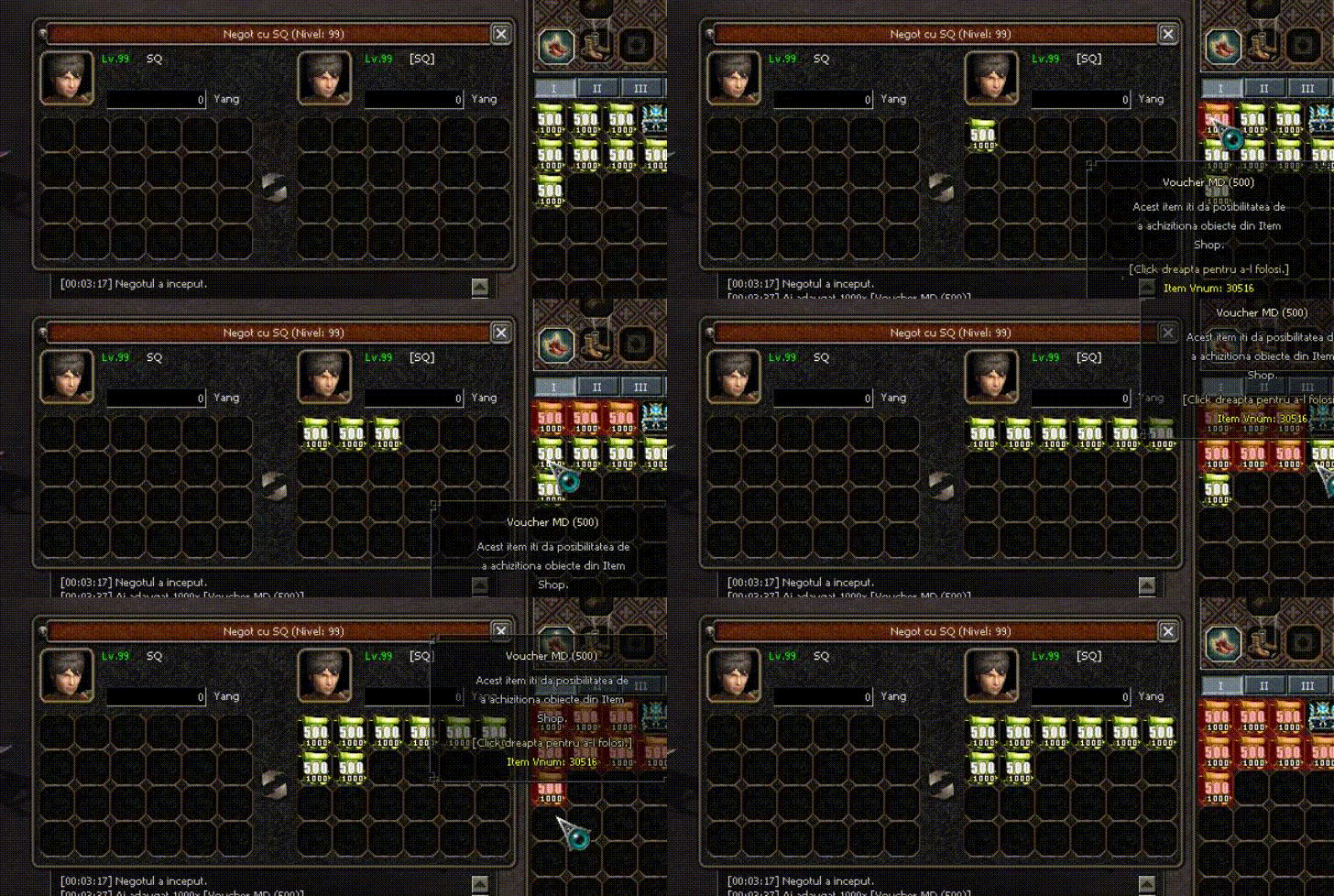
Sağ Tık İle Ticarete İtem Ekleme
Metin2 özel sunucularında kullanıcı deneyimini artırmak için birçok geliştirici, oyuncuların daha kolay ve hızlı işlemler yapabilmesi için farklı yollar arayışına girer. Bu yollardan birisi de sağ tık menüsüne özel fonksiyonlar eklemektir. Özellikle sağ tık ile ticarete item ekleme işlemi, oyuncuların eşyalarını hızlıca alıcıya aktarabilmesi açısından oldukça faydalıdır. Bu yazıda, Metin2 özel sunucu geliştirme sürecinde nasıl sağ tık ile ticarete item ekleneceğini adım adım anlatacağız.
Neden Sağ Tık ile Ticarete Item Eklenmeli?
Oyuncuların bazı eşyaları hızlıca satmak veya takas yapmak istemesi oldukça doğal bir durumdur. Normalde Metin2'de bir itemi ticarete eklemek için sol tıkla seçip, ardından ticaret penceresine sürüklemek gerekir. Ancak sağ tık menüsüne bu özelliği entegre ederek kullanıcı dostu bir sistem oluşturabilirsiniz. Bu sayede hem oyun içi akış daha hızlı olur hem de oyuncu memnuniyeti artar.
Geliştirme Ortamı ve Gerekli Dosyalar
Bu işlem için öncelikle client side üzerinde değişiklik yapılması gerekir. Gerekli dosyalar şunlardır:
- uiscript/InventoryWindow.py
- root/interfacemodule.py
- gamecore üzerinden gelen item tıklama işlemleri için C++ tarafında gerekli tanımların yapılması.
Python GUI Tarafında Sağ Tık Menüsü Tanımı
PyRoot ve UIScript dosyalarında, sağ tıklanan item için bir menü açılıp 'Ticarete Ekle' komutu eklenmelidir. Örneğin, inventorywindow.py dosyasında sağ tıklama event'ı yakalanmalı ve menüye yeni bir buton eklenmelidir. Bu buton, seçilen itemi doğrudan ticaret penceresine gönderir.
Örnek Kod Yapısı:
def OnMouseRightButtonUp(self, x, y):
if self.__CheckInventoryLock(): return
selectedSlot = self.GetSlotNumber(x, y)
if selectedSlot != -1:
self.__ShowTradeMenu(selectedSlot)
Sunucu Tarafında (Game Server Side) İşlemler
Game server tarafında da bu işlemi karşılayan bir fonksiyon yazılmalıdır. Bu fonksiyon, client tarafından gelen isteğe göre itemi doğru şekilde ticaret penceresine yönlendirir. Burada dikkat edilmesi gereken güvenlik önlemleri ve item validasyonudur. C++ tabanlı sunucularda, pack dosyaları üzerinden bu fonksiyon çağrısı yapılmalıdır. Ayrıca, Martysama gibi popüler sistemlerle uyumlu çalışması sağlanmalıdır.
Metin2 Compile ve Test Süreci
Değişiklikler yapıldıktan sonra Metin2 compile işlemi gerçekleştirilmeli ve test sunucusunda bu özellik kontrol edilmelidir. Hatalar ayıklanmalı ve kullanıcıya sunulmadan önce tüm güvenlik kontrolleri yapılmalıdır. Oyuncuların bu sistemi kullanırken yaşayabileceği herhangi bir sorun olmamalıdır.
Sonuç
Metin2 özel sunucularında kullanıcı dostu özellikler eklemek, oyuncu sadakati ve sunucu popülerliğini artırır. Sağ tık ile ticarete item ekleme sistemi, hem kolay hem de etkili bir yöntemdir. Bu tip geliştirmeler, source edit ve server programming bilgisi gerektirse de, uygulanması durumunda büyük faydalar sağlar.
Adding Items to Trade via Right Click
In Metin2 private servers, many developers seek different methods to enhance the user experience by enabling players to perform actions more easily and quickly. One such method is adding custom functions to the right-click menu. Particularly, adding items to trade via right click is highly beneficial for players who wish to transfer items to buyers rapidly. In this article, we will explain step-by-step how to implement this functionality within the Metin2 private server development process.
Why Add Items to Trade via Right Click?
It's quite natural for players to want to sell or trade certain items quickly. By default, in Metin2, players must left-click an item and drag it into the trade window. However, integrating this feature into the right-click menu allows for a more user-friendly system. This speeds up in-game flow and enhances player satisfaction.
Development Environment and Required Files
This modification requires changes on the client side. The necessary files are:
- uiscript/InventoryWindow.py
- root/interfacemodule.py
- Necessary definitions on the C++ side for item-click events handled by gamecore.
Defining Right-Click Menu in Python GUI
In PyRoot and UIScript files, a menu should be created upon right-clicking an item, including an option like 'Add to Trade'. For example, in the inventorywindow.py file, the right-click event should be captured and a button added to the menu that sends the selected item directly to the trade window.
Sample Code Structure:
def OnMouseRightButtonUp(self, x, y):
if self.__CheckInventoryLock(): return
selectedSlot = self.GetSlotNumber(x, y)
if selectedSlot != -1:
self.__ShowTradeMenu(selectedSlot)
Server-Side Operations (Game Server Side)
On the game server side, a function must be implemented to handle the request sent from the client. This function forwards the item correctly to the trade window. Attention must be paid to security measures and item validation here. In C++-based servers, this function call must be made through pack files. Compatibility with popular systems like Martysama must also be ensured.
Metin2 Compile and Testing Process
After making changes, a Metin2 compile operation should be performed, and the feature must be tested on a test server. Errors must be debugged, and all security checks completed before releasing to users. No issues should arise for players while using this system.
Conclusion
Adding user-friendly features in Metin2 private servers increases player loyalty and server popularity. The right-click-to-trade feature is both simple and effective. Although such enhancements require knowledge of source edit and server programming, they offer significant benefits when properly implemented.
