

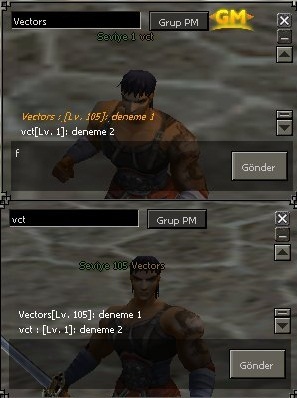
Aratılır;
Kod:
def SendWhisper(self):
Kod:
def SendWhisper(self): text = self.chatLine.GetText() textLength = len(text) if textLength > 0: if net.IsInsultIn(text): chat.AppendChat(chat.CHAT_TYPE_INFO, localeInfo.CHAT_INSULT_STRING) return net.SendWhisperPacket(self.targetName, text) self.chatLine.SetText("") chat.AppendWhisper(chat.WHISPER_TYPE_CHAT, self.targetName, player.GetName() + " : " + text)
Ziyaretçiler için gizlenmiş link,görmek için üye olmalısınız!
Giriş yap veya üye ol.
kullananlar;
Kod:
def SendWhisper(self): import player text = self.chatLine.GetText() textLength = len(text) if textLength > 0: if net.IsInsultIn(text): chat.AppendChat(chat.CHAT_TYPE_INFO, locale.CHAT_INSULT_STRING) return net.SendWhisperPacket(self.targetName, "[Lv. " + str(player.GetStatus(player.LEVEL)) + "]: " + text) self.chatLine.SetText("") chat.AppendWhisper(chat.WHISPER_TYPE_CHAT, self.targetName, player.GetName() + "[Lv. " + str(player.GetStatus(player.LEVEL)) + "]: " + text)
Ziyaretçiler için gizlenmiş link,görmek için üye olmalısınız!
Giriş yap veya üye ol.
kullananlar;
Kod:
def SendWhisper(self): import player text = self.chatLine.GetText() textLength = len(text) if textLength > 0: if net.IsInsultIn(text): chat.AppendChat(chat.CHAT_TYPE_INFO, localeInfo.CHAT_INSULT_STRING) return net.SendWhisperPacket(self.targetName, "[Lv. " + str(player.GetStatus(player.LEVEL)) + "]: " + text) self.chatLine.SetText("") chat.AppendWhisper(chat.WHISPER_TYPE_CHAT, self.targetName, player.GetName() + "[Lv. " + str(player.GetStatus(player.LEVEL)) + "]: " + text)
Ziyaretçiler için gizlenmiş link,görmek için üye olmalısınız!
Giriş yap veya üye ol.
(denenmedi.);
Kod:
def SendWhisper(self): import sys, player if sys.version_info[:2] == (2, 2): import locale as localeInfo else: import localeInfo textLength = len(self.chatLine.GetText()) if textLength > 0: if net.IsInsultIn(text): chat.AppendChat(chat.CHAT_TYPE_INFO, localeInfo.CHAT_INSULT_STRING) return net.SendWhisperPacket(self.targetName, "[Lv. " + str(player.GetStatus(player.LEVEL)) + "]: " + text) self.chatLine.SetText("") chat.AppendWhisper(chat.WHISPER_TYPE_CHAT, self.targetName, player.GetName() + "[Lv. " + str(player.GetStatus(player.LEVEL)) + "]: " + text)Kodları verdiğim siteden alt kısımdan kopyalayın yada down. edin.
Vectors..
Sohbet Penceresine Level Ekleme (Fısıltı) - Metin2 Özel Sunucular İçin Gelişmiş Sistem
Metin2 özel sunucu geliştirmeye odaklı olan oyuncular ve geliştiriciler için kullanıcı deneyimini artırmak önemli bir önceliktir. Oyuncuların birbirleriyle etkileşim kurduğu temel alanlardan birisi sohbet sistemidir. Bu yazıda, Metin2 özel sunucularında sohbet penceresinde fısıltı mesajları sırasında gönderen kişinin level bilgisini görüntülemek için nasıl bir sistem geliştirileceğini ele alacağız. Bu sayede sunucu sahipleri, oyuncuların daha fazla tanınabilirlik kazanmasını sağlayabilir ve PvP ortamında seviye farklarına göre stratejiler geliştirebilirler.
Neden Fısıldanan Mesajlara Level Eklenmeli?
Metin2 özel sunucularında PvP odaklı sistemlerin yaygın olması nedeniyle, oyuncular genellikle birbirleriyle iletişim kurarken level farklarını önemserler. Özellikle turnuvalar veya gizli saldırılar gibi durumlarda, fısıltı yoluyla iletişim kurulduğunda level bilgisi bilinmiyorsa bu durum oyuncular için dezavantaj yaratabilir. Bu eksikliği gidermek için fısıldanan mesajlara gönderenin level bilgisini eklemek büyük kolaylık sağlar.
Sistem Nasıl Çalışır?
Bu sistem genellikle client-side ve server-side olarak iki ana parçada çalışır. Client tarafında sohbet arayüzüne müdahale edilerek fısıltı mesajı geldiğinde level bilgisi görüntülenecek şekilde UI düzenlenir. Server tarafında ise fısıltı mesajı gönderilirken gönderen oyuncunun level bilgisi mesaja eklenerek istemciye iletilir. Bu işlem için genellikle game server source code üzerinde değişiklik yapılması gerekir.
Client-Side Değişiklikler
Client tarafında genellikle uiscript dosyaları üzerinde çalışılır. Sohbet penceresi genellikle bir GUI sınıfı tarafından yönetilir. Burada fısıltı mesajı geldiğinde level bilgisini gösterecek şekilde metin formatı güncellenmelidir. Örneğin:
Fısıldayan: [Level: 120] OyuncuAdı: Merhaba!
Bu yapılandırmayı gerçekleştirmek için Python tabanlı GUI sistemlerinde py root dosyalarında gerekli fonksiyonlar yazılmalıdır. Bu sistemde level bilgisi doğrudan mesajın önüne eklenir ve kullanıcıya daha net bir bilgi sunulur.
Server-Side Entegrasyon
Sunucu tarafında fısıltı mesajları genellikle belirli opcode'lar üzerinden gönderilir. Bu noktada, C++ source code üzerinde gerekli değişiklikler yapılmalıdır. Whisper mesajı işlendiğinde, gönderen oyuncunun level bilgisi de mesaja dahil edilir. Bu işlem için genellikle game/core modülünde yer alan whisper fonksiyonları üzerinde değişiklik yapılır.
Ayrıca, bu sistem için bir database bağlantısı da gerekebilir. Oyuncunun level bilgisi doğrudan sunucu belleğinden alınabileceği gibi, bazı sistemlerde DB üzerinden de çekilebilir. Bu da sistemin esnekliğini ve ölçeklenebilirliğini artırır.
Güvenlik ve Performans Konuları
Bu tip sistemlerde güvenlik ön plandadır. Yanlış yapılandırılmış bir sistem, exploit risklerine yol açabilir. Bu yüzden level bilgisinin doğruluğu kontrol edilmeli ve sadece mevcut kullanıcı verileri üzerinden aktarılmalıdır. Ayrıca performans açısından her fısıltı mesajında level bilgisi tekrar tekrar veritabanından çekilmemelidir. Cache mekanizmaları kullanılarak sistem optimize edilmelidir.
Sonuç
Metin2 özel sunucularında kullanıcı deneyimi artırmak için geliştirilen küçük ama etkili sistemlerden biri olan 'sohbet penceresine level ekleme' sistemi, özellikle PvP odaklı sunucularda büyük avantaj sağlar. Hem teknik hem de kullanıcı dostu bir yapı sunarak, oyuncuların stratejik kararlar almasına yardımcı olur. Bu tarz sistemlerin geliştirilmesi için Metin2 Lobby gibi platformlarda paylaşım yaparak toplulukla birlikte çalışmak, gelişimi hızlandırır.
Adding Level to Chat Window (Whisper) - Advanced System for Metin2 Private Servers
For players and developers focused on Metin2 private server development, enhancing user experience is a key priority. One of the main areas where players interact with each other is the chat system. In this article, we will discuss how to implement a system that displays the sender's level information during whisper messages in the chat window within Metin2 private servers. This way, server owners can increase player recognition and allow them to develop strategies based on level differences in PvP environments.
Why Should Level Be Added to Whispered Messages?
Due to the prevalence of PvP-focused systems in Metin2 private servers, players often care about level differences when communicating with one another. Particularly during tournaments or covert attacks, if the sender’s level isn't known when receiving whispered messages, it can be disadvantageous for players. Adding the sender's level information to whispered messages helps solve this issue and enhances gameplay clarity.
How Does the System Work?
The system typically operates in two main parts: client-side and server-side. On the client side, the chat interface is modified so that the level information appears when a whisper message is received. On the server side, the sender's level is included in the message before being sent to the client. For this, modifications are usually required in the game server source code.
Client-Side Modifications
On the client side, changes are generally made to uiscript files. The chat window is usually managed by a GUI class. Here, the text formatting must be updated to display the level information when a whisper message arrives. For example:
Whispered by: [Level: 120] PlayerName: Hello!
To implement this configuration, necessary functions must be written in py root files within Python-based GUI systems. In this setup, the level information is directly prepended to the message, providing users with clearer data.
Server-Side Integration
On the server side, whisper messages are typically transmitted via specific opcodes. At this point, changes must be made in the C++ source code. When a whisper message is processed, the sender's level information is also included in the message. Such changes are usually implemented in whisper-related functions found in the game/core module.
Additionally, a database connection might be needed for this system. Although the player's level can be retrieved directly from the server memory, in some systems it may be fetched from the database, increasing flexibility and scalability.
Security and Performance Considerations
Security is paramount in such systems. An incorrectly configured system could lead to exploit risks. Therefore, the accuracy of the level information should be verified, and only existing user data should be used for transmission. Additionally, for performance reasons, the level information should not be repeatedly fetched from the database with every whisper message. Cache mechanisms should be utilized to optimize the system.
Conclusion
The 'adding level to chat window' system is a small but effective feature developed to enhance user experience in Metin2 private servers, particularly in PvP-oriented environments. By offering both technical and user-friendly structures, it helps players make strategic decisions. Developing such systems and sharing them on platforms like Metin2 Lobby allows collaborative work with the community and accelerates progress.
