

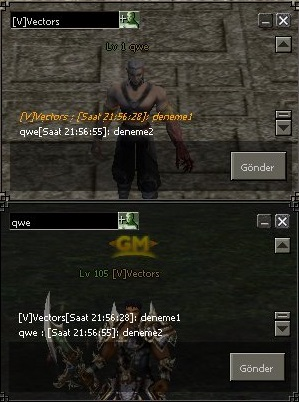
Kod:
def SendWhisper(self):
Kod:
def SendWhisper(self): import time text = self.chatLine.GetText() textLength = len(text) if textLength > 0: if net.IsInsultIn(text): chat.AppendChat(chat.CHAT_TYPE_INFO, locale.CHAT_INSULT_STRING) return VectorsSaat = time.strftime("%H:%M:%S") net.SendWhisperPacket(self.targetName, "[Saat " + VectorsSaat + "]: " + text) self.chatLine.SetText("")[CENTER] chat.AppendWhisper(chat.WHISPER_TYPE_CHAT, self.targetName, player.GetName() + "[Saat " + VectorsSaat + "]: " + text)[/CENTER]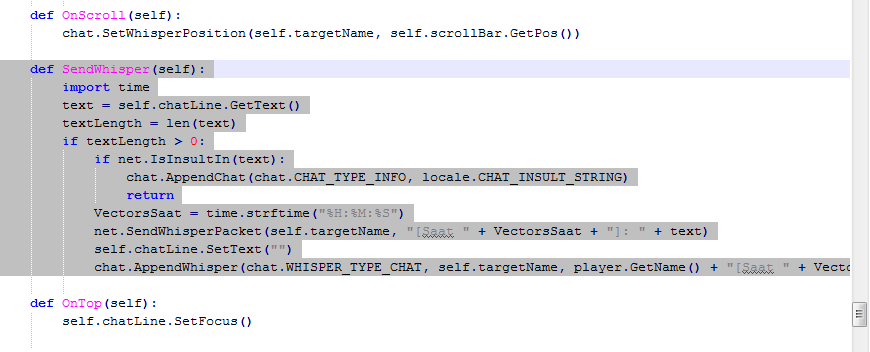
Kodları
Ziyaretçiler için gizlenmiş link,görmek için üye olmalısınız!
Giriş yap veya üye ol.
siteden alt kısımdan kopyalayın yada down. edin. Sohbet Penceresine Saat Ekleme (Fısıltı)
Metin2 özel sunucularında kullanıcı deneyimini artırmak isteyen geliştiriciler için küçük ama etkileyici değişiklikler yapmak oldukça önemlidir. Bu yazıda, Metin2 клиент tarafında yer alan sohbet penceresine bir saat eklemeyi, özellikle fısıltı (whisper) kısmına entegre ederek nasıl yapacağınızı adım adım anlatacağız. Bu işlem, oyuncuların sohbet geçmişinde mesajların hangi zamanda gönderildiğini görebilmelerini sağlar ve hem PvP hem de sosyal etkileşim açısından ciddi bir avantaj sunabilir.
Neden Saat Eklenmeli?
Metin2 özel sunucularında zaman zaman mesajların ne zaman gönderildiği belirsiz kalabiliyor. Özellikle fısıltı gibi özel mesajlaşma kanallarında, zaman damgası olmaması nedeniyle bazı anlaşmazlıklar çıkabiliyor. Saatin eklenmesi ile hem kullanıcılar hem de yöneticiler için daha şeffaf bir iletişim ortamı oluşur. Ayrıca, bu tür geliştirmeler sunucunuzun profesyonelliğini artırır.
Geliştirme Ortamı ve Gereksinimler
Bu işlem sırasında aşağıdaki araçlara ihtiyacınız olacak:
- Uiscript düzenleyici (örneğin Notepad++, Sublime Text)
- Client-side kaynak kod erişimi
- Python GUI bilgisi (Metin2 UI dosyaları genellikle .py formatındadır)
Adım Adım Saat Ekleme
1. Fısıltı Penceresini Tanımlayın
Metin2'in sohbet sistemi genellikle 'WhisperDialog.py' veya benzeri bir dosya üzerinden çalışır. Bu dosyayı açın ve sohbet mesajlarının yazıldığı alanı bulun. Genellikle 'AppendChat' fonksiyonu bu işlemi gerçekleştirir.
2. Zaman Damgası Oluşturun
Python dilinde 'datetime' modülünü kullanarak mevcut zamanı alabilirsiniz. Örnek kod parçası:
import datetime
timestamp = datetime.datetime.now().strftime('%H:%M')
3. Mesaja Zaman Ekleyin
Mesajı ekrana yazarken, zaman damgasını başa veya sona ekleyerek görüntüleyebilirsiniz. Örneğin:
message_with_time = f'[{timestamp}] {original_message}'
self.AppendChat(message_with_time)
4. Tasarımı Güncelleştirin
Zaman damgasının okunaklı olması için metin rengi veya stili üzerinde değişiklik yapabilirsiniz. Örneğin, zaman kısmı gri renkte gösterilebilir:
[{timestamp}] {original_message}
Sonuç
Bu şekilde, sohbet penceresine zaman damgası eklenmiş olur. Kullanıcılar artık hangi mesajın ne zaman gönderildiğini kolayca takip edebilir. Bu küçük değişiklik, Metin2 özel sunucunuzun kullanıcı dostu yönünü daha da artırır. Geliştirme sürecinde MARTYSAMA gibi kaynaklardan destek alarak daha hızlı ilerleyebilirsiniz. Aynı mantıkla PvP sistemlerinde de benzer geliştirmeler yapılabilir. Örneğin, bir savaş raporu ya da eşya düşme logları gibi verilerin zamanlamasını da bu yöntemle tutabilirsiniz.
Adding Clock to Chat Window (Whisper)
For developers who want to enhance the user experience on their Metin2 private servers, making small but effective changes can be quite important. In this article, we will explain step by step how to add a clock to the chat window on the client side of Metin2, especially integrating it into the whisper section. This addition allows players to see when messages were sent in the chat history, providing a significant advantage both for PvP and social interactions.
Why Add a Clock?
On Metin2 private servers, the timing of messages sometimes remains unclear. Especially in private messaging channels like whispers, the absence of timestamps can lead to misunderstandings. By adding a timestamp, a more transparent communication environment is created for both users and administrators. Additionally, such improvements increase the professionalism of your server.
Development Environment and Requirements
You will need the following tools during this process:
- Uiscript editor (e.g., Notepad++, Sublime Text)
- Access to client-side source code
- Knowledge of Python GUI (Metin2 UI files are usually in .py format)
Step-by-Step Clock Addition
1. Identify the Whisper Window
The chat system in Metin2 typically operates through a file named 'WhisperDialog.py' or similar. Open this file and locate the area where chat messages are displayed. Usually, the 'AppendChat' function handles this task.
2. Create a Timestamp
You can retrieve the current time using the 'datetime' module in Python. Example code snippet:
import datetime
timestamp = datetime.datetime.now().strftime('%H:%M')
3. Add Time to the Message
When displaying the message on screen, you can prepend or append the timestamp. For example:
message_with_time = f'[{timestamp}] {original_message}'
self.AppendChat(message_with_time)
4. Update the Design
To ensure readability of the timestamp, you may modify its color or style. For example, the timestamp part could be shown in gray:
[{timestamp}] {original_message}
Conclusion
In this way, a timestamp is added to the chat window. Users can now easily track when each message was sent. This small change further enhances the user-friendly aspect of your Metin2 private server. You can accelerate your progress by using resources like MARTYSAMA during the development process. Similar improvements can also be made in PvP systems using the same logic. For instance, the timing of battle reports or item drop logs can also be tracked using this method.
