

Forumda Paylaşıldımı Görmedim Eğer Paylaşıldıysa Raporlayınız.
İyi Kullanımlar
İyi Forumlar...
İyi Kullanımlar
İyi Forumlar...
Ziyaretçiler için gizlenmiş link,görmek için üye olmalısınız!
Giriş yap veya üye ol.
Ziyaretçiler için gizlenmiş link,görmek için üye olmalısınız!
Giriş yap veya üye ol.
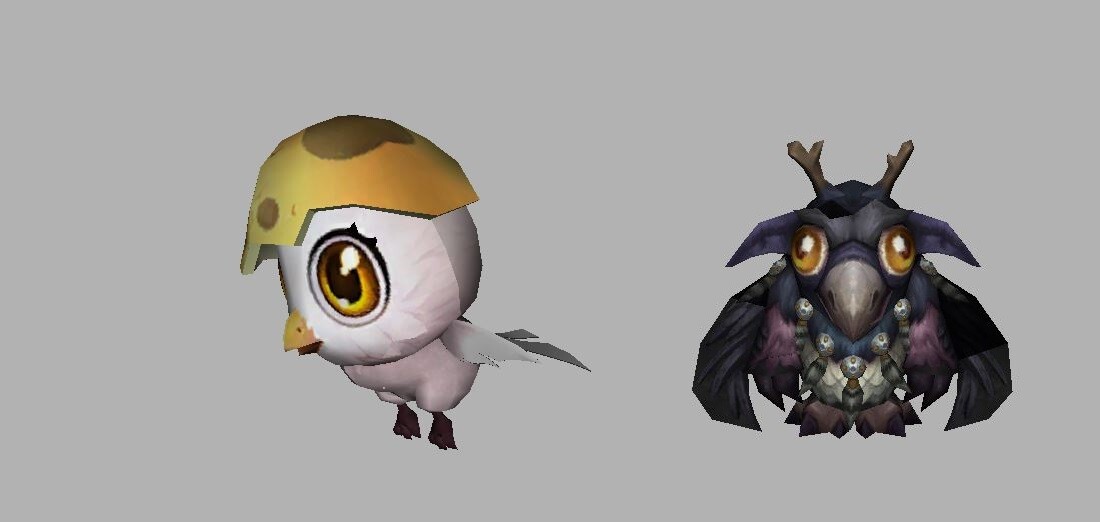
Tipsiz Baykuş - Yeni Doğmuş Civciv Pet
Metin2 Lobby olarak, Metin2 oyununda 3D modelleme ve özel efektler üzerine çalışan geliştiriciler için değerli ipuçları sunmaya devam ediyoruz. Bu yazıda Tipsiz Baykuş adlı yeni doğmuş civciv pet modeli üzerinde duracağız. Bu model, hem görsellik hem de karakterle entegrasyon açısından önemli bir yere sahiptir. Özellikle Metin2 sunucularında kullanılmak üzere özel olarak tasarlanmış bu pet modeli, 3D Max veya Blender gibi yazılımlarla kolayca düzenlenebilir.
Pet Modelinin Özellikleri
Tipsiz Baykuş, Metin2 oyunu içinde kullanıcılar tarafından sevilen bir hayvan türüdür. Bu nedenle, onun özel olarak tasarlanmış bir pet modeli sunulduğunda, oyuncuların ilgisini çekeceği açıktır. Bu model, GR2 formatında gelmekte olup, Metin2 sistemine kolayca entegre edilebilir.
UV Mapping[/COORD] ve Texture dosyaları ayrılmaz bir parçasıdır bu modelin. Gerekli doku ve renk detayları, baykuşun gerçekçi görünmesini sağlar. Ayrıca, Rigging işlemi yapılmış olması sayesinde, modelin hareketleri doğal ve akıcıdır.
Nasıl Kullanılır?
Tipsiz Baykuş pet modeli, Metin2 sunucusuna entegre edilirken bazı teknik adımlar izlenmelidir. Öncelikle, GR2 dosyasının doğru bir şekilde içe aktarılması gerekir. Bu işlem sırasında Model Edit araçları kullanılabilir. Ardından, Texture dosyası uygun klasöre yerleştirilmelidir.
Metin2 geliştiricileri için bu tür modelleri doğru şekilde yüklemek, sunucunun estetik kalitesini ciddi anlamda artırır. Tipsiz Baykuş modeli, Custom Model kategorisinde değerlendirilir ve sunucuya özel bir his katmak isteyen geliştiriciler için idealdir.
3DS Max ve Blender ile Uyumlu
Bu model, 3DS Max ve Blender ile tam uyumlu çalışmaktadır. Geliştiriciler, model üzerinde değişiklik yapmak istediklerinde bu yazılımları kullanabilirler. Blender ile modelin dış hatları, dokusu veya animasyonu yeniden düzenlenebilir.
Export ve Import işlemleri sırasında GR2 formatının korunması önemlidir. Bu sayede model, Metin2 oyunu içinde sorunsuz çalışacaktır.
Geliştirici Paketleri ve EterPack
Metin2 geliştiricileri için EterPack gibi paketler, bu tür modelleri sunucuya entegre etmede büyük kolaylık sağlar. Tipsiz Baykuş modeli, EterPack formatında da uyumlu olacak şekilde optimize edilmiştir. Geliştiriciler, bu modeli doğrudan paket içine entegre edebilirler.
Metin2 Lobby olarak, bu gibi özgün ve yüksek kaliteli modelleri sizlere sunmaktan mutluluk duyarız. Tipsiz Baykuş gibi özel pet modelleri, oyuncularınızın ilgisini çekecek ve sunucunuzun rekabet gücünü artıracaktır.
Owl Without Tip - New Born Chick Pet
Metin2 Lobby, continues to provide valuable tips for developers working on 3D modeling and special effects in the Metin2 game. In this article, we will focus on the newly born chick pet model called Owl Without Tip. This model holds significant importance both visually and in terms of integration with characters. Specifically designed for use in Metin2 servers, this pet model can be easily edited using software such as 3D Max or Blender.
Features of the Pet Model
Owl Without Tip is a beloved animal type among players in the Metin2 game. Therefore, presenting a specially designed pet model of it naturally attracts interest. This model comes in GR2 format and can be easily integrated into the Metin2 system.
UV Mapping and Texture files are inseparable parts of this model. The necessary texture and color details ensure that the owl appears realistic. Additionally, since Rigging has been performed, the movements of the model are natural and fluid.
How to Use
When integrating the Owl Without Tip pet model into a Metin2 server, certain technical steps must be followed. First, the GR2 file needs to be imported correctly. During this process, Model Edit tools can be used. Then, the Texture file should be placed in the appropriate folder.
For Metin2 developers, loading such models correctly significantly enhances the aesthetic quality of the server. The Owl Without Tip model is categorized under Custom Model and is ideal for developers aiming to add a unique feel to their server.
Compatible with 3DS Max and Blender
This model works fully compatible with 3DS Max and Blender. Developers who wish to modify the model can use these programs. With Blender, the outline, texture, or animation of the model can be rearranged.
During Export and Import operations, maintaining the GR2 format is important. This ensures the model runs smoothly within the Metin2 game.
Developer Packages and EterPack
Packages like EterPack provide great convenience for Metin2 developers when integrating such models into their servers. The Owl Without Tip model is optimized to be compatible with EterPack format as well. Developers can directly integrate this model into the package.
Metin2 Lobby is pleased to offer original and high-quality models like these. Models like Owl Without Tip will attract your players' attention and enhance the competitive strength of your server.
