

- <li data-xf-list-type="ul">

Ziyaretçiler için gizlenmiş link,görmek için üye olmalısınız! Giriş yap veya üye ol.
Ziyaretçiler için gizlenmiş link,görmek için üye olmalısınız! Giriş yap veya üye ol.
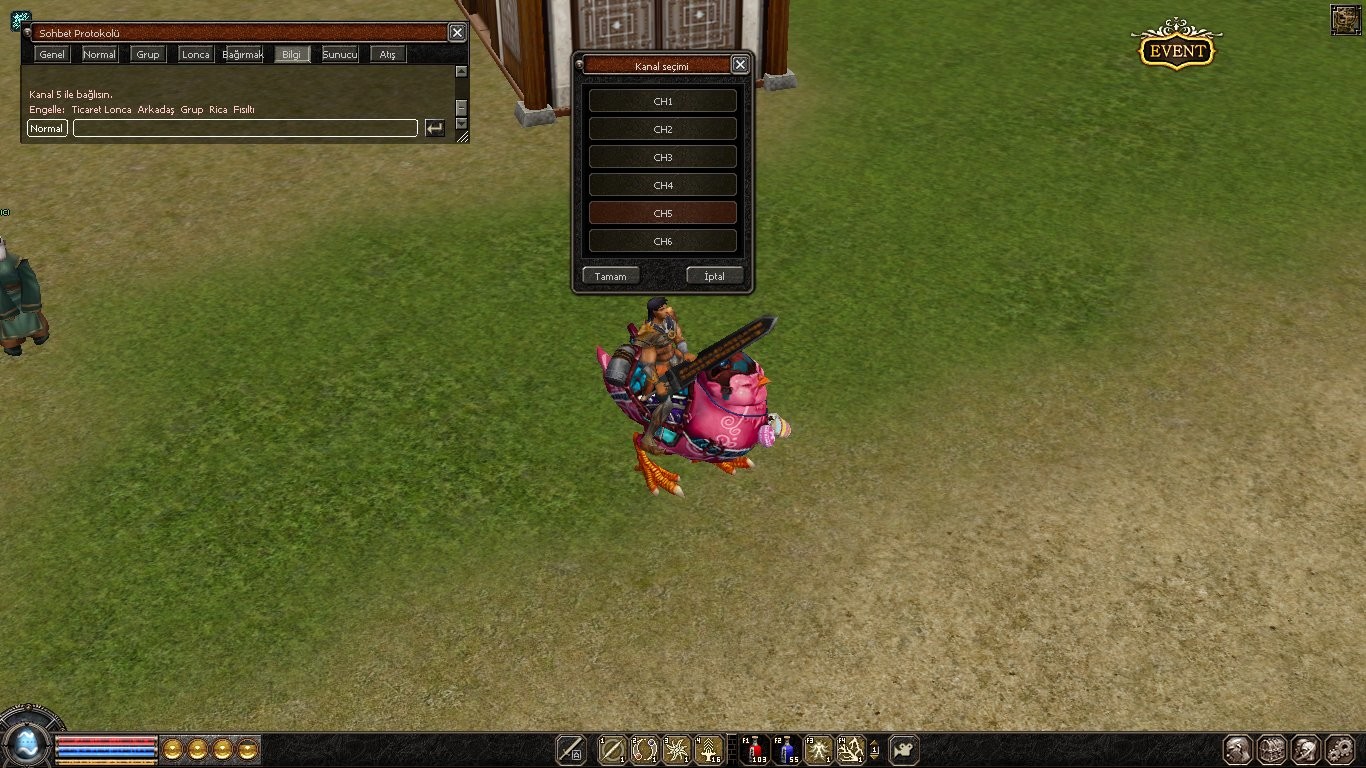
TR'de Karakter Atınca veya Oyuna Giriş Yapınca Bağlı Olduğu Kanalı Göstermek
Metin2 sunucularında kullanıcı deneyimini artırmak ve sunucu yönetimi kolaylaştırmak adına bazı gelişmiş sistemlerin entegrasyonu oldukça önemlidir. Bunlardan birisi de oyuncunun karakter seçimi sırasında ya da oyuna giriş yaptığında bağlı bulunduğu kanal bilgisinin otomatik olarak gösterilmesidir. Bu özellik özellikle TR tabanlı Metin2 sunucularında aktif olarak tercih edilmektedir. Bu yazıda, karakter atarken veya oyuna giriş yaparken bağlı kanalı göstermenin nasıl yapılabileceğini detaylıca ele alacağız. Ayrıca bu işlem için gerekli olan Quest sistemine dair bilgileri ve Lua script kullanımını da inceleyeceğiz.
Kanal Nedir ve Neden Önemlidir?
Metin2'de kanal, oyuncuların farklı sunucu bölgelerine ayrılıp daha stabil ve akıcı bir şekilde oyun oynamasını sağlayan yapılardır. Her kanal, belirli bir harita seti üzerinde çalışır ve genellikle oyun içi yoğunluğu azaltmak için kullanılır. TR sunucularda kanal sistemi, oyuncuların doğru kanala yönlendirilmesiyle birlikte sunucu performansını artırır. Bu nedenle, oyuncuların hangi kanala bağlı olduğunu bilmeleri büyük önem taşır.
Kanal Bilgisi Gösterimi İçin Gerekli Sistemler
Oyuncu karakter atarken veya oyuna giriş yaparken bağlı olduğu kanal bilgisini göstermek için bazı sistemsel ayarlar yapılması gerekir. Bu işlemler genellikle Quest sistemleri üzerinden yapılır. Metin2'nin esnek scripting yapısı sayesinde Lua dili kullanılarak bu tür özelleştirmeler kolayca gerçekleştirilebilir.
Quest Sistemi ile Kanal Bilgisi Gösterimi
Quest sistemi, Metin2 oyununda olayları tetiklemek ve belirli eylemleri gerçekleştirmek için kullanılan güçlü bir araçtır. Kanal bilgisi gösterimi için de quest script dosyaları üzerinden gerekli komutlar yazılmalıdır. Öncelikle, oyuncu oyuna giriş yaptığında veya karakter seçimi sırasında tetiklenecek bir fonksiyon tanımlamak gerekir.
Lua Script Kullanımı
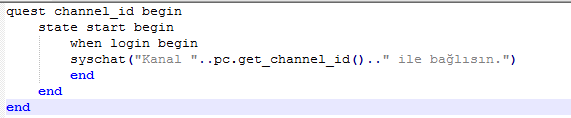
Lua, Metin2'nin quest sistemlerinde kullanılan temel programlama dilidir. Kanal bilgisi gösterimi için örnek bir Lua script şu şekildedir:
Kod:
[B]quest channel_info begin[/B][BR][/BR][B]state start begin[/B][BR][/BR][B]when login or enter begin[/B][BR][/BR][B]local player_channel = pc.get_map_index()[/B][BR][/BR][B]notice('Kanalınız: ' .. player_channel)[/B][BR][/BR][B]end[/B][BR][/BR][B]end[/B][BR][/BR][B]end[/B]Yukarıdaki script, oyuncu sisteme giriş yaptığında kanal bilgisini ekrana yazdırır. Bu örnek, quest sistemine dayalıdır ve Metin2 sunucusuna uygun şekilde entegre edilmelidir.
Gelişmiş Kanal Bildirim Sistemleri
Daha gelişmiş sunucularda, kanal bilgisi sadece bir bildirimle kalmaz. Aynı zamanda kanalın adı, IP adresi veya özel durumları da bildirilebilir. Bu gibi sistemler için özel quest scriptleri hazırlanabilir. Örneğin, belirli kanallarda özel etkinlikler varsa, oyuncuya bu bilgi de otomatik olarak aktarılabilir.
Hata Ayıklama ve Debugging
Quest sistemlerinde yapılan küçük hatalar sistemin çalışmamasına neden olabilir. Bu nedenle, oluşturulan quest dosyaları dikkatlice test edilmeli ve gerekirse debug işlemleri yapılmalıdır. Metin2 quest debug yöntemleri, scriptlerdeki hataları tespit etmede yardımcı olur.
Sonuç
TR tabanlı Metin2 sunucularında, oyuncuların bağlı oldukları kanal bilgisini karakter atarken veya oyuna giriş yaparken göstermek hem kullanıcı deneyimini artırır hem de sunucu yönetimini kolaylaştırır. Bu işlem, quest sistemleri ve Lua scripting ile kolayca uygulanabilir. Ancak, bu tür özelleştirmeler doğru şekilde yapılandırılmadan uygulanırsa sistemsel sorunlara yol açabilir. Bu nedenle, опытli geliştiricilerle çalışmak veya mevcut quest şablonlarını kullanmak en güvenli yoldur.
Showing the Channel That Player is Connected When Creating a Character or Entering the Game in Turkey
In Metin2 servers, integrating advanced systems to enhance user experience and simplify server management is highly important. One of these features is automatically showing the channel information that the player is connected to during character selection or upon entering the game. This feature is especially preferred in Turkish-based Metin2 servers. In this article, we will discuss how to show the channel information when creating a character or entering the game in detail. Additionally, we will examine relevant information about the Quest system and the usage of Lua scripts required for this process.
What is a Channel and Why is it Important?
In Metin2, channels allow players to be separated into different server regions, enabling a more stable and smoother gameplay experience. Each channel operates on a specific set of maps and is generally used to reduce in-game traffic. On Turkish servers, the channel system increases server performance by directing players to the correct channel. Therefore, it's crucial for players to know which channel they are connected to.
Required Systems for Displaying Channel Information
To display the channel information when a player creates a character or enters the game, certain systemic adjustments must be made. These operations are usually done via the Quest system. Thanks to Metin2's flexible scripting structure, such customizations can easily be implemented using the Lua language.
Displaying Channel Information with Quest System
The Quest system is a powerful tool used in Metin2 to trigger events and execute specific actions. To display channel information, necessary commands must be written within the quest script files. First, a function should be defined that triggers when the player logs in or enters the game.
Usage of Lua Scripts
Lua is the primary programming language used in Metin2’s quest systems. An example Lua script for displaying channel information looks like this:
Kod:
[B]quest channel_info begin[/B][BR][/BR][B]state start begin[/B][BR][/BR][B]when login or enter begin[/B][BR][/BR][B]local player_channel = pc.get_map_index()[/B][BR][/BR][B]notice('Your Channel: ' .. player_channel)[/B][BR][/BR][B]end[/B][BR][/BR][B]end[/B][BR][/BR][B]end[/B]The above script prints the channel information to the screen when the player logs into the system. This example is based on the quest system and must be integrated properly into the Metin2 server.
Advanced Channel Notification Systems
On more advanced servers, channel information doesn't just stop at a simple notification. The name of the channel, its IP address, or special conditions can also be displayed. Custom quest scripts can be prepared for such systems. For example, if there are special events on specific channels, this information can also be automatically relayed to the player.
Debugging and Error Handling
Small errors in quest systems can cause the entire system to malfunction. Therefore, created quest files should be carefully tested, and debugging procedures may be necessary. Metin2 quest debugging methods help identify errors in scripts.
Conclusion
On Turkish-based Metin2 servers, showing the channel information to players when creating a character or entering the game enhances user experience and simplifies server management. This process can be easily implemented using the quest system and Lua scripting. However, if these customizations are not configured correctly, they may lead to systemic issues. Therefore, working with experienced developers or using existing quest templates is the safest approach.
