

Selamlar, Visual Studio c++17 derlemesi için aşağıda vermiş olduğum adımları uygulayabilirsiniz.
Öncellikle Visual Studio'ya / std: c ++ 17 derlemesini istediğimizi belirtmemiz gerekiyor.
Bunu, sağdaki tüm projeleri seçerek ve özelliklere tıklayarak yapabilirsiniz. (proje> Özellikler> C / C ++> Dil> C ++ Dil Standardı)
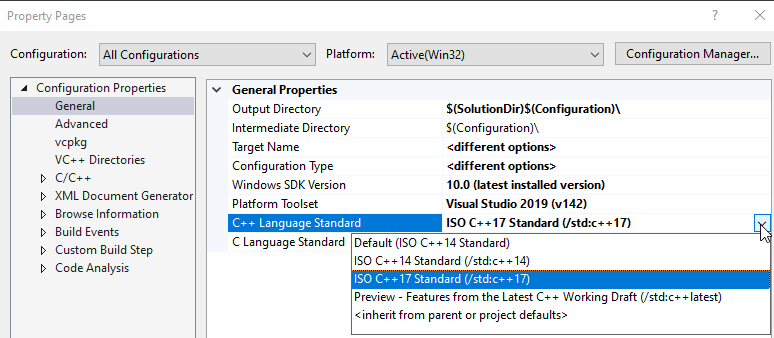
C++17 seçeneğini seçin ve Uygula'ya tıklayın (duh)
O zaman ilk olarak, std :: byte'ın girişini çözelim.
Şimdi, tüm std fonksiyonlarını (make_pair, string, haritaların bildirimleri, vektörler vb.) std :: byte ekleyerek düzenlemeliyiz, örneğin:
olması gereken
Hepsini bulduğunuzda derleyin ve düzeltin.
Stl.h'yi EterBase'de açın şöyle olacaktır:
Hepsini değiştirin:
cipher.cpp içinde değiştirin:
İkarus çevrimdışı mağazanız varsa, libconfig'i aynı ayarlarla yeniden derlemelisiniz.
Giriş
Metin2 özel sunucu geliştirme sürecinde, özellikle C++ tabanlı kaynak kodların derlenmesi büyük önem taşır. Bu bağlamda, Microsoft Visual Studio gibi güçlü entegre geliştirme ortamları (IDE), geliştiricilere geniş imkanlar sunar. Ancak, daha modern C++ standartları olan ISO C++17 standartlarına uygun derleme işlemleri, bazı yapılandırmalar gerektirir. Bu yazıda, Visual Studio üzerinde ISO C++17 derlemesinin nasıl yapılandırılacağı, bu standartların Metin2 geliştirme süreçlerinde nasıl avantaj sağladığı ele alınacaktır.
ISO C++17 Nedir?
ISO C++17, C++ dilinin 2017 yılında yayınlanan resmi standardıdır. Bu standartla birlikte dilin okunabilirliği, performansı ve geliştirici dostluğu artmıştır. Özellikle auto, structured bindings, constexpr gibi yenilikler, kodun daha temiz ve optimize yazılmasına olanak tanır. Metin2 geliştiricileri için bu standartlar, source edit süreçlerinde daha esnek ve güçlü yapılar kurmaya yardımcı olur.
Visual Studio'da C++17 Aktivasyonu
Visual Studio üzerinde bir proje oluşturduğunuzda, varsayılan olarak C++14 ya da daha eski bir standart seçili olabilir. C++17 standardını aktif etmek için aşağıdaki adımları izlemelisiniz:
1. Projenizi sağ tıklayıp Properties'e gidin.
2. Sol menüden Configuration Properties > C/C++ > Language sekmesine girin.
3. C++ Language Standard kısmında ISO C++17 Standard (/std:c++17) seçeneğini seçin.
4. Değişiklikleri kaydedip projeyi yeniden derleyin.
Neden C++17? Metin2 Geliştirme İçin Avantajları
Metin2 özel sunucularında, özellikle game server programming ve auth sistemlerinde yüksek performans beklenir. C++17 ile gelen bazı özellikler:
- Structured Bindings: std::map veya std: air gibi yapılardan kolayca veri çekmenizi sağlar.
- if constexpr: Compile-time koşullarını daha okunabilir hale getirir.
- Class Template Argument Deduction: Sınıf şablonlarının kullanımını kolaylaştırır.
Dikkat Edilmesi Gerekenler
C++17 derlemesi sırasında bazı derleyici uyarıları ya da hata mesajları alabilirsiniz. Bu durumda, metin2 server src dosyalarınızın C++17 ile uyumlu olduğundan emin olmalısınız. Eski C++ standartlarında yazılan bazı kodlar, C++17 ile uyumsuz olabilir. Özellikle martysama gibi paylaşılan kaynaklarda, bazı bölümlerin güncellenmesi gerekebilir.
Sonuç
Visual Studio üzerinde ISO C++17 standardında derleme yapmak, Metin2 özel sunucu geliştirme sürecini hem modernleştirmekte hem de kod kalitesini artırmaktadır. Özellikle source edit veya client src üzerinde çalışan geliştiriciler, bu standartları kullanarak daha sağlam ve sürdürülebilir sistemler inşa edebilir. Bu yazı sayesinde, C++17 derlemesi yaparken nelere dikkat etmeniz gerektiğini öğrenmiş oldunuz.
Introduction
In the process of developing Metin2 private servers, compiling C++ based source codes holds great importance. In this context, powerful integrated development environments (IDEs) like Microsoft Visual Studio offer developers extensive capabilities. However, compiling according to modern C++ standards such as ISO C++17 requires certain configurations. This article will explain how to configure ISO C++17 compilation in Visual Studio and how these standards provide advantages in Metin2 development processes.
What is ISO C++17?
ISO C++17 is the official standard of the C++ language published in 2017. With this standard, readability, performance, and developer-friendliness of the language have improved. Especially innovations such as auto, structured bindings, and constexpr allow code to be written more cleanly and efficiently. For Metin2 developers, these standards help establish more flexible and robust structures during source edit processes.
Activating C++17 in Visual Studio
When creating a project in Visual Studio, by default, C++14 or an older standard may be selected. To activate the C++17 standard, follow these steps:
1. Right-click your project and go to Properties.
2. From the left menu, navigate to Configuration Properties > C/C++ > Language.
3. Under C++ Language Standard, select ISO C++17 Standard (/std:c++17).
4. Save the changes and recompile your project.
Why C++17? Advantages for Metin2 Development
In Metin2 private servers, especially in game server programming and auth systems, high performance is expected. Some features introduced with C++17:
- Structured Bindings: Allows easy extraction of data from structures like std::map or std:air.
- if constexpr: Makes compile-time conditions more readable.
- Class Template Argument Deduction: Simplifies the usage of class templates.
Important Considerations
During C++17 compilation, you might encounter compiler warnings or error messages. In such cases, ensure that your metin2 server src files are compatible with C++17. Some code written in older C++ standards may not be compatible with C++17. Particularly in shared resources like martysama, some sections may need updating.
Conclusion
Compiling under the ISO C++17 standard in Visual Studio both modernizes the Metin2 private server development process and improves code quality. Developers working on source edit or client src can build more robust and maintainable systems by utilizing these standards. Through this article, you have learned what to consider when performing C++17 compilation.
Öncellikle Visual Studio'ya / std: c ++ 17 derlemesini istediğimizi belirtmemiz gerekiyor.
Bunu, sağdaki tüm projeleri seçerek ve özelliklere tıklayarak yapabilirsiniz. (proje> Özellikler> C / C ++> Dil> C ++ Dil Standardı)
C++17 seçeneğini seçin ve Uygula'ya tıklayın (duh)
O zaman ilk olarak, std :: byte'ın girişini çözelim.
Kod:
using namespace std;Şimdi, tüm std fonksiyonlarını (make_pair, string, haritaların bildirimleri, vektörler vb.) std :: byte ekleyerek düzenlemeliyiz, örneğin:
Kod:
operator const string() const { return m_sRaw; }olması gereken
Kod:
operator const std::string() const { return m_sRaw; }Hepsini bulduğunuzda derleyin ve düzeltin.
Stl.h'yi EterBase'de açın şöyle olacaktır:
Kod:
namespace std { template <class _Ty> class void_mem_fun_t : public unary_function<_Ty *, void> { public: explicit void_mem_fun_t(void (_Ty::*_Pm)()) : _Ptr(_Pm) {} void operator()(_Ty *_P) const {((_P->*_Ptr)()); } private: void (_Ty::*_Ptr)(); }; template<class _Ty> inline void_mem_fun_t<_Ty> void_mem_fun(void (_Ty::*_Pm)()) {return (void_mem_fun_t<_Ty>(_Pm)); } template<class _Ty> class void_mem_fun_ref_t : public unary_function<_Ty, void> { public: explicit void_mem_fun_ref_t(void (_Ty::*_Pm)()) : _Ptr(_Pm) {} void operator()(_Ty& _X) const {return ((_X.*_Ptr)()); } private: void (_Ty::*_Ptr)(); }; template<class _Ty> inline void_mem_fun_ref_t<_Ty> void_mem_fun_ref(void (_Ty::*_Pm)()) {return (void_mem_fun_ref_t< _Ty>(_Pm)); } // TEMPLATE CLASS mem_fun1_t template<class _R, class _Ty, class _A> class void_mem_fun1_t : public binary_function<_Ty *, _A, _R> { public: explicit void_mem_fun1_t(_R (_Ty::*_Pm)(_A)) : _Ptr(_Pm) {} _R operator()(_Ty *_P, _A _Arg) const {return ((_P->*_Ptr)(_Arg)); } private: _R (_Ty::*_Ptr)(_A); }; // TEMPLATE FUNCTION mem_fun1 template<class _R, class _Ty, class _A> inline void_mem_fun1_t<_R, _Ty, _A> void_mem_fun1(_R (_Ty::*_Pm)(_A)) {return (void_mem_fun1_t<_R, _Ty, _A>(_Pm)); } }Hepsini değiştirin:
Kod:
std :: void_mem_fun
Kod:
std :: mem_fncipher.cpp içinde değiştirin:
Kod:
std :: auto_ptr
Kod:
std :: unique_ptrİkarus çevrimdışı mağazanız varsa, libconfig'i aynı ayarlarla yeniden derlemelisiniz.
Visual Studio ile ISO C++17 Derlemesi: Metin2 Geliştirme Sürecinde Modern C++ Kullanımı
Giriş
Metin2 özel sunucu geliştirme sürecinde, özellikle C++ tabanlı kaynak kodların derlenmesi büyük önem taşır. Bu bağlamda, Microsoft Visual Studio gibi güçlü entegre geliştirme ortamları (IDE), geliştiricilere geniş imkanlar sunar. Ancak, daha modern C++ standartları olan ISO C++17 standartlarına uygun derleme işlemleri, bazı yapılandırmalar gerektirir. Bu yazıda, Visual Studio üzerinde ISO C++17 derlemesinin nasıl yapılandırılacağı, bu standartların Metin2 geliştirme süreçlerinde nasıl avantaj sağladığı ele alınacaktır.
ISO C++17 Nedir?
ISO C++17, C++ dilinin 2017 yılında yayınlanan resmi standardıdır. Bu standartla birlikte dilin okunabilirliği, performansı ve geliştirici dostluğu artmıştır. Özellikle auto, structured bindings, constexpr gibi yenilikler, kodun daha temiz ve optimize yazılmasına olanak tanır. Metin2 geliştiricileri için bu standartlar, source edit süreçlerinde daha esnek ve güçlü yapılar kurmaya yardımcı olur.
Visual Studio'da C++17 Aktivasyonu
Visual Studio üzerinde bir proje oluşturduğunuzda, varsayılan olarak C++14 ya da daha eski bir standart seçili olabilir. C++17 standardını aktif etmek için aşağıdaki adımları izlemelisiniz:
1. Projenizi sağ tıklayıp Properties'e gidin.
2. Sol menüden Configuration Properties > C/C++ > Language sekmesine girin.
3. C++ Language Standard kısmında ISO C++17 Standard (/std:c++17) seçeneğini seçin.
4. Değişiklikleri kaydedip projeyi yeniden derleyin.
Neden C++17? Metin2 Geliştirme İçin Avantajları
Metin2 özel sunucularında, özellikle game server programming ve auth sistemlerinde yüksek performans beklenir. C++17 ile gelen bazı özellikler:
- Structured Bindings: std::map veya std:
air gibi yapılardan kolayca veri çekmenizi sağlar.- if constexpr: Compile-time koşullarını daha okunabilir hale getirir.
- Class Template Argument Deduction: Sınıf şablonlarının kullanımını kolaylaştırır.
Dikkat Edilmesi Gerekenler
C++17 derlemesi sırasında bazı derleyici uyarıları ya da hata mesajları alabilirsiniz. Bu durumda, metin2 server src dosyalarınızın C++17 ile uyumlu olduğundan emin olmalısınız. Eski C++ standartlarında yazılan bazı kodlar, C++17 ile uyumsuz olabilir. Özellikle martysama gibi paylaşılan kaynaklarda, bazı bölümlerin güncellenmesi gerekebilir.
Sonuç
Visual Studio üzerinde ISO C++17 standardında derleme yapmak, Metin2 özel sunucu geliştirme sürecini hem modernleştirmekte hem de kod kalitesini artırmaktadır. Özellikle source edit veya client src üzerinde çalışan geliştiriciler, bu standartları kullanarak daha sağlam ve sürdürülebilir sistemler inşa edebilir. Bu yazı sayesinde, C++17 derlemesi yaparken nelere dikkat etmeniz gerektiğini öğrenmiş oldunuz.
Compiling with ISO C++17 in Visual Studio: Using Modern C++ in Metin2 Development
Introduction
In the process of developing Metin2 private servers, compiling C++ based source codes holds great importance. In this context, powerful integrated development environments (IDEs) like Microsoft Visual Studio offer developers extensive capabilities. However, compiling according to modern C++ standards such as ISO C++17 requires certain configurations. This article will explain how to configure ISO C++17 compilation in Visual Studio and how these standards provide advantages in Metin2 development processes.
What is ISO C++17?
ISO C++17 is the official standard of the C++ language published in 2017. With this standard, readability, performance, and developer-friendliness of the language have improved. Especially innovations such as auto, structured bindings, and constexpr allow code to be written more cleanly and efficiently. For Metin2 developers, these standards help establish more flexible and robust structures during source edit processes.
Activating C++17 in Visual Studio
When creating a project in Visual Studio, by default, C++14 or an older standard may be selected. To activate the C++17 standard, follow these steps:
1. Right-click your project and go to Properties.
2. From the left menu, navigate to Configuration Properties > C/C++ > Language.
3. Under C++ Language Standard, select ISO C++17 Standard (/std:c++17).
4. Save the changes and recompile your project.
Why C++17? Advantages for Metin2 Development
In Metin2 private servers, especially in game server programming and auth systems, high performance is expected. Some features introduced with C++17:
- Structured Bindings: Allows easy extraction of data from structures like std::map or std:
air.- if constexpr: Makes compile-time conditions more readable.
- Class Template Argument Deduction: Simplifies the usage of class templates.
Important Considerations
During C++17 compilation, you might encounter compiler warnings or error messages. In such cases, ensure that your metin2 server src files are compatible with C++17. Some code written in older C++ standards may not be compatible with C++17. Particularly in shared resources like martysama, some sections may need updating.
Conclusion
Compiling under the ISO C++17 standard in Visual Studio both modernizes the Metin2 private server development process and improves code quality. Developers working on source edit or client src can build more robust and maintainable systems by utilizing these standards. Through this article, you have learned what to consider when performing C++17 compilation.
