

Kimseye iyilik yaramaz size birdaha konu yok kapatın
edit //
 [/CENTER]
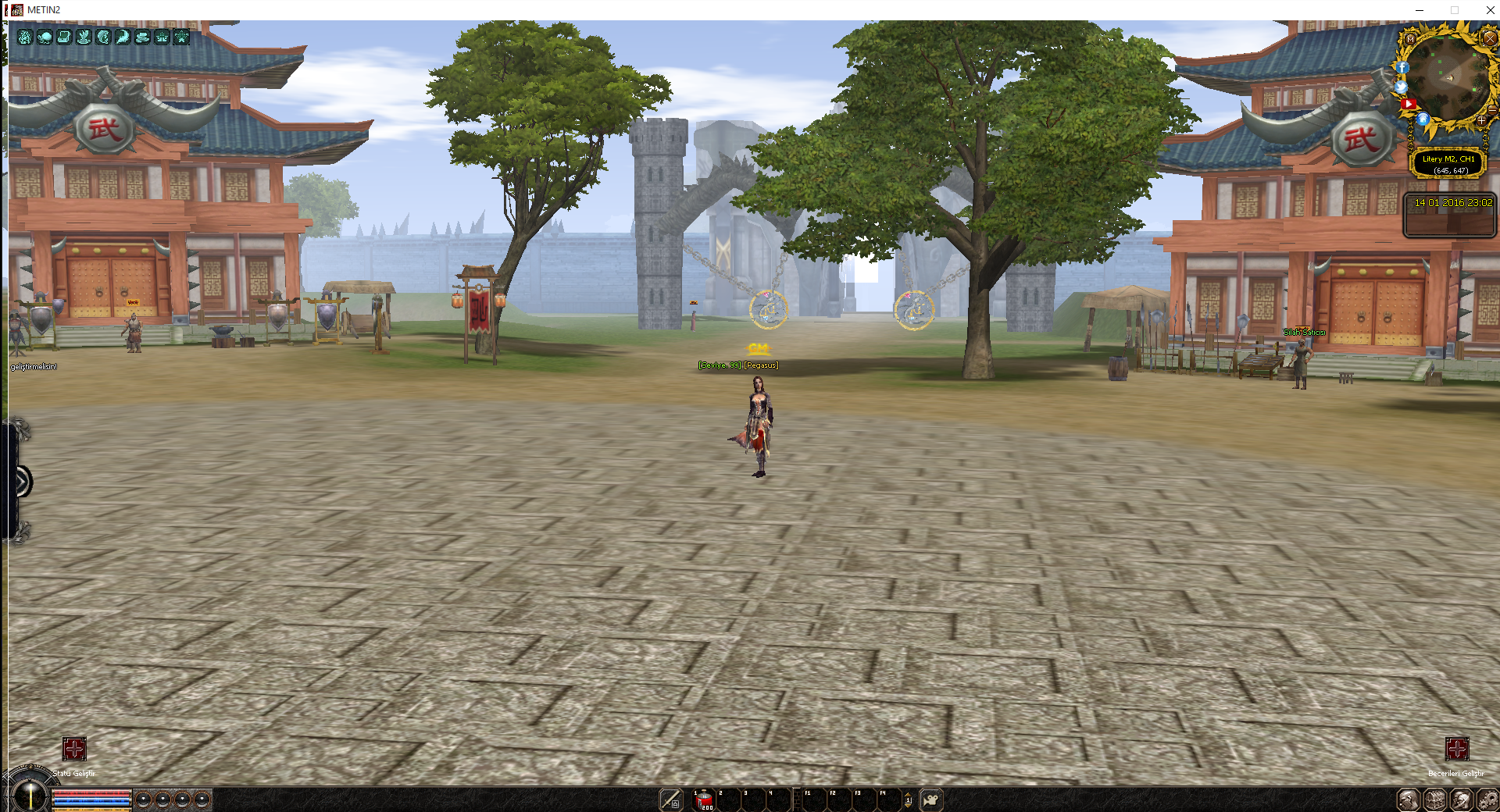
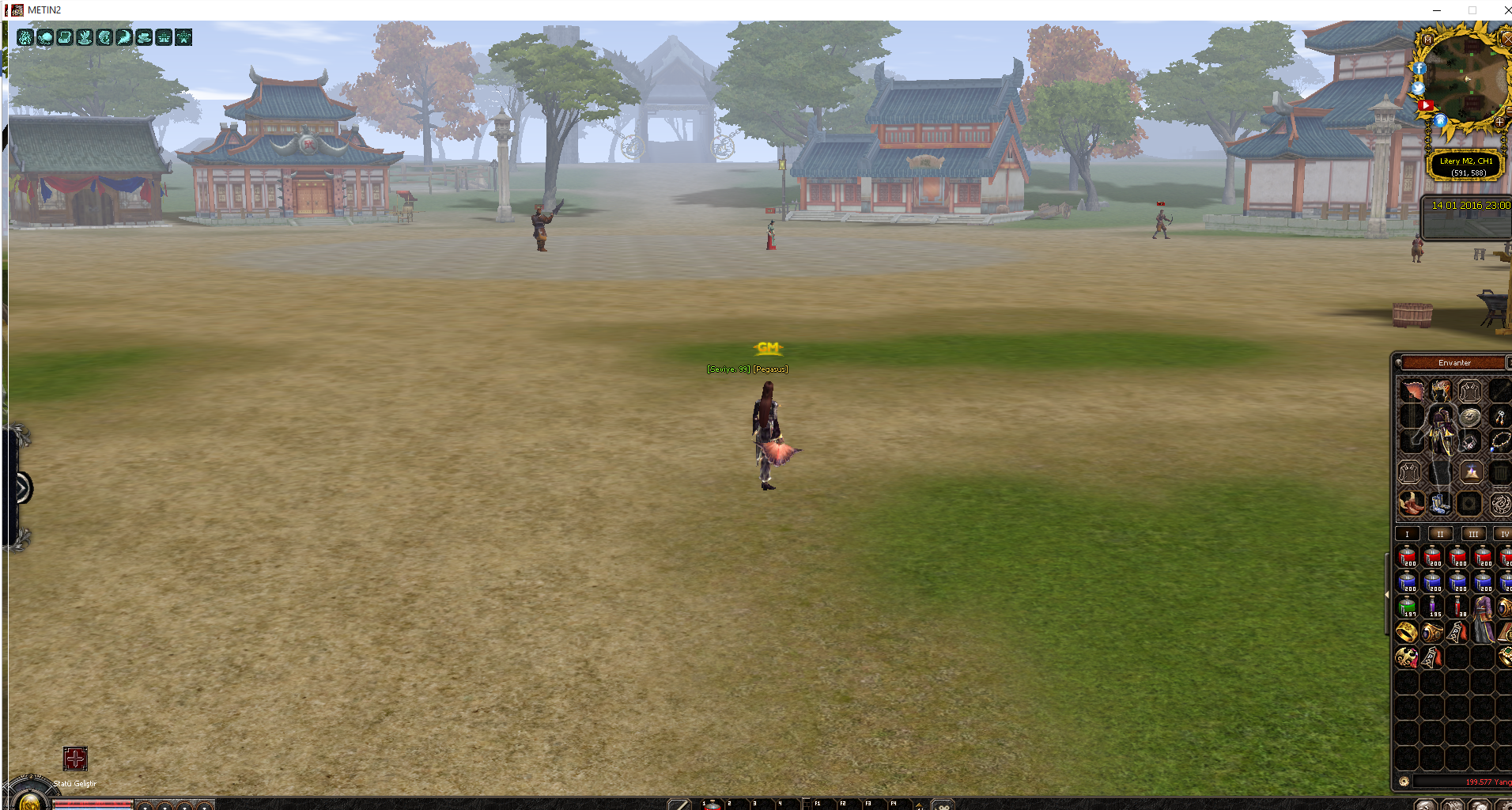
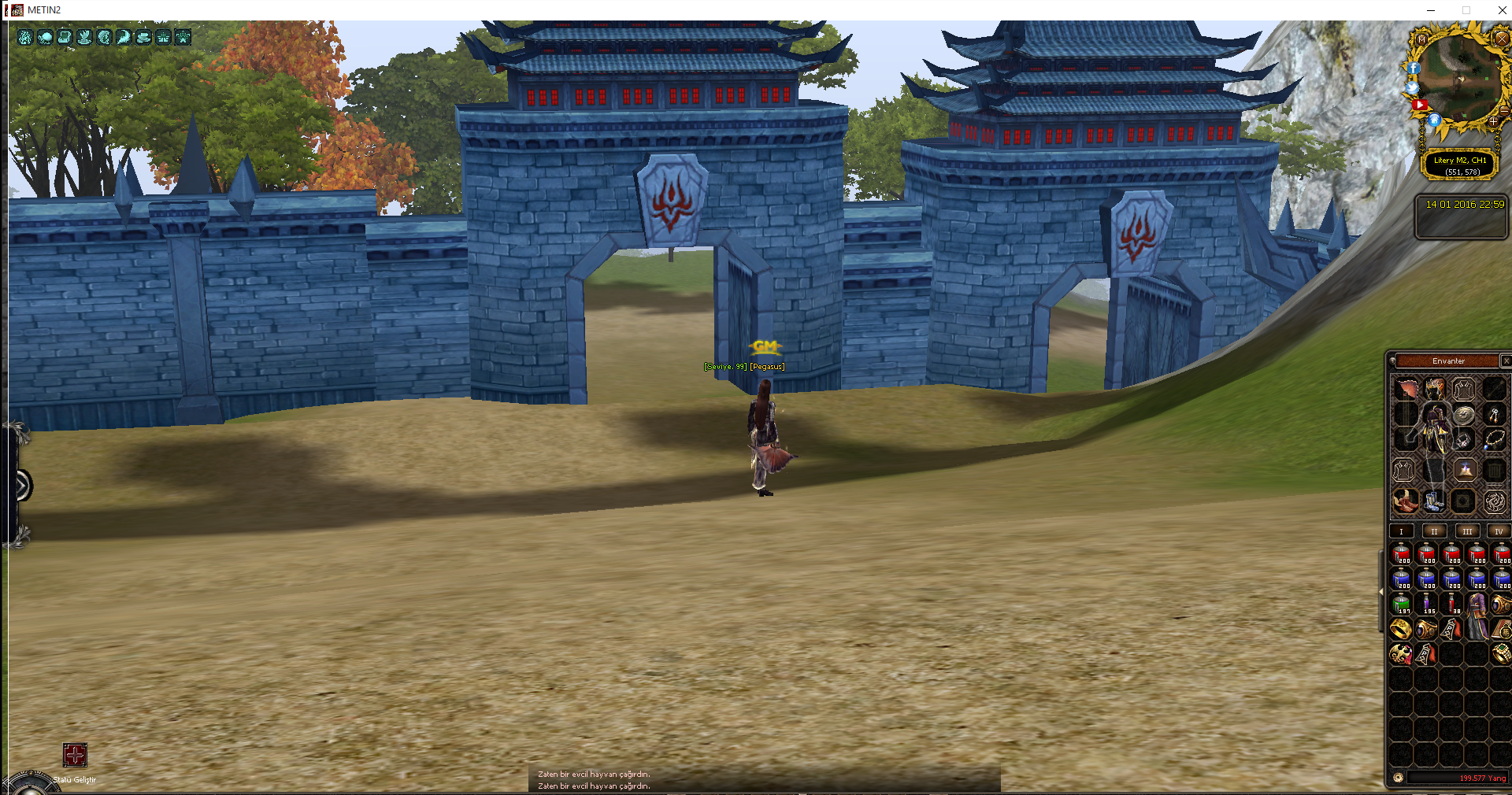
EVET ARKADASLAR LİNKLERE GELDİK
Virüs Total :
 )
)
İyi Forumlar -Pegasus..
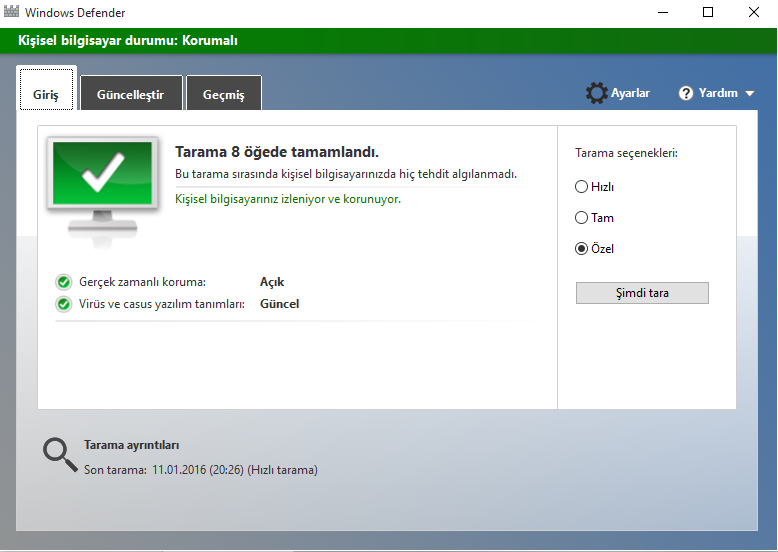
İNDİREMEYENLER İÇİN YEDEK LİNK AYNI DOSYADIR SADECE DOSYA.CO YA UPLOAD EDİLDİ
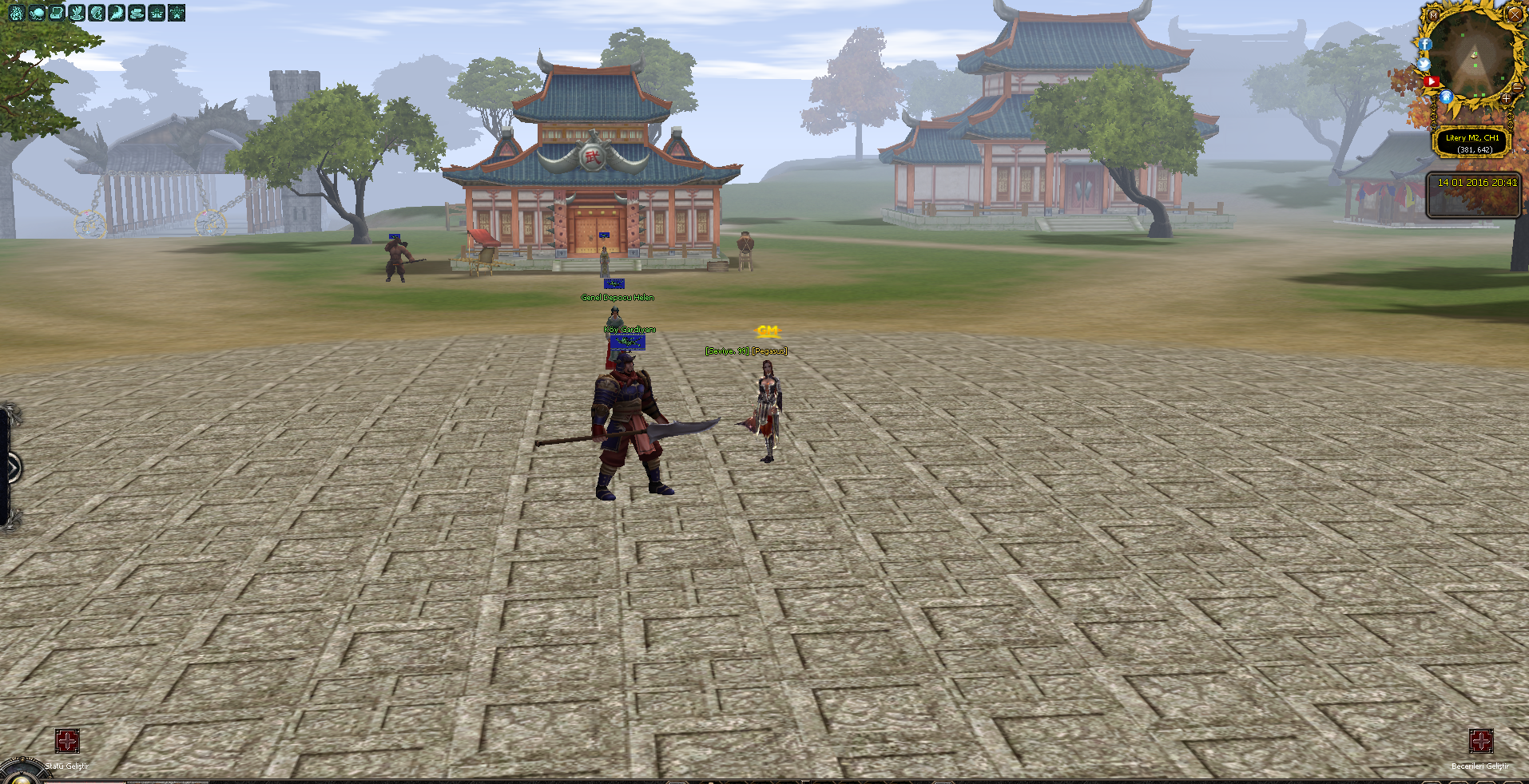
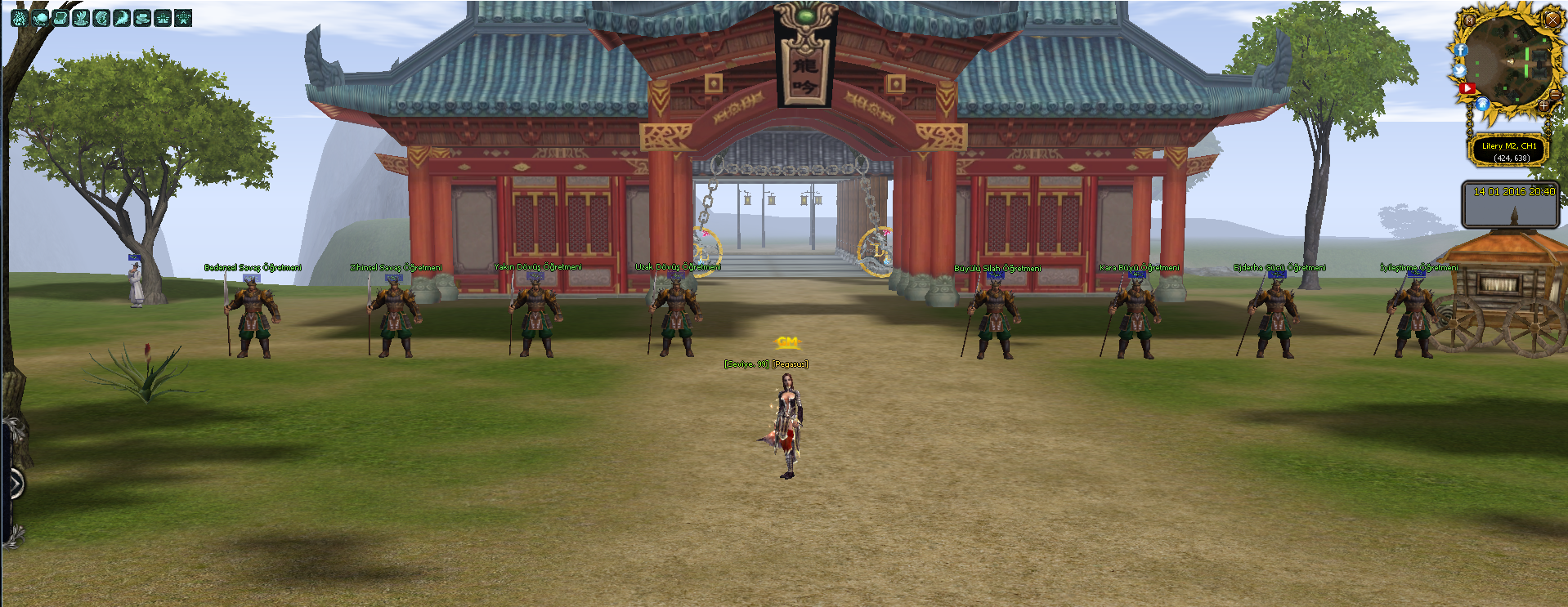
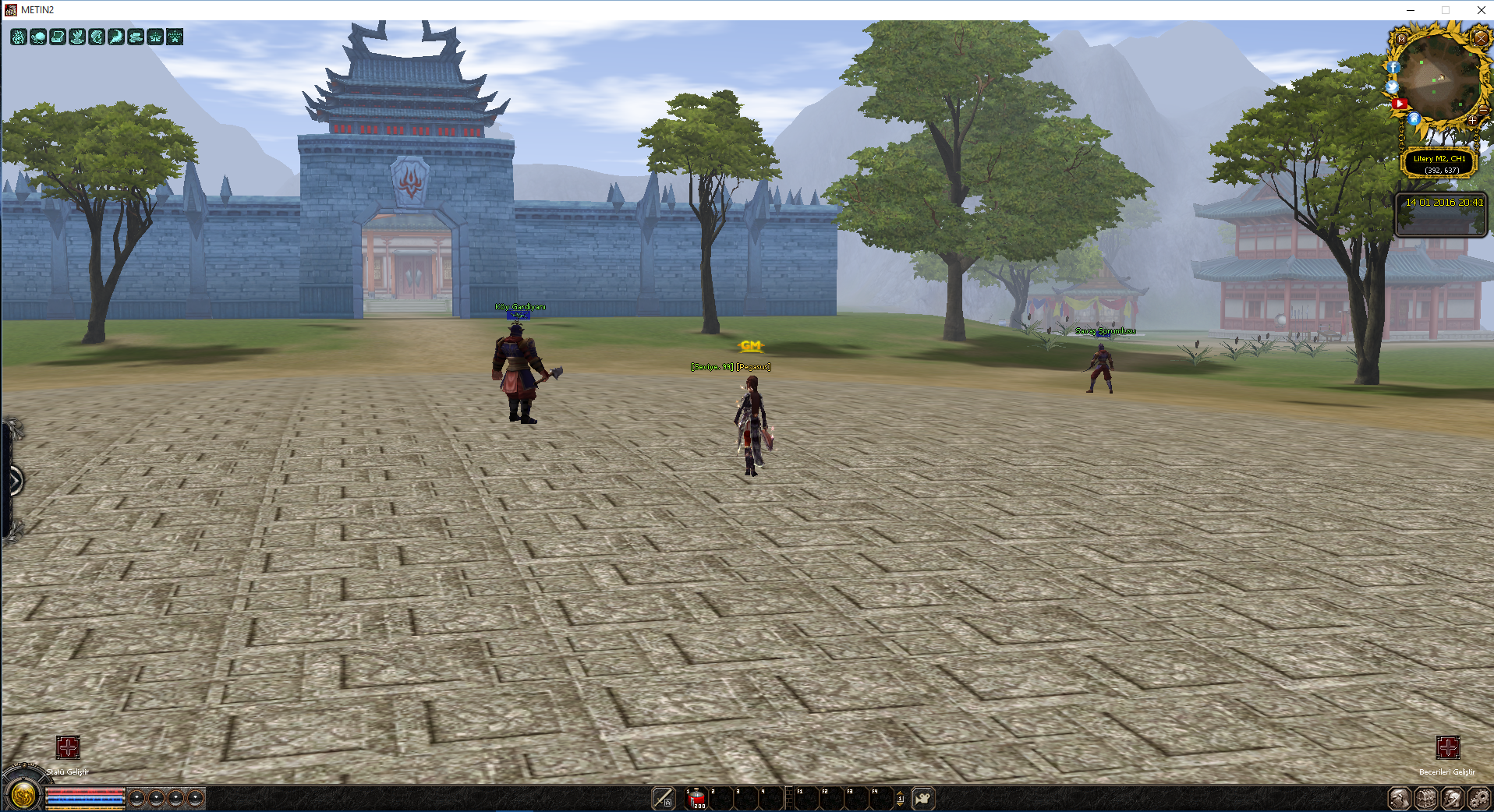
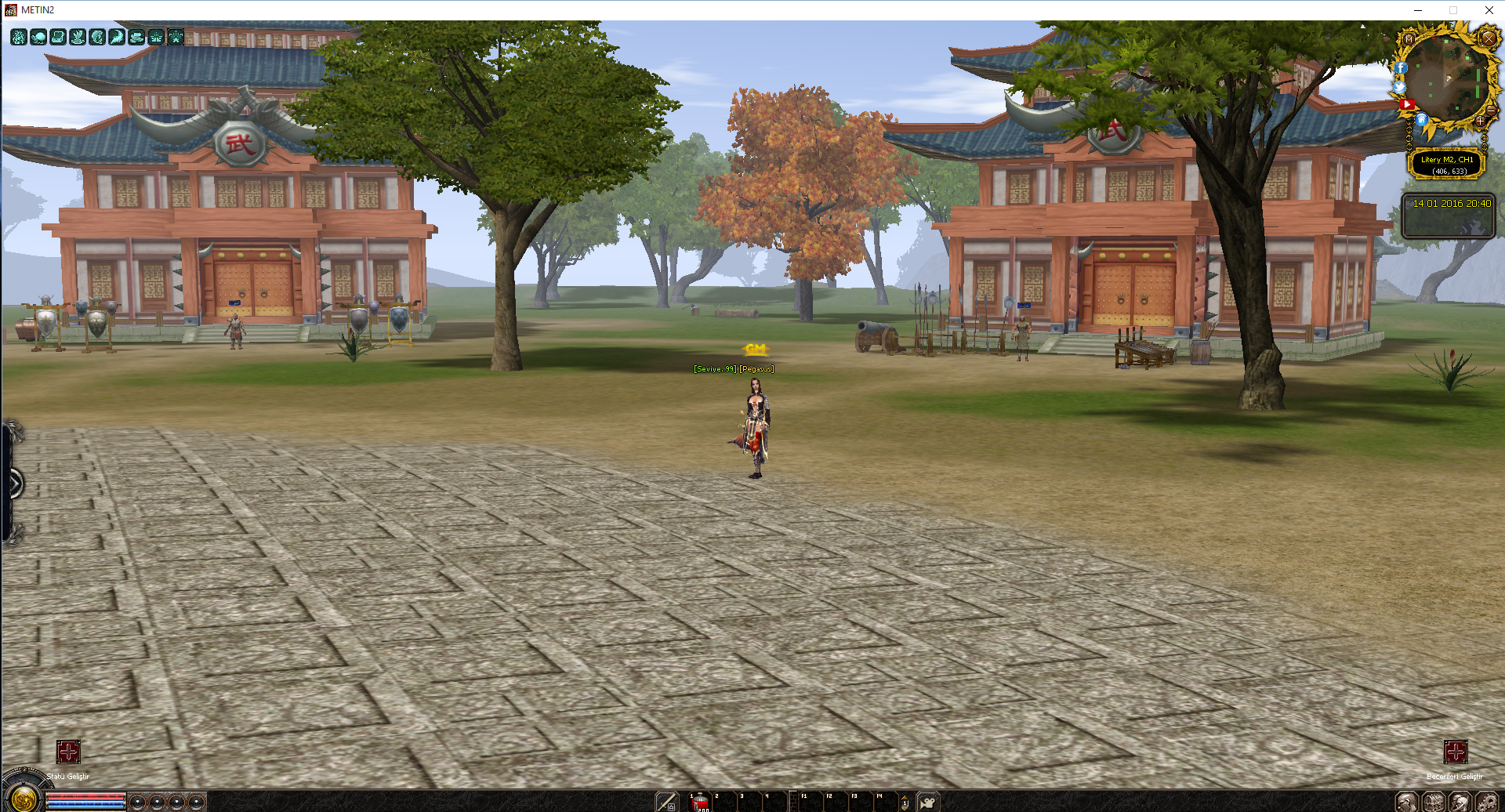
Yeni Evler ve Yeni Köy Tasarımı -Pegasus-
Metin2 dünyasında 3D modelleme sanatı, oyun deneyimini zenginleştirmek için önemli bir rol üstlenmektedir. Özellikle yeni evler ve yeni köy tasarımı gibi projeler, oyuncuların daha estetik ve özgün alanlarda vakit geçirmesini sağlar. Bu bağlamda, Pegasus temalı yeni köy tasarımı, hem görsel açıdan etkileyici hem de Metin2’in mevcut yapısına uyumlu bir yapıya sahiptir. Bu makalede, Metin2 3D modelleme teknikleriyle nasıl özgün evler ve köy ortamları yaratılabileceğini detaylı olarak inceleyeceğiz.
Metin2 3D Modelleme Nedir?
Metin2 3D modelleme, oyun içi objelerin, karakterlerin, NPC’lerin, canavarların, eşyaların ve harita yapılarının 3 boyutlu olarak tasarlanmasını ifade eder. Bu süreçte genellikle 3ds Max veya Blender gibi yazılımlar kullanılır. Modelleme sonrası, Metin2 GR2 veya Granny3D formatlarına dönüştürülerek oyun içine entegre edilir. Bu işlemler, Metin2 model import ve export süreçleriyle tamamlanır.
Pegasus Teması ile Yeni Köy Tasarımı
Pegasus temalı köy tasarımı, mitolojiden esinlenilmiş bir yapıya sahiptir. Bu köyde, Pegasus figürüne atfedilen hafiflik ve özgürlük hissi mimariye yansıtılır. Köyde kullanılan binalar, çatılar ve dekoratif objeler, Metin2 building model olarak tasarlanmıştır. Aynı zamanda Metin2 dungeon model teknikleriyle bazı alanlarda gizli mağaralar ya da doğa temalı barınaklar yer alabilir. Tasarımda dikkat edilen en önemli konulardan birisi, Metin2 texture ve skin kalitesidir. Renk paleti, doğa tonlarına uygun şekilde seçilmiştir.
3D Max ve Blender ile Uyumlu Model Oluşturma
3ds Max ve Blender, Metin2 modelleme sürecinde sıkça tercih edilen araçlardır. Blender, ücretsiz ve güçlü bir alternatif iken; 3ds Max profesyonel düzeyde detaylı modellemeye olanak tanır. Her iki programda da Metin2 UV map, rigging, animation gibi adımlar titizlikle uygulanmalıdır. Özellikle Metin2 bone yapısı doğru tanımlanmazsa, model oyun içine aktarıldığında deformasyon yaşayabilir. Bu nedenle Metin2 animation süreçleri için iskelet (bone) yapısı büyük önem taşır.
Model Paketleme ve Eterpack Kullanımı
Oluşturulan modeller, Metin2 pack model sistemine göre paketlenmelidir. Bu paketleme işlemi sırasında Eterpack gibi araçlar, modelin doğru çalışmasını sağlar. Metin2 eter dosyaları, modelin oyun içi davranışlarını belirler. Doğru bir paketleme sayesinde, yeni evler ve köy yapıları sorunsuzca oyun içine entegre edilir. Ayrıca Metin2 model replace yöntemiyle mevcut modeller kolayca değiştirilebilir.
Özelleştirilmiş Görsel Modlar
Geliştiriciler, Metin2 visual mod veya graphic mod sistemleri aracılığıyla oyunun görsel atmosferini değiştirebilir. Pegasus temalı köy için özel gölgelendirme, ışık efektleri ve doku detayları eklenerek daha etkileyici bir deneyim sunulabilir. Metin2 effect model sistemleriyle su sesleri, rüzgar animasyonları gibi detaylar da eklenebilir.
Sonuç
Yeni evler ve köy tasarımları, Metin2 oyun deneyimini zenginleştiren özgün içeriklerdir. Metin2 3D modelleme teknikleriyle Pegasus temalı köy gibi projeler, hem estetik hem de teknik açıdan profesyonel düzeyde hazırlanmalıdır. Blender, 3ds Max, GR2, Granny3D, UV mapping, texturing, rigging gibi teknik bilgiler, bu süreci başarıyla tamamlamak için kritik öneme sahiptir. Metin2Lobby üzerinden farklı model örneklerini inceleyebilir ve kendi tasarımlarınızı geliştirebilirsiniz.
New Houses and New Village Design -Pegasus-
In the world of Metin2, 3D modeling serves an important role in enriching the gaming experience. Particularly projects like new houses and village designs allow players to spend time in more aesthetic and original environments. In this context, the new village design themed around Pegasus features both visually impressive and structurally compatible elements with the existing Metin2 framework. In this article, we will examine in detail how to create original houses and village environments using Metin2 3D modeling techniques.
What is Metin2 3D Modeling?
Metin2 3D modeling refers to the creation of 3D representations of objects, characters, NPCs, monsters, items, and map structures within the game. This process typically involves software such as 3ds Max or Blender. After modeling, these are converted into Metin2 GR2 or Granny3D formats for integration into the game. These processes are completed through Metin2 model import and export procedures.
New Village Design with Pegasus Theme
The Pegasus-themed village design reflects a structure inspired by mythology. In this village, the lightness and freedom associated with the Pegasus figure are reflected in the architecture. The buildings, roofs, and decorative objects used in the village are designed as Metin2 building models. Additionally, some areas may feature hidden caves or nature-themed shelters created using Metin2 dungeon model techniques. One of the most important considerations in the design is the quality of Metin2 textures and skins. The color palette has been chosen to align with natural tones.
Creating Compatible Models with 3ds Max and Blender
3ds Max and Blender are frequently preferred tools in the Metin2 modeling process. While Blender serves as a free and powerful alternative, 3ds Max allows for detailed professional-level modeling. In both programs, steps like Metin2 UV mapping, rigging, and animation must be executed carefully. Especially, if Metin2 bone structures are not properly defined, the model may suffer deformation when imported into the game. Therefore, the skeleton (bone) structure is of great importance for Metin2 animations.
Model Packaging and Using Eterpack
Created models should be packaged according to the Metin2 pack model system. During this packaging process, tools like Eterpack ensure that the model functions correctly. Metin2 eter files determine the behavior of the model within the game. With proper packaging, new houses and village structures can be seamlessly integrated into the game. Moreover, with the Metin2 model replace method, existing models can easily be swapped out.
Custom Visual Mods
Developers can alter the visual atmosphere of the game through Metin2 visual mods or graphic mods. For a Pegasus-themed village, special shading, lighting effects, and texture details can be added to create a more immersive experience. Additional details like water sounds or wind animations can also be implemented using Metin2 effect models.
Conclusion
New house and village designs are original contents that enrich the Metin2 gameplay experience. Projects like the Pegasus-themed village must be developed with both aesthetic and technical excellence using Metin2 3D modeling techniques. Technical knowledge in Blender, 3ds Max, GR2, Granny3D, UV mapping, texturing, rigging, and similar areas is crucial for successfully completing this process. You can explore various model examples and develop your own designs via Metin2Lobby.
edit //
EVET ARKADASLAR LİNKLERE GELDİK
Virüs Total :
Ziyaretçiler için gizlenmiş link,görmek için üye olmalısınız!
Giriş yap veya üye ol.
Teşekkürler Oğuzhan )İyi Forumlar -Pegasus..
İNDİREMEYENLER İÇİN YEDEK LİNK AYNI DOSYADIR SADECE DOSYA.CO YA UPLOAD EDİLDİ
Yeni Evler ve Yeni Köy Tasarımı -Pegasus-
Metin2 dünyasında 3D modelleme sanatı, oyun deneyimini zenginleştirmek için önemli bir rol üstlenmektedir. Özellikle yeni evler ve yeni köy tasarımı gibi projeler, oyuncuların daha estetik ve özgün alanlarda vakit geçirmesini sağlar. Bu bağlamda, Pegasus temalı yeni köy tasarımı, hem görsel açıdan etkileyici hem de Metin2’in mevcut yapısına uyumlu bir yapıya sahiptir. Bu makalede, Metin2 3D modelleme teknikleriyle nasıl özgün evler ve köy ortamları yaratılabileceğini detaylı olarak inceleyeceğiz.
Metin2 3D Modelleme Nedir?
Metin2 3D modelleme, oyun içi objelerin, karakterlerin, NPC’lerin, canavarların, eşyaların ve harita yapılarının 3 boyutlu olarak tasarlanmasını ifade eder. Bu süreçte genellikle 3ds Max veya Blender gibi yazılımlar kullanılır. Modelleme sonrası, Metin2 GR2 veya Granny3D formatlarına dönüştürülerek oyun içine entegre edilir. Bu işlemler, Metin2 model import ve export süreçleriyle tamamlanır.
Pegasus Teması ile Yeni Köy Tasarımı
Pegasus temalı köy tasarımı, mitolojiden esinlenilmiş bir yapıya sahiptir. Bu köyde, Pegasus figürüne atfedilen hafiflik ve özgürlük hissi mimariye yansıtılır. Köyde kullanılan binalar, çatılar ve dekoratif objeler, Metin2 building model olarak tasarlanmıştır. Aynı zamanda Metin2 dungeon model teknikleriyle bazı alanlarda gizli mağaralar ya da doğa temalı barınaklar yer alabilir. Tasarımda dikkat edilen en önemli konulardan birisi, Metin2 texture ve skin kalitesidir. Renk paleti, doğa tonlarına uygun şekilde seçilmiştir.
3D Max ve Blender ile Uyumlu Model Oluşturma
3ds Max ve Blender, Metin2 modelleme sürecinde sıkça tercih edilen araçlardır. Blender, ücretsiz ve güçlü bir alternatif iken; 3ds Max profesyonel düzeyde detaylı modellemeye olanak tanır. Her iki programda da Metin2 UV map, rigging, animation gibi adımlar titizlikle uygulanmalıdır. Özellikle Metin2 bone yapısı doğru tanımlanmazsa, model oyun içine aktarıldığında deformasyon yaşayabilir. Bu nedenle Metin2 animation süreçleri için iskelet (bone) yapısı büyük önem taşır.
Model Paketleme ve Eterpack Kullanımı
Oluşturulan modeller, Metin2 pack model sistemine göre paketlenmelidir. Bu paketleme işlemi sırasında Eterpack gibi araçlar, modelin doğru çalışmasını sağlar. Metin2 eter dosyaları, modelin oyun içi davranışlarını belirler. Doğru bir paketleme sayesinde, yeni evler ve köy yapıları sorunsuzca oyun içine entegre edilir. Ayrıca Metin2 model replace yöntemiyle mevcut modeller kolayca değiştirilebilir.
Özelleştirilmiş Görsel Modlar
Geliştiriciler, Metin2 visual mod veya graphic mod sistemleri aracılığıyla oyunun görsel atmosferini değiştirebilir. Pegasus temalı köy için özel gölgelendirme, ışık efektleri ve doku detayları eklenerek daha etkileyici bir deneyim sunulabilir. Metin2 effect model sistemleriyle su sesleri, rüzgar animasyonları gibi detaylar da eklenebilir.
Sonuç
Yeni evler ve köy tasarımları, Metin2 oyun deneyimini zenginleştiren özgün içeriklerdir. Metin2 3D modelleme teknikleriyle Pegasus temalı köy gibi projeler, hem estetik hem de teknik açıdan profesyonel düzeyde hazırlanmalıdır. Blender, 3ds Max, GR2, Granny3D, UV mapping, texturing, rigging gibi teknik bilgiler, bu süreci başarıyla tamamlamak için kritik öneme sahiptir. Metin2Lobby üzerinden farklı model örneklerini inceleyebilir ve kendi tasarımlarınızı geliştirebilirsiniz.
New Houses and New Village Design -Pegasus-
In the world of Metin2, 3D modeling serves an important role in enriching the gaming experience. Particularly projects like new houses and village designs allow players to spend time in more aesthetic and original environments. In this context, the new village design themed around Pegasus features both visually impressive and structurally compatible elements with the existing Metin2 framework. In this article, we will examine in detail how to create original houses and village environments using Metin2 3D modeling techniques.
What is Metin2 3D Modeling?
Metin2 3D modeling refers to the creation of 3D representations of objects, characters, NPCs, monsters, items, and map structures within the game. This process typically involves software such as 3ds Max or Blender. After modeling, these are converted into Metin2 GR2 or Granny3D formats for integration into the game. These processes are completed through Metin2 model import and export procedures.
New Village Design with Pegasus Theme
The Pegasus-themed village design reflects a structure inspired by mythology. In this village, the lightness and freedom associated with the Pegasus figure are reflected in the architecture. The buildings, roofs, and decorative objects used in the village are designed as Metin2 building models. Additionally, some areas may feature hidden caves or nature-themed shelters created using Metin2 dungeon model techniques. One of the most important considerations in the design is the quality of Metin2 textures and skins. The color palette has been chosen to align with natural tones.
Creating Compatible Models with 3ds Max and Blender
3ds Max and Blender are frequently preferred tools in the Metin2 modeling process. While Blender serves as a free and powerful alternative, 3ds Max allows for detailed professional-level modeling. In both programs, steps like Metin2 UV mapping, rigging, and animation must be executed carefully. Especially, if Metin2 bone structures are not properly defined, the model may suffer deformation when imported into the game. Therefore, the skeleton (bone) structure is of great importance for Metin2 animations.
Model Packaging and Using Eterpack
Created models should be packaged according to the Metin2 pack model system. During this packaging process, tools like Eterpack ensure that the model functions correctly. Metin2 eter files determine the behavior of the model within the game. With proper packaging, new houses and village structures can be seamlessly integrated into the game. Moreover, with the Metin2 model replace method, existing models can easily be swapped out.
Custom Visual Mods
Developers can alter the visual atmosphere of the game through Metin2 visual mods or graphic mods. For a Pegasus-themed village, special shading, lighting effects, and texture details can be added to create a more immersive experience. Additional details like water sounds or wind animations can also be implemented using Metin2 effect models.
Conclusion
New house and village designs are original contents that enrich the Metin2 gameplay experience. Projects like the Pegasus-themed village must be developed with both aesthetic and technical excellence using Metin2 3D modeling techniques. Technical knowledge in Blender, 3ds Max, GR2, Granny3D, UV mapping, texturing, rigging, and similar areas is crucial for successfully completing this process. You can explore various model examples and develop your own designs via Metin2Lobby.
