

İyi Kullanımlar
Ziyaretçiler için gizlenmiş link,görmek için üye olmalısınız!
Giriş yap veya üye ol.
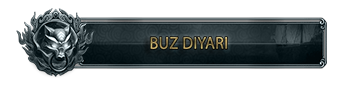
Yeni Map Names Butonu (PSD) İle Harita İsimlerini Kişiselleştirin!
Metin2 oyuncuları ve server sahipleri için harita tasarımı, oyun deneyimini büyük ölçüde etkileyen önemli bir unsurdur. Özellikle özel client veya custom pack kullanan sunucular, oyuncularına benzersiz bir atmosfer sunmak için harita isimlerini özelleştirmek ister. İşte tam da bu noktada Yeni Map Names Butonu (PSD) devreye giriyor!
Bu özel PSD dosyası, haritaların üzerinde görünecek olan 'Map Names' butonunun tasarımını tamamen sizin kontrolünüze almanızı sağlar. Artık sadece varsayılan metinlerle yetinmek kalmadı; istediğiniz renk, font, stil ve konumlandırma ile harita isimlerinizi şık ve etkileyici hale getirebilirsiniz. Bu, özellikle Metin2 pvp client veya Metin2 özel client hazırlayanlar için büyük bir avantaj sunar.
Neden Yeni Map Names Butonu (PSD)?
Eski harita ismi gösterimleri sıklıkla sınırlayıcı ve estetik açıdan yetersiz kalıyor. Bu yeni PSD dosyası ile:
• Tam Kontrol: Harita isminin yazı tipi, boyutu, rengi ve gölge efektlerini istediğiniz gibi ayarlayın.
• Kolay Entegrasyon: PSD dosyasını açıp düzenledikten sonra, Metin2 client dosyaları içine kolayca entegre edebilirsiniz.
• Profesyonel Görünüm: Oyuncularınıza daha profesyonel ve özenli bir Metin2 pack sunun, markalaşmanızı güçlendirin.
• Esneklik: Farklı haritalar için farklı temalar ve stiller oluşturarak oyun içi atmosferi zenginleştirin.
Nasıl Kullanılır?
1. PSD Dosyasını İndirin: Metin2Lobby.com üzerinden 'Yeni Map Names Butonu (PSD)' dosyasını indirin.
2. Tasarım Yazılımı ile Açın: Adobe Photoshop veya benzeri bir tasarım programı ile PSD dosyasını açın.
3. İstediğiniz Şekilde Düzenleyin: Harita ismini, fontunu, rengini ve efektlerini özelleştirin. Örneğin, tehlikeli bir harita için kırmızı veya barışçıl bir bölge için yeşil renk seçebilirsiniz.
4. Client Dosyalarına Entegre Edin: Düzenlediğiniz görseli kaydedip, Metin2 client edit işlemleri ile ilgili dosyalara yerleştirin.
5. Test Edin ve Keyfini Çıkarın: Client'ınızı başlatın ve harita isimlerinin yeni tasarımını görün!
Sitemizle İlgili Video ve Fotoğraf Ekleme!
Aşağıda, Metin2Lobby.com üzerinden indirebileceğiniz Yeni Map Names Butonu (PSD) ile ilgili örnek görseller ve nasıl kullanılacağını gösteren bir video bulacaksınız. Bu içerikler, Metin2 client ve Metin2 pack hazırlama sürecinizi kolaylaştırmak için tasarlanmıştır.
Video Rehber:
Ziyaretçiler için gizlenmiş link,görmek için üye olmalısınız!
Giriş yap veya üye ol.
Örnek Fotoğraflar:
Eski Harita İsmi Görünümü vs. Yeni Map Names Butonu ile Kişiselleştirilmiş Görünüm.
Avantajlı Yönler:
Avantajlı Yönler:
Bu yenilik, sadece görsel bir değişiklik değil, aynı zamanda oyuncu deneyimini ve Metin2 server yönetimini kolaylaştıran bir araç. Zaman kazanın, çaba sarf etmeden profesyonel sonuçlar elde edin. Ayrıca, Metin2 client indir veya Metin2 pack download sayfalarımızdan diğer özel içeriklerimizi de keşfedebilirsiniz.
Not: Bu PSD dosyası, Metin2Lobby.com tarafından özel olarak hazırlanmıştır ve Metin2 client dosyaları ile uyumludur. Lütfen dosyayı telif hakkı ihlali yapmadan kullanın ve sadece kendi Metin2 server projelerinizde kullanın.
Hazır mısınız? Metin2Lobby.com adresini ziyaret edin ve Yeni Map Names Butonu (PSD)'yu hemen indirin!
Customize Map Names with the New Map Names Button (PSD)!
For Metin2 players and server owners, map design is a crucial element that significantly impacts the gaming experience. Server administrators using special clients or custom packs often want to customize map names to offer players a unique atmosphere. This is precisely where the New Map Names Button (PSD) comes into play!
This special PSD file allows you to take complete control over the design of the 'Map Names' button that appears on maps. No more settling for default text; you can now make your map names stylish and impressive with your desired color, font, style, and positioning. This offers a significant advantage, especially for those preparing Metin2 pvp clients or Metin2 custom clients.
Why the New Map Names Button (PSD)?
Old map name displays were often limiting and aesthetically inadequate. With this new PSD file, you can:
• Full Control: Adjust the font, size, color, and shadow effects of the map name exactly as you wish.
• Easy Integration: After opening and editing the PSD file, you can easily integrate it into your Metin2 client files.
• Professional Look: Present a more professional and meticulous Metin2 pack to your players, strengthening your branding.
• Flexibility: Create different themes and styles for various maps, enriching the in-game atmosphere.
How to Use It?
1. Download the PSD File: Download the 'New Map Names Button (PSD)' file from Metin2Lobby.com.
2. Open with Design Software: Open the PSD file with Adobe Photoshop or similar design software.
3. Edit as Desired: Customize the map name, its font, color, and effects. For example, you can choose red for a dangerous map or green for a peaceful area.
4. Integrate into Client Files: Save your edited graphic and place it into the relevant files using Metin2 client edit procedures.
5. Test and Enjoy: Launch your client and see the new design of your map names!
Video and Photo Content Related to Our Site!
Below, you'll find example images and a video demonstrating how to use the New Map Names Button (PSD), which you can download from Metin2Lobby.com. This content is designed to facilitate your Metin2 client and Metin2 pack preparation process.
Video Guide:
Ziyaretçiler için gizlenmiş link,görmek için üye olmalısınız!
Giriş yap veya üye ol.
Sample Photos:
Old Map Name Appearance vs. Customized Appearance with the New Map Names Button.
Advantages:
Advantages:
This innovation is not just a visual change but also a tool that simplifies player experience and Metin2 server management. Save time and effortlessly achieve professional results. Also, explore our other special content from our Metin2 client download or Metin2 pack download pages.
Note: This PSD file is specially prepared by Metin2Lobby.com and is compatible with Metin2 client files. Please use the file without violating copyright and only in your own Metin2 server projects.
Are you ready? Visit Metin2Lobby.com and download the New Map Names Button (PSD) now!
