

Selamunaleykum arkadaşlar Vectors arkadaşımızın paylaştığı konuyu 40k üzeri sistemlerde çalıştırmayı deneyip yapamayanlar için anlatacağım
Root/uitooltip.py dosyası açılır
aratılır
Alt dizine eklenir
aratılır
Üstüne eklenir
aratılır
Bir alt dizine eklenir
aratılır
altına eklenir
Kanıt:
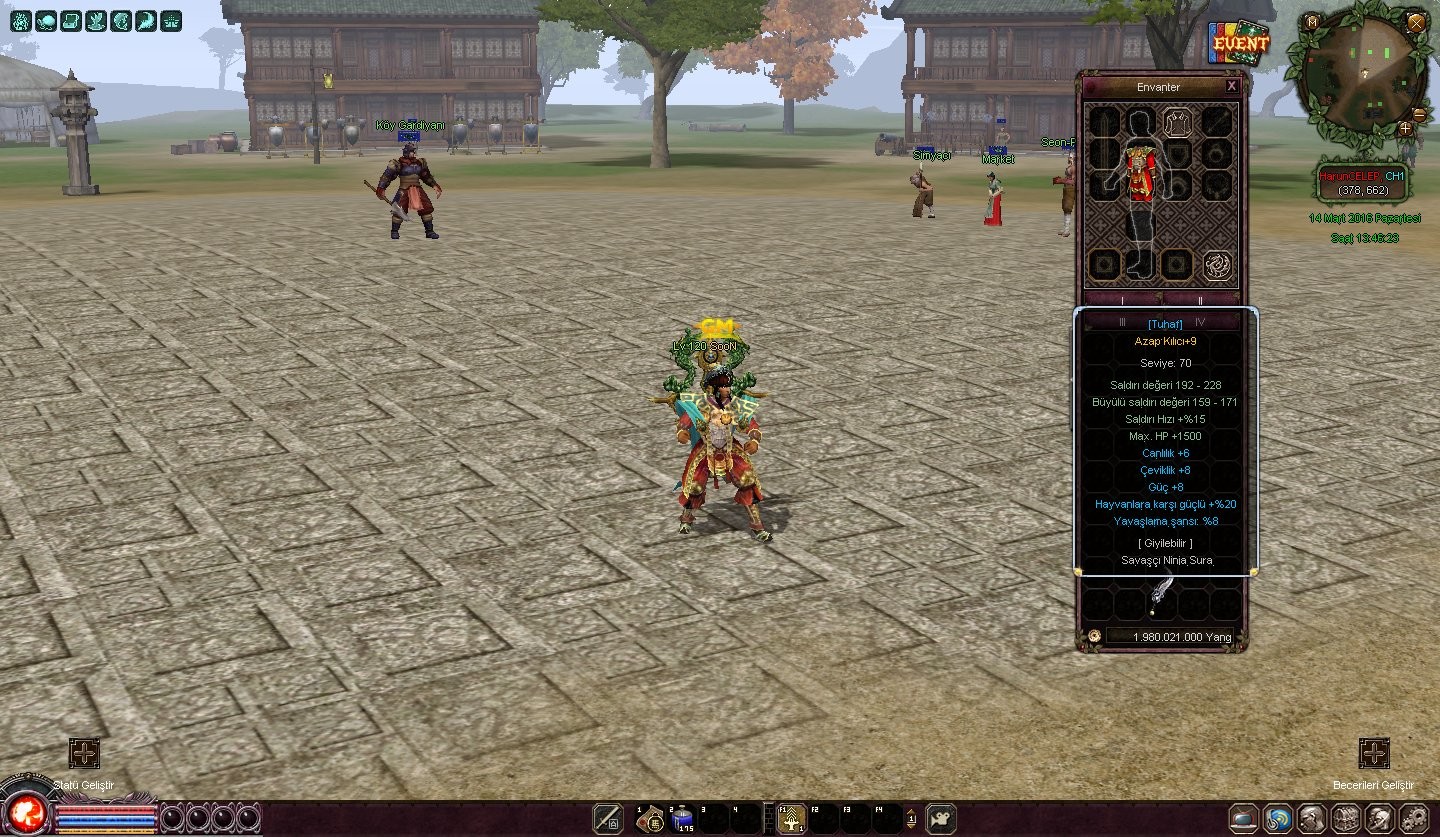
Root/uitooltip.py dosyası açılır
aratılır
Kod:
self.AppendTextLine(item.GetItemName(), self.SPECIAL_TITLE_COLOR)Alt dizine eklenir
Kod:
def Rango_Bonus(self, attrSlot): lista_bonus = [['1','3000'],['2','80'],['3','12'],['4','12'],['5','12'],['6','12'],['7','8'],['8','20'],['9','20'],['10','30'],['11','30'],['12','8'],['13','8'],['14','8'],['15','10'],['16','10'],['17','10'],['18','20'],['19','20'],['20','20'],['21','20'],['22','20'],['23','10'],['24','10'],['25','10'],['26','10'],['27','15'],['28','15'],['29','15'],['30','15'],['31','15'],['32','15'],['33','15'],['34','15'],['35','15'],['36','15'],['37','15'],['38','15'],['39','15'],['41','5'],['43','20'],['44','20'],['45','20'],['48','1'],['53','50'],['71','10'],['72','35']] lista_texto = [['[Son]',grp.GenerateColor(051,255,255, 1.0)],['[Efsanevi]',grp.GenerateColor(24,116,205, 1.0)],['[Epic]',grp.GenerateColor(0.63,0.13,0.94, 1.0)],['[Tuhaf]',grp.GenerateColor(0,0.75,1, 1.0)],['[Ortak]',grp.GenerateColor(0,0.79,0.34, 1.0)],['[Normal]',grp.GenerateColor(0.9490, 0.9058, 0.7568, 1.0)],['[Bilinmeyen]',grp.GenerateColor(193,205,193, 1.0)],['[Biraz]',grp.GenerateColor(131,139,131, 1.0)]] i2 = 0 right = 0 for i in xrange(player.ATTRIBUTE_SLOT_MAX_NUM): type = attrSlot[i][0] value = attrSlot[i][1] if 0 == value: continue else: for line in range(len(lista_bonus)): if int(lista_bonus[line-1][0]) == int(type): if int(lista_bonus[line-1][1]) == int(value) or int(lista_bonus[line-1][1]) < int(value): right = right+1 i2 = i2+1 for i3 in [0,1,2,3,4,5,6,7]: if int(i2) == int(int(right)+int(i3)): i2 = i3 try: self.AppendTextLine(lista_texto[i2][0], lista_texto[i2][1]) except: dbg.TraceError("Bonus listesi yuklenemedi.")aratılır
Kod:
self.__SetSpecialItemTitle()Üstüne eklenir
Kod:
self.Rango_Bonus(attrSlot)aratılır
Kod:
self.AppendTextLine(localeInfo.TOOLTIP_ITEM_MAGIC_DEF_POWERBir alt dizine eklenir
Kod:
def GetBonusColor(self, attrSlot): # Lista de Bonus # #1 = Max HP #2 = Max SP #3 = Vitalidad #4 = Inteligencia #5 = Fuerza #6 = Dextreza #7 = Velocidad de ataque #8 = Velocidad de Movimiento #9 = Velocidad Hechizo #10 = Regeneracion de HP #11 = Regeneracion de SP #12 = Probabilidad de Envenenamiento #13 = Probabilidad de Apagon #14 = Probabilidad de Retardo #15 = Probabilidad de golpes criticos #16 = Probabilidad de golpes de penetracion #17 = Fuerza Contra MedioHumanos #18 = Fuerza Contra Animales #19 = Fuerza Contra Orcos #20 = Fuerza Contra Misticos #21 = Fuerza Contra No-muertos #22 = Fuerza Contra Demonios #23 = Probabilidad de Absorver HP #24 = Probabilidad de Absorver SP #25 = Probabilidad de robar HP #26 = Probabilidad de recuperar SP al golpear #27 = Posibilidad de bloquear un ataque cuerpo a cuerpo #28 = Probabilidad de Esquivar Flechas #29 = Defensa Espada #30 = Defensa Dos Manos #31 = Defensa Daga #32 = Defensa Campana #33 = Defensa Fan #34 = Resistencia de Flechas #35 = Resistencia Fuego #36 = Resistencia Relampago #37 = Resistencia Magia #38 = Resistencia Vento #39 = Probabilidad de reflectar golpes fisicos #40 = Probabilidad de reflectar maldicion #41 = Resistencia veneno #42 = Probabilidad para recuperar SP #43 = Probabilidad de bonus de doble de EXP #44 = Probabilidad de Caer Doble Drop de Yang #45 = Probabilidad de Caer Doble Drop de Items #46 = Aumentar el efecto de las pociones #47 = Probabilidad para recuperar HP #48 = Defensa contra Apagones #49 = Defensa contra Retardo #50 = Defensa contra Caidas #51 = UNKNOWN_TYTE [51] SIN EFECTO #52 = Alcance del arco #53 = Valor de ataque #54 = Defensa #55 = Valor de Ataque magico #56 = Defensa Magica #57 = UNKNOWN_TYPE [57] SIN EFECTO #58 = Max Resistencia #59 = Fuerza contra Guerrero #60 = Fuerza contra Ninja #61 = Fuerza contra Sura #62 = Fuerza contra Chamanes #63 = Fuerza contra Mounstruo #64 = Valor de ataque #65 = Defensa #66 = EXP #67 = Probabilidad de capturar objetos multiplicada con x.xx (las X son un porcentaje % = Bonus) #68 = Probabilidad de capturar Yang multiplicada con x.xx (las X son un porcentaje % = Bonus) #69 = UNKNOWN_TYPE [69] SIN EFECTO #70 = UNKNOWN_TYPE [70] SIN EFECTO #71 = Dano de Habilidad #72 = Dano Media #73 = Resistencia al dano de habilidad ( contrarresta el bonus ID:71 ) #74 = Resistencia al dano de media( contrarresta el bonus ID:72 ) #75 = UNKNOWN_TYPE [75] SIN EFECTO #76 = EXP Bonus x.xx (las X son un porcentaje % = Bonus) #77 = Probabilidad de capturar objetos mas x.xx (las X son un porcentaje % = Bonus) #78 = Defensa Contra Guerrero #79 = Defensa Contra Ninja #80 = Defensa Contra Sura #81 = Defensa Contra Chaman # Lista de Bonus End lista_bonus = [['1','3000'],['2','80'],['3','12'],['4','12'],['5','12'],['6','12'],['7','8'],['8','20'],['9','20'],['10','30'],['11','30'],['12','8'],['13','8'],['14','8'],['15','10'],['16','10'],['17','10'],['18','20'],['19','20'],['20','20'],['21','20'],['22','20'],['23','10'],['24','10'],['25','10'],['26','10'],['27','15'],['28','15'],['29','15'],['30','15'],['31','15'],['32','15'],['33','15'],['34','15'],['35','15'],['36','15'],['37','15'],['38','15'],['39','15'],['41','5'],['43','20'],['44','20'],['45','20'],['48','1'],['53','50'],['71','10'],['72','35']] lista_color = [[grp.GenerateColor(051,255,255, 1.0)],[grp.GenerateColor(24,116,205, 1.0)],[grp.GenerateColor(0.63,0.13,0.94, 1.0)],[grp.GenerateColor(0,0.75,1, 1.0)],[grp.GenerateColor(0,0.79,0.34, 1.0)],[grp.GenerateColor(0.9490, 0.9058, 0.7568, 1.0)],[grp.GenerateColor(193,205,193, 1.0)],[grp.GenerateColor(131,139,131, 1.0)]] i2 = 0 right = 0 for i in xrange(player.ATTRIBUTE_SLOT_MAX_NUM): type = attrSlot[i][0] value = attrSlot[i][1] if 0 == value: continue else: for line in range(len(lista_bonus)): if int(lista_bonus[line-1][0]) == int(type): if int(lista_bonus[line-1][1]) == int(value) or int(lista_bonus[line-1][1]) < int(value): right = right+1 i2 = i2+1 for i3 in [0,1,2,3,4,5,6,7]: if int(i2) == int(int(right)+int(i3)): i2 = i3 try: return lista_color[i2][0] except: dbg.TraceError("Bonus listesi yuklenemedi.")aratılır
Kod:
def __AppendAttributeInformation(self, attrSlot): if 0 != attrSlot:
Kod:
TitleColor = self.GetBonusColor(attrSlot)Kanıt:
+40 K Sistemlerinde Renkli Efsun
Metin2 özel sunucularında, özellikle yüksek seviye sistemlere odaklanan oyuncular için renkli efsunlar büyük bir avantaj sağlar. Bu yazıda, +40 K sistemlerinde renkli efsunların nasıl çalıştığını, nasıl uygulanacağını ve bu sistemin sunucu tarafında nasıl yapılandırılacağını detaylı olarak ele alacağız.
Renkli Efsun Nedir?
Metin2 oyununda efsunlar, karakterinizi güçlendiren özel itemlardır. Standart efsunlar belirli bonuslar sağlarken, renkli efsunlar daha güçlü ve özelleştirilebilir bonuslar sunar. Özellikle +40 K sistemlerinde, efsunların gücü arttıkça, bu bonuslar daha da dikkat çekici hale gelir.
Renkli Efsun Sistemi Nasıl Çalışır?
Renkli efsunlar, farklı renklerde ve bonuslarla gelir. Örneğin:
- Mavi efsunlar: +%10 Can
- Kırmızı efsunlar: +%10 Hasar
- Sarı efsunlar: +%10 Hız
Bu sistem, Python GUI veya C++ Script tabanlı olarak geliştirilir ve sunucu tarafında özel item tanımları yapılır.
+40 K Sistemleriyle Entegrasyon
+40 K sistemleri, Metin2 özel sunucularında genellikle yüksek seviye karakterler için geliştirilen özel güçlendirme sistemleridir. Bu sistemlerde efsunlarla entegrasyon için:
- DB Core tarafında item tablosuna özel satırlar eklenir.
- Game Server Programming ile efsunlar karaktere bağlanır.
- Auth ve Game sunucuları arasında senkronizasyon sağlanır.
Renkli Efsun Oluşturma
Renkli efsunlar genellikle özel pack dosyalarıyla gelir. Bu dosyalar içinde:
- Item ID tanımları
- Bonus efektleri
- Renk ve görünüm ayarları
bulunur. Py Root klasörlerinde bu dosyalar düzenlenerek özelleştirilebilir.
C++ ile Renkli Efsun Geliştirme
Gelişmiş sistemlerde, C++ System ile efsunlar doğrudan Server SRC üzerinden yönetilir. Bu sayede:
- Performans artar
- Güvenlik sağlanır
- Daha fazla özelleştirme imkanı oluşur
Uygulama Adımları
1. Item Creation: Yeni efsun itemlerini oluşturun.
2. UIScript ile arayüzde görünümünü ayarlayın.
3. DB tarafında bonus efektlerini tanımlayın.
4. Game Core üzerinde aktif hale getirin.
Sonuç
Renkli efsunlar, Metin2 özel sunucularında oyuncuların dikkatini çekecek güçlü bir özelliktir. +40 K sistemlerinde doğru uygulandığında hem oyun deneyimini artırır hem de sunucunuzun rekabet gücünü yükseltir. Metin2Lobby olarak, bu gibi gelişmiş sistemlerin tüm detaylarını kaynak kodlarla birlikte sunuyoruz.
Colored Enchantments in +40 K Systems
In Metin2 private servers, colored enchantments offer a significant advantage for players focused on high-level systems. In this article, we will examine how colored enchantments work in +40 K systems, how they are implemented, and how this system is configured on the server side.
What Are Colored Enchantments?
In Metin2, enchantments are special items that enhance your character. While standard enchantments provide basic bonuses, colored enchantments offer stronger and customizable bonuses. Especially in +40 K systems, as the power of enchantments increases, these bonuses become even more noticeable.
How Does the Colored Enchantment System Work?
Colored enchantments come in different colors and bonuses. For example:
- Blue enchantments: +%10 HP
- Red enchantments: +%10 Damage
- Yellow enchantments: +%10 Speed
This system is developed based on Python GUI or C++ Script, and special item definitions are made on the server side.
Integration with +40 K Systems
+40 K systems are usually custom power-up systems developed for high-level characters in Metin2 private servers. To integrate enchantments into these systems:
- Special rows are added to the item table in the DB Core.
- Enchantments are linked to the character through Game Server Programming.
- Synchronization between Auth and Game servers is established.
Creating Colored Enchantments
Colored enchantments typically come with custom pack files. These files contain:
- Item ID definitions
- Bonus effects
- Color and appearance settings
These files can be customized by editing them inside the Py Root folders.
Developing Colored Enchantments with C++
In advanced systems, C++ System is used to manage enchantments directly from the Server SRC. This way:
- Performance increases
- Security is ensured
- More customization options are available
Implementation Steps
1. Item Creation: Create new enchantment items.
2. Adjust their appearance in the interface using UIScript.
3. Define bonus effects on the DB side.
4. Activate them within the Game Core.
Conclusion
Colored enchantments are a powerful feature that attracts players in Metin2 private servers. When correctly applied in +40 K systems, they enhance both the gaming experience and the competitiveness of your server. At Metin2Lobby, we provide all the details of such advanced systems along with their source codes.
