

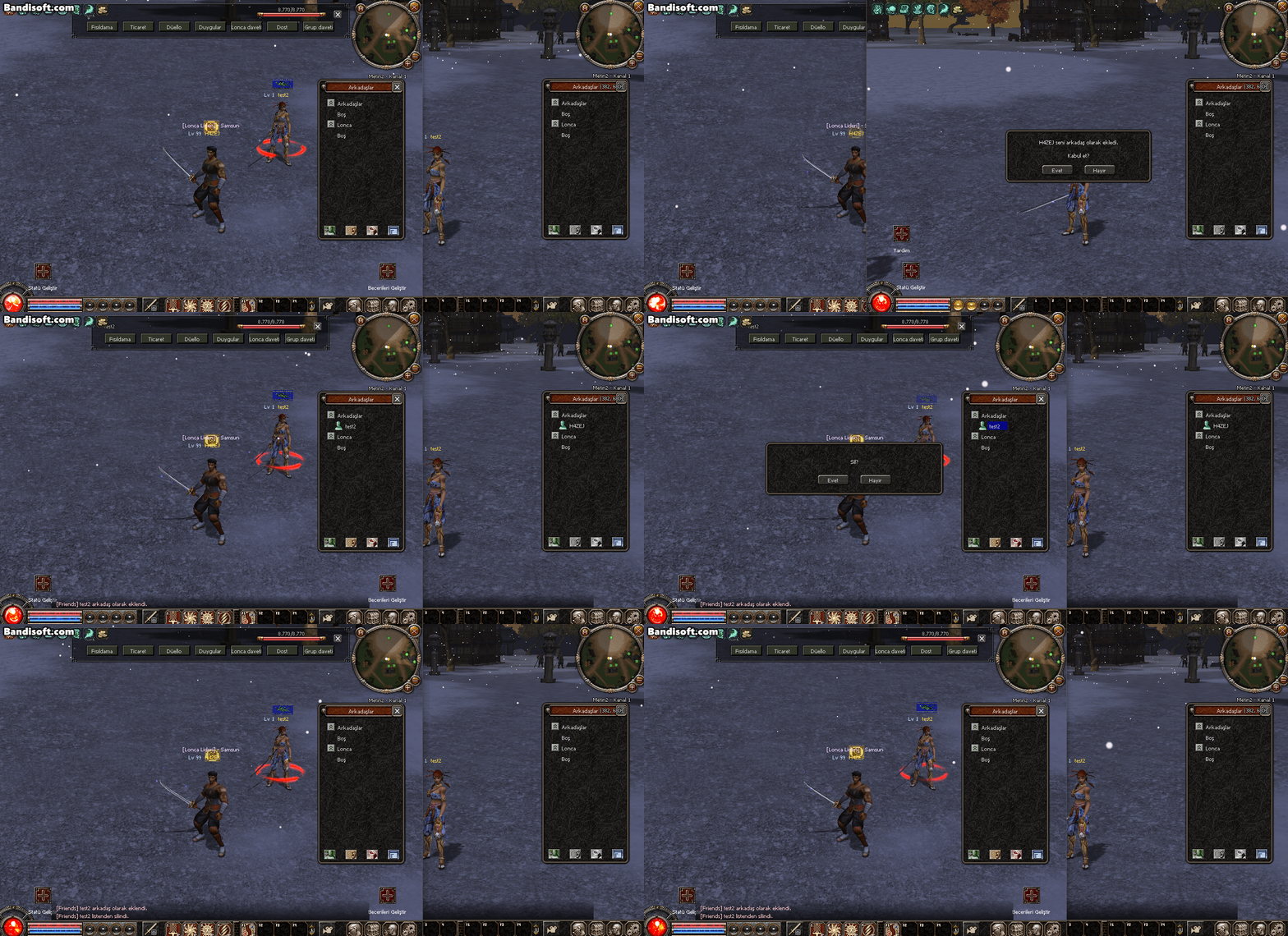
Paylaşılan hata çözümü (
Ziyaretçiler için gizlenmiş link,görmek için üye olmalısınız!
Giriş yap veya üye ol.
) karşı taraf teleport attıktan sonra çözüme ulaşıyordu. Bende biraz araştırıp bu fixi buldum. İyi kullanımlar.
Ziyaretçiler için gizlenmiş link,görmek için üye olmalısınız!
Giriş yap veya üye ol.
Ziyaretçiler için gizlenmiş link,görmek için üye olmalısınız!
Giriş yap veya üye ol.
Arkadaş Listesinden Silme Hata Çözümü v2
Metin2 özel sunucularında geliştirme yaparken birçok geliştirici benzer hatalarla karşılaşabilir. Bu hatalardan birisi de arkadaş listesi üzerinden bir kullanıcıyı silerken ortaya çıkan hata durumudur. Özellikle PvP sunucularda oyuncu deneyimi optimize edilmeye çalışılırken, bu tür küçük hatalar bile kullanıcı memnuniyetini ciddi şekilde etkileyebilir. Bu nedenle, Arkadaş Listesinden Silme Hata Çözümü v2 konusunu detaylı olarak ele alacağız.
Hatanın Tanımı ve Etkileri
Metin2 sunucularında arkadaş listesinden bir kullanıcı silinmek istendiğinde bazen istemci (client) tarafından gönderilen veri sunucuya ulaşamaz ya da sunucu bu işlemi doğru şekilde işleyemez. Bu durumda oyuncu, arkadaş listenizden silinen kişi hâlâ orada gibi görünür veya tam tersine, silme işlemi yapıldığı halde sunucu tarafında hata mesajı alınabilir. Bu tür hatalar genellikle C++ sunucu tarafında tanımlı olan game core içindeki fonksiyonlarda meydana gelen eksikliklerden veya istemci ile sunucu arasında uyuşmayan protokol nedeniyle ortaya çıkar.
Yaygın Nedenler
1. Sunucu tarafında friend_remove fonksiyonunun eksik veya hatalı implementasyonu.
2. Client tarafında uiscript dosyasında tanımlanan butonların tetiklediği fonksiyonlarla sunucu arasındaki iletişim kopukluğu.
3. Game server ile auth server arasında eksik senkronizasyon.
4. Oyuncu ID'si geçersiz ya da hatalı olduğunda bu ID'nin kontrol edilmeden silme işlemi yapılması.
Çözüm Yaklaşımı v2
Bu sürümde, hem C++ hem de Python tabanlı çözümler detaylandırılmıştır. İlk olarak, game core içinde yer alan friend_manager.cpp dosyasındaki RemoveFriend fonksiyonuna odaklanmalısınız. Bu fonksiyon, silme işlemini başlatmadan önce oyuncunun gerçekten arkadaş listesinde olup olmadığını kontrol etmelidir. Eğer liste kontrolü eksikse, bu durumda hata mesajı döndürülmelidir.
Python Tarafında Uygulanacak Kontroller
Sunucu tarafında py root dosyalarında yer alan net.py veya player.py gibi dosyalarda friend_remove komutu doğru şekilde işlenmelidir. Bu işlem sırasında player.GetAID() ve player.GetName() gibi değerlerle silinmek istenen arkadaşın doğruluğu teyit edilmelidir. Eğer gerekirse, db_core üzerinden de doğrulama yapılmalıdır.
Client Tarafında Yapılması Gerekenler
Client tarafında, uiscript dosyasında yer alan friend_list.py dosyasında onPressDeleteButton fonksiyonu üzerinden silme işlemi başlatılır. Bu fonksiyon, doğru şekilde sunucuya RemoveFriend paketi göndermelidir. Paket içinde hem silinen oyuncunun adı hem de ID'si bulunmalıdır. Eğer bu veriler eksikse, sunucu işlemi reddeder.
Test Süreci ve Geliştirme
Bu çözümü uyguladıktan sonra, sunucunuzda test yapmanız önemlidir. Channel sunucularınızda farklı hesaplarla arkadaşlık kurup ardından silme işlemlerini yaparak hatanın çözülüp çözülmediğini gözlemleyin. Ayrıca, martysama gibi Metin2 geliştirme platformlarında benzer durumları yaşayan diğer geliştiricilerin deneyimlerini inceleyerek kendi sisteminizi daha da optimize edebilirsiniz.
Sonuç
Arkadaş listesinden silme hatası, Metin2 özel sunucularında karşılaşılan yaygın sorunlardan biridir. Ancak doğru analiz ve uygulama ile bu hata kolayca çözülebilir. Bu v2 çözümü sayesinde hem C++ hem de Python tabanlı sistemlerde kalıcı bir çözüm elde edebilirsiniz. Bu tür küçük ama önemli detaylar, sunucunuzun genel stabilitesini ve oyuncu memnuniyetini artırır.
Friend List Removal Error Solution v2
While developing Metin2 private servers, many developers may encounter similar errors. One of these errors is related to removing a user from the friend list. Especially on PvP servers where player experience is optimized, such small bugs can seriously affect user satisfaction. Therefore, we will examine the topic of Friend List Removal Error Solution v2 in detail.
Error Definition and Effects
When trying to remove a user from the friend list in Metin2 servers, sometimes the data sent by the client does not reach the server, or the server cannot process this operation correctly. In this case, the player removed from your friend list might still appear there, or conversely, even though the removal action was performed, an error message could be received from the server. Such errors generally occur due to missing or incorrect implementation of the friend_remove function defined in the C++ server-side game core or due to protocol mismatches between the client and server.
Common Causes
1. Missing or incorrect implementation of the friend_remove function on the server side.
2. Communication gap between the functions triggered by buttons defined in the uiscript file on the client side and the server.
3. Insufficient synchronization between the game server and the auth server.
4. Performing the deletion without checking if the player ID is invalid or incorrect when attempting removal.
Solution Approach v2
In this version, both C++ and Python-based solutions are detailed. First, focus on the RemoveFriend function within the friend_manager.cpp file located in the game core. This function should check whether the player really exists in the friend list before starting the removal operation. If this check is missing, an error message should be returned.
Controls to Be Applied on the Python Side
On the server side, in files like net.py or player.py located in the py root folder, the friend_remove command must be handled correctly. During this process, values like player.GetAID() and player.GetName() must be validated to ensure that the targeted friend is correct for removal. If needed, validation via db_core should also be performed.
What Needs To Be Done On The Client Side
On the client side, in the friend_list.py file located in the uiscript folder, the onPressDeleteButton function triggers the removal action. This function must correctly send the RemoveFriend packet to the server. The packet should contain both the name and the ID of the player being removed. If this data is incomplete, the server will reject the operation.
Testing Process and Development
After applying this solution, testing on your server is essential. On your Channel servers, create friendships with different accounts and then attempt removals to see whether the error has been resolved. Additionally, you can examine experiences shared by other developers facing similar issues on platforms like martysama to further optimize your system.
Conclusion
The friend list removal error is one of the common issues encountered in Metin2 private servers. However, with proper analysis and application, this error can easily be fixed. With this v2 solution, you can achieve a permanent fix in both C++ and Python-based systems. Such small but important details increase your server's overall stability and player satisfaction.
