

SELAMUN ALEYKÜM ARKADAŞLAR,
6 VE 7 EFSUN EKLEME İLE UĞRAŞIRKEN KONULARA GÖZ GEZDİRDİM ADAM AKILLI BİR KONU YOK İNŞAALLAH BU KONU İŞİNİZİ GÖRÜR.
SİSTEM:
40K FİLESLERDE HALİ HAZIRDA EKLİ OLAN 6&7 EFSUN İTEMLERİNİN AKTİF ETMEYİ GÖSTERECEĞİM.
6 VE 7 EFSUN EKLEME İLE UĞRAŞIRKEN KONULARA GÖZ GEZDİRDİM ADAM AKILLI BİR KONU YOK İNŞAALLAH BU KONU İŞİNİZİ GÖRÜR.
SİSTEM:
40K FİLESLERDE HALİ HAZIRDA EKLİ OLAN 6&7 EFSUN İTEMLERİNİN AKTİF ETMEYİ GÖSTERECEĞİM.
Kod:
Game Source > Game > char_item.cpp; Arat: case 71051: İçinde Bul SİL: if (LC_IsEurope() || LC_IsSingapore() || LC_IsVietnam()) return false; Tekrar Arat: case 71052 : İçinde Bul SİL: if (LC_IsEurope() || LC_IsSingapore() || LC_IsVietnam()) return false;
Kod:
Game Source İle İşlem Bitti Gelelim İtemleri Eklemeye: Pack: locale_tr > locale > tr ## item_desc.txt En Alta Ekle: 71051 2. Arttırma Kağıdı Eşyalarınıza özel olarak 6. ve 7. efsunları ekler. 71052 2. Arttırma Kağıdı Eğer eşyanıza mevcut ise 6. ve 7. efsunları değişitmeye yarar ## item_list.txt En Alta Ekle: 71051 ETC icon/item/71051.tga 71052 ETC icon/item/71052.tga PROTOLAR: En Alta Ekle: ## item_names.txt: 71051 2. Arttırma Kağıdı 71052 2. Efsun Nesnesi ## item_proto.txt: [SPOILER="TXT"] 71051 67_Efsun_Ekle ITEM_USE USE_SPECIAL 1 ANTI_DROP | ANTI_SELL | ANTI_GIVE | ANTI_MYSHOP ITEM_STACKABLE | LOG NONE NONE 0 0 0 0 0 LIMIT_NONE 0 LIMIT_NONE 0 APPLY_NONE 0 APPLY_NONE 0 APPLY_NONE 0 0 0 0 0 0 0 0 0 0 71052 67_Efsun_Dgstr ITEM_USE USE_SPECIAL 1 ANTI_DROP | ANTI_SELL | ANTI_GIVE | ANTI_MYSHOP ITEM_STACKABLE | LOG NONE NONE 0 0 0 0 0 LIMIT_NONE 0 LIMIT_NONE 0 APPLY_NONE 0 APPLY_NONE 0 APPLY_NONE 0 0 0 0 0 0 0 0 0 0 [/SPOILER] item_names.txt ve item_proto.txt FTP ( filezilla yada winscp ne kullanıoyrsanuz )' de' gerekli yere atın. Son olarak txt leri dump proto ile kapatıp locale_tr içine atın.Arkadaşlar icon dosyaları olmayanlar için iconlar:
Link:
V.T:
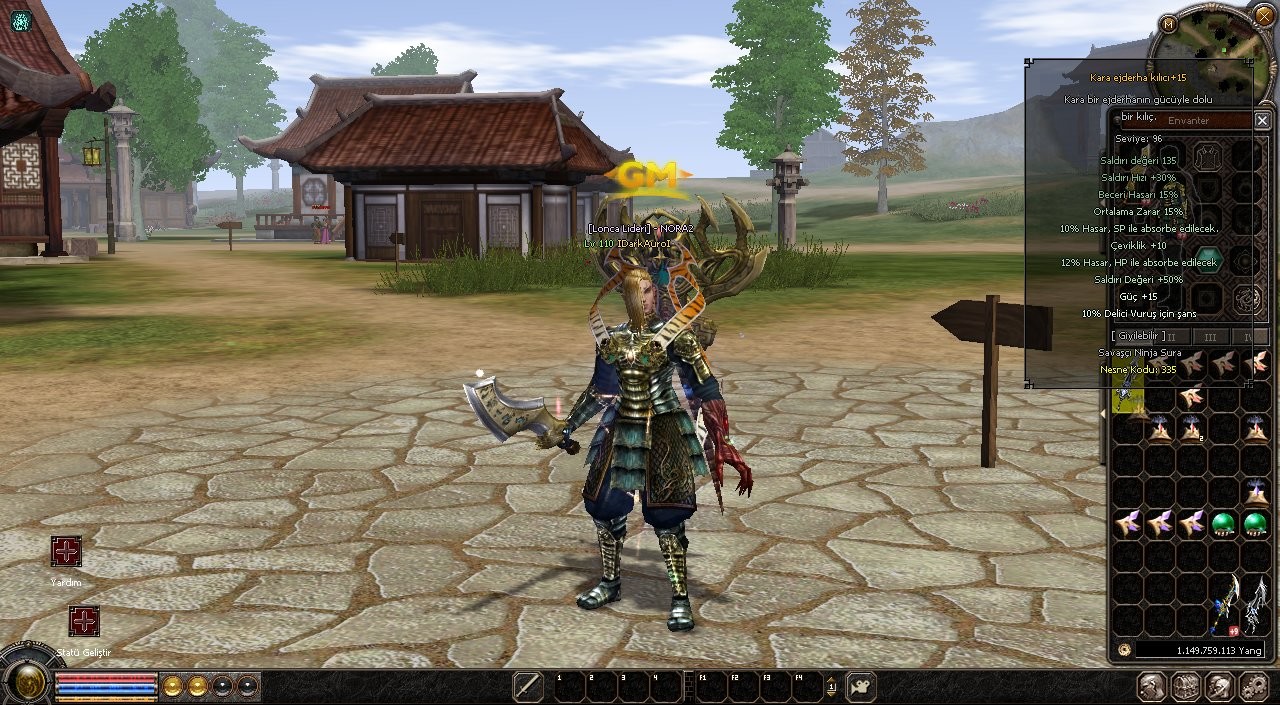
İtemlerin Çalıştığına Dair Kanıt:
C++ ile Metin2 6&7 Efsun 40K Source Aktif Etme ve İtem Proto [TXT]
Metin2 özel sunucularında C++ tabanlı sistemlerin gelişmesiyle birlikte, efsunlama mekanikleri daha da karmaşık hale gelmiştir. Bu yazıda, C++ tabanlı bir Metin2 sunucu kaynağında 6. ve 7. efsun seviyesinin 40.000 exp sınırıyla aktif edilmesi ve item_proto.txt dosyasında gerekli değişiklikler anlatılacaktır.
Neden 6&7 Efsun Sistemi?
Metin2 oyununda efsunlama sistemi, oyuncuların silah ve zırh gibi eşyalarını güçlendirmek için kullandığı önemli bir özelliktir. Klasik sistemlerde bu işlem genellikle 5. efsuna kadar mümkündür. Ancak özel sunucularda geliştirilen C++ modifikasyonlarla bu sınır genişletilebilir. 6 ve 7. efsun seviyeleri, oyunculara daha fazla stratejik derinlik ve PvP avantajı sunar. Bu seviyelerin aktif edilmesi, hem oyun içi dengeleri hem de oyuncu tutkusunu artırabilir.
Gereksinimler
- Metin2 C++ tabanlı sunucu kaynağı (örneğin: GameCore)
- item_proto.txt dosyasına erişim
- Python ROOT ve UIScript düzenlenebilir yapı
- Auth ve DB Core uyumlu sistem
- 40K exp sistemine göre ayarlanmış item_proto.txt dosyası
Adım Adım 6&7 Efsun Aktivasyonu
1. Öncelikle, sunucu kaynağınızda (GameCore) efsun sistemini destekleyen fonksiyonların aktif olduğundan emin olun. Bu fonksiyonlar genellikle C++ kodlarında 'upgrade_item' veya benzeri isimlerle tanımlıdır.
2. Item_proto.txt dosyasında, 6. ve 7. efsun seviyelerine özel olarak eklenmesi gereken item ID'leri tanımlamalısınız. Bu ID'ler, 40.000 exp gerektiren efsun taşlarıdır.
3. item_proto.txt dosyasında, her item için 'gold_pct', 'refine_set', ve 'addon_type' gibi alanlar 6. ve 7. efsun seviyeleri için doğru şekilde tanımlanmalıdır. Örneğin:
ID: 100001
Name: 'EfsunTasi_6'
Type: 'RefineStone'
GoldPct: 40000
RefineSet: 6
4. Python tarafında (py_root), GUI ve UIscript sistemlerinde efsun menüsüne 6. ve 7. seviyeler için uygun buton ve görseller eklenmelidir. Bu işlem, oyuncuların efsunlama ekranında bu seviyeleri görebilmesi için önemlidir.
5. DB Core üzerinde, 6 ve 7. efsun seviyeleri için gerekli olan SQL tablolarının tanımlı olduğundan emin olun. Bu tablolar, efsun geçmişi ve item durumu gibi verileri saklamak için gereklidir.
6. Compile işlemi sırasında, 6. ve 7. efsunlar için özel kontrol fonksiyonları C++ kodlara entegre edilmelidir. Bu fonksiyonlar, efsun seviyesi kontrolü ve exp hesaplaması için çalışır.
7. Test aşamasında, 40K exp taşlarıyla efsun yaparak sistemin doğru çalışıp çalışmadığını deneyin. Eğer bir sorunla karşılaşırsanız, log dosyalarında hata mesajlarını kontrol edin.
Sonuç
Metin2 özel sunucularında 6 ve 7. efsun seviyelerinin aktif edilmesi, C++ sistem bilgisi gerektiren ancak oldukça ödüllendirici bir işlemdir. Oyuncuların daha yüksek seviye efsunlara ulaşması, oyun içi deneyimi zenginleştirir. Bu rehber sayesinde, item_proto.txt dosyasında gerekli değişiklikleri yaparak ve C++ kodlarda uygun ayarlamaları sağlayarak bu sistemi aktif edebilirsiniz. Daha fazla Metin2 geliştirici rehberi için Metin2Lobby sitesini takip etmeyi unutmayın.
Activating 6&7 Enchant 40K Source and Item Proto [TXT] with C++
With the evolution of C++ based systems in Metin2 private servers, enchantment mechanics have become more complex. In this article, we will explain how to activate 6th and 7th enchant levels with a 40,000 exp requirement in a C++ based Metin2 server source and the necessary modifications in the item_proto.txt file.
Why 6&7 Enchant System?
In Metin2, the enchantment system is a key feature that allows players to strengthen their weapons and armor. Traditional systems usually allow enchanting up to level 5. However, with custom C++ modifications on private servers, this limit can be extended. The 6th and 7th enchant levels offer players deeper strategic gameplay and PvP advantages. Activating these levels can enhance both in-game balance and player engagement.
Requirements
- Metin2 C++ based server source (e.g., GameCore)
- Access to item_proto.txt file
- Editable Python ROOT and UIScript structures
- Auth and DB Core compatible system
- item_proto.txt configured for 40K exp system
Step-by-Step Activation of 6&7 Enchants
1. First, ensure that the enchantment functions are active in your server source (GameCore). These functions are usually named 'upgrade_item' or similar in C++ code.
2. In the item_proto.txt file, you need to define specific item IDs for 6th and 7th enchant levels. These IDs correspond to the enchant stones requiring 40,000 exp.
3. In item_proto.txt, fields like 'gold_pct', 'refine_set', and 'addon_type' must be correctly defined for 6th and 7th enchant levels. For example:
ID: 100001
Name: 'EnchantStone_6'
Type: 'RefineStone'
GoldPct: 40000
RefineSet: 6
4. In the Python side (py_root), appropriate buttons and visuals for 6th and 7th levels must be added to the GUI and UIscript systems so players can see these levels in the enchantment menu.
5. Ensure that required SQL tables for 6th and 7th enchant levels exist in the DB Core. These tables store enchant history and item status data.
6. During compilation, special control functions for 6th and 7th enchant levels should be integrated into C++ codes. These functions handle enchant level checks and exp calculations.
7. During testing, use 40K exp stones to enchant and verify if the system works properly. If any issues arise, check error logs.
Conclusion
Activating 6th and 7th enchant levels in Metin2 private servers is a rewarding process that requires C++ knowledge. Allowing players to reach higher enchant levels enriches the in-game experience. With this guide, you can activate this system by making necessary changes in the item_proto.txt file and adjusting C++ codes accordingly. Don't forget to follow Metin2Lobby for more guides on Metin2 development.
Link:
Ziyaretçiler için gizlenmiş link,görmek için üye olmalısınız!
Giriş yap veya üye ol.
V.T:
Ziyaretçiler için gizlenmiş link,görmek için üye olmalısınız!
Giriş yap veya üye ol.
İtemlerin Çalıştığına Dair Kanıt:
C++ ile Metin2 6&7 Efsun 40K Source Aktif Etme ve İtem Proto [TXT]
Metin2 özel sunucularında C++ tabanlı sistemlerin gelişmesiyle birlikte, efsunlama mekanikleri daha da karmaşık hale gelmiştir. Bu yazıda, C++ tabanlı bir Metin2 sunucu kaynağında 6. ve 7. efsun seviyesinin 40.000 exp sınırıyla aktif edilmesi ve item_proto.txt dosyasında gerekli değişiklikler anlatılacaktır.
Neden 6&7 Efsun Sistemi?
Metin2 oyununda efsunlama sistemi, oyuncuların silah ve zırh gibi eşyalarını güçlendirmek için kullandığı önemli bir özelliktir. Klasik sistemlerde bu işlem genellikle 5. efsuna kadar mümkündür. Ancak özel sunucularda geliştirilen C++ modifikasyonlarla bu sınır genişletilebilir. 6 ve 7. efsun seviyeleri, oyunculara daha fazla stratejik derinlik ve PvP avantajı sunar. Bu seviyelerin aktif edilmesi, hem oyun içi dengeleri hem de oyuncu tutkusunu artırabilir.
Gereksinimler
- Metin2 C++ tabanlı sunucu kaynağı (örneğin: GameCore)
- item_proto.txt dosyasına erişim
- Python ROOT ve UIScript düzenlenebilir yapı
- Auth ve DB Core uyumlu sistem
- 40K exp sistemine göre ayarlanmış item_proto.txt dosyası
Adım Adım 6&7 Efsun Aktivasyonu
1. Öncelikle, sunucu kaynağınızda (GameCore) efsun sistemini destekleyen fonksiyonların aktif olduğundan emin olun. Bu fonksiyonlar genellikle C++ kodlarında 'upgrade_item' veya benzeri isimlerle tanımlıdır.
2. Item_proto.txt dosyasında, 6. ve 7. efsun seviyelerine özel olarak eklenmesi gereken item ID'leri tanımlamalısınız. Bu ID'ler, 40.000 exp gerektiren efsun taşlarıdır.
3. item_proto.txt dosyasında, her item için 'gold_pct', 'refine_set', ve 'addon_type' gibi alanlar 6. ve 7. efsun seviyeleri için doğru şekilde tanımlanmalıdır. Örneğin:
ID: 100001
Name: 'EfsunTasi_6'
Type: 'RefineStone'
GoldPct: 40000
RefineSet: 6
4. Python tarafında (py_root), GUI ve UIscript sistemlerinde efsun menüsüne 6. ve 7. seviyeler için uygun buton ve görseller eklenmelidir. Bu işlem, oyuncuların efsunlama ekranında bu seviyeleri görebilmesi için önemlidir.
5. DB Core üzerinde, 6 ve 7. efsun seviyeleri için gerekli olan SQL tablolarının tanımlı olduğundan emin olun. Bu tablolar, efsun geçmişi ve item durumu gibi verileri saklamak için gereklidir.
6. Compile işlemi sırasında, 6. ve 7. efsunlar için özel kontrol fonksiyonları C++ kodlara entegre edilmelidir. Bu fonksiyonlar, efsun seviyesi kontrolü ve exp hesaplaması için çalışır.
7. Test aşamasında, 40K exp taşlarıyla efsun yaparak sistemin doğru çalışıp çalışmadığını deneyin. Eğer bir sorunla karşılaşırsanız, log dosyalarında hata mesajlarını kontrol edin.
Sonuç
Metin2 özel sunucularında 6 ve 7. efsun seviyelerinin aktif edilmesi, C++ sistem bilgisi gerektiren ancak oldukça ödüllendirici bir işlemdir. Oyuncuların daha yüksek seviye efsunlara ulaşması, oyun içi deneyimi zenginleştirir. Bu rehber sayesinde, item_proto.txt dosyasında gerekli değişiklikleri yaparak ve C++ kodlarda uygun ayarlamaları sağlayarak bu sistemi aktif edebilirsiniz. Daha fazla Metin2 geliştirici rehberi için Metin2Lobby sitesini takip etmeyi unutmayın.
Activating 6&7 Enchant 40K Source and Item Proto [TXT] with C++
With the evolution of C++ based systems in Metin2 private servers, enchantment mechanics have become more complex. In this article, we will explain how to activate 6th and 7th enchant levels with a 40,000 exp requirement in a C++ based Metin2 server source and the necessary modifications in the item_proto.txt file.
Why 6&7 Enchant System?
In Metin2, the enchantment system is a key feature that allows players to strengthen their weapons and armor. Traditional systems usually allow enchanting up to level 5. However, with custom C++ modifications on private servers, this limit can be extended. The 6th and 7th enchant levels offer players deeper strategic gameplay and PvP advantages. Activating these levels can enhance both in-game balance and player engagement.
Requirements
- Metin2 C++ based server source (e.g., GameCore)
- Access to item_proto.txt file
- Editable Python ROOT and UIScript structures
- Auth and DB Core compatible system
- item_proto.txt configured for 40K exp system
Step-by-Step Activation of 6&7 Enchants
1. First, ensure that the enchantment functions are active in your server source (GameCore). These functions are usually named 'upgrade_item' or similar in C++ code.
2. In the item_proto.txt file, you need to define specific item IDs for 6th and 7th enchant levels. These IDs correspond to the enchant stones requiring 40,000 exp.
3. In item_proto.txt, fields like 'gold_pct', 'refine_set', and 'addon_type' must be correctly defined for 6th and 7th enchant levels. For example:
ID: 100001
Name: 'EnchantStone_6'
Type: 'RefineStone'
GoldPct: 40000
RefineSet: 6
4. In the Python side (py_root), appropriate buttons and visuals for 6th and 7th levels must be added to the GUI and UIscript systems so players can see these levels in the enchantment menu.
5. Ensure that required SQL tables for 6th and 7th enchant levels exist in the DB Core. These tables store enchant history and item status data.
6. During compilation, special control functions for 6th and 7th enchant levels should be integrated into C++ codes. These functions handle enchant level checks and exp calculations.
7. During testing, use 40K exp stones to enchant and verify if the system works properly. If any issues arise, check error logs.
Conclusion
Activating 6th and 7th enchant levels in Metin2 private servers is a rewarding process that requires C++ knowledge. Allowing players to reach higher enchant levels enriches the in-game experience. With this guide, you can activate this system by making necessary changes in the item_proto.txt file and adjusting C++ codes accordingly. Don't forget to follow Metin2Lobby for more guides on Metin2 development.
