

Herkese Selamın Aleyküm Daha Önce Paylaşıldımı Bilmiyorum Arkadaşım'ın Serverinde Ch Düşme oldu Syser : CHECKPOINT shutdown: tics did not updated
Olarak Verilmişti Aradım Ama Turkmmoda Böyle Bir Çözüm Bulamadım Bir Tane Açılmış Ve Kapatılmış Bu Yüzden Paylaşma Gereği Duydum Paylaşıldıysa Daha Önce Konu Kapatılabilir Hayırlı Forumlar ..
/usr/src/...../libthecore/src girilir ..
signal.c açılır
Aratılır
Aşşağıdaki İle Değiştirilir ..
Son Hali Şöyle Olacak ..
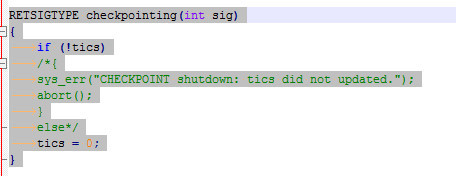
Bu Şekilde Syserr'i Ve Coreyi Önlemiş Oluyoruz Bu Yaptığım Fix Deildir Sadece Devre Dışı Bırakmış Oluyoruz Bu Fonksiyonu ..
Tekrardan Hayırlı Forumlar ..
Metin2 Oyun Sunucusu Hatası: CHECKPOINT shutdown: tics did not updated Game Core
Metin2 özel sunucularında karşılaşılan yaygın sorunlardan birisi, oyun çekirdeğinin (Game Core) zamanlayıcı (tics) güncellemelerini yapamamasıdır. Bu durumda sistem, CHECKPOINT shutdown: tics did not updated hatası vererek oyun döngüsünü sonlandırabilir. Bu yazıda, bu hatanın nedenlerini, nasıl teşhis edileceğini ve çözüm yollarını detaylı olarak ele alacağız.
Hatanın Tanımı
CHECKPOINT shutdown: tics did not updated Game Core hatası, genellikle oyun döngüsünün belirli bir süre boyunca tics adı verilen zamanlayıcı değerlerini güncelleyemediği durumlarda ortaya çıkar. Tics, oyun içindeki zamanlamalar, animasyonlar, AI işlemleri ve fiziksel hesaplamalar gibi birçok işlemi yöneten kritik bir yapıdır. Eğer bu değer güncellenmezse, oyun döngüsü donabilir veya tamamen kapanabilir.
Olası Nedenler
- CPU aşırı yüklenmesi veya donanım sınırlamaları
- Kodsal olarak sonsuz döngü veya bekleme durumu
- Thread senkronizasyon problemleri
- Zamanlayıcı (timer) ayarlarında hata
- Veritabanı bağlantı gecikmeleri veya bloklamalar
- Ağ bağlantısı ile ilgili gecikmeler
Teşhis ve Analiz Yöntemleri
Sorunu çözebilmek için ilk adım, hatayı tetikleyen kodun yerini belirlemektir. Bu işlem için aşağıdaki adımlar izlenebilir:
1. Log dosyalarını kontrol edin. Özellikle tics değeriyle ilgili uyarılar ya da hatalar burada görünebilir.
2. Performans monitörleri (CPU, RAM, disk) ile sistemin genel durumu incelenmelidir.
3. Oyun döngüsünde beklenmedik duraklamalar ya da sonsuz döngüler varsa, profiling araçları ile analiz yapılmalıdır.
4. Thread'lerin durumu kontrol edilmeli; deadlock (kilitlenme) veya race condition (yarış durumu) olup olmadığı değerlendirilmelidir.
Olası Çözüm Yolları
CPU Yükünü Azaltmak
Sunucu üzerinde çok fazla işlem varsa, bu durum tics değerlerinin güncellenmesini engelleyebilir. Özellikle AI işlemleri, çok sayıda oyuncunun aynı alanda bulunması gibi durumlar CPU yükünü artırabilir. Bu durumda:
- AI kodlarını optimize edin.
- NPC sayısı azaltılabilecekse azaltın.
- Gereksiz sorguları minimize edin.
Zamanlayıcı Ayarlarını Kontrol Etmek
Tics değeri, genellikle belirli bir aralıkta güncellenir. Bu değer yanlış tanımlanmışsa, sistem zamanında tepki veremeyebilir. Bu nedenle:
- Timer interval değerlerini kontrol edin.
- Zamanlayıcı ayarlarının sistem donanımına uygun olduğundan emin olun.
Thread Senkronizasyonunu Gözden Geçirmek
Birden fazla thread kullanıldığında, thread’ler arasında kilitlenmeler veya veri paylaşımındaki problemler tics’in güncellenmesini engelleyebilir. Bu durumda:
- Mutex, semaphore gibi senkronizasyon yapılarını gözden geçirin.
- Thread’lerin doğru sırayla çalıştığından emin olun.
Veritabanı Bağlantılarını Optimize Etmek
Veritabanı sorguları uzun sürüyorsa, ana oyun döngüsünü bloke edebilir. Bu da tics değerinin güncellenmemesine sebep olur. Bu nedenle:
- Sorguları async olarak çalıştırın.
- Gereksiz sorguları kaldırın veya optimize edin.
Network Gecikmelerini Minimize Etmek
Ağ üzerinden gelen istekler zamanında yanıtlanmazsa, bu da oyun döngüsünü etkileyebilir. Bu durumda:
- Network timeout ayarlarını gözden geçirin.
- Ağ bağlantısının kararlı olduğundan emin olun.
Sonuç
CHECKPOINT shutdown: tics did not updated Game Core hatası, Metin2 özel sunucularında karşılaşılabilecek ciddi bir performans ve kodlama sorunudur. Bu hatanın çözümü için hem sistemsel hem de kodsal incelemeler yapılmalıdır. Doğru analiz ve uygun optimizasyonlarla bu sorun çözülebilir ve sunucu daha stabil hale getirilebilir.
Kaynak: Metin2 Lobby
Metin2 Server Error: CHECKPOINT shutdown: tics did not updated Game Core
One of the common issues encountered in Metin2 private servers occurs when the game core fails to update its timer values (tics). In such cases, the system may throw the error 'CHECKPOINT shutdown: tics did not updated', causing the game loop to freeze or shut down entirely. In this article, we will examine the causes of this error, how to diagnose it, and potential solutions in detail.
Definition of the Error
The error 'CHECKPOINT shutdown: tics did not updated Game Core' typically arises when the game loop fails to update the 'tics' value for a certain period. Tics are critical for managing various processes within the game, including timing, animations, AI operations, and physics calculations. If this value is not updated, the game loop may freeze or terminate completely.
Possible Causes
- CPU overload or hardware limitations
- Infinite loops or blocking states in code
- Thread synchronization problems
- Incorrect timer settings
- Database connection delays or blocking
- Network-related delays
Diagnosis and Analysis Methods
To resolve the issue, the first step is identifying the code that triggers the error. The following steps can be taken for diagnosis:
1. Check log files. Warnings or errors related to the tics value may appear here.
2. Examine the overall system status using performance monitors (CPU, RAM, disk).
3. If unexpected pauses or infinite loops occur in the game loop, analyze them using profiling tools.
4. Check the status of threads; evaluate whether deadlocks or race conditions exist.
Potential Solutions
Reducing CPU Load
If there are too many operations on the server, this may prevent the tics value from updating. Especially AI operations or high player density in one area can increase CPU load. In this case:
- Optimize your AI code.
- Reduce the number of NPCs if possible.
- Minimize unnecessary queries.
Check Timer Settings
The tics value is usually updated at specific intervals. If this value is incorrectly defined, the system may fail to respond in time. Therefore:
- Review timer interval values.
- Ensure timer settings are appropriate for the system hardware.
Review Thread Synchronization
When multiple threads are used, deadlocks or data sharing issues between threads can prevent the tics value from updating. In this case:
- Review synchronization mechanisms like mutexes and semaphores.
- Ensure threads run in the correct order.
Optimize Database Connections
If database queries take too long, they may block the main game loop, preventing the tics value from being updated. Therefore:
- Run queries asynchronously.
- Remove or optimize unnecessary queries.
Minimize Network Delays
If network requests are not responded to in time, it can affect the game loop. In this case:
- Review network timeout settings.
- Ensure network connection stability.
Conclusion
The 'CHECKPOINT shutdown: tics did not updated Game Core' error is a serious performance and coding issue that can occur in Metin2 private servers. Resolving this error requires both system-level and code-level analysis. With proper diagnosis and optimization, this issue can be resolved, making the server more stable.
Source: Metin2 Lobby
Olarak Verilmişti Aradım Ama Turkmmoda Böyle Bir Çözüm Bulamadım Bir Tane Açılmış Ve Kapatılmış Bu Yüzden Paylaşma Gereği Duydum Paylaşıldıysa Daha Önce Konu Kapatılabilir Hayırlı Forumlar ..
/usr/src/...../libthecore/src girilir ..
signal.c açılır
Aratılır
Kod:
RETSIGTYPE checkpointing(int sig){ if (!tics) { sys_err("CHECKPOINT shutdown: tics did not updated."); abort(); } else tics = 0; }Aşşağıdaki İle Değiştirilir ..
Kod:
RETSIGTYPE checkpointing(int sig) { /*if (!tics) { sys_err("CHECKPOINT shutdown: tics did not updated."); abort(); } else*/ tics = 0; }Son Hali Şöyle Olacak ..
Bu Şekilde Syserr'i Ve Coreyi Önlemiş Oluyoruz Bu Yaptığım Fix Deildir Sadece Devre Dışı Bırakmış Oluyoruz Bu Fonksiyonu ..
Tekrardan Hayırlı Forumlar ..
Metin2 Oyun Sunucusu Hatası: CHECKPOINT shutdown: tics did not updated Game Core
Metin2 özel sunucularında karşılaşılan yaygın sorunlardan birisi, oyun çekirdeğinin (Game Core) zamanlayıcı (tics) güncellemelerini yapamamasıdır. Bu durumda sistem, CHECKPOINT shutdown: tics did not updated hatası vererek oyun döngüsünü sonlandırabilir. Bu yazıda, bu hatanın nedenlerini, nasıl teşhis edileceğini ve çözüm yollarını detaylı olarak ele alacağız.
Hatanın Tanımı
CHECKPOINT shutdown: tics did not updated Game Core hatası, genellikle oyun döngüsünün belirli bir süre boyunca tics adı verilen zamanlayıcı değerlerini güncelleyemediği durumlarda ortaya çıkar. Tics, oyun içindeki zamanlamalar, animasyonlar, AI işlemleri ve fiziksel hesaplamalar gibi birçok işlemi yöneten kritik bir yapıdır. Eğer bu değer güncellenmezse, oyun döngüsü donabilir veya tamamen kapanabilir.
Olası Nedenler
- CPU aşırı yüklenmesi veya donanım sınırlamaları
- Kodsal olarak sonsuz döngü veya bekleme durumu
- Thread senkronizasyon problemleri
- Zamanlayıcı (timer) ayarlarında hata
- Veritabanı bağlantı gecikmeleri veya bloklamalar
- Ağ bağlantısı ile ilgili gecikmeler
Teşhis ve Analiz Yöntemleri
Sorunu çözebilmek için ilk adım, hatayı tetikleyen kodun yerini belirlemektir. Bu işlem için aşağıdaki adımlar izlenebilir:
1. Log dosyalarını kontrol edin. Özellikle tics değeriyle ilgili uyarılar ya da hatalar burada görünebilir.
2. Performans monitörleri (CPU, RAM, disk) ile sistemin genel durumu incelenmelidir.
3. Oyun döngüsünde beklenmedik duraklamalar ya da sonsuz döngüler varsa, profiling araçları ile analiz yapılmalıdır.
4. Thread'lerin durumu kontrol edilmeli; deadlock (kilitlenme) veya race condition (yarış durumu) olup olmadığı değerlendirilmelidir.
Olası Çözüm Yolları
CPU Yükünü Azaltmak
Sunucu üzerinde çok fazla işlem varsa, bu durum tics değerlerinin güncellenmesini engelleyebilir. Özellikle AI işlemleri, çok sayıda oyuncunun aynı alanda bulunması gibi durumlar CPU yükünü artırabilir. Bu durumda:
- AI kodlarını optimize edin.
- NPC sayısı azaltılabilecekse azaltın.
- Gereksiz sorguları minimize edin.
Zamanlayıcı Ayarlarını Kontrol Etmek
Tics değeri, genellikle belirli bir aralıkta güncellenir. Bu değer yanlış tanımlanmışsa, sistem zamanında tepki veremeyebilir. Bu nedenle:
- Timer interval değerlerini kontrol edin.
- Zamanlayıcı ayarlarının sistem donanımına uygun olduğundan emin olun.
Thread Senkronizasyonunu Gözden Geçirmek
Birden fazla thread kullanıldığında, thread’ler arasında kilitlenmeler veya veri paylaşımındaki problemler tics’in güncellenmesini engelleyebilir. Bu durumda:
- Mutex, semaphore gibi senkronizasyon yapılarını gözden geçirin.
- Thread’lerin doğru sırayla çalıştığından emin olun.
Veritabanı Bağlantılarını Optimize Etmek
Veritabanı sorguları uzun sürüyorsa, ana oyun döngüsünü bloke edebilir. Bu da tics değerinin güncellenmemesine sebep olur. Bu nedenle:
- Sorguları async olarak çalıştırın.
- Gereksiz sorguları kaldırın veya optimize edin.
Network Gecikmelerini Minimize Etmek
Ağ üzerinden gelen istekler zamanında yanıtlanmazsa, bu da oyun döngüsünü etkileyebilir. Bu durumda:
- Network timeout ayarlarını gözden geçirin.
- Ağ bağlantısının kararlı olduğundan emin olun.
Sonuç
CHECKPOINT shutdown: tics did not updated Game Core hatası, Metin2 özel sunucularında karşılaşılabilecek ciddi bir performans ve kodlama sorunudur. Bu hatanın çözümü için hem sistemsel hem de kodsal incelemeler yapılmalıdır. Doğru analiz ve uygun optimizasyonlarla bu sorun çözülebilir ve sunucu daha stabil hale getirilebilir.
Kaynak: Metin2 Lobby
Metin2 Server Error: CHECKPOINT shutdown: tics did not updated Game Core
One of the common issues encountered in Metin2 private servers occurs when the game core fails to update its timer values (tics). In such cases, the system may throw the error 'CHECKPOINT shutdown: tics did not updated', causing the game loop to freeze or shut down entirely. In this article, we will examine the causes of this error, how to diagnose it, and potential solutions in detail.
Definition of the Error
The error 'CHECKPOINT shutdown: tics did not updated Game Core' typically arises when the game loop fails to update the 'tics' value for a certain period. Tics are critical for managing various processes within the game, including timing, animations, AI operations, and physics calculations. If this value is not updated, the game loop may freeze or terminate completely.
Possible Causes
- CPU overload or hardware limitations
- Infinite loops or blocking states in code
- Thread synchronization problems
- Incorrect timer settings
- Database connection delays or blocking
- Network-related delays
Diagnosis and Analysis Methods
To resolve the issue, the first step is identifying the code that triggers the error. The following steps can be taken for diagnosis:
1. Check log files. Warnings or errors related to the tics value may appear here.
2. Examine the overall system status using performance monitors (CPU, RAM, disk).
3. If unexpected pauses or infinite loops occur in the game loop, analyze them using profiling tools.
4. Check the status of threads; evaluate whether deadlocks or race conditions exist.
Potential Solutions
Reducing CPU Load
If there are too many operations on the server, this may prevent the tics value from updating. Especially AI operations or high player density in one area can increase CPU load. In this case:
- Optimize your AI code.
- Reduce the number of NPCs if possible.
- Minimize unnecessary queries.
Check Timer Settings
The tics value is usually updated at specific intervals. If this value is incorrectly defined, the system may fail to respond in time. Therefore:
- Review timer interval values.
- Ensure timer settings are appropriate for the system hardware.
Review Thread Synchronization
When multiple threads are used, deadlocks or data sharing issues between threads can prevent the tics value from updating. In this case:
- Review synchronization mechanisms like mutexes and semaphores.
- Ensure threads run in the correct order.
Optimize Database Connections
If database queries take too long, they may block the main game loop, preventing the tics value from being updated. Therefore:
- Run queries asynchronously.
- Remove or optimize unnecessary queries.
Minimize Network Delays
If network requests are not responded to in time, it can affect the game loop. In this case:
- Review network timeout settings.
- Ensure network connection stability.
Conclusion
The 'CHECKPOINT shutdown: tics did not updated Game Core' error is a serious performance and coding issue that can occur in Metin2 private servers. Resolving this error requires both system-level and code-level analysis. With proper diagnosis and optimization, this issue can be resolved, making the server more stable.
Source: Metin2 Lobby
