

Merhaba arkadaşlar,
game.core dosyası hakkında bir araştırma yaptım ve yabancı forumlarda bu konu ile ilgili güzel bilgiler edindim.
Herhangi bir sebepten ötürü oyun game.core verip kanalları düşürüyorsa artık hatanın nereden kaynaklı olduğunu bulabileceksiniz.
Uyarı: Hataları görebilmek için strip edilmemiş game kullanmanız gerekli!
Başlamadan önce kontrol!
ssh ekranında gdb yazdığımızda hata alıyorsanız ilk önce şu paketleri kurun;
Kurulum bittikten sonra;
game.core'yi hangi kanalda verdiyse ilk önce o kanala gidiyoruz. Örn;
Fileslere göre dizinler farklıdır. Sizde kendi filesinize göre dizine giriniz. Sırasıyla şu işlemleri yapınız;
İlk önce gdb yazıyoruz;
gdb kuruluysa veya kurulumu doğru yaptıysanız şu şekilde bir yazı gelmesi lazım;
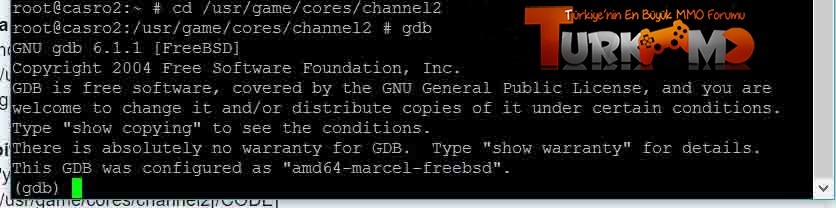
Uyarı: Metin2 32bitlik bir sistem olduğu için 64bit freebsdlerde gdb yapabilmek için şu kodu yazınız;
Evet şimdi sıra geldi şu game.core'nin derdine. Sırasıyla şunları yazın;
Not: Filesinizde gamenin adı ne şekilde onu öğrenin. Fileslere göre çekirdek dosyasının ismi farklı olabilir. Örn gamenizin adı cekirdek ise file cekirdek yazacaksınız.
Bu işlemleri yaptıktan sonra artık hata mesajı ekrana yazacaktır. Bendeki örnek;
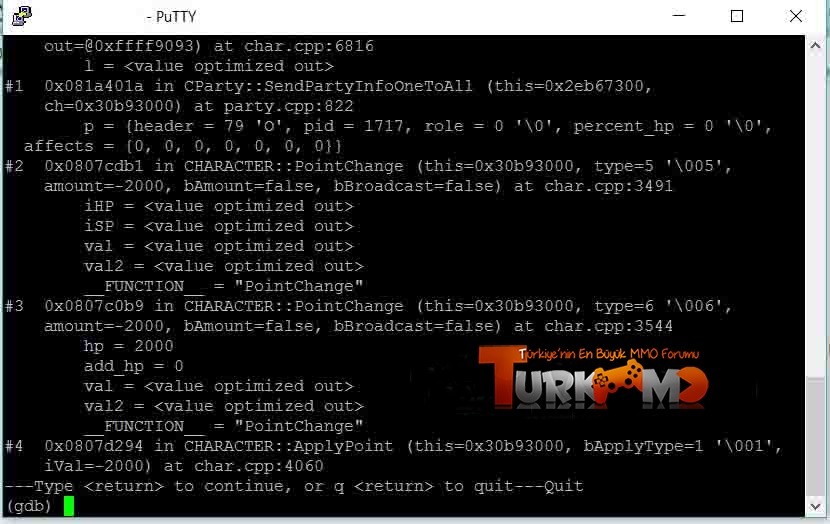
İŞLEM BU KADAR İYİ FORUMLAR .
Game.core Dosyasında Yazan Hataları Öğrenme
Metin2 özel sunucu geliştirme sürecinde karşılaşılan en önemli sorunlardan birisi game.core dosyasında yer alan hataların doğru bir şekilde analiz edilip çözülmesidir. Bu hata türleri genellikle C++ tabanlı game server programlamada meydana gelir ve sunucu çökmelerine veya istismarlara neden olabilir. Bu yazıda Metin2Lobby olarak, game.core dosyasının ne olduğunu, neden oluştuğunu ve nasıl çözüleceğini detaylıca ele alacağız.
Game.core Nedir?
Game.core dosyası, Metin2 sunucusunda çalışan game server’ın bir hata sonucu oluşturduğu kritik bir dump dosyasıdır. Sunucuda çalışan C++ sistemlerde bir bellek hatası, segmentation fault (segfault) ya da bir pointer hatası meydana geldiğinde, işletim sistemi bu dosyayı oluşturarak süreci durdurur. Bu sayede geliştiriciler, sunucunun tam olarak hangi noktada ve neden çöktüğünü analiz edebilirler.
Neden Game.core Oluşur?
Game.core dosyası genellikle aşağıdaki sebeplerden dolayı oluşur:
- Yanlış pointer kullanımı: Null pointer referansı, serbest bırakılmış belleğe erişim gibi hatalar.
- Stack overflow: Fonksiyon yığınının taşması.
- Hatalı bellek yönetimi: malloc/free, new/delete eşleşmelerinde bozukluklar.
- Python entegrasyonunda hatalar: Özellikle py root ve uiscript ile çalışan sistemlerde, Python ile C++ arasında veri aktarımı yapılırken meydana gelebilecek bellek sızıntısı.
- Script hataları: C++ ile yazılmış sistemlerde script üzerinden gelen verilerin kontrolsüz kullanılması.
Game.core Dosyasını Nasıl Okuruz?
Game.core dosyasının içeriğini okumak için GDB (GNU Debugger) kullanılır. GDB, C++ tabanlı uygulamalarda debug işlemleri için geliştirilmiş güçlü bir araçtır. Aşağıdaki komut ile game.core dosyası incelenebilir:
gdb /path/to/game /path/to/game.core
gdb yüklü değilse, önce kurulum yapılmalıdır. Ubuntu tabanlı sistemlerde:
sudo apt-get install gdb
GDB ile Hata Analizi
GDB ile açılan core dosyasında şu komutlar işe yarayacaktır:
- bt: Call stack’i gösterir. Hangi fonksiyonda hata oluştuğunu belirtir.
- info registers: CPU register değerlerini gösterir.
- list: Hatanın oluştuğu satırın kodunu gösterir (source code varsa).
- print variable_name: Belirli bir değişkenin değerini yazdırır.
Game.core Dosyası ile Karşılaştığınızda Yapılacaklar
1. Core dosyasının oluştuğu game binary ile aynı sürümden olduğundan emin olun.
2. Debug sembolleri derleme sırasında eklenmiş mi? Yoksa derlemeyi [-g][/B] flag’iyle tekrar yapmalısınız.
3. Semboller eksikse, hata analizi sınırlı kalabilir.
4. Python modülleriniz varsa, Python sürümü ile C++ kodunuzun uyumuna dikkat edin.
Olası Çözümler
- Valgrind aracıyla bellek sızıntılarını tespit edin.
- GDB ile adım adım debug işlemi yapın.
- Python tarafında py root ve uiscript ile çalışırken dikkatli olun. Bellek sızıntısı yapmamaya özen gösterin.
- C++ sistemlerde pointer kontrolleri yapın. Null pointer check yapın.
Özetle
Game.core dosyası, Metin2 özel sunucularında karşılaşılan ciddi hataların kaynağıdır. Bu dosyaları doğru şekilde analiz edebilmek, sunucu stabilitesini artırmak ve güvenlik açıklarını kapatmak için kritik öneme sahiptir. Metin2 geliştiricileri olarak, bu dosyaları okuyabilmek, C++ bilgimizi ve debug becerilerimizi artırmamızı sağlar. Metin2Lobby olarak, bu konuda bilgi sahibi olmak tüm Metin2 geliştiricileri için hayati önem taşımaktadır.
Learning Errors Written in the Game.core File
Metin2 private server development process involves one of the most critical issues: correctly analyzing and resolving errors found in the game.core file. These error types typically occur in C++-based game server programming and can lead to server crashes or exploits. In this article, Metin2Lobby will explain what the game.core file is, why it occurs, and how to resolve it in detail.
What is Game.core?
Game.core is a critical dump file generated by the Metin2 server when the game server encounters an error. When memory errors, segmentation faults (segfault), or pointer errors occur in C++ systems running on the server, the operating system creates this file and stops the process. This allows developers to analyze exactly where and why the server crashed.
Why Does Game.core Occur?
Game.core files are usually caused by the following reasons:
- Incorrect pointer usage: Null pointer references, accessing freed memory, etc.
- Stack overflow: Overflow of function stack.
- Faulty memory management: Mismatched malloc/free, new/delete operations.
- Errors in Python integration: Especially in systems working with py root and uiscript, memory leaks may occur during data transfer between Python and C++.
- Script errors: Uncontrolled use of data received from scripts in C++-based systems.
How Do We Read the Game.core File?
To read the content of the game.core file, GDB (GNU Debugger) is used. GDB is a powerful tool developed for debugging operations in C++-based applications. You can inspect the game.core file using the following command:
gdb /path/to/game /path/to/game.core
If gdb is not installed, you should install it first. On Ubuntu-based systems:
sudo apt-get install gdb
Error Analysis with GDB
The following commands are useful when examining a core file opened with GDB:
- bt: Displays the call stack. Indicates in which function the error occurred.
- info registers: Shows CPU register values.
- list: Shows the code of the line where the error occurred (if source code is available).
- print variable_name: Prints the value of a specific variable.
What to Do When You Encounter a Game.core File
1. Ensure that the game binary matches the version of the core file created.
2. Are debug symbols included during compilation? If not, recompile with the [-g][/B] flag.
3. If symbols are missing, error analysis might be limited.
4. If you have Python modules, ensure compatibility between your Python version and C++ code.
Possible Solutions
- Detect memory leaks using the Valgrind tool.
- Perform step-by-step debugging with GDB.
- Be cautious when working with py root and uiscript in Python. Avoid causing memory leaks.
- In C++ systems, perform pointer checks. Always check for null pointers.
In Summary
The game.core file is the source of serious errors encountered in Metin2 private servers. Correctly analyzing these files is critically important to enhance server stability and close security vulnerabilities. As Metin2 developers, being able to read these files helps us improve our C++ knowledge and debugging skills. At Metin2Lobby, having knowledge about this topic is vital for all Metin2 developers.
game.core dosyası hakkında bir araştırma yaptım ve yabancı forumlarda bu konu ile ilgili güzel bilgiler edindim.
Ziyaretçiler için gizlenmiş link,görmek için üye olmalısınız!
Giriş yap veya üye ol.
geliştirenler ve açık kaynak dosyalarına sistem yazanlar için yardımcı olabilecek bir bilgi.Herhangi bir sebepten ötürü oyun game.core verip kanalları düşürüyorsa artık hatanın nereden kaynaklı olduğunu bulabileceksiniz.
Uyarı: Hataları görebilmek için strip edilmemiş game kullanmanız gerekli!
Başlamadan önce kontrol!
ssh ekranında gdb yazdığımızda hata alıyorsanız ilk önce şu paketleri kurun;
Kod:
cd /usr/ports/devel/gdb/ && make install clean pkg install gdbgame.core'yi hangi kanalda verdiyse ilk önce o kanala gidiyoruz. Örn;
Kod:
cd /usr/game/cores/channel2İlk önce gdb yazıyoruz;
Kod:
gdbgdb kuruluysa veya kurulumu doğru yaptıysanız şu şekilde bir yazı gelmesi lazım;
Uyarı: Metin2 32bitlik bir sistem olduğu için 64bit freebsdlerde gdb yapabilmek için şu kodu yazınız;
Kod:
set gnutarget i386-marcel-freebsdNot: Filesinizde gamenin adı ne şekilde onu öğrenin. Fileslere göre çekirdek dosyasının ismi farklı olabilir. Örn gamenizin adı cekirdek ise file cekirdek yazacaksınız.
Kod:
file game core game.core bt fullİŞLEM BU KADAR İYİ FORUMLAR .
Game.core Dosyasında Yazan Hataları Öğrenme
Metin2 özel sunucu geliştirme sürecinde karşılaşılan en önemli sorunlardan birisi game.core dosyasında yer alan hataların doğru bir şekilde analiz edilip çözülmesidir. Bu hata türleri genellikle C++ tabanlı game server programlamada meydana gelir ve sunucu çökmelerine veya istismarlara neden olabilir. Bu yazıda Metin2Lobby olarak, game.core dosyasının ne olduğunu, neden oluştuğunu ve nasıl çözüleceğini detaylıca ele alacağız.
Game.core Nedir?
Game.core dosyası, Metin2 sunucusunda çalışan game server’ın bir hata sonucu oluşturduğu kritik bir dump dosyasıdır. Sunucuda çalışan C++ sistemlerde bir bellek hatası, segmentation fault (segfault) ya da bir pointer hatası meydana geldiğinde, işletim sistemi bu dosyayı oluşturarak süreci durdurur. Bu sayede geliştiriciler, sunucunun tam olarak hangi noktada ve neden çöktüğünü analiz edebilirler.
Neden Game.core Oluşur?
Game.core dosyası genellikle aşağıdaki sebeplerden dolayı oluşur:
- Yanlış pointer kullanımı: Null pointer referansı, serbest bırakılmış belleğe erişim gibi hatalar.
- Stack overflow: Fonksiyon yığınının taşması.
- Hatalı bellek yönetimi: malloc/free, new/delete eşleşmelerinde bozukluklar.
- Python entegrasyonunda hatalar: Özellikle py root ve uiscript ile çalışan sistemlerde, Python ile C++ arasında veri aktarımı yapılırken meydana gelebilecek bellek sızıntısı.
- Script hataları: C++ ile yazılmış sistemlerde script üzerinden gelen verilerin kontrolsüz kullanılması.
Game.core Dosyasını Nasıl Okuruz?
Game.core dosyasının içeriğini okumak için GDB (GNU Debugger) kullanılır. GDB, C++ tabanlı uygulamalarda debug işlemleri için geliştirilmiş güçlü bir araçtır. Aşağıdaki komut ile game.core dosyası incelenebilir:
gdb /path/to/game /path/to/game.core
gdb yüklü değilse, önce kurulum yapılmalıdır. Ubuntu tabanlı sistemlerde:
sudo apt-get install gdb
GDB ile Hata Analizi
GDB ile açılan core dosyasında şu komutlar işe yarayacaktır:
- bt: Call stack’i gösterir. Hangi fonksiyonda hata oluştuğunu belirtir.
- info registers: CPU register değerlerini gösterir.
- list: Hatanın oluştuğu satırın kodunu gösterir (source code varsa).
- print variable_name: Belirli bir değişkenin değerini yazdırır.
Game.core Dosyası ile Karşılaştığınızda Yapılacaklar
1. Core dosyasının oluştuğu game binary ile aynı sürümden olduğundan emin olun.
2. Debug sembolleri derleme sırasında eklenmiş mi? Yoksa derlemeyi [-g][/B] flag’iyle tekrar yapmalısınız.
3. Semboller eksikse, hata analizi sınırlı kalabilir.
4. Python modülleriniz varsa, Python sürümü ile C++ kodunuzun uyumuna dikkat edin.
Olası Çözümler
- Valgrind aracıyla bellek sızıntılarını tespit edin.
- GDB ile adım adım debug işlemi yapın.
- Python tarafında py root ve uiscript ile çalışırken dikkatli olun. Bellek sızıntısı yapmamaya özen gösterin.
- C++ sistemlerde pointer kontrolleri yapın. Null pointer check yapın.
Özetle
Game.core dosyası, Metin2 özel sunucularında karşılaşılan ciddi hataların kaynağıdır. Bu dosyaları doğru şekilde analiz edebilmek, sunucu stabilitesini artırmak ve güvenlik açıklarını kapatmak için kritik öneme sahiptir. Metin2 geliştiricileri olarak, bu dosyaları okuyabilmek, C++ bilgimizi ve debug becerilerimizi artırmamızı sağlar. Metin2Lobby olarak, bu konuda bilgi sahibi olmak tüm Metin2 geliştiricileri için hayati önem taşımaktadır.
Learning Errors Written in the Game.core File
Metin2 private server development process involves one of the most critical issues: correctly analyzing and resolving errors found in the game.core file. These error types typically occur in C++-based game server programming and can lead to server crashes or exploits. In this article, Metin2Lobby will explain what the game.core file is, why it occurs, and how to resolve it in detail.
What is Game.core?
Game.core is a critical dump file generated by the Metin2 server when the game server encounters an error. When memory errors, segmentation faults (segfault), or pointer errors occur in C++ systems running on the server, the operating system creates this file and stops the process. This allows developers to analyze exactly where and why the server crashed.
Why Does Game.core Occur?
Game.core files are usually caused by the following reasons:
- Incorrect pointer usage: Null pointer references, accessing freed memory, etc.
- Stack overflow: Overflow of function stack.
- Faulty memory management: Mismatched malloc/free, new/delete operations.
- Errors in Python integration: Especially in systems working with py root and uiscript, memory leaks may occur during data transfer between Python and C++.
- Script errors: Uncontrolled use of data received from scripts in C++-based systems.
How Do We Read the Game.core File?
To read the content of the game.core file, GDB (GNU Debugger) is used. GDB is a powerful tool developed for debugging operations in C++-based applications. You can inspect the game.core file using the following command:
gdb /path/to/game /path/to/game.core
If gdb is not installed, you should install it first. On Ubuntu-based systems:
sudo apt-get install gdb
Error Analysis with GDB
The following commands are useful when examining a core file opened with GDB:
- bt: Displays the call stack. Indicates in which function the error occurred.
- info registers: Shows CPU register values.
- list: Shows the code of the line where the error occurred (if source code is available).
- print variable_name: Prints the value of a specific variable.
What to Do When You Encounter a Game.core File
1. Ensure that the game binary matches the version of the core file created.
2. Are debug symbols included during compilation? If not, recompile with the [-g][/B] flag.
3. If symbols are missing, error analysis might be limited.
4. If you have Python modules, ensure compatibility between your Python version and C++ code.
Possible Solutions
- Detect memory leaks using the Valgrind tool.
- Perform step-by-step debugging with GDB.
- Be cautious when working with py root and uiscript in Python. Avoid causing memory leaks.
- In C++ systems, perform pointer checks. Always check for null pointers.
In Summary
The game.core file is the source of serious errors encountered in Metin2 private servers. Correctly analyzing these files is critically important to enhance server stability and close security vulnerabilities. As Metin2 developers, being able to read these files helps us improve our C++ knowledge and debugging skills. At Metin2Lobby, having knowledge about this topic is vital for all Metin2 developers.
