

FORUMDA ARIYORDUM BULAMADIGIM İÇİN KENDİM SÖKÜP PAYLAŞTIM H.O :d
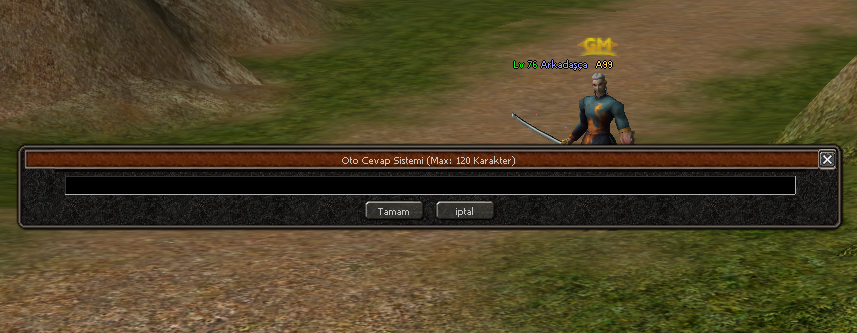
Kod:
Game py en altına ekle . def otocevapekran(self): import constInfo if constInfo.AFK == 1: constInfo.AFK = 0 chat.AppendChat(chat.CHAT_TYPE_INFO, "Oto cevap sistemi kapatildi") else: ocevap = uiCommon.InputDialog() ocevap.SetTitle("Oto Cevap Sistemi (Max: 120 Karakter) ") ocevap.SetMaxLength(120) ocevap.SetAcceptEvent(ui.__mem_func__(self.otocevapac)) ocevap.SetCancelEvent(ui.__mem_func__(self.otocevapekrankapa)) ocevap.Open() self.ocevap = ocevap def otocevapekrankapa(self): self.ocevap = None return TRUE def otocevapac(self): if not self.ocevap: return TRUE if not len(self.ocevap.GetText()): return TRUE import constInfo constInfo.otocevap = self.ocevap.GetText() constInfo.AFK = 1 constInfo.otoisim = player.GetName() chat.AppendChat(chat.CHAT_TYPE_INFO, "Oto cevap sistemi acildi") self.otocevapekrankapa() return TRUE cons aç : ekle kafana göre [/CENTER] AFK = 0 otocevap = "" otoisim = "" [CENTER]Herkesin Bulamadığı
 Python Oto Cevap Ekranı
  @A99
@A99Metin2 özel sunucu geliştirmesi yapan geliştiriciler için önemli bir konu olan otomatik cevap sistemleri, oyuncuların daha aktif ve etkileşimli olmasına yardımcı olur.
Python GUI kullanarak basit ve güçlü bir oto-cevap ekranı oluşturmak mümkündür. Bu yazıda, Metin2 özel sunucularında kullanılabilecek, Python GUI tabanlı bir otomatik cevap ekranı geliştireceğiz.
Neden Python Kullanılır?
Python, kolay okunabilirliği ve geniş kütüphane desteği sayesinde hem script geliştiriciler hem de core geliştiriciler tarafından tercih edilir. Özellikle kullanıcı arayüzü (GUI) oluşturmak için Tkinter, PyQt gibi modüller kullanılır. Bu sayede root dosyalarına entegre edilebilir veya bağımsız çalışabilen sistemler geliştirilebilir.
Otomatik Cevap Sistemi Nedir?
Metin2 özel sunucularda, oyuncuların belirli komutları yazması durumunda otomatik olarak cevap alması sağlanabilir. Örneğin, bir oyuncu '!yardim' yazdığında sistemden otomatik olarak yardım menüsü gelmesi gibi. Bu, hem oyun içi deneyimi artırır hem de sunucu yöneticilerinin zaman kazanmasını sağlar.
Python GUI Arayüz Geliştirme Adımları
1. Gerekli kütüphaneleri yükleyin: Tkinter, requests gibi kütüphaneler gerekir.
2. Arayüz tasarımı: Buton, textbox gibi bileşenler kullanılır.
3. Cevap sistemini tanımlayın: Belirli kelimelere özel cevaplar verilir.
4. Sunucu ile entegrasyon: Eğer gerekirse, auth veya game sunucusuna mesaj gönderilebilir.
Python Kod Örneği (Basit)
Kod:
import tkinter as tk[BR][/BR][BR][/BR]def cevap_ver():[BR][/BR] girilen_metin = entry.get()[BR][/BR] if 'yardim' in girilen_metin.lower():[BR][/BR] sonuc.config(text='Yardim menusu acildi!')[BR][/BR] else:[BR][/BR] sonuc.config(text='Anlasilamadi.')[BR][/BR][BR][/BR]pencere = tk.Tk()[BR][/BR]pencere.title('Oto Cevap Ekrani')[BR][/BR][BR][/BR]entry = tk.Entry(pencere)[BR][/BR]entry.pack()[BR][/BR][BR][/BR]buton = tk.Button(pencere, text='Gonder', command=cevap_ver)[BR][/BR]buton.pack()[BR][/BR][BR][/BR]sonuc = tk.Label(pencere, text='Cevap burada gorunecek')[BR][/BR]sonuc.pack()[BR][/BR][BR][/BR]pencere.mainloop()Sistem Entegrasyonu Hakkında
Bu tür bir sistem, Metin2 server src üzerinde geliştirilmiş uiscript[/CODE] dosyalarına entegre edilebilir veya bağımsız bir py root olarak da kullanılabilir. Martysama ve diğer pack yapıları ile uyumlu olacak şekilde ayarlanabilir.
Sonuç
Python ile geliştirilen otomatik cevap sistemleri, Metin2 özel sunucularında kullanıcı deneyimini artırmak için harika bir araçtır. Basit arayüzlerle bile büyük etkiler elde edilebilir. @A99 gibi sistemlerle daha da geliştirilebilir. Daha fazla bilgi için Metin2Lobby üzerinden kaynak kodlara ulaşabilirsiniz.
The Hard-to-Find
Python Auto-Reply Screen @A99For developers working on Metin2 private servers, automatic response systems are important for increasing player engagement and interaction.
Using Python GUI to create a simple yet powerful auto-reply screen is entirely possible. In this article, we'll develop an auto-reply screen based on Python GUI that can be used in Metin2 private servers.
Why Use Python?
Python is preferred by both script and core developers due to its readability and extensive library support. Especially for creating user interfaces (GUI), modules like Tkinter and PyQt are commonly used. This allows integration into root files or building standalone systems.
What Is an Auto-Reply System?
In Metin2 private servers, players can receive automatic responses when typing specific commands. For example, typing '!help' might trigger an automatic help menu. This improves the in-game experience and saves time for server administrators.
Steps to Develop a Python GUI Interface
1. Install required libraries: Libraries such as Tkinter and requests are needed.
2. Design the interface: Components like buttons and textboxes are used.
3. Define the reply system: Specific replies are assigned to certain keywords.
4. Integration with the server: If necessary, messages can be sent to the auth or game server.
Sample Python Code (Basic)
Kod:
import tkinter as tk[BR][/BR][BR][/BR]def cevap_ver():[BR][/BR] girilen_metin = entry.get()[BR][/BR] if 'yardim' in girilen_metin.lower():[BR][/BR] sonuc.config(text='Yardim menusu acildi!')[BR][/BR] else:[BR][/BR] sonuc.config(text='Anlasilamadi.')[BR][/BR][BR][/BR]pencere = tk.Tk()[BR][/BR]pencere.title('Oto Cevap Ekrani')[BR][/BR][BR][/BR]entry = tk.Entry(pencere)[BR][/BR]entry.pack()[BR][/BR][BR][/BR]buton = tk.Button(pencere, text='Gonder', command=cevap_ver)[BR][/BR]buton.pack()[BR][/BR][BR][/BR]sonuc = tk.Label(pencere, text='Cevap burada gorunecek')[BR][/BR]sonuc.pack()[BR][/BR][BR][/BR]pencere.mainloop()About System Integration
Such a system can be integrated into Metin2 server src developed uiscript[/CODE] files or used as a standalone py root. It can also be adjusted to work with structures like Martysama and other pack formats.
Conclusion
Auto-reply systems developed with Python are excellent tools for enhancing user experience in Metin2 private servers. Even with simple interfaces, significant effects can be achieved. These systems can be further enhanced with systems like @A99. You can find more resources at Metin2Lobby.
