


- Katılım
- 6 Mayıs 2022
- Konular
- 48,280
- Mesajlar
- 48,590
- Tepkime puanı
- 75
- M2 Yaşı
- 3 yıl 11 ay 10 gün
- Trophy Puan
- 48
- M2 Yang
- 488,769
Hello everyone,
I want to introduce my small but very practical tool that helps you work with C++ source files and Python client files. It is designed to identify define blocks in source files and optionally scan Python client files for defines.
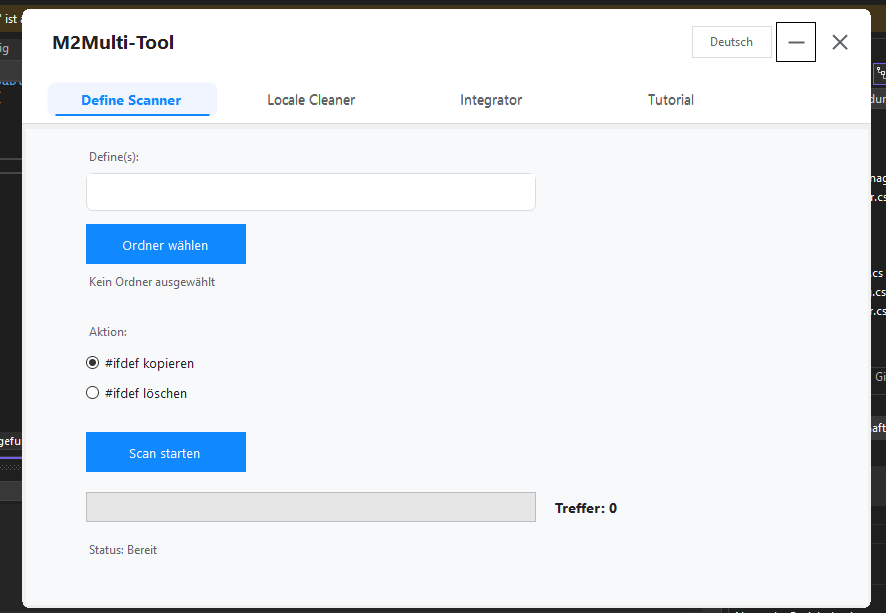
Actually in German and Englisch version , Turkish will be added today.
NEU!!! Tutorial-Bereich hinzugefügt!
Metin2Lobby olarak sunucu geliştirme konusunda aktif olan geliştiriciler için önemli bir güncelleme daha geliyor! M2Multi-Tool V2 artık kullanıma açık. Bu yeni sürüm, Clean, Copy, Delete ve Create gibi temel işlemleri kolaylaştıran güçlü bir araç seti sunuyor. Metin2 özel sunucularında çalışmak isteyen herkes için kritik öneme sahip olan bu aracın detaylarına aşağıdan ulaşabilirsiniz.
M2Multi-Tool Nedir?
M2Multi-Tool, Metin2 özel sunucu geliştiricilerinin işlerini kolaylaştırmak için tasarlanmış bir araçtır. Özellikle C++ tabanlı sunucu sistemlerinde ya da Python ile yazılmış GUI uygulamalarında hızlıca dosya yönetimi yapmanızı sağlar. Yeni versiyon ile birlikte, kullanıcı dostu bir arayüz ve gelişmiş fonksiyonlar eklendi. Artık hem pack yönetimi hem de src dosyaları üzerinde daha kolay işlem yapabilirsiniz.
V2 Sürümüne Özel Özellikler
Yeni sürümda aşağıdaki özellikler yer alıyor:
- Clean: Gereksiz dosyaları temizleme.
- Copy: Belirli dosyaları veya dizinleri kopyalama.
- Delete: Belirtilen dosyaları güvenli silme.
- Create: Yeni proje veya dosya oluşturma.
Ayrıca, db ve game server yapıları üzerinde çalışırken ihtiyaç duyacağınız birçok otomasyon özelliği de bu sürümde yer alıyor.
M2Multi-Tool Nasıl Kullanılır?
Arayüzü oldukça basit ve kullanışlıdır. İlk olarak uygulamayı başlatın. Ardından, hangi işlemi yapmak istediğinizi seçin. Örneğin, bir client src dosyasını temizlemek istiyorsanız 'Clean' seçeneğini kullanabilirsiniz. Benzer şekilde, bir uiscript dosyasını başka bir proje klasörüne kopyalamak isterseniz 'Copy' seçeneğiyle hızlıca yapabilirsiniz. Bu sayede source edit süreçleri daha verimli hale geliyor.
Neden M2Multi-Tool V2?
Metin2 özel sunucu geliştirme süreci oldukça karmaşık olabilir. Özellikle auth ve game server yapıları üzerinde çalışırken, dosya yönetimi zaman alıcı olabilir. M2Multi-Tool V2 ile bu süreçler hızlandırılıyor. Hem compile hem de martysama sistemlerinde uyumlu çalışan bu araç, metin2dev ve game core projelerinde de kolay kullanım sunuyor.
Sonuç
M2Multi-Tool V2, Metin2 özel sunucu geliştiricileri için güçlü ve kullanışlı bir yardımcı. Geliştirme süreçlerini hızlandırmak, hata riskini azaltmak ve daha düzenli bir core yapısı kurmak isteyen herkes için ideal bir çözüm. Hemen indirip denemeye başlayabilirsiniz. Daha fazla bilgi ve destek için Metin2Lobby forumuna göz atabilirsiniz.
Metin2Lobby announces another important update for active developers working on server development! M2Multi-Tool V2 is now available. This new version offers a powerful toolset that simplifies essential operations like Clean, Copy, Delete and Create. You can find detailed information about this critical tool for everyone working with Metin2 private servers below.
What is M2Multi-Tool?
M2Multi-Tool is a utility designed to assist Metin2 private server developers in their work. It particularly helps with file management processes in C++ based server systems or GUI applications written in Python. With the new version, user-friendly interfaces and enhanced features have been added. Now you can more easily manage both pack files and src files.
Features Exclusive to Version V2
The following features are included in the new version:
- Clean: Remove unnecessary files.
- Copy: Copy specific files or directories.
- Delete: Safely delete specified files.
- Create: Create new projects or files.
Additionally, many automation features needed while working on db and game server structures are also included in this version.
How to Use M2Multi-Tool?
Its interface is quite simple and practical. First, launch the application. Then, select the operation you want to perform. For example, if you want to clean a client src file, you can use the 'Clean' option. Similarly, you can quickly copy a uiscript file to another project folder using the 'Copy' option. Thus, source edit processes become more efficient.
Why M2Multi-Tool V2?
The process of developing Metin2 private servers can be quite complex. Especially when working on auth and game server structures, file management can be time-consuming. M2Multi-Tool V2 accelerates these processes. Compatible with both compile and martysama systems, this tool provides easy usage in metin2dev and game core projects.
Conclusion
M2Multi-Tool V2 is a powerful and practical helper for Metin2 private server developers. It speeds up development processes, reduces error risks, and allows for building a more organized core structure. You can immediately download and start testing it. For further information and support, visit the Metin2Lobby forums.
I want to introduce my small but very practical tool that helps you work with C++ source files and Python client files. It is designed to identify define blocks in source files and optionally scan Python client files for defines.
Core Features
- <li data-xf-list-type="ol">Define Scanner (C++ Source)
- <li data-xf-list-type="ul">Scans all .cpp and .h files in a selected folder. <li data-xf-list-type="ul">Finds complete
Ziyaretçiler için gizlenmiş link,görmek için üye olmalısınız! Giriş yap veya üye ol.blocks for the provided defines. <li data-xf-list-type="ul">Option to copy or delete the blocks. <li data-xf-list-type="ul">Output is stored in structured folders under DefineScan_System with all files and block info.
- <li data-xf-list-type="ul">Optional scan of .py files in the client folder. <li data-xf-list-type="ul">Searches for if app. defines. <li data-xf-list-type="ul">Detects complete Python if-blocks, including nested blocks, elif and else. <li data-xf-list-type="ul">Output is stored in structured folders under DefineScan_Client.
- <li data-xf-list-type="ul">Multiple defines can be separated by comma, semicolon, or space.
- <li data-xf-list-type="ul">Scans all .cpp and .h files in a selected folder. <li data-xf-list-type="ul">Finds complete
How to use the tool
- <li data-xf-list-type="ol">Select Folder
- <li data-xf-list-type="ul">Choose the folder for system scan (.cpp / .h files). <li data-xf-list-type="ul">Optional: Enable “Scan Client” and select the client folder (.py files).
- <li data-xf-list-type="ul">Example: ENABLE_TEST, ENABLE_RENDER. <li data-xf-list-type="ul">Separate multiple defines with, , ; or space.
- <li data-xf-list-type="ul">#ifdef copy -> blocks are saved in new folders. <li data-xf-list-type="ul">#ifdef delete -> blocks are removed from files (backup is created).
- <li data-xf-list-type="ul">Click “Start Scan”. <li data-xf-list-type="ul">Progress bar shows current progress. <li data-xf-list-type="ul">Hits are counted and files are saved in output folders.
Actually in German and Englisch version , Turkish will be added today.
NEU!!! Tutorial-Bereich hinzugefügt!
Ziyaretçiler için gizlenmiş link,görmek için üye olmalısınız!
Giriş yap veya üye ol.
Ziyaretçiler için gizlenmiş link,görmek için üye olmalısınız!
Giriş yap veya üye ol.
🌟M2Multi-Tool V2 out now - Clean , Copy , Delete & Create at All 🌟
Metin2Lobby olarak sunucu geliştirme konusunda aktif olan geliştiriciler için önemli bir güncelleme daha geliyor! M2Multi-Tool V2 artık kullanıma açık. Bu yeni sürüm, Clean, Copy, Delete ve Create gibi temel işlemleri kolaylaştıran güçlü bir araç seti sunuyor. Metin2 özel sunucularında çalışmak isteyen herkes için kritik öneme sahip olan bu aracın detaylarına aşağıdan ulaşabilirsiniz.
M2Multi-Tool Nedir?
M2Multi-Tool, Metin2 özel sunucu geliştiricilerinin işlerini kolaylaştırmak için tasarlanmış bir araçtır. Özellikle C++ tabanlı sunucu sistemlerinde ya da Python ile yazılmış GUI uygulamalarında hızlıca dosya yönetimi yapmanızı sağlar. Yeni versiyon ile birlikte, kullanıcı dostu bir arayüz ve gelişmiş fonksiyonlar eklendi. Artık hem pack yönetimi hem de src dosyaları üzerinde daha kolay işlem yapabilirsiniz.
V2 Sürümüne Özel Özellikler
Yeni sürümda aşağıdaki özellikler yer alıyor:
- Clean: Gereksiz dosyaları temizleme.
- Copy: Belirli dosyaları veya dizinleri kopyalama.
- Delete: Belirtilen dosyaları güvenli silme.
- Create: Yeni proje veya dosya oluşturma.
Ayrıca, db ve game server yapıları üzerinde çalışırken ihtiyaç duyacağınız birçok otomasyon özelliği de bu sürümde yer alıyor.
M2Multi-Tool Nasıl Kullanılır?
Arayüzü oldukça basit ve kullanışlıdır. İlk olarak uygulamayı başlatın. Ardından, hangi işlemi yapmak istediğinizi seçin. Örneğin, bir client src dosyasını temizlemek istiyorsanız 'Clean' seçeneğini kullanabilirsiniz. Benzer şekilde, bir uiscript dosyasını başka bir proje klasörüne kopyalamak isterseniz 'Copy' seçeneğiyle hızlıca yapabilirsiniz. Bu sayede source edit süreçleri daha verimli hale geliyor.
Neden M2Multi-Tool V2?
Metin2 özel sunucu geliştirme süreci oldukça karmaşık olabilir. Özellikle auth ve game server yapıları üzerinde çalışırken, dosya yönetimi zaman alıcı olabilir. M2Multi-Tool V2 ile bu süreçler hızlandırılıyor. Hem compile hem de martysama sistemlerinde uyumlu çalışan bu araç, metin2dev ve game core projelerinde de kolay kullanım sunuyor.
Sonuç
M2Multi-Tool V2, Metin2 özel sunucu geliştiricileri için güçlü ve kullanışlı bir yardımcı. Geliştirme süreçlerini hızlandırmak, hata riskini azaltmak ve daha düzenli bir core yapısı kurmak isteyen herkes için ideal bir çözüm. Hemen indirip denemeye başlayabilirsiniz. Daha fazla bilgi ve destek için Metin2Lobby forumuna göz atabilirsiniz.
🌟M2Multi-Tool V2 out now - Clean , Copy , Delete & Create at All 🌟
Metin2Lobby announces another important update for active developers working on server development! M2Multi-Tool V2 is now available. This new version offers a powerful toolset that simplifies essential operations like Clean, Copy, Delete and Create. You can find detailed information about this critical tool for everyone working with Metin2 private servers below.
What is M2Multi-Tool?
M2Multi-Tool is a utility designed to assist Metin2 private server developers in their work. It particularly helps with file management processes in C++ based server systems or GUI applications written in Python. With the new version, user-friendly interfaces and enhanced features have been added. Now you can more easily manage both pack files and src files.
Features Exclusive to Version V2
The following features are included in the new version:
- Clean: Remove unnecessary files.
- Copy: Copy specific files or directories.
- Delete: Safely delete specified files.
- Create: Create new projects or files.
Additionally, many automation features needed while working on db and game server structures are also included in this version.
How to Use M2Multi-Tool?
Its interface is quite simple and practical. First, launch the application. Then, select the operation you want to perform. For example, if you want to clean a client src file, you can use the 'Clean' option. Similarly, you can quickly copy a uiscript file to another project folder using the 'Copy' option. Thus, source edit processes become more efficient.
Why M2Multi-Tool V2?
The process of developing Metin2 private servers can be quite complex. Especially when working on auth and game server structures, file management can be time-consuming. M2Multi-Tool V2 accelerates these processes. Compatible with both compile and martysama systems, this tool provides easy usage in metin2dev and game core projects.
Conclusion
M2Multi-Tool V2 is a powerful and practical helper for Metin2 private server developers. It speeds up development processes, reduces error risks, and allows for building a more organized core structure. You can immediately download and start testing it. For further information and support, visit the Metin2Lobby forums.