


- Katılım
- 6 Mayıs 2022
- Konular
- 48,302
- Mesajlar
- 48,612
- Tepkime puanı
- 75
- M2 Yaşı
- 3 yıl 11 ay 11 gün
- Trophy Puan
- 48
- M2 Yang
- 488,989
We are in 2025, my bad, almost 2026.
Using pack of icons used by tons of other server isn't really something that people want.
We all expect server to have their own style, and own items, that why instead of using packs of icons you can now generate your customs icons online.
Up to 375 icons a months FREE, with update often to have better and better generation.
Icons are generated in PNG and TGA with transparent (alpha) background, and up to 1x1 or 1x2 size ready for your client.
And you can generate up to 5 icons at same time. It also generate a "Custom title and description"
Dont waste time, it's online, no download needed
Site translate in 6 language, EN, FR, TR, DE, RO, IT
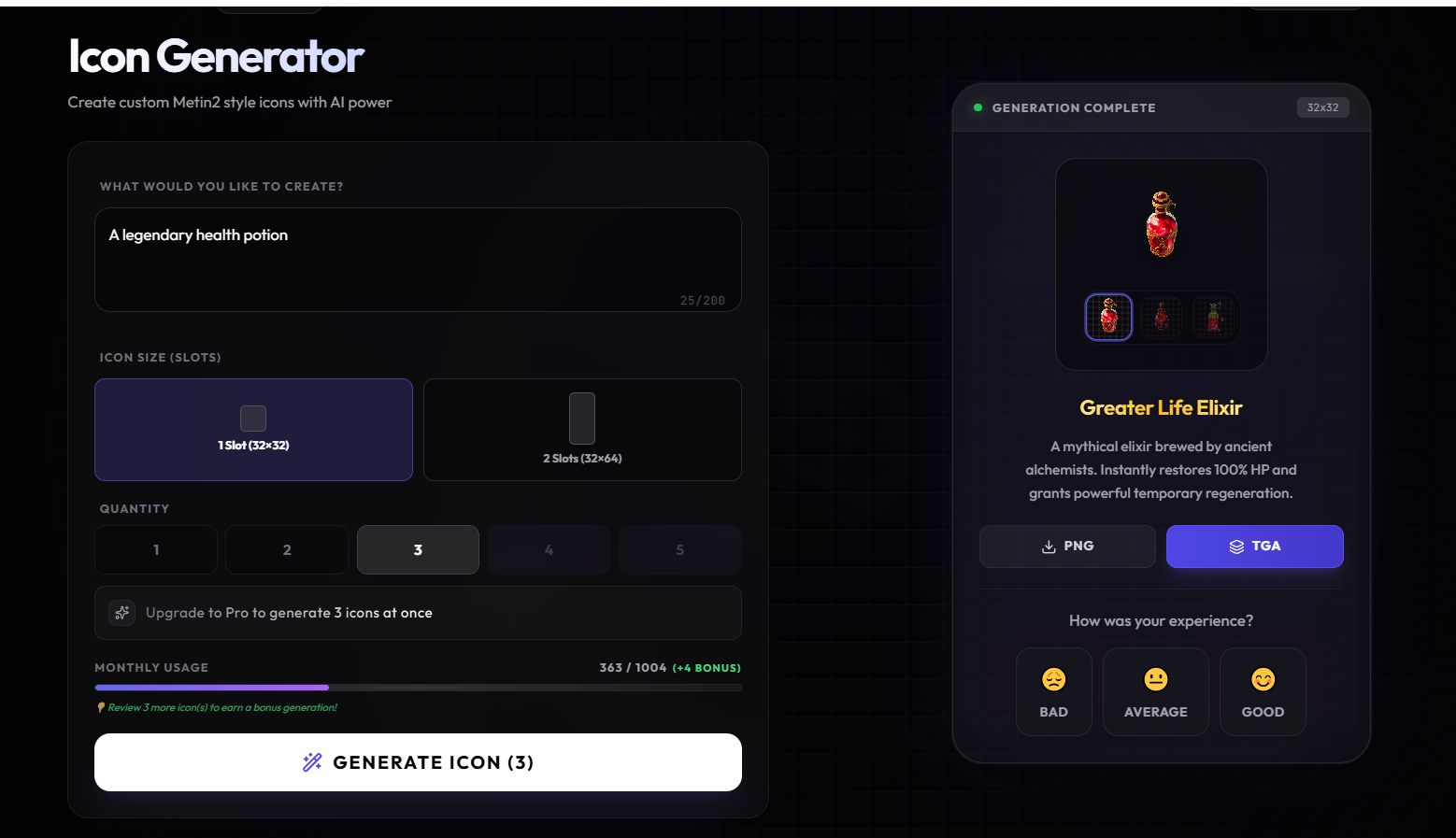
If you use it, let review on generation to help us being more accurate
Metin 2 topluluğu için sürekli olarak yeni içerikler üretmek, oyun deneyimini zenginleştirmek ve oyuncuların ihtiyaçlarına yanıt vermek websitemizin temel hedeflerindendir
Bu kapsamlı rehberde sizlere 375 TGA formatında eşya ikonu oluşturma sürecini adım adım anlatıyoruz
Bu ikon seti hem özel Metin 2 client paketleri hem de PVP odaklı modifikasyonlar için kritik bir bileşendir
TGA Formatının Önemi
TGA Truevision Graphics dosya formatı Metin 2 motorunun yerel desteklediği bir resim formatıdır
Bu format sayesinde saydamlık desteği ve yüksek kaliteli dokular elde edilir
Özellikle eşya ikonlarında arka planın şeffaf olması gerektiğinden TGA zorunludur
İkon Oluşturma Adımları
1
Her ikon için 32x32 piksel boyutunda bir alan ayrılmalıdır
2
Renk paleti oyunun genel estetiğine uygun seçilmelidir
3
Her eşyaya özgü simgeleştirme yapılmalı sadece metin kullanılmamalıdır
4
Alpha kanalı aktif edilerek arka plan saydamlığı sağlanmalıdır
Teknik Gereksinimler
Niş Uyumluluğu ve Kullanım Alanları
Oluşturulan bu 375 ikon doğrudan Metin 2 client pack dosyalarına entegre edilebilir
Metin2Lobby platformunda paylaşılan özel client paketlerimizde bu ikon seti standart olarak bulunmaktadır
Ayrıca PVP client modifikasyonları, eter pack yamaları ve custom skin paketleri için de uygundur
Hata Giderme ve Optimizasyon
Bazı oyuncularda ikonların görünmemesi sorunu yaşanabilir
Bu durum genellikle yanlış dosya yollandığı veya alpha kanalının aktif olmamasından kaynaklanır
Çözüm önerisi
Görsel ve Video Destek
Aşağıda ikon oluşturma sürecini gösteren örnek görseller yer almaktadır


Ayrıca adım adım video kılavuzumuzu buradan izleyebilirsiniz
Sonuç olarak bu 375 TGA ikon seti Metin 2 client edit işlemlerinde vazgeçilmez bir kaynaktır
Hem yeni başlayanlar hem de martysama client veya metin2dev client kullanan ileri seviye kullanıcılar için faydalıdır
Tüm içerikler Metin2 Lobby adresinde ücretsiz olarak paylaşılmaktadır
Creating new content for the Metin 2 community and enriching the gaming experience while responding to players' needs are among the core goals of our website
In this comprehensive guide we will walk you step-by-step through the process of generating 375 item icons in TGA format
This icon set is a critical component for both custom Metin 2 client packs and PVP-focused modifications
Importance of TGA Format
TGA Truevision Graphics is an image file format natively supported by the Metin 2 engine
This format enables transparency support and high-quality textures
Especially for item icons where a transparent background is required TGA is mandatory
Steps to Create Icons
1
Allocate a 32x32 pixel area for each icon
2
Select a color palette consistent with the game's overall aesthetic
3
Use unique visual representation for each item avoid using only text
4
Enable the alpha channel to ensure background transparency
Technical Requirements
Niche Compatibility and Use Cases
The 375 generated icons can be directly integrated into Metin 2 client pack files
This icon set comes standard with our custom client packages shared on the Metin2Lobby platform
It is also suitable for PVP client modifications eter pack patches and custom skin packs
Troubleshooting and Optimization
Some players may experience missing icons
This issue is usually caused by incorrect file paths or inactive alpha channels
Recommended solutions
Visual and Video Support
Below are sample images demonstrating the icon creation process
You can also watch our step-by-step video tutorial here
In conclusion this 375 TGA icon set is an indispensable resource for Metin 2 client editing tasks
It benefits both beginners and advanced users employing martysama client or metin2dev client
All content is freely shared at Metin2 Lobby
Using pack of icons used by tons of other server isn't really something that people want.
We all expect server to have their own style, and own items, that why instead of using packs of icons you can now generate your customs icons online.
Up to 375 icons a months FREE, with update often to have better and better generation.
Icons are generated in PNG and TGA with transparent (alpha) background, and up to 1x1 or 1x2 size ready for your client.
And you can generate up to 5 icons at same time. It also generate a "Custom title and description"
Dont waste time, it's online, no download needed
Site translate in 6 language, EN, FR, TR, DE, RO, IT
If you use it, let review on generation to help us being more accurate
Metin 2 Icons - 375 TGA Items Icons Oluşturma Rehberi
Metin 2 topluluğu için sürekli olarak yeni içerikler üretmek, oyun deneyimini zenginleştirmek ve oyuncuların ihtiyaçlarına yanıt vermek websitemizin temel hedeflerindendir
Bu kapsamlı rehberde sizlere 375 TGA formatında eşya ikonu oluşturma sürecini adım adım anlatıyoruz
Bu ikon seti hem özel Metin 2 client paketleri hem de PVP odaklı modifikasyonlar için kritik bir bileşendir
TGA Formatının Önemi
TGA Truevision Graphics dosya formatı Metin 2 motorunun yerel desteklediği bir resim formatıdır
Bu format sayesinde saydamlık desteği ve yüksek kaliteli dokular elde edilir
Özellikle eşya ikonlarında arka planın şeffaf olması gerektiğinden TGA zorunludur
İkon Oluşturma Adımları
1
Her ikon için 32x32 piksel boyutunda bir alan ayrılmalıdır
2
Renk paleti oyunun genel estetiğine uygun seçilmelidir
3
Her eşyaya özgü simgeleştirme yapılmalı sadece metin kullanılmamalıdır
4
Alpha kanalı aktif edilerek arka plan saydamlığı sağlanmalıdır
Teknik Gereksinimler
• Adobe Photoshop veya GIMP ile düzenleme
• 32-bit derinlik desteği
• .tga uzantılı kayıt
• Sabit boyutlandırma 32x32 piksel
• 32-bit derinlik desteği
• .tga uzantılı kayıt
• Sabit boyutlandırma 32x32 piksel
Niş Uyumluluğu ve Kullanım Alanları
Oluşturulan bu 375 ikon doğrudan Metin 2 client pack dosyalarına entegre edilebilir
Metin2Lobby platformunda paylaşılan özel client paketlerimizde bu ikon seti standart olarak bulunmaktadır
Ayrıca PVP client modifikasyonları, eter pack yamaları ve custom skin paketleri için de uygundur
Hata Giderme ve Optimizasyon
Bazı oyuncularda ikonların görünmemesi sorunu yaşanabilir
Bu durum genellikle yanlış dosya yollandığı veya alpha kanalının aktif olmamasından kaynaklanır
Çözüm önerisi
• Paketi doğru şekilde extract etmek
• Client dosyalarını güncellemek
• GFX klasör yapısını kontrol etmek
• Client dosyalarını güncellemek
• GFX klasör yapısını kontrol etmek
Görsel ve Video Destek
Aşağıda ikon oluşturma sürecini gösteren örnek görseller yer almaktadır
Ayrıca adım adım video kılavuzumuzu buradan izleyebilirsiniz
Sonuç olarak bu 375 TGA ikon seti Metin 2 client edit işlemlerinde vazgeçilmez bir kaynaktır
Hem yeni başlayanlar hem de martysama client veya metin2dev client kullanan ileri seviye kullanıcılar için faydalıdır
Tüm içerikler Metin2 Lobby adresinde ücretsiz olarak paylaşılmaktadır
Keyifli indirmeler dileriz!
Metin 2 Icons - Generate 375 TGA Items Icons Guide
Creating new content for the Metin 2 community and enriching the gaming experience while responding to players' needs are among the core goals of our website
In this comprehensive guide we will walk you step-by-step through the process of generating 375 item icons in TGA format
This icon set is a critical component for both custom Metin 2 client packs and PVP-focused modifications
Importance of TGA Format
TGA Truevision Graphics is an image file format natively supported by the Metin 2 engine
This format enables transparency support and high-quality textures
Especially for item icons where a transparent background is required TGA is mandatory
Steps to Create Icons
1
Allocate a 32x32 pixel area for each icon
2
Select a color palette consistent with the game's overall aesthetic
3
Use unique visual representation for each item avoid using only text
4
Enable the alpha channel to ensure background transparency
Technical Requirements
• Editing with Adobe Photoshop or GIMP
• 32-bit depth support
• Save with .tga extension
• Fixed sizing at 32x32 pixels
• 32-bit depth support
• Save with .tga extension
• Fixed sizing at 32x32 pixels
Niche Compatibility and Use Cases
The 375 generated icons can be directly integrated into Metin 2 client pack files
This icon set comes standard with our custom client packages shared on the Metin2Lobby platform
It is also suitable for PVP client modifications eter pack patches and custom skin packs
Troubleshooting and Optimization
Some players may experience missing icons
This issue is usually caused by incorrect file paths or inactive alpha channels
Recommended solutions
• Extract the pack properly
• Update client files
• Verify the GFX folder structure
• Update client files
• Verify the GFX folder structure
Visual and Video Support
Below are sample images demonstrating the icon creation process
You can also watch our step-by-step video tutorial here
In conclusion this 375 TGA icon set is an indispensable resource for Metin 2 client editing tasks
It benefits both beginners and advanced users employing martysama client or metin2dev client
All content is freely shared at Metin2 Lobby
Happy downloading!