

Game.py aratılır:
Altına Eklenir:
Costınfo.py eklenir;
Uichat.py aratılır:
Altına eklenir:
Uiwhisper.py aratılır:
Kodların sonuna eklenir:
Tekrar aratılır:
Tamamı değiştirilir:
Tekrar aratılır:
Bunun altına:
Bu eklenir:
Not:Game.py ve uiwhisper.py de import os yoksa importlara ekleyin
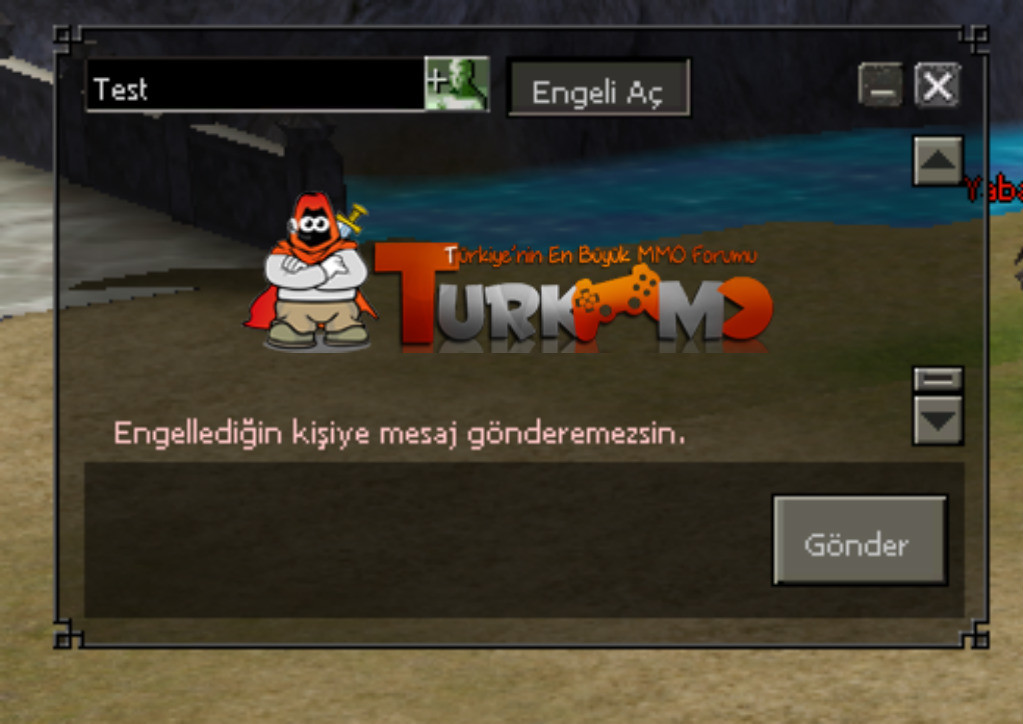
PM'de Engelleme Sistemi [PYTHON] - ENGEL AÇ - ENGELLE
Metin2 özel sunucularında geliştirme yaparken, kullanıcılar arasında mesajlaşma sistemlerinin güvenliğini ve kullanıcı deneyimini artırmak oldukça önemlidir. Bu bağlamda, özel mesaj (PM) sisteminde bir engelleme mekanizması oluşturmak, hem spam içeriklerden korunmayı sağlar hem de kullanıcıların istemediği kişilerle iletişimi kesmesine olanak tanır. Bu yazıda, Python tabanlı bir PM Engelleme Sistemi geliştirmeye odaklanacağız. Bu sistem sayesinde oyuncular, diğer oyuncuları ENGELLE veya ENGELİ AÇABİLİR.
Python ile PM Engelleme Sistemi Nedir?
Python, Metin2 sunucu tarafında birçok işlemi kolaylaştıran güçlü bir programlama dilidir. Özellikle py root dosyalarında geliştirilen GUI ve sistemlerle, kullanıcı dostu arayüzler oluşturulabilir. Bu sistemde, oyuncuların birbirlerini özel mesajlaşma sırasında engellemesi için bir veritabanı bağlantısı kurulur. Kullanıcı, bir başka kullanıcıyı engellediğinde, bu bilgi DB (veritabanı) üzerinde saklanır ve ilgili kullanıcıdan gelen mesajlar otomatik olarak engellenir.
Engelleme Sisteminin Temel Özellikleri
Bu sistemde temel olarak şu özellikler yer almalıdır:
- Oyuncu listesinden bir kullanıcıya sağ tıklayarak engelleme seçeneği.
- Engellenmiş kullanıcıları görüntüleme ve engeli kaldırma.
- Veritabanında kalıcı olarak tutulan engelli kullanıcı listesi.
- Sunucu tarafında mesaj gönderim kontrolü.
Python Kod Yapısı ve Uygulama Detayları
Engelleme sistemi genellikle iki ana bileşenden oluşur: Client-side (istemci tarafı) ve Server-side (sunucu tarafı). Client-side tarafında UIScript ile kullanıcı arayüzü tasarlanır. Py GUI kullanılarak menüye bir 'Engelle' butonu eklenebilir. Sunucu tarafında ise Python komutları ile veritabanı sorguları yapılır. Örneğin bir kullanıcı engellenmek istendiğinde şu gibi bir komut çalıştırılır:
Veritabanı Tasarımı
Sistemde kullanılacak veritabanı tablosu şu şekilde olabilir:
Bu tablo sayesinde her oyuncunun engellediği kullanıcılar takip edilebilir. Ayrıca bu tabloya göre mesaj gönderme sırasında filtreleme yapılabilir.
Sistem Entegrasyonu ve Test
Bu sistem, Metin2 özel sunucularında test edilerek doğrulanmalıdır. Özellikle auth ve game sunucuları arasında uyumlu çalışması gerekir. Sistem doğru şekilde entegre edildiğinde, kullanıcılar artık birbirlerini özel mesajlar üzerinden rahatsız etmelerini önleyebileceklerdir. Bu da daha adil ve keyifli bir oyun ortamı yaratır.
PM Blocking System [PYTHON] - UNBLOCK - BLOCK
In Metin2 private server development, enhancing the security and user experience of messaging systems between players is highly important. In this context, creating a blocking mechanism within the private message (PM) system helps prevent spam and allows users to cut off communication with unwanted individuals. In this article, we will focus on developing a PM Blocking System based on Python. This system enables players to BLOCK or UNBLOCK other players.
What is a Python-Based PM Blocking System?
Python is a powerful programming language that simplifies many operations on the Metin2 server side. With the help of py root files and developed GUIs and systems, user-friendly interfaces can be built. In this system, when a player blocks another, the information is stored in the DB (database), and messages from the blocked user are automatically filtered out.
Core Features of the Blocking System
The system should primarily include these features:
- Right-clicking on a user in the player list to access the block option.
- Ability to view and unblock previously blocked users.
- A persistent list of blocked users stored in the database.
- Server-side control over message sending.
Python Code Structure and Implementation Details
The blocking system consists of two main components: Client-side and Server-side. On the client-side, the user interface is designed using UIScript. A 'Block' button can be added to the menu using Py GUI. On the server-side, Python commands execute database queries. For example, when a user is to be blocked, a command like the following is executed:
Database Design
The database table used by the system could look like this:
With this table, every player's blocked users can be tracked. Additionally, filtering can be performed during message sending based on this table.
System Integration and Testing
This system must be tested thoroughly within Metin2 private servers. It is essential for it to operate seamlessly between the auth and game servers. When properly integrated, users will be able to prevent others from bothering them via private messages, thus creating a fairer and more enjoyable gaming environment.
Kod:
def OnRecvWhisper(self, mode, name, line): if mode == chat.WHISPER_TYPE_GM: self.interface.RegisterGameMasterName(name) else: passAltına Eklenir:
Kod:
if os.path.exists(str(constInfo.CLIENT_YOL)+"block_"+str(player.GetName())+".kf") and open(str(constInfo.CLIENT_YOL)+"block_"+str(player.GetName())+".kf", "r").read().find("#"+str(name)+"#") != -1: net.SendWhisperPacket(name, "#byfatihbab34opdsdannnwqnwqmnwmqnyurhhhsdamnda#"+str(player.GetStatus(player.LEVEL))+"#1#") return else: pass if line.find("byfatihbab34opdsdannnwqnwqmnwmqnyurhhhsdamnda") != -1: bol = line.split("#") chat.AppendWhisper(chat.WHISPER_TYPE_SYSTEM, name, "Sizi engellemis, Bu kisiye mesaj atamassiniz.") returnCostınfo.py eklenir;
Kod:
CLIENT_YOL = "lib/"Uichat.py aratılır:
Kod:
def __SendChatPacket(self, text, type):Altına eklenir:
Kod:
if text == "?block": chat.AppendChat(chat.CHAT_TYPE_INFO, "|cFF32CD32|H|hEngelli Oyuncular:") if not os.path.exists(str(constInfo.CLIENT_YOL)+"block_"+str(player.GetName())+".kf"): chat.AppendChat(chat.CHAT_TYPE_INFO, "Engelli oyuncu yok.") else: acla = open(str(constInfo.CLIENT_YOL)+"block_"+str(player.GetName())+".kf", "r").read() if not acla.find("#") != -1: chat.AppendChat(chat.CHAT_TYPE_INFO, "Engelli oyuncu yok.") return ac = open(str(constInfo.CLIENT_YOL)+"block_"+str(player.GetName())+".kf", "r").readlines() for i in ac: if str(i).find("#") != -1: chat.AppendChat(chat.CHAT_TYPE_INFO, str(i.split("#")[1].split("#")[0])) returnUiwhisper.py aratılır:
Kod:
def OpenWithTarget(self, targetName):Kodların sonuna eklenir:
Kod:
if os.path.exists(str(constInfo.CLIENT_YOL)+"block_"+str(player.GetName())+".kf") and open(str(constInfo.CLIENT_YOL)+"block_"+str(player.GetName())+".kf", "r").read().find("#"+str(targetName)+"#") != -1: self.ignoreButton.Show() self.ignoreButton.SetText("Engeli ac") else: self.ignoreButton.Show() self.ignoreButton.SetText("Engelle")Tekrar aratılır:
Kod:
def IgnoreTarget(self):Tamamı değiştirilir:
Kod:
def IgnoreTarget(self): if str(self.targetName).find("[") != -1: chat.AppendChat(chat.CHAT_TYPE_INFO, "<Fısıltı>: Game Master'leri sohbetten engelleyemessin.") return if os.path.exists(str(constInfo.CLIENT_YOL)+"block_"+str(player.GetName())+".kf") and open(str(constInfo.CLIENT_YOL)+"block_"+str(player.GetName())+".kf", "r").read().find("#"+str(self.targetName)+"#") != -1: ac = open(str(constInfo.CLIENT_YOL)+"block_"+str(player.GetName())+".kf", "r") oku = ac.read() ac.close() open(str(constInfo.CLIENT_YOL)+"block_"+str(player.GetName())+".kf", "w").write(str(oku).replace(str("#"+self.targetName+"#"), "")) self.ignoreButton.SetText("Engelle") else: if os.path.exists(str(constInfo.CLIENT_YOL)+"block_"+str(player.GetName())+".kf"): open(str(constInfo.CLIENT_YOL)+"block_"+str(player.GetName())+".kf", "a+").write("\n"+str("#"+self.targetName+"#")) else: open(str(constInfo.CLIENT_YOL)+"block_"+str(player.GetName())+".kf", "a+").write(str("#"+self.targetName+"#")) self.ignoreButton.SetText("Engeli ac")Tekrar aratılır:
Kod:
def SendWhisper(self):Bunun altına:
Kod:
if textLength > 0: if net.IsInsultIn(text): chat.AppendChat(chat.CHAT_TYPE_INFO, localeInfo.CHAT_INSULT_STRING) returnBu eklenir:
Kod:
if os.path.exists(str(constInfo.CLIENT_YOL)+"block_"+str(player.GetName())+".kf") and open(str(constInfo.CLIENT_YOL)+"block_"+str(player.GetName())+".kf", "r").read().find("#"+str(self.targetName)+"#") != -1: chat.AppendWhisper(chat.WHISPER_TYPE_SYSTEM, self.targetName, 'Engelledigin kisiye mesaj gonderemezsin.') returnNot:Game.py ve uiwhisper.py de import os yoksa importlara ekleyin
PM'de Engelleme Sistemi [PYTHON] - ENGEL AÇ - ENGELLE
Metin2 özel sunucularında geliştirme yaparken, kullanıcılar arasında mesajlaşma sistemlerinin güvenliğini ve kullanıcı deneyimini artırmak oldukça önemlidir. Bu bağlamda, özel mesaj (PM) sisteminde bir engelleme mekanizması oluşturmak, hem spam içeriklerden korunmayı sağlar hem de kullanıcıların istemediği kişilerle iletişimi kesmesine olanak tanır. Bu yazıda, Python tabanlı bir PM Engelleme Sistemi geliştirmeye odaklanacağız. Bu sistem sayesinde oyuncular, diğer oyuncuları ENGELLE veya ENGELİ AÇABİLİR.
Python ile PM Engelleme Sistemi Nedir?
Python, Metin2 sunucu tarafında birçok işlemi kolaylaştıran güçlü bir programlama dilidir. Özellikle py root dosyalarında geliştirilen GUI ve sistemlerle, kullanıcı dostu arayüzler oluşturulabilir. Bu sistemde, oyuncuların birbirlerini özel mesajlaşma sırasında engellemesi için bir veritabanı bağlantısı kurulur. Kullanıcı, bir başka kullanıcıyı engellediğinde, bu bilgi DB (veritabanı) üzerinde saklanır ve ilgili kullanıcıdan gelen mesajlar otomatik olarak engellenir.
Engelleme Sisteminin Temel Özellikleri
Bu sistemde temel olarak şu özellikler yer almalıdır:
- Oyuncu listesinden bir kullanıcıya sağ tıklayarak engelleme seçeneği.
- Engellenmiş kullanıcıları görüntüleme ve engeli kaldırma.
- Veritabanında kalıcı olarak tutulan engelli kullanıcı listesi.
- Sunucu tarafında mesaj gönderim kontrolü.
Python Kod Yapısı ve Uygulama Detayları
Engelleme sistemi genellikle iki ana bileşenden oluşur: Client-side (istemci tarafı) ve Server-side (sunucu tarafı). Client-side tarafında UIScript ile kullanıcı arayüzü tasarlanır. Py GUI kullanılarak menüye bir 'Engelle' butonu eklenebilir. Sunucu tarafında ise Python komutları ile veritabanı sorguları yapılır. Örneğin bir kullanıcı engellenmek istendiğinde şu gibi bir komut çalıştırılır:
Kod:
def block_user(self, target_player_id):[BR][/BR] query = 'INSERT INTO blocked_users (player_id, blocked_player_id) VALUES (%s, %s)'[BR][/BR] cursor.execute(query, (self.player_id, target_player_id))[BR][/BR] db.commit()Veritabanı Tasarımı
Sistemde kullanılacak veritabanı tablosu şu şekilde olabilir:
Kod:
CREATE TABLE blocked_users ([BR][/BR] id INT AUTO_INCREMENT PRIMARY KEY,[BR][/BR] player_id INT NOT NULL,[BR][/BR] blocked_player_id INT NOT NULL,[BR][/BR] created_at TIMESTAMP DEFAULT CURRENT_TIMESTAMP[BR][/BR]);Bu tablo sayesinde her oyuncunun engellediği kullanıcılar takip edilebilir. Ayrıca bu tabloya göre mesaj gönderme sırasında filtreleme yapılabilir.
Sistem Entegrasyonu ve Test
Bu sistem, Metin2 özel sunucularında test edilerek doğrulanmalıdır. Özellikle auth ve game sunucuları arasında uyumlu çalışması gerekir. Sistem doğru şekilde entegre edildiğinde, kullanıcılar artık birbirlerini özel mesajlar üzerinden rahatsız etmelerini önleyebileceklerdir. Bu da daha adil ve keyifli bir oyun ortamı yaratır.
PM Blocking System [PYTHON] - UNBLOCK - BLOCK
In Metin2 private server development, enhancing the security and user experience of messaging systems between players is highly important. In this context, creating a blocking mechanism within the private message (PM) system helps prevent spam and allows users to cut off communication with unwanted individuals. In this article, we will focus on developing a PM Blocking System based on Python. This system enables players to BLOCK or UNBLOCK other players.
What is a Python-Based PM Blocking System?
Python is a powerful programming language that simplifies many operations on the Metin2 server side. With the help of py root files and developed GUIs and systems, user-friendly interfaces can be built. In this system, when a player blocks another, the information is stored in the DB (database), and messages from the blocked user are automatically filtered out.
Core Features of the Blocking System
The system should primarily include these features:
- Right-clicking on a user in the player list to access the block option.
- Ability to view and unblock previously blocked users.
- A persistent list of blocked users stored in the database.
- Server-side control over message sending.
Python Code Structure and Implementation Details
The blocking system consists of two main components: Client-side and Server-side. On the client-side, the user interface is designed using UIScript. A 'Block' button can be added to the menu using Py GUI. On the server-side, Python commands execute database queries. For example, when a user is to be blocked, a command like the following is executed:
Kod:
def block_user(self, target_player_id):[BR][/BR] query = 'INSERT INTO blocked_users (player_id, blocked_player_id) VALUES (%s, %s)'[BR][/BR] cursor.execute(query, (self.player_id, target_player_id))[BR][/BR] db.commit()Database Design
The database table used by the system could look like this:
Kod:
CREATE TABLE blocked_users ([BR][/BR] id INT AUTO_INCREMENT PRIMARY KEY,[BR][/BR] player_id INT NOT NULL,[BR][/BR] blocked_player_id INT NOT NULL,[BR][/BR] created_at TIMESTAMP DEFAULT CURRENT_TIMESTAMP[BR][/BR]);With this table, every player's blocked users can be tracked. Additionally, filtering can be performed during message sending based on this table.
System Integration and Testing
This system must be tested thoroughly within Metin2 private servers. It is essential for it to operate seamlessly between the auth and game servers. When properly integrated, users will be able to prevent others from bothering them via private messages, thus creating a fairer and more enjoyable gaming environment.
