- Katılım
- 6 Mayıs 2022
- Konular
- 52,316
- Mesajlar
- 52,635
- Tepkime puanı
- 136
- M2 Yaşı
- 4 yıl 2 ay 17 gün
- Trophy Puan
- 63
- M2 Yang
- 529,254
Ziyaretçiler için gizlenmiş link,görmek için üye olmalısınız!
Giriş yap veya üye ol.
ile beraber zamanında çok aradık ama ya hepsinin linki bozuktu yada kodlar işlevsiz kalıyordu.Sistem rohan2 filesinden sökülmüştür.
İlk önce uiscriptten sistem seçeneklerine buton ekliyoruz;
uiscript/systemoptiondialog.py açılır.
Aratılır;
Kod:
{ "name" : "tiling_apply", "type" : "button", "x" : 110+100, "y" : 185, "text" : uiScriptLocale.OPTION_TILING_APPLY, "default_image" : ROOT_PATH + "middle_Button_01.sub", "over_image" : ROOT_PATH + "middle_Button_02.sub", "down_image" : ROOT_PATH + "middle_Button_03.sub", },Altına şu şekilde eklenir;
Unutmayın ekledikten sonra koordinatları kendi sistem seçeneklerinize göre ayarlayın.
Kod:
{ "name" : "font_type_name", "type" : "text", "x" : 30, "y" : 232, "text" : "Yazı Tipi", }, { "name" : "font_type_arial", "type" : "radio_button", "x" : 110, "y" : 232, "text" : "Arial", "default_image" : ROOT_PATH + "Middle_Button_01.sub", "over_image" : ROOT_PATH + "Middle_Button_02.sub", "down_image" : ROOT_PATH + "Middle_Button_03.sub", }, { "name" : "font_type_tahoma", "type" : "radio_button", "x" : 110+70, "y" : 232, "text" : "Tahoma", "default_image" : ROOT_PATH + "Middle_Button_01.sub", "over_image" : ROOT_PATH + "Middle_Button_02.sub", "down_image" : ROOT_PATH + "Middle_Button_03.sub", },Uiscript ile işimiz bitti.
Şimdi root/uisystemoption.py açılır.
importların arasına - import os - eklenir.
Ardından;
Kod:
blockMode = 0
Kod:
class PopupDialog(ui.ScriptWindow): def __init__(self, parent): print "PopupDialog::PopupDialog()" ui.ScriptWindow.__init__(self) self.__Load() self.__Bind() def __del__(self): ui.ScriptWindow.__del__(self) print "PopupDialog::~PopupDialog()" def __Load(self): try: pyScrLoader = ui.PythonScriptLoader() pyScrLoader.LoadScriptFile(self, "UIScript/PopupDialog.py") except: import exception exception.Abort("PopupDialog.__Load") def __Bind(self): try: self.textLine=self.GetChild("message") self.okButton=self.GetChild("accept") except: import exception exception.Abort("PopupDialog.__Bind") self.okButton.SAFE_SetEvent(self.__OnOK) def Open(self, msg): self.textLine.SetText(msg) self.SetCenterPosition() self.Show() self.SetTop() def __OnOK(self): self.Hide()Ardından bu kod bloğu aratılır.
Kod:
self.SetCenterPosition() self.titleBar.SetCloseEvent(ui.__mem_func__(self.Close))Bu şekilde değiştirilir.
Kod:
self.SetCenterPosition() self.popupDialog = PopupDialog(self) self.titleBar.SetCloseEvent(ui.__mem_func__(self.Close))Aratılır;
Kod:
self.tilingModeButtonList = []Altına eklenir;
Kod:
self.fonttypeButtonList = []Aratılır;
Kod:
self.tilingApplyButton=GetObject("tiling_apply")Altına eklenir;
Kod:
self.fonttypeButtonList.append(GetObject("font_type_arial")) self.fonttypeButtonList.append(GetObject("font_type_tahoma"))Aratılır;
Kod:
self.tilingModeButtonList[1].SAFE_SetEvent(self.__OnClickTilingModeGPUButton)Altına eklenir;
Kod:
self.fonttypeButtonList[0].SAFE_SetEvent(self.__OnClickArialButton) self.fonttypeButtonList[1].SAFE_SetEvent(self.__OnClickTahomaButton)Aratılır;
Kod:
self.__ClickRadioButton(self.cameraModeButtonList, constInfo.GET_CAMERA_MAX_DISTANCE_INDEX())Altına eklenir;
Kod:
if os.path.exists("gameoption.cfg"): fd = open( "gameoption.cfg" , "r") fonttype = fd.readline() fd.close() if fonttype == "0": self.__ClickRadioButton(self.fonttypeButtonList, 0) elif fonttype == "1": self.__ClickRadioButton(self.fonttypeButtonList, 1) else: self.__ClickRadioButton(self.fonttypeButtonList, 0)Aratılır;
Kod:
def OnCloseInputDialog(self): self.inputDialog.Close() self.inputDialog = None return TrueBu kod bloğunun üstüne eklenir;
Kod:
def __OnClickArialButton(self): if os.path.exists("gameoption.cfg"): os.remove("gameoption.cfg") f = open( "gameoption.cfg", "w") f.write("0") f.close() self.popupDialog.Open(localeInfo.LANG_RESTART_FOR_CHANGE) self.__ClickRadioButton(self.fonttypeButtonList, 0) def __OnClickTahomaButton(self): if os.path.exists("gameoption.cfg"): os.remove("gameoption.cfg") f = open( "gameoption.cfg", "w") f.write("1") f.close() self.popupDialog.Open(localeInfo.LANG_RESTART_FOR_CHANGE) self.__ClickRadioButton(self.fonttypeButtonList, 1)uisystemoption.py ile işimiz bitti.
gelelim root/prototype.py
importlara - import os - eklenir.
Aratılır;
Kod:
def RunApp(): musicInfo.LoadLastPlayFieldMusic() app.SetHairColorEnable(constInfo.HAIR_COLOR_ENABLE) app.SetArmorSpecularEnable(constInfo.ARMOR_SPECULAR_ENABLE) app.SetWeaponSpecularEnable(constInfo.WEAPON_SPECULAR_ENABLE) app.SetMouseHandler(mouseModule.mouseController) wndMgr.SetMouseHandler(mouseModule.mouseController) wndMgr.SetScreenSize(systemSetting.GetWidth(), systemSetting.GetHeight())Bu kod bloğu tamamen değiştirilir;
Kod:
def RunApp(): musicInfo.LoadLastPlayFieldMusic() app.SetHairColorEnable(constInfo.HAIR_COLOR_ENABLE) app.SetArmorSpecularEnable(constInfo.ARMOR_SPECULAR_ENABLE) app.SetWeaponSpecularEnable(constInfo.WEAPON_SPECULAR_ENABLE) #Initialize default fonts. if os.path.exists("gameoption.cfg"): fd = open( "gameoption.cfg" , "r") fonttype = fd.readline() if fonttype == "0": localeInfo.UI_DEF_FONT = "Arial:14" localeInfo.UI_DEF_FONT_LARGE = "Arial:16" elif fonttype == "1": localeInfo.UI_DEF_FONT = "Tahoma:12" localeInfo.UI_DEF_FONT_LARGE = "Tahoma:16" fd.close() app.SetMouseHandler(mouseModule.mouseController) wndMgr.SetMouseHandler(mouseModule.mouseController) wndMgr.SetScreenSize(systemSetting.GetWidth(), systemSetting.GetHeight())prototype.py ile işimiz bitti gelelim.
root/uitooltip.py açılır.
importlara eklenir -import os-
Aratılır;
Kod:
self.defFontName = localeInfo.UI_DEF_FONT self.ClearToolTip()Değiştirilir;
Kod:
if os.path.exists("gameoption.cfg"): fd = open( "gameoption.cfg" , "r") fonttype = fd.readline() fd.close() if fonttype == "0": self.defFontName = "Arial:14" elif fonttype == "1": self.defFontName = "Tahoma:12" else: self.defFontName = localeInfo.UI_DEF_FONT self.ClearToolTip()Root ile işimiz bitti.
locale_tr içinden locale_game.txt açın.
ve en sona ekleyin.
Kod:
LANG_RESTART_FOR_CHANGE Değişiklik için oyunu tekrar başlatmalısın.Son işlem olarak client dosyanızın içine
Ziyaretçiler için gizlenmiş link,görmek için üye olmalısınız!
Giriş yap veya üye ol.
bunu atın.Güncelleme 1; Arkadaşlar küçük bi sorun vardı şöyle ki; Misal oyunu tahoma yaptıktan sonra karakter ismi,derecesi,npcler ve bazı bölümler değişmiyordu bunun sebebi ui.py'deki ''app.SetDefaultFontName(localeInfo.UI_DEF_FONT)'' bu bölüm default yazı fontunu çektiği için böyle bi problem oluşturuyordu. Yardımından ötürü
Ziyaretçiler için gizlenmiş link,görmek için üye olmalısınız!
Giriş yap veya üye ol.
'ye teşekkür ediyorum.ui.py açılır.
İmportlara eklenir ; - import os -
Aratılır.
Kod:
app.SetDefaultFontName(localeInfo.UI_DEF_FONT)Ve değiştirilir;
Kod:
if os.path.exists("gameoption.cfg"): fd = open( "gameoption.cfg" , "r") fonttype = fd.readline() if fonttype == "0": app.SetDefaultFontName("Arial:14") elif fonttype == "1": app.SetDefaultFontName("Tahoma:12") fd.close()Kanıt;
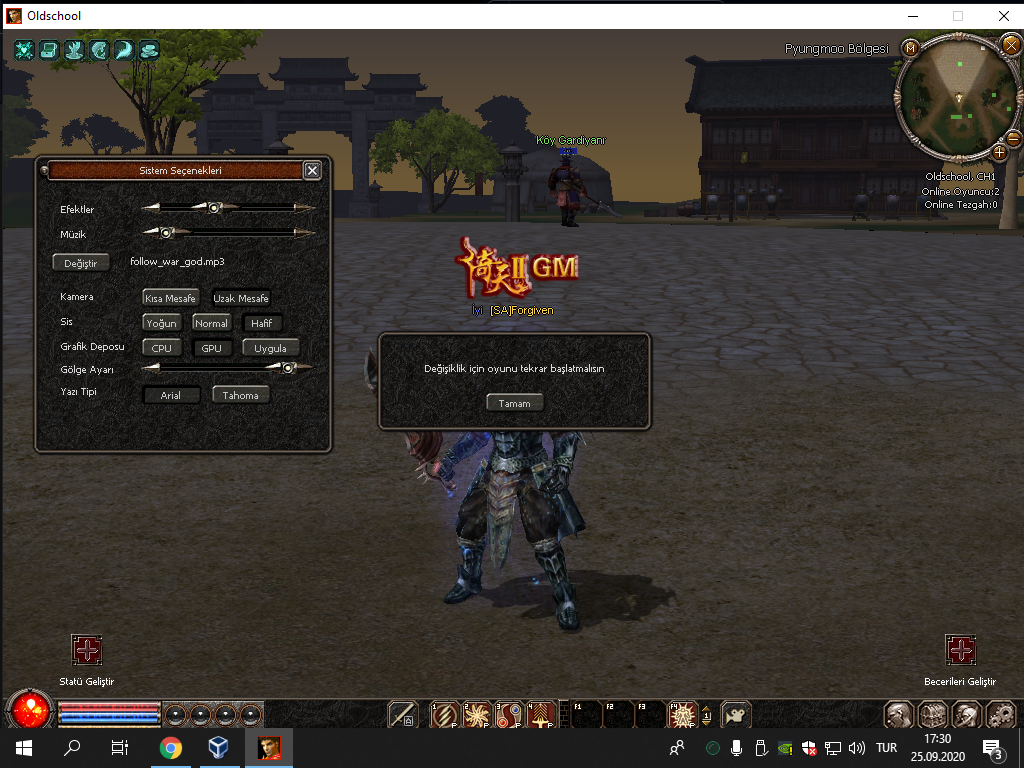
Metin2 Özel Sunucularında PY Sistem Seçeneklerine Yazı Tipi Eklentisi Ekleme
Metin2 özel sunucu geliştirme sürecinde, kullanıcı arayüzünün estetiği ve okunabilirliği büyük önem taşır. Özellikle oyun içi menülerde ya da PY (Python) tabanlı GUI sistemlerinde kullanılan yazı tipleri, oyuncunun deneyimini doğrudan etkileyebilir. Bu nedenle PY sistem seçeneklerine yazı tipi eklentisi entegre etmek, hem görsel açıdan daha şık hem de kullanıcı dostu bir arayüz oluşturmak adına kritik bir adımdır.
Yazı Tipi Nedir ve Neden Önemlidir?
Yazı tipleri, metinlerin ekranda nasıl görüneceğini belirleyen temel unsurlardır. Metin2 özel sunucularda genellikle uiscript dosyaları üzerinden arayüz kontrol edilir. Bu dosyalarda kullanılan font tanımlamaları, menüleri, karakter bilgilerini, skor tablolarını veya özel sistem mesajlarını daha okunabilir ve estetik kılar. Py root veya py gui sistemlerinde, yazı tipleri doğrudan GUI bileşenlerine entegre edilebilir. Bu sayede oyuncular için daha net ve dikkat çekici metinler oluşturulabilir.
PY Sistem Seçeneklerine Yazı Tipi Entegrasyonu
PY sistemlerinde yazı tipi eklentisi oluşturmak için birkaç adım izlenmelidir. İlk olarak, seçilen yazı tipi (.ttf veya .otf uzantılı) dosyası projeye dahil edilmelidir. Ardından bu yazı tipi, Python GUI kütüphaneleri üzerinden yüklenerek uygulanmalıdır. Örneğin, Tkinter veya PyQt gibi kütüphanelerde yazı tipleri özelleştirilebilir. Metin2 özel sunucularda ise genellikle uiscript veya benzeri arayüz sistemleri kullanıldığından, burada yazı tipi tanımlamaları özel olarak yapılmaktadır.
Özel PY GUI Tasarımlarında Yazı Tipi Ayarları
Metin2 özel sunucularında geliştirilen C++ system ile entegre çalışan PY GUI modüllerinde, yazı tipleri doğrudan sistem ayarları içerisine entegre edilebilir. Bu işlem için uiscript dosyasında bulunan FONT tanımlamaları değiştirilir. Yazının boyutu, kalınlığı ve font ailesi gibi ayarlar buradan yapılabilir. Aynı zamanda, pack dosyaları içerisinde yazı tipleri saklanarak sunucuya özel fontlar entegre edilebilir. Bu sayede sunucu sahipleri tamamen özgün bir deneyim sunabilir.
Metin2 Sunucularında PY Sistemleri ile Yazı Tipi Değiştirme Adımları
1. Yazı tipi dosyasını hazırlayın: .ttf uzantılı bir font dosyası alın ve projeye dahil edin.
2. PY GUI sistemine entegre edin: Python GUI sınıflarında font tanımlaması yaparak yazı tipini uygulayın.
3. Uiscript dosyasını düzenleyin: Menüde gösterilecek metinlerin fontunu güncelleyin.
4. Sunucu tarafında test edin: Oyuncu tarafından görülecek metinlerin doğru görünüp görünmediğini kontrol edin.
PY Sistemleri ile Yazı Tipi Kullanımının Avantajları
- Daha estetik ve profesyonel bir oyun arayüzü.
- Oyuncu dikkatini çekecek görsel etkiler.
- Marka kimliği oluşturmaya yardımcı olacak özgün stiller.
- Daha iyi okunabilirlik ve kullanıcı deneyimi.
Sonuç
Metin2 özel sunucularında PY sistem seçeneklerine yazı tipi eklentisi eklemek, hem oyun hem de arayüz geliştirme açısından büyük faydalar sağlar. Metin2 development sürecinde dikkat edilmesi gereken küçük detaylar, büyük farklar yaratır. Yazının estetik ve fonksiyonel yönlerini optimize etmek için yazı tipleri gibi detaylara özen göstermek, sunucunuzun kalitesini artırmak açısından kritik öneme sahiptir.
Adding Font Extensions to PY System Options in Metin2 Private Servers
In the process of developing Metin2 private servers, the aesthetics and readability of the user interface are of great importance. Especially in in-game menus or PY (Python)-based GUI systems, the fonts used directly affect the player's experience. Therefore, integrating a font extension into PY system options is a critical step towards creating a more visually appealing and user-friendly interface.
What is a Font and Why is it Important?
Fonts determine how text appears on the screen. In Metin2 private servers, interfaces are typically controlled through uiscript files. The font definitions used in these files make menus, character information, scoreboards, or custom system messages more readable and aesthetic. In Py root or py gui systems, fonts can be integrated directly into GUI components, allowing for clearer and more eye-catching texts for players.
Integrating Font Extensions into PY System Options
To create a font extension in PY systems, several steps must be followed. First, the selected font file (with .ttf or .otf extension) must be included in the project. Then, this font should be loaded via Python GUI libraries and applied. For instance, in libraries like Tkinter or PyQt, fonts can be customized. However, in Metin2 private servers, where interfaces like uiscript are commonly used, font definitions are made specifically within those systems.
Font Settings in Custom PY GUI Designs
In PY GUI modules developed in Metin2 private servers that integrate with C++ system, fonts can be embedded directly into system settings. To do this, the FONT definitions found in the uiscript file are modified. Size, weight, and family of the font can be adjusted here. Additionally, fonts can be stored in pack files and integrated as server-specific fonts, allowing server owners to provide a completely unique experience.
Steps for Changing Fonts with PY Systems in Metin2 Servers
1. Prepare the font file: Obtain a .ttf font file and include it in your project.
2. Integrate into PY GUI system: Define the font in Python GUI classes and apply it.
3. Edit the uiscript file: Update the font used for texts displayed in menus.
4. Test on the server side: Verify whether the texts visible to the player appear correctly.
Advantages of Using Fonts with PY Systems
- A more aesthetic and professional game interface.
- Visual effects that catch the player's attention.
- Unique styles that help establish brand identity.
- Better readability and user experience.
Conclusion
Adding font extensions to PY system options in Metin2 private servers provides significant benefits in both game and interface development. Small details, such as those considered during Metin2 development, can make a big difference. Paying attention to details like fonts to optimize both aesthetic and functional aspects of texts is crucial to enhancing the overall quality of your server.