

Sistem :
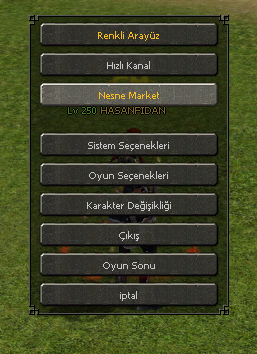
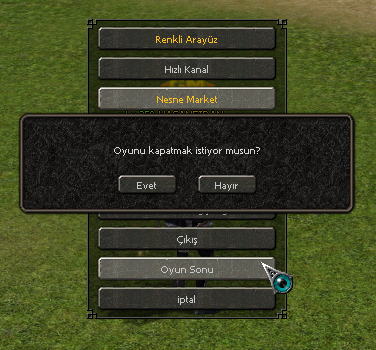
Herkesin Bildiği ' Hızlı Oyun Sonu ' getirmedir. Fakat çoğu anlatımlarda farklı butonlara fonksiyonlara eklenmiştir ben kendi orjinal butonuna ekledim çok basit ve sadedir.
Resim :
Anlatım :
Not : Kodlar Tab Ayarlıdır Kopyala Yapıştır yapabilirsiniz. ( Teşekkürler )
Python ile Metin2 Oyun Sonu Sistemi: Basit ve Etkili Uygulama
Giriş
Metin2 özel sunucularında oyun sonu (game over) deneyimini kullanıcı dostu ve hızlı hale getirmek, oyuncuların dikkatini çekmenin önemli yollarından biridir. Bu sistemde, karakterin canı bittiğinde ekranda beliren arayüz veya oyun sonu ekranı, hem estetik hem de işlevsel olarak tasarlanmalıdır. Bu yazıda, Python dilini kullanarak basit ve sade bir oyun sonu ekranı nasıl yapılır, adım adım inceleyeceğiz. Özellikle Py GUI veya UIScript tabanlı sistemlerde kolayca entegre edilebilecek bir yapı üzerinde duracağız.
Oyun Sonu Sisteminin Amacı
Oyun sonu ekranı, oyuncunun karakteri öldüğünde devreye girer. Bu ekranda genellikle aşağıdaki bilgiler yer alır:
- Öldürülme nedeni
- Karakterin öldüğü yer
- Yeniden canlanma seçeneği
- Sunucu içi istatistikler
Python kullanarak bu bilgileri görsel bir arayüzde sunmak, hem geliştiriciye hem de oyuncuya kolaylık sağlar. Özellikle root klasörlerde yer alan py dosyaları sayesinde bu ekranlar dinamik olarak yönetilebilir.
Python ile Oyun Sonu Arayüzü Oluşturmak
Python ile bir arayüz oluşturmak için Tkinter veya PyQt gibi modüller kullanılabilir. Ancak Metin2 özel sunucularında genellikle UIScript yapısı tercih edilir. UIScript, Metin2'nin arayüz sistemidir ve doğrudan py dosyalarıyla entegre çalışır. Bu yapıda, oyun sonu ekranı için bir sınıf tanımlayabiliriz:
Sistem Entegrasyonu
Bu arayüzü pack dosyasına eklemek oldukça kolaydır. Dosya yapısında, uiscript ve root dizinleri düzenlenerek, oyun sonu arayüzü sunucu tarafında aktif hale getirilebilir. Bu işlem sırasında db ve auth sunucularında gerekli loglamalar yapılmalıdır. Örneğin, karakter öldüğünde bir mesaj gönderilip, arayüz açılır. Bu süreçte C++ sistemle Python arasındaki haberleşme önemlidir.
Yeniden Canlanma Sistemi
Oyun sonu ekranında bir yeniden canlanma butonu yer almalıdır. Butona basıldığında, karakterin son bulunduğu konuma veya respawn noktasına dönmesi sağlanır. Bu işlem, game server üzerinden tetiklenmelidir. Python tarafında sadece arayüz kontrol edilir, gerçek olaylar C++ tarafında işlenir.
Sonuç
Python kullanarak basit ve sade bir oyun sonu ekranı oluşturmak, Metin2 özel sunucularında kullanıcı deneyimini artırmak açısından oldukça faydalıdır. Özellikle MartySama gibi geliştiricilerin paylaştığı sistemlerle uyumlu çalışabilen bu yapılar, hem kolaylık hem de esneklik sunar. Python GUI sistemleri, Metin2Dev projelerinde sıklıkla tercih edilir çünkü kodlama süresini kısaltır ve hata ayıklamayı kolaylaştırır.
Kaynaklar
- Metin2 Lobby
- Metin2 Development Community
Python-based Metin2 Game Over System: Simple and Effective Implementation
Introduction
Making the game over experience user-friendly and fast in Metin2 private servers is one of the key ways to capture players' attention. In this system, the interface that appears on screen when a character dies should be designed to be both aesthetic and functional. In this article, we will examine step by step how to create a simple and clean game over screen using Python. Specifically, we will focus on a structure that can be easily integrated into Py GUI or UIScript based systems.
Purpose of the Game Over System
The game over screen activates when a player's character dies. Usually, the following information appears on this screen:
- Reason for death
- Location where the character died
- Respawn option
- In-game statistics
Using Python to present this information visually provides convenience for both developers and players. Particularly with the help of py files located in the root folders, these screens can be managed dynamically.
Creating a Game Over Interface with Python
To create an interface with Python, modules like Tkinter or PyQt can be used. However, in Metin2 private servers, the UIScript structure is generally preferred. UIScript is Metin2's interface system and integrates directly with py files. Within this structure, we can define a class for the game over screen:
System Integration
Adding this interface to the pack file is quite easy. By editing the uiscript and root directories in the file structure, the game over screen can be activated on the server side. During this process, necessary logging must be done on db and auth servers. For example, when a character dies, a message is sent and the interface opens. Communication between the C++ system and Python is important during this process.
Respawn System
A respawn button should appear on the game over screen. When clicked, the character should return to their last known location or respawn point. This action must be triggered via the game server. On the Python side, only the interface is controlled; actual events are processed on the C++ side.
Conclusion
Creating a simple and clean game over screen using Python is highly beneficial in enhancing the user experience in Metin2 private servers. Structures compatible with systems shared by developers such as MartySama offer both ease of use and flexibility. Python GUI systems are frequently preferred in Metin2Dev projects because they reduce coding time and simplify debugging.
Sources
- Metin2 Lobby
- Metin2 Development Community
Herkesin Bildiği ' Hızlı Oyun Sonu ' getirmedir. Fakat çoğu anlatımlarda farklı butonlara fonksiyonlara eklenmiştir ben kendi orjinal butonuna ekledim çok basit ve sadedir.
Resim :
Anlatım :
Ziyaretçiler için gizlenmiş link,görmek için üye olmalısınız!
Giriş yap veya üye ol.
Not : Kodlar Tab Ayarlıdır Kopyala Yapıştır yapabilirsiniz. ( Teşekkürler )
Python ile Metin2 Oyun Sonu Sistemi: Basit ve Etkili Uygulama
Giriş
Metin2 özel sunucularında oyun sonu (game over) deneyimini kullanıcı dostu ve hızlı hale getirmek, oyuncuların dikkatini çekmenin önemli yollarından biridir. Bu sistemde, karakterin canı bittiğinde ekranda beliren arayüz veya oyun sonu ekranı, hem estetik hem de işlevsel olarak tasarlanmalıdır. Bu yazıda, Python dilini kullanarak basit ve sade bir oyun sonu ekranı nasıl yapılır, adım adım inceleyeceğiz. Özellikle Py GUI veya UIScript tabanlı sistemlerde kolayca entegre edilebilecek bir yapı üzerinde duracağız.
Oyun Sonu Sisteminin Amacı
Oyun sonu ekranı, oyuncunun karakteri öldüğünde devreye girer. Bu ekranda genellikle aşağıdaki bilgiler yer alır:
- Öldürülme nedeni
- Karakterin öldüğü yer
- Yeniden canlanma seçeneği
- Sunucu içi istatistikler
Python kullanarak bu bilgileri görsel bir arayüzde sunmak, hem geliştiriciye hem de oyuncuya kolaylık sağlar. Özellikle root klasörlerde yer alan py dosyaları sayesinde bu ekranlar dinamik olarak yönetilebilir.
Python ile Oyun Sonu Arayüzü Oluşturmak
Python ile bir arayüz oluşturmak için Tkinter veya PyQt gibi modüller kullanılabilir. Ancak Metin2 özel sunucularında genellikle UIScript yapısı tercih edilir. UIScript, Metin2'nin arayüz sistemidir ve doğrudan py dosyalarıyla entegre çalışır. Bu yapıda, oyun sonu ekranı için bir sınıf tanımlayabiliriz:
Kod:
class GameOverWindow:[BR][/BR] def __init__(self):[BR][/BR] self.is_open = False[BR][/BR][BR][/BR] def show(self):[BR][/BR] # Oyun sonu ekranını göster[BR][/BR] self.is_open = True[BR][/BR][BR][/BR] def hide(self):[BR][/BR] # Oyun sonu ekranını gizle[BR][/BR] self.is_open = FalseSistem Entegrasyonu
Bu arayüzü pack dosyasına eklemek oldukça kolaydır. Dosya yapısında, uiscript ve root dizinleri düzenlenerek, oyun sonu arayüzü sunucu tarafında aktif hale getirilebilir. Bu işlem sırasında db ve auth sunucularında gerekli loglamalar yapılmalıdır. Örneğin, karakter öldüğünde bir mesaj gönderilip, arayüz açılır. Bu süreçte C++ sistemle Python arasındaki haberleşme önemlidir.
Yeniden Canlanma Sistemi
Oyun sonu ekranında bir yeniden canlanma butonu yer almalıdır. Butona basıldığında, karakterin son bulunduğu konuma veya respawn noktasına dönmesi sağlanır. Bu işlem, game server üzerinden tetiklenmelidir. Python tarafında sadece arayüz kontrol edilir, gerçek olaylar C++ tarafında işlenir.
Sonuç
Python kullanarak basit ve sade bir oyun sonu ekranı oluşturmak, Metin2 özel sunucularında kullanıcı deneyimini artırmak açısından oldukça faydalıdır. Özellikle MartySama gibi geliştiricilerin paylaştığı sistemlerle uyumlu çalışabilen bu yapılar, hem kolaylık hem de esneklik sunar. Python GUI sistemleri, Metin2Dev projelerinde sıklıkla tercih edilir çünkü kodlama süresini kısaltır ve hata ayıklamayı kolaylaştırır.
Kaynaklar
- Metin2 Lobby
- Metin2 Development Community
Python-based Metin2 Game Over System: Simple and Effective Implementation
Introduction
Making the game over experience user-friendly and fast in Metin2 private servers is one of the key ways to capture players' attention. In this system, the interface that appears on screen when a character dies should be designed to be both aesthetic and functional. In this article, we will examine step by step how to create a simple and clean game over screen using Python. Specifically, we will focus on a structure that can be easily integrated into Py GUI or UIScript based systems.
Purpose of the Game Over System
The game over screen activates when a player's character dies. Usually, the following information appears on this screen:
- Reason for death
- Location where the character died
- Respawn option
- In-game statistics
Using Python to present this information visually provides convenience for both developers and players. Particularly with the help of py files located in the root folders, these screens can be managed dynamically.
Creating a Game Over Interface with Python
To create an interface with Python, modules like Tkinter or PyQt can be used. However, in Metin2 private servers, the UIScript structure is generally preferred. UIScript is Metin2's interface system and integrates directly with py files. Within this structure, we can define a class for the game over screen:
Kod:
class GameOverWindow:[BR][/BR] def __init__(self):[BR][/BR] self.is_open = False[BR][/BR][BR][/BR] def show(self):[BR][/BR] # Show game over screen[BR][/BR] self.is_open = True[BR][/BR][BR][/BR] def hide(self):[BR][/BR] # Hide game over screen[BR][/BR] self.is_open = FalseSystem Integration
Adding this interface to the pack file is quite easy. By editing the uiscript and root directories in the file structure, the game over screen can be activated on the server side. During this process, necessary logging must be done on db and auth servers. For example, when a character dies, a message is sent and the interface opens. Communication between the C++ system and Python is important during this process.
Respawn System
A respawn button should appear on the game over screen. When clicked, the character should return to their last known location or respawn point. This action must be triggered via the game server. On the Python side, only the interface is controlled; actual events are processed on the C++ side.
Conclusion
Creating a simple and clean game over screen using Python is highly beneficial in enhancing the user experience in Metin2 private servers. Structures compatible with systems shared by developers such as MartySama offer both ease of use and flexibility. Python GUI systems are frequently preferred in Metin2Dev projects because they reduce coding time and simplify debugging.
Sources
- Metin2 Lobby
- Metin2 Development Community
