

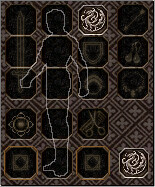
Merhaba arkadaşlar, bu sistem "Tatsumaru" tarafından yapılmıştır. Sistem, saç stillerine icon bulmak zor olduğu için saç stillerinde kullanmak için genel bir icondur. Aynı zamanda slot olarak kullanarak da farklı bir görünüm yakalayabilirsiniz.
Saç Stili Icon

Saç Stili Slot
İndirme Bağlantısı
Metin2 oyuncuları için saç modeli slot ve icon sistemi, karakter özelleştirme deneyimini en üst düzeye çıkaran önemli unsurlardan biridir.
Bu rehberde, Metin2 Lobby üzerinden paylaşılan Metin2 client, Metin2 pack ve özellikle Metin2 pvp client gibi özel sürümlerde saç modellerinin nasıl yönetildiğini, slot yapısını ve icon dosyalarının işlevini detaylı şekilde açıklıyoruz.
Saç Modeli Slot Nedir?
Metin2'de her karakterin saç modeli, belirli bir 'slot' numarası ile ilişkilendirilir.
Bu slotlar, oyun motorunun hangi saç modelinin yükleneceğini belirlemesini sağlar.
Örneğin, bir erkek şaman karakterinde 1'den 10'a kadar olan slotlar farklı saç stillerini temsil edebilir.
Metin2 client edit işlemleri sırasında yeni saç modelleri eklerken, bu slot numaralarının doğru şekilde atanması ve çakışmaması büyük önem taşır.
Aksi takdirde, mevcut saçlar bozulabilir veya yeni eklenenler görünmeyebilir.
Metin2 pack dosyalarını açıp içerdeki saç modellerini incelemek, hangi slotların kullanıldığını anlamak için kritik bir adımdır.
Saç Icon Sistemi ve Kullanımı
Saç modellerinin oyun içi karakter seçim ekranında veya saç değiştirme NPC'lerinde görüntülenen küçük resimlere 'icon' denir.
Bu iconlar, oyuncunun saç stilini görsel olarak seçmesini sağlar.
Icon dosyaları genellikle .dds veya .tga formatında olup, belirli bir boyutta (örneğin 64x64 piksel) olmalıdır.
Metin2 client içerisinde bu iconların doğru yolda bulunması ve Metin2 client dosyaları arasında uygun şekilde referans verilmesi gerekir.
Eğer icon eksikse veya yanlış konumdaysa, saç modeli seçili olsa bile boş bir kare görünebilir.
Özellikle Metin2 custom client veya Metin2 özel client geliştirirken, yeni saç modellerine özel iconlar tasarlamak estetik ve kullanıcı dostu bir deneyim sunar.
Metin2 Pack ile Saç Modeli Entegrasyonu
Metin2 pack indir işlemi yaptığınızda, genellikle saç modelleriyle birlikte iconlar ve gerekli konfigürasyon dosyaları gelir.
Bu packları Metin2 pack açarak içeriğini incelemek, hangi slotlara ve iconlara sahip olduğunu öğrenmenizi sağlar.
Başarılı bir entegrasyon için, pack içindeki saç modeli dosyalarını (.chr veya .gr2) Metin2 client dosyaları içindeki ilgili klasörlere yerleştirmek yeterli değildir.
Aynı zamanda oyunun bu modelleri tanıyabilmesi için character.txt veya benzeri konfigürasyon dosyalarında slot numarası ve icon yolu güncellenmelidir.
Metin2 client yama veya Metin2 client patch işlemlerinde bu adımların atlanmaması, hataların önlenmesinde kritik rol oynar.
Hata Çözümü ve Güncellemeler
Saç modeli slot ve icon sistemlerinde sıkça karşılaşılan sorunlar arasında 'saç görünmeyebilir', 'icon boş görünür' veya 'karakter baş ağrısı gibi görsel hatalar' yer alır.
Bu tür Metin2 client hata durumları, genellikle eksik dosyalar, yanlış slot atamaları veya bozuk iconlardan kaynaklanır.
Metin2 client fix uygulamak için öncelikle eksik veya hatalı dosyaları kontrol edin.
Ardından, Metin2 client update sırasında yapılan değişikliklerin tüm bileşenleri kapsadığından emin olun.
Metin2lobby.com gibi güvenilir platformlardan Metin2 pvp pack veya Metin2 eter pack indirerek, test edilmiş ve hata düzeltmeleri içeren içeriklere erişebilirsiniz.

Saç modeli slot ve icon entegrasyonunu gösteren örnek bir Metin2 client ekran görüntüsü.
Sonuç ve Tavsiyeler
Saç modeli slot ve icon sistemi, Metin2 client ve Metin2 pack düzenlemesinde ustalaşmanız gereken temel bir konudur.
Doğru slot yönetimi, net iconlar ve dikkatli entegrasyon, oyunculara benzersiz bir karakter deneyimi sunar.
Her zaman Metin2 client skin, Metin2 client texture ve Metin2 client effect gibi diğer özelleştirme unsurlarıyla uyumlu olacak şekilde çalışın.
Metin2dev client veya martysama client gibi popüler çatallamalar, bu süreçte size rehberlik edebilir.
Unutmayın, dikkatli bir şekilde Metin2 pack extract işlemi yaparak ve tüm dosyaları kontrol ederek, sorunsuz bir Metin2 deneyimi elde edebilirsiniz.
For Metin2 players, the hair model slot and icon system is one of the key elements that elevates the character customization experience to the highest level.
In this guide, we explain in detail how hair models are managed, the slot structure, and the function of icon files, particularly in special versions such as Metin2 client, Metin2 pack, and especially Metin2 pvp client shared via Metin2 Lobby.
What is a Hair Model Slot?
In Metin2, each character's hair model is associated with a specific 'slot' number.
These slots allow the game engine to determine which hair model to load.
For example, in a male shaman character, slots ranging from 1 to 10 can represent different hair styles.
During Metin2 client edit operations, when adding new hair models, it is crucial to assign these slot numbers correctly and ensure there are no conflicts.
Otherwise, existing hair may be corrupted or newly added ones may not appear.
Examining hair models within Metin2 pack files by extracting them is a critical step to understand which slots are in use.
Hair Icon System and Usage
The small images that represent hair models on the in-game character selection screen or at hair-changing NPCs are called 'icons'.
These icons allow the player to visually select a hair style.
Icon files are usually in .dds or .tga format and must be a specific size (e.g., 64x64 pixels).
Within the Metin2 client, these icons must be located in the correct path and properly referenced among the Metin2 client files.
If an icon is missing or in the wrong location, even if the hair model is selected, an empty square may appear.
Especially when developing a Metin2 custom client or Metin2 özel client, designing unique icons for new hair models provides an aesthetic and user-friendly experience.
Hair Model Integration with Metin2 Pack
When you Metin2 pack download, it usually comes with hair models, icons, and necessary configuration files.
Metin2 pack extracting to examine its contents allows you to learn which slots and icons it has.
For successful integration, it is not enough to just place the hair model files (.chr or .gr2) from the pack into the relevant folders within the Metin2 client files.
At the same time, configuration files like character.txt must be updated with the slot number and icon path so the game can recognize these models.
During Metin2 client yama or Metin2 client patch operations, skipping these steps plays a critical role in preventing errors.
Troubleshooting and Updates
Common issues with hair model slot and icon systems include 'hair not visible', 'icon appears blank', or 'visual glitches like character head aches'.
These Metin2 client hata situations usually stem from missing files, incorrect slot assignments, or corrupted icons.
To Metin2 client fix these, first check for missing or faulty files.
Then, ensure that changes made during Metin2 client update cover all components.
You can access tested content with bug fixes by downloading Metin2 pvp pack or Metin2 eter pack from reliable platforms like Metin2lobby.com.
A sample Metin2 client screenshot showing the integration of hair model slots and icons.
Conclusion and Recommendations
The hair model slot and icon system is a fundamental topic you must master in Metin2 client and Metin2 pack editing.
Proper slot management, clear icons, and careful integration provide players with a unique character experience.
Always work in harmony with other customization elements such as Metin2 client skin, Metin2 client texture, and Metin2 client effect.
Popular forks like Metin2dev client or martysama client can guide you through this process.
Remember, by carefully performing Metin2 pack extract operations and checking all files, you can achieve a seamless Metin2 experience.
Saç Stili Icon
Saç Stili Slot
İndirme Bağlantısı
Ziyaretçiler için gizlenmiş link,görmek için üye olmalısınız!
Giriş yap veya üye ol.
Ziyaretçiler için gizlenmiş link,görmek için üye olmalısınız!
Giriş yap veya üye ol.
Saç Modeli Slot ve Icon: Metin2 Client ve Pack Düzenleme Rehberi
Metin2 oyuncuları için saç modeli slot ve icon sistemi, karakter özelleştirme deneyimini en üst düzeye çıkaran önemli unsurlardan biridir.
Bu rehberde, Metin2 Lobby üzerinden paylaşılan Metin2 client, Metin2 pack ve özellikle Metin2 pvp client gibi özel sürümlerde saç modellerinin nasıl yönetildiğini, slot yapısını ve icon dosyalarının işlevini detaylı şekilde açıklıyoruz.
Saç Modeli Slot Nedir?
Metin2'de her karakterin saç modeli, belirli bir 'slot' numarası ile ilişkilendirilir.
Bu slotlar, oyun motorunun hangi saç modelinin yükleneceğini belirlemesini sağlar.
Örneğin, bir erkek şaman karakterinde 1'den 10'a kadar olan slotlar farklı saç stillerini temsil edebilir.
Metin2 client edit işlemleri sırasında yeni saç modelleri eklerken, bu slot numaralarının doğru şekilde atanması ve çakışmaması büyük önem taşır.
Aksi takdirde, mevcut saçlar bozulabilir veya yeni eklenenler görünmeyebilir.
Metin2 pack dosyalarını açıp içerdeki saç modellerini incelemek, hangi slotların kullanıldığını anlamak için kritik bir adımdır.
Saç Icon Sistemi ve Kullanımı
Saç modellerinin oyun içi karakter seçim ekranında veya saç değiştirme NPC'lerinde görüntülenen küçük resimlere 'icon' denir.
Bu iconlar, oyuncunun saç stilini görsel olarak seçmesini sağlar.
Icon dosyaları genellikle .dds veya .tga formatında olup, belirli bir boyutta (örneğin 64x64 piksel) olmalıdır.
Metin2 client içerisinde bu iconların doğru yolda bulunması ve Metin2 client dosyaları arasında uygun şekilde referans verilmesi gerekir.
Eğer icon eksikse veya yanlış konumdaysa, saç modeli seçili olsa bile boş bir kare görünebilir.
Özellikle Metin2 custom client veya Metin2 özel client geliştirirken, yeni saç modellerine özel iconlar tasarlamak estetik ve kullanıcı dostu bir deneyim sunar.
Metin2 Pack ile Saç Modeli Entegrasyonu
Metin2 pack indir işlemi yaptığınızda, genellikle saç modelleriyle birlikte iconlar ve gerekli konfigürasyon dosyaları gelir.
Bu packları Metin2 pack açarak içeriğini incelemek, hangi slotlara ve iconlara sahip olduğunu öğrenmenizi sağlar.
Başarılı bir entegrasyon için, pack içindeki saç modeli dosyalarını (.chr veya .gr2) Metin2 client dosyaları içindeki ilgili klasörlere yerleştirmek yeterli değildir.
Aynı zamanda oyunun bu modelleri tanıyabilmesi için character.txt veya benzeri konfigürasyon dosyalarında slot numarası ve icon yolu güncellenmelidir.
Metin2 client yama veya Metin2 client patch işlemlerinde bu adımların atlanmaması, hataların önlenmesinde kritik rol oynar.
Hata Çözümü ve Güncellemeler
Saç modeli slot ve icon sistemlerinde sıkça karşılaşılan sorunlar arasında 'saç görünmeyebilir', 'icon boş görünür' veya 'karakter baş ağrısı gibi görsel hatalar' yer alır.
Bu tür Metin2 client hata durumları, genellikle eksik dosyalar, yanlış slot atamaları veya bozuk iconlardan kaynaklanır.
Metin2 client fix uygulamak için öncelikle eksik veya hatalı dosyaları kontrol edin.
Ardından, Metin2 client update sırasında yapılan değişikliklerin tüm bileşenleri kapsadığından emin olun.
Metin2lobby.com gibi güvenilir platformlardan Metin2 pvp pack veya Metin2 eter pack indirerek, test edilmiş ve hata düzeltmeleri içeren içeriklere erişebilirsiniz.
Saç modeli slot ve icon entegrasyonunu gösteren örnek bir Metin2 client ekran görüntüsü.
Sonuç ve Tavsiyeler
Saç modeli slot ve icon sistemi, Metin2 client ve Metin2 pack düzenlemesinde ustalaşmanız gereken temel bir konudur.
Doğru slot yönetimi, net iconlar ve dikkatli entegrasyon, oyunculara benzersiz bir karakter deneyimi sunar.
Her zaman Metin2 client skin, Metin2 client texture ve Metin2 client effect gibi diğer özelleştirme unsurlarıyla uyumlu olacak şekilde çalışın.
Metin2dev client veya martysama client gibi popüler çatallamalar, bu süreçte size rehberlik edebilir.
Unutmayın, dikkatli bir şekilde Metin2 pack extract işlemi yaparak ve tüm dosyaları kontrol ederek, sorunsuz bir Metin2 deneyimi elde edebilirsiniz.
Hair Model Slot and Icon: Metin2 Client and Pack Editing Guide
For Metin2 players, the hair model slot and icon system is one of the key elements that elevates the character customization experience to the highest level.
In this guide, we explain in detail how hair models are managed, the slot structure, and the function of icon files, particularly in special versions such as Metin2 client, Metin2 pack, and especially Metin2 pvp client shared via Metin2 Lobby.
What is a Hair Model Slot?
In Metin2, each character's hair model is associated with a specific 'slot' number.
These slots allow the game engine to determine which hair model to load.
For example, in a male shaman character, slots ranging from 1 to 10 can represent different hair styles.
During Metin2 client edit operations, when adding new hair models, it is crucial to assign these slot numbers correctly and ensure there are no conflicts.
Otherwise, existing hair may be corrupted or newly added ones may not appear.
Examining hair models within Metin2 pack files by extracting them is a critical step to understand which slots are in use.
Hair Icon System and Usage
The small images that represent hair models on the in-game character selection screen or at hair-changing NPCs are called 'icons'.
These icons allow the player to visually select a hair style.
Icon files are usually in .dds or .tga format and must be a specific size (e.g., 64x64 pixels).
Within the Metin2 client, these icons must be located in the correct path and properly referenced among the Metin2 client files.
If an icon is missing or in the wrong location, even if the hair model is selected, an empty square may appear.
Especially when developing a Metin2 custom client or Metin2 özel client, designing unique icons for new hair models provides an aesthetic and user-friendly experience.
Hair Model Integration with Metin2 Pack
When you Metin2 pack download, it usually comes with hair models, icons, and necessary configuration files.
Metin2 pack extracting to examine its contents allows you to learn which slots and icons it has.
For successful integration, it is not enough to just place the hair model files (.chr or .gr2) from the pack into the relevant folders within the Metin2 client files.
At the same time, configuration files like character.txt must be updated with the slot number and icon path so the game can recognize these models.
During Metin2 client yama or Metin2 client patch operations, skipping these steps plays a critical role in preventing errors.
Troubleshooting and Updates
Common issues with hair model slot and icon systems include 'hair not visible', 'icon appears blank', or 'visual glitches like character head aches'.
These Metin2 client hata situations usually stem from missing files, incorrect slot assignments, or corrupted icons.
To Metin2 client fix these, first check for missing or faulty files.
Then, ensure that changes made during Metin2 client update cover all components.
You can access tested content with bug fixes by downloading Metin2 pvp pack or Metin2 eter pack from reliable platforms like Metin2lobby.com.
A sample Metin2 client screenshot showing the integration of hair model slots and icons.
Conclusion and Recommendations
The hair model slot and icon system is a fundamental topic you must master in Metin2 client and Metin2 pack editing.
Proper slot management, clear icons, and careful integration provide players with a unique character experience.
Always work in harmony with other customization elements such as Metin2 client skin, Metin2 client texture, and Metin2 client effect.
Popular forks like Metin2dev client or martysama client can guide you through this process.
Remember, by carefully performing Metin2 pack extract operations and checking all files, you can achieve a seamless Metin2 experience.
