

Merhaba arkadaşlar bir filesten söktüm ismini değerlerini kendinize göre ayarlarsınız artık

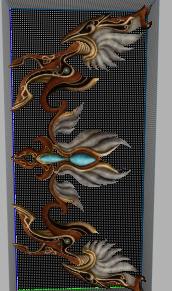
item_list.txt
Kod:
40209 WEAPON icon/item/arco_icona.tga d:/ymir work/item/weapon/arco_baso.gr2item_proto.sql
Kod:
INSERT INTO `item_proto` VALUES ('40209', 0xC3B5B7E6C1F6B1C32B39, 0x4B72616C6979657420596179FD202B39, '1', '2', '0', '2', '262196', '1', '16', '', '120000', '10', '0', '0', '0', '0', '1', '105', '0', '0', '7', '15', '17', '15', '63', '5', '0', '0', '0', '237', '436', '250', '-1', '-1', '-1', '-1', '-1', '-1', '0', '3', '0', '0');item_proto_dump.xml
Kod:
<!--AddonType="0"--><Item vnum="40209" name="õ·æÁö±Ã+9" gb2312name="Kraliyet Yayı +9" type="1" subtype="2" weight="0" size="2" antiflag="52" flag="1" wearflag="16" immuneflag="0" gold="120000" buy_price="0" limittype0="1" limitvalue0="105" limittype1="0" limitvalue1="0" applytype0="7" applyvalue0="15" applytype1="17" applyvalue1="15" applytype2="63" applyvalue2="5" value0="0" value1="0" value2="0" value3="237" value4="436" value5="250" socket0="0" socket1="0" socket2="0" socket3="0" socket4="0" socket5="0" refine_vnum="0" refine_set="0" magic_pct="0" specular="100" socket_pct="3" />Yeniyay.eix ve epk yi packa at ve
İNDEX ekle
Metin2 Lobby olarak, Metin2 dünyasında 3D modelleme konusunda en güncel ve kapsamlı bilgileri siz değerli kullanıcılarımıza sunmaya devam ediyoruz. Bu makalemizde Yeni Kraliyet Yayı modeli üzerinde durarak, Metin2 özel model ekleme süreçlerini, GR2 formatının önemini ve 3ds Max ya da Blender gibi yazılımlarla nasıl çalışıldığını ele alacağız.
Metin2 Özel Model Dünyası
Metin2, uzun yıllardır popülerliğini koruyan bir MMORPG oyunudur. Ancak zamanla oyuncuların estetik beklentileri artmış; bu da Metin2 3D model oluşturma, NPC model değiştirme, monster model özelleştirme gibi faaliyetlerin popülaritesini artırmıştır. Yeni Kraliyet Yayı gibi özel silah modelleri, oyuncuların karakterlerini daha özgün kılmak için büyük önem taşır.
GR2 Formatı ve Önemi
Metin2 oyun motoru, 3D modelleri GR2 adı verilen özel bir formatta kullanır. Bu format, Granny3D kütüphanesi ile entegre çalışmaktadır. GR2 Import ve Export işlemleri, model değiştirme sürecinin temelini oluşturur. Blender veya 3ds Max kullanarak oluşturduğunuz modeli GR2 formatına dönüştürmek için özel eklentiler kullanılır. Metin2 model edit işlemlerinde bu dönüşüm çok kritiktir.
Yeni Kraliyet Yayı Modeli Nasıl Eklenir?
Yeni Kraliyet Yayı, Metin2’de özel bir silah modelidir. Bu modelin doğru şekilde entegrasyonu için öncelikle texture ve UV Map düzenlemeleri yapılmalıdır. Mesh yapısı bozulmadan modelin bone sistemine uyumlu olması gerekir. Bu işlem sırasında Metin2 rigging teknikleri dikkate alınmalıdır. Animation uyumu da ihmal edilmemelidir.
3ds Max ve Blender ile Metin2 Modelleme
Blender ve 3ds Max, Metin2 modelleme sürecinde en çok tercih edilen yazılımlardır. Blender ücretsiz olmasıyla nổidür, ancak 3ds Max daha gelişmiş kontrol imkanları sunabilir. Her iki yazılımda da GR2 Export eklentileri mevcuttur. Bu sayede Metin2’ye uyumlu modeller üretmek mümkün hale gelir. Metin2 texture ve skin işlemleri de bu yazılımlar üzerinden kolayca yapılır.
Özel Model Paketleme ve Paylaşma
Metin2 özel modelleri genellikle pack dosyaları içinde saklanır. Metin2 model replace işlemleri için bu paketler düzenlenmelidir. EterPack ve benzeri araçlar, bu işlemi kolaylaştırır. Martysama, Metin2Dev ve diğer geliştirici toplulukları, yüksek kaliteli custom model paylaşımlarıyla dikkat çeker. Metin2 3D art içerikleri bu sayede daha da zenginleşir.
Sonuç
Yeni Kraliyet Yayı gibi özel modellerin Metin2 dünyasına entegrasyonu, hem teknik bilgi hem de yaratıcılık gerektirir. Metin2 Lobby olarak bizler, bu alandaki tüm gelişmeleri takip ederek kullanıcılarımıza en doğru bilgiyi sunmaya çalışıyoruz. 3D modelleme, animation, texture ve import/export gibi konular sürekli gelişmekte; bu da Metin2’nin görsel açıdan daha da zenginleşmesini sağlar.
Metin2 Lobby, we continue to provide our valuable users with the latest and most comprehensive information about 3D modeling in the world of Metin2. In this article, we will examine the process of adding custom models to Metin2, focusing on the New Royal Bow model, the importance of the GR2 format, and how to work with tools like 3ds Max and Blender.
Custom Model World in Metin2
Metin2 is a long-standing MMORPG that has maintained its popularity for years. Over time, players' aesthetic expectations have increased, which has raised the popularity of activities such as Metin2 3D model creation, changing NPC models, and customizing monster models. Special weapon models like the New Royal Bow are significant for players who want to make their characters more unique.
The GR2 Format and Its Importance
Metin2's game engine uses a special format called GR2 for 3D models. This format works integrated with the Granny3D library. GR2 Import and Export processes form the basis of the model replacement workflow. To convert your model created in Blender or 3ds Max into the GR2 format, specific plugins are used. During Metin2 model edit operations, this conversion is critical.
How to Add the New Royal Bow Model?
The New Royal Bow is a special weapon model in Metin2. For proper integration of this model, texture and UV Map adjustments must first be made. The mesh structure must remain intact and compatible with the model's bone system. During this process, Metin2 rigging techniques must be considered. Animation compatibility should also not be overlooked.
Metin2 Modeling with 3ds Max and Blender
Blender and 3ds Max are the most preferred software in the Metin2 modeling process. Blender is popular due to being free, while 3ds Max offers more advanced control options. Both softwares have GR2 Export plugins, making it possible to create Metin2-compatible models. Metin2 texture and skin operations can also be easily done through these tools.
Packing and Sharing Custom Models
Metin2 custom models are generally stored inside pack files. For Metin2 model replace operations, these packages need to be edited. Tools like EterPack simplify this process. Developer communities such as Martysama and Metin2Dev stand out by sharing high-quality custom models. This enriches Metin2 3D art content even further.
Conclusion
Integrating special models like the New Royal Bow into the world of Metin2 requires both technical knowledge and creativity. As Metin2 Lobby, we strive to provide our users with the most accurate information by following all developments in this area. Topics such as 3D modeling, animation, texture, and import/export continuously evolve, enabling Metin2 to become richer visually.
İNDEX ekle
Kod:
* Yeniyay
Ziyaretçiler için gizlenmiş link,görmek için üye olmalısınız!
Giriş yap veya üye ol.
Ziyaretçiler için gizlenmiş link,görmek için üye olmalısınız!
Giriş yap veya üye ol.
Metin2 Lobby olarak, Metin2 dünyasında 3D modelleme konusunda en güncel ve kapsamlı bilgileri siz değerli kullanıcılarımıza sunmaya devam ediyoruz. Bu makalemizde Yeni Kraliyet Yayı modeli üzerinde durarak, Metin2 özel model ekleme süreçlerini, GR2 formatının önemini ve 3ds Max ya da Blender gibi yazılımlarla nasıl çalışıldığını ele alacağız.
Metin2 Özel Model Dünyası
Metin2, uzun yıllardır popülerliğini koruyan bir MMORPG oyunudur. Ancak zamanla oyuncuların estetik beklentileri artmış; bu da Metin2 3D model oluşturma, NPC model değiştirme, monster model özelleştirme gibi faaliyetlerin popülaritesini artırmıştır. Yeni Kraliyet Yayı gibi özel silah modelleri, oyuncuların karakterlerini daha özgün kılmak için büyük önem taşır.
GR2 Formatı ve Önemi
Metin2 oyun motoru, 3D modelleri GR2 adı verilen özel bir formatta kullanır. Bu format, Granny3D kütüphanesi ile entegre çalışmaktadır. GR2 Import ve Export işlemleri, model değiştirme sürecinin temelini oluşturur. Blender veya 3ds Max kullanarak oluşturduğunuz modeli GR2 formatına dönüştürmek için özel eklentiler kullanılır. Metin2 model edit işlemlerinde bu dönüşüm çok kritiktir.
Yeni Kraliyet Yayı Modeli Nasıl Eklenir?
Yeni Kraliyet Yayı, Metin2’de özel bir silah modelidir. Bu modelin doğru şekilde entegrasyonu için öncelikle texture ve UV Map düzenlemeleri yapılmalıdır. Mesh yapısı bozulmadan modelin bone sistemine uyumlu olması gerekir. Bu işlem sırasında Metin2 rigging teknikleri dikkate alınmalıdır. Animation uyumu da ihmal edilmemelidir.
3ds Max ve Blender ile Metin2 Modelleme
Blender ve 3ds Max, Metin2 modelleme sürecinde en çok tercih edilen yazılımlardır. Blender ücretsiz olmasıyla nổidür, ancak 3ds Max daha gelişmiş kontrol imkanları sunabilir. Her iki yazılımda da GR2 Export eklentileri mevcuttur. Bu sayede Metin2’ye uyumlu modeller üretmek mümkün hale gelir. Metin2 texture ve skin işlemleri de bu yazılımlar üzerinden kolayca yapılır.
Özel Model Paketleme ve Paylaşma
Metin2 özel modelleri genellikle pack dosyaları içinde saklanır. Metin2 model replace işlemleri için bu paketler düzenlenmelidir. EterPack ve benzeri araçlar, bu işlemi kolaylaştırır. Martysama, Metin2Dev ve diğer geliştirici toplulukları, yüksek kaliteli custom model paylaşımlarıyla dikkat çeker. Metin2 3D art içerikleri bu sayede daha da zenginleşir.
Sonuç
Yeni Kraliyet Yayı gibi özel modellerin Metin2 dünyasına entegrasyonu, hem teknik bilgi hem de yaratıcılık gerektirir. Metin2 Lobby olarak bizler, bu alandaki tüm gelişmeleri takip ederek kullanıcılarımıza en doğru bilgiyi sunmaya çalışıyoruz. 3D modelleme, animation, texture ve import/export gibi konular sürekli gelişmekte; bu da Metin2’nin görsel açıdan daha da zenginleşmesini sağlar.
Metin2 Lobby, we continue to provide our valuable users with the latest and most comprehensive information about 3D modeling in the world of Metin2. In this article, we will examine the process of adding custom models to Metin2, focusing on the New Royal Bow model, the importance of the GR2 format, and how to work with tools like 3ds Max and Blender.
Custom Model World in Metin2
Metin2 is a long-standing MMORPG that has maintained its popularity for years. Over time, players' aesthetic expectations have increased, which has raised the popularity of activities such as Metin2 3D model creation, changing NPC models, and customizing monster models. Special weapon models like the New Royal Bow are significant for players who want to make their characters more unique.
The GR2 Format and Its Importance
Metin2's game engine uses a special format called GR2 for 3D models. This format works integrated with the Granny3D library. GR2 Import and Export processes form the basis of the model replacement workflow. To convert your model created in Blender or 3ds Max into the GR2 format, specific plugins are used. During Metin2 model edit operations, this conversion is critical.
How to Add the New Royal Bow Model?
The New Royal Bow is a special weapon model in Metin2. For proper integration of this model, texture and UV Map adjustments must first be made. The mesh structure must remain intact and compatible with the model's bone system. During this process, Metin2 rigging techniques must be considered. Animation compatibility should also not be overlooked.
Metin2 Modeling with 3ds Max and Blender
Blender and 3ds Max are the most preferred software in the Metin2 modeling process. Blender is popular due to being free, while 3ds Max offers more advanced control options. Both softwares have GR2 Export plugins, making it possible to create Metin2-compatible models. Metin2 texture and skin operations can also be easily done through these tools.
Packing and Sharing Custom Models
Metin2 custom models are generally stored inside pack files. For Metin2 model replace operations, these packages need to be edited. Tools like EterPack simplify this process. Developer communities such as Martysama and Metin2Dev stand out by sharing high-quality custom models. This enriches Metin2 3D art content even further.
Conclusion
Integrating special models like the New Royal Bow into the world of Metin2 requires both technical knowledge and creativity. As Metin2 Lobby, we strive to provide our users with the most accurate information by following all developments in this area. Topics such as 3D modeling, animation, texture, and import/export continuously evolve, enabling Metin2 to become richer visually.
